
Fitting Mastery and Skill Plan generator.

Project description
Fitting Mastery Plugin for Alliance Auth
aa-fitting-mastery is an Alliance Auth plugin that turns doctrine fittings into actionable skill plans.
It connects your configured doctrines and fittings from the fittings plugin with character and skill data from aa-memberaudit, then provides:
- pilot readiness views for accessible doctrine fittings,
- missing required and recommended skills,
- exportable in-game skill plans,
- configurable required and recommended skill plans per fitting,
- leadership summary views for doctrine coverage.






Contents
- Overview
- Requirements
- Main features
- Screenshots
- Installation
- Updating
- Configuration
- Permissions
- How it works
- Settings
- Contributing
Overview
Fitting Mastery is designed for organizations that already manage doctrine ships in fittings and track character skills in aa-memberaudit.
The plugin adds two complementary workflows:
-
Pilot workflow
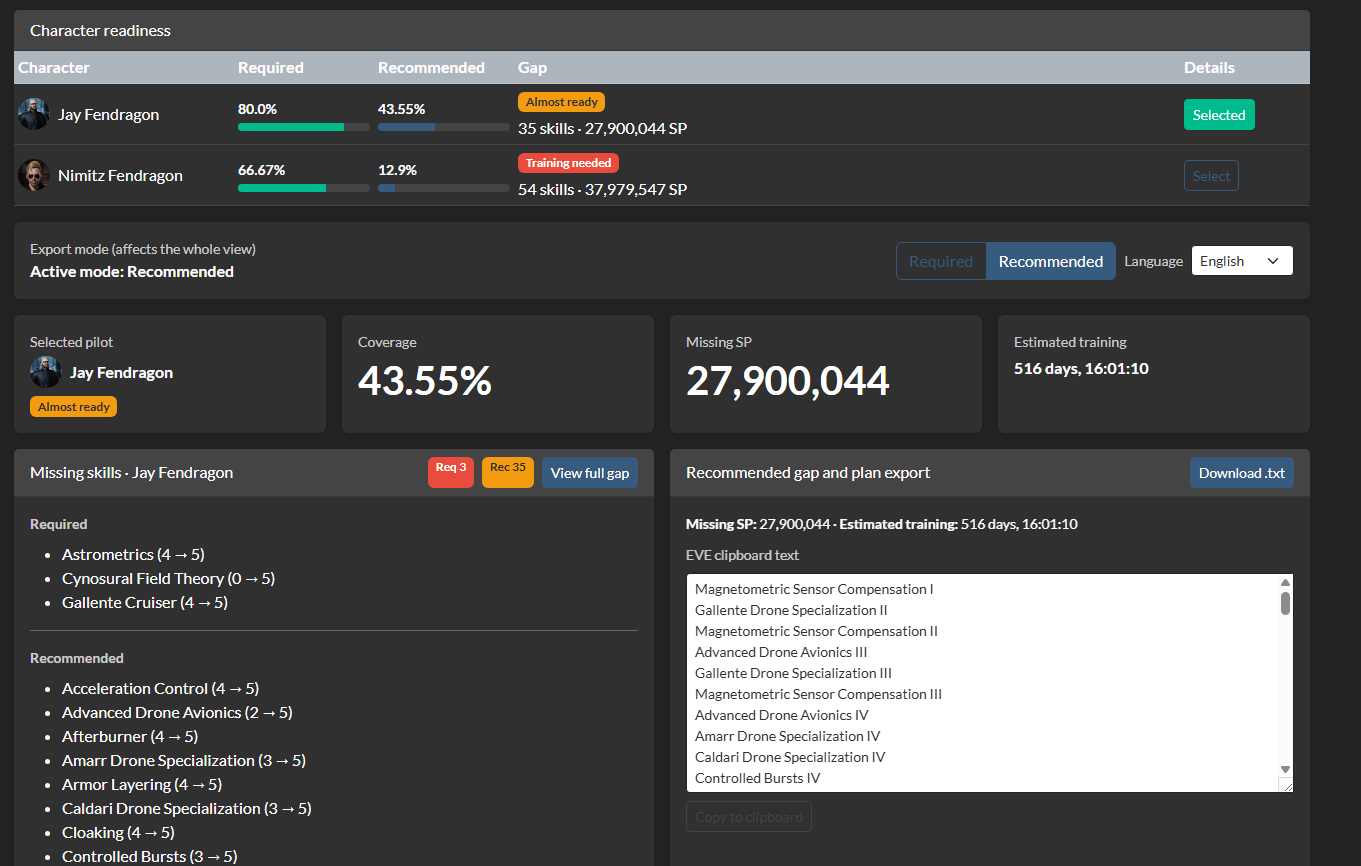
- members can see which of their characters can fly a doctrine fitting,
- inspect missing required / recommended skills,
- export missing skills in a format suitable for EVE skill plan import.
-
Leadership workflow
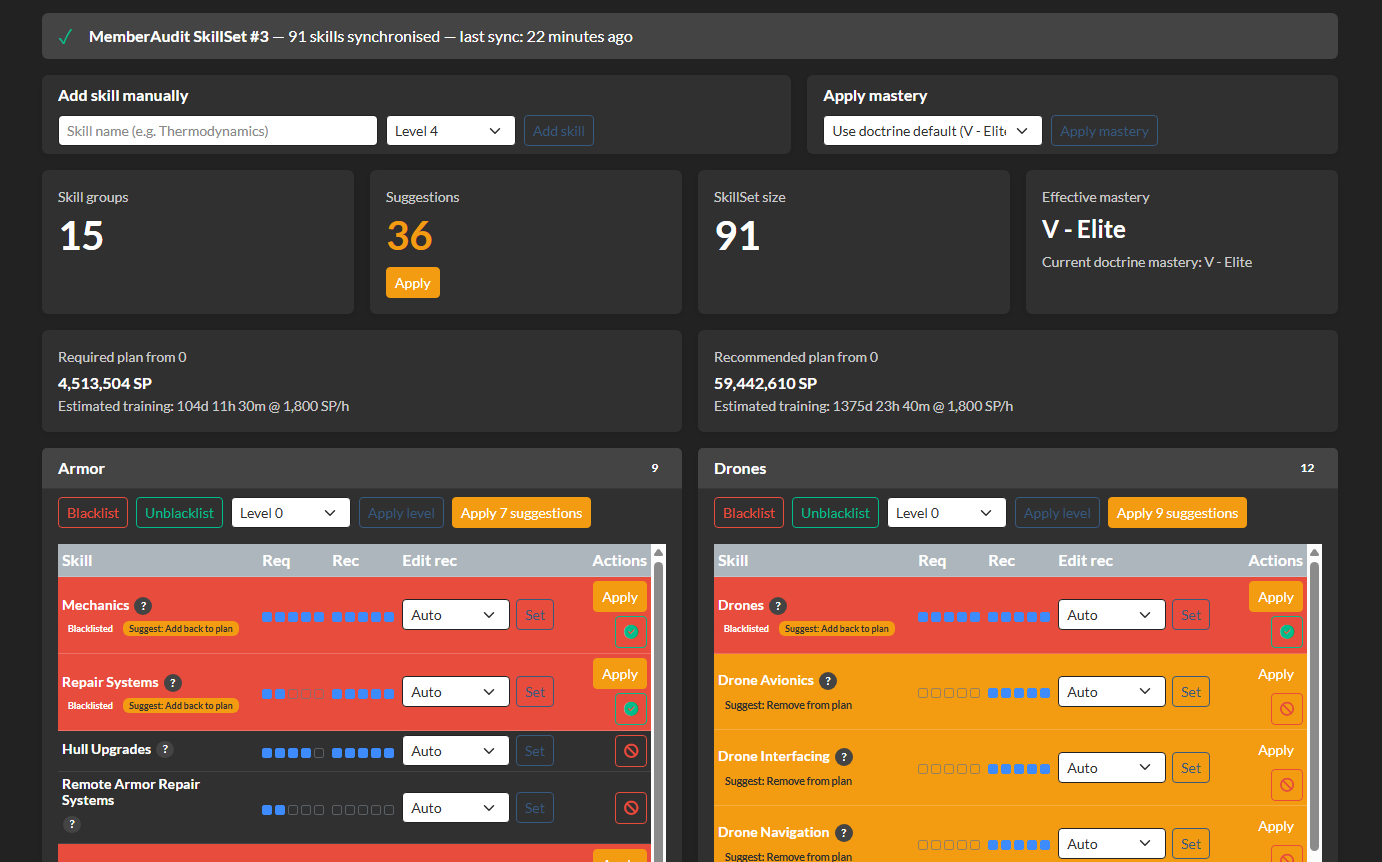
- doctrine managers can configure fitting skill plans,
- review suggestions to blacklist or restore skills,
- define summary groups across corporations and alliances,
- view doctrine coverage for a selected audience.
Access to doctrines and fittings follows the visibility rules from the fittings plugin so that category restrictions are respected consistently.
Requirements
This plugin depends on the following components:
fittings— requiredaa-memberaudit— requireddjango-eveonline-sde/eve_sde— required for ship mastery and dogma data- Alliance Auth 4.x
Important This plugin does not replace
fittingsoraa-memberaudit. It builds on top of both. You need both plugins installed and working before enablingmastery.
Main features
- Generate fitting skill plans from doctrine ships and their modules
- Merge required fitting skills with recommended ship mastery skills
- Add manual skills, blacklist skills, or override recommended levels per fitting
- Detect and suggest skills that can be removed from a plan
- Export missing skills in dependency-safe order for in-game EVE import
- Support multiple export languages for skill names
- Show member-facing doctrine readiness based on accessible fittings only
- Show leadership doctrine coverage across configurable corp/alliance audience groups
- Keep fitting access aligned with the access rules configured in the
fittingsplugin
Screenshots
Character progress
Fitting skill plan management
Installation
1 - Install prerequisites
Make sure your Alliance Auth installation already has these apps installed and configured:
fittingsmemberauditeve_sde
2 - Install the package
Install the plugin into your Alliance Auth virtual environment:
pip install aa-fitting-mastery
3 - Add the app to Alliance Auth
Add mastery to INSTALLED_APPS in your local.py:
INSTALLED_APPS += [
    "mastery",
]
4 - Configure the scheduled SDE mastery update task
Add the periodic task to your CELERYBEAT_SCHEDULE (every day at midnight):
from celery.schedules import crontab

CELERYBEAT_SCHEDULE["update_sde_masteries"] = {
    "task": "mastery.tasks.update_sde_masteries",
    "schedule": crontab(minute="0", hour="0"),
}
5 - Run migrations and collect static files
python manage.py migrate
python manage.py collectstatic
6 - Import mastery data
Import ship mastery and certificate data from the EVE SDE:
python manage.py import_sde_masteries
For a test run without writing to the database:
python manage.py import_sde_masteries --dry-run
7 - Restart your services
Restart your web and Celery services so the plugin and beat task are loaded.
Updating
To update an existing installation:
pip install -U aa-fitting-mastery
python manage.py migrate
python manage.py collectstatic
Then restart your web and Celery services.
Configuration
After installation, the usual setup flow is:
- Ensure your doctrines and fittings already exist in the
fittingsplugin - Open Manage Skill Plans in Fitting Mastery
- Generate or sync doctrine skill plans
- Review each fitting and adjust:
- mastery level,
- manual skills,
- blacklisted skills,
- recommended level overrides,
- skill suggestions
- If you want doctrine leadership views, create audience groups in Summary Group Settings
- Assign the appropriate permissions to members, doctrine managers and leadership roles
Access model
For pilot-facing views, Fitting Mastery uses the same fittings visibility rules as the fittings plugin.
That means:
- users must have access to
fittingsitself, - category restrictions remain effective,
- doctrines and fittings that are hidden in
fittingswill not be exposed by Fitting Mastery.
Permissions
The plugin defines the following permissions:
| Code | Description |
|---|---|
basic_access |
Can access the pilot-facing Fitting Mastery pages |
manage_fittings |
Can manage doctrine/fitting skill plans |
doctrine_summary |
Can view leadership doctrine summary pages |
manage_summary_groups |
Can create and manage summary audience groups |
Recommended usage
- Members:
basic_access - Doctrine / fitting managers:
basic_access,manage_fittings - Leadership / FC / HR reviewers:
basic_access,doctrine_summary - Admins managing summary scopes:
manage_summary_groups
In practice, pilot-facing access is usually granted together with fitting visibility from the fittings plugin.
You will typically also want matching access in the fittings plugin, especially fittings.access_fittings or fittings.manage.
How it works
At a high level the plugin works like this:
- It reads the ship and module requirements from fitting dogma data
- It reads ship mastery recommendations from imported SDE mastery data
- It combines both into a per-fitting skill plan
- It lets managers refine that plan with blacklists, manual additions and level overrides
- It compares those plans against character skills from
aa-memberaudit - It presents the result in pilot and leadership views
Required vs Recommended
- Required skills come from fitting / module requirements and their recursive prerequisites
- Recommended skills come from ship mastery data, plus any manual adjustments you configure
Summary groups
Doctrine summary views can be scoped to configurable audience groups.
Each summary group can combine:
- corporations,
- alliances,
- mixed corporation/alliance audiences.
This makes it possible to review doctrine coverage for a coalition, SIG, alliance wing or any other relevant operational scope.
Exported skill plans
When exporting missing skills for a pilot, the plugin:
- includes all missing intermediate levels,
- adds missing prerequisites recursively,
- orders skills so prerequisites appear first,
- supports multiple languages for skill labels.
Settings
The following setting can be added to your Alliance Auth local.py:
| Name | Description | Default |
|---|---|---|
MASTERY_PLAN_ESTIMATE_SP_PER_HOUR |
Training speed used to estimate plan duration in fitting previews | 1800 |
MASTERY_STATUS_ELITE_RECOMMENDED_PCT |
Recommended coverage threshold for the Elite bucket | 100 |
MASTERY_STATUS_ALMOST_ELITE_RECOMMENDED_PCT |
Recommended coverage threshold for the Almost elite bucket | 75 |
MASTERY_STATUS_ALMOST_FIT_REQUIRED_PCT |
Required coverage threshold for the Almost fit bucket | 90 |
MASTERY_DEFAULT_SKILLS |
Global default required skills injected into all generated fitting plans | [] |
Example:
MASTERY_PLAN_ESTIMATE_SP_PER_HOUR = 1800
MASTERY_STATUS_ELITE_RECOMMENDED_PCT = 100
MASTERY_STATUS_ALMOST_ELITE_RECOMMENDED_PCT = 75
MASTERY_STATUS_ALMOST_FIT_REQUIRED_PCT = 90
MASTERY_DEFAULT_SKILLS = [
    {"type_id": 28164, "required_level": 1},  # Thermodynamics I
]
Default skills injected into all plans
MASTERY_DEFAULT_SKILLS lets you force one or more baseline skills into every generated fitting plan.
This is useful for alliance-wide standards such as always requiring Thermodynamics I, even when that skill does not come directly from fitting requirements or ship mastery data.
Format:
MASTERY_DEFAULT_SKILLS = [
    {"type_id": 28164, "required_level": 1},
    {"type_id": 3436, "required_level": 4},
]
Behavior:
- each entry must provide
type_idandrequired_level, required_levelmust be between1and5,- if a skill already exists in the generated plan, the plugin keeps the highest required level,
- invalid entries are ignored safely instead of breaking plan generation.
Contributing
Contributions are welcome.
Suggested local workflow:
- Create a branch from
main - Run tests and lint locally before opening a PR
- Keep changes focused (feature/fix scope) and avoid unrelated refactors
- Update
README.md/CHANGELOG.mdwhen behavior or settings change
Typical commands:
python -m pip install -e .
python -m pip install tox
tox -e py312-django42
tox -e pylint
Alliance Auth plugin conventions used in this project:
- Keep async/sync boundaries clear (views/services split)
- Prefer thin views and reusable service helpers
- Reuse existing partial templates for repeated UI blocks
- Preserve
fittingsvisibility rules in all pilot/summary views
Notes
- If you change doctrine skill plan configuration, regenerate or sync the affected doctrine/fitting so changes are reflected in the active skill set.
- If leadership summaries are enabled, remember to configure at least one summary audience group.
- If no mastery data has been imported yet, recommended ship skills will be incomplete until
import_sde_masterieshas been run. - Fitting Mastery respects fitting visibility from the
fittingsplugin and will not intentionally expose restricted doctrines or fittings outside that access model.
Release history Release notifications | RSS feed


Download files
Download the file for your platform. If you're not sure which to choose, learn more about installing packages.
Source Distribution
Built Distribution
Filter files by name, interpreter, ABI, and platform.
If you're not sure about the file name format, learn more about wheel file names.
Copy a direct link to the current filters
File details
Details for the file aa_fitting_mastery-0.1.7.tar.gz.
File metadata
- Download URL: aa_fitting_mastery-0.1.7.tar.gz
- Upload date:
- Size: 348.1 kB
- Tags: Source
- Uploaded using Trusted Publishing? No
- Uploaded via: twine/6.2.0 CPython/3.11.15
File hashes
| Algorithm | Hash digest | |
|---|---|---|
| SHA256 |
c385a103d30103dbcfa7de4395f5af2809f34e0c05a9b5583f598b2a59dd042f
|
|
| MD5 |
6ca7499b055555ff7648ba529005983b
|
|
| BLAKE2b-256 |
d48bb7c50c1877438c66f14d429924ae4d407dfe305ae7f2c18f80155b61791b
|
File details
Details for the file aa_fitting_mastery-0.1.7-py3-none-any.whl.
File metadata
- Download URL: aa_fitting_mastery-0.1.7-py3-none-any.whl
- Upload date:
- Size: 151.8 kB
- Tags: Python 3
- Uploaded using Trusted Publishing? No
- Uploaded via: twine/6.2.0 CPython/3.11.15
File hashes
| Algorithm | Hash digest | |
|---|---|---|
| SHA256 |
70f60dc0cadb801b2f10745cedd3424d0ef1c9a3aee1acdca0d850ecbcb46cc1
|
|
| MD5 |
eb7a61c870883f86ef378be85076c579
|
|
| BLAKE2b-256 |
7b2b2fe7d9ea2a503995cbee2682241ab511e0c889da1ce3beb12eef921e8113
|






