
AA Fleet Pings














App for Alliance Auth that can format your fleet pings and ping for you to Discord.
- Screenshots
- Installation
- Updating
- Configuration
- Changelog
- Translation Status
- Contributing
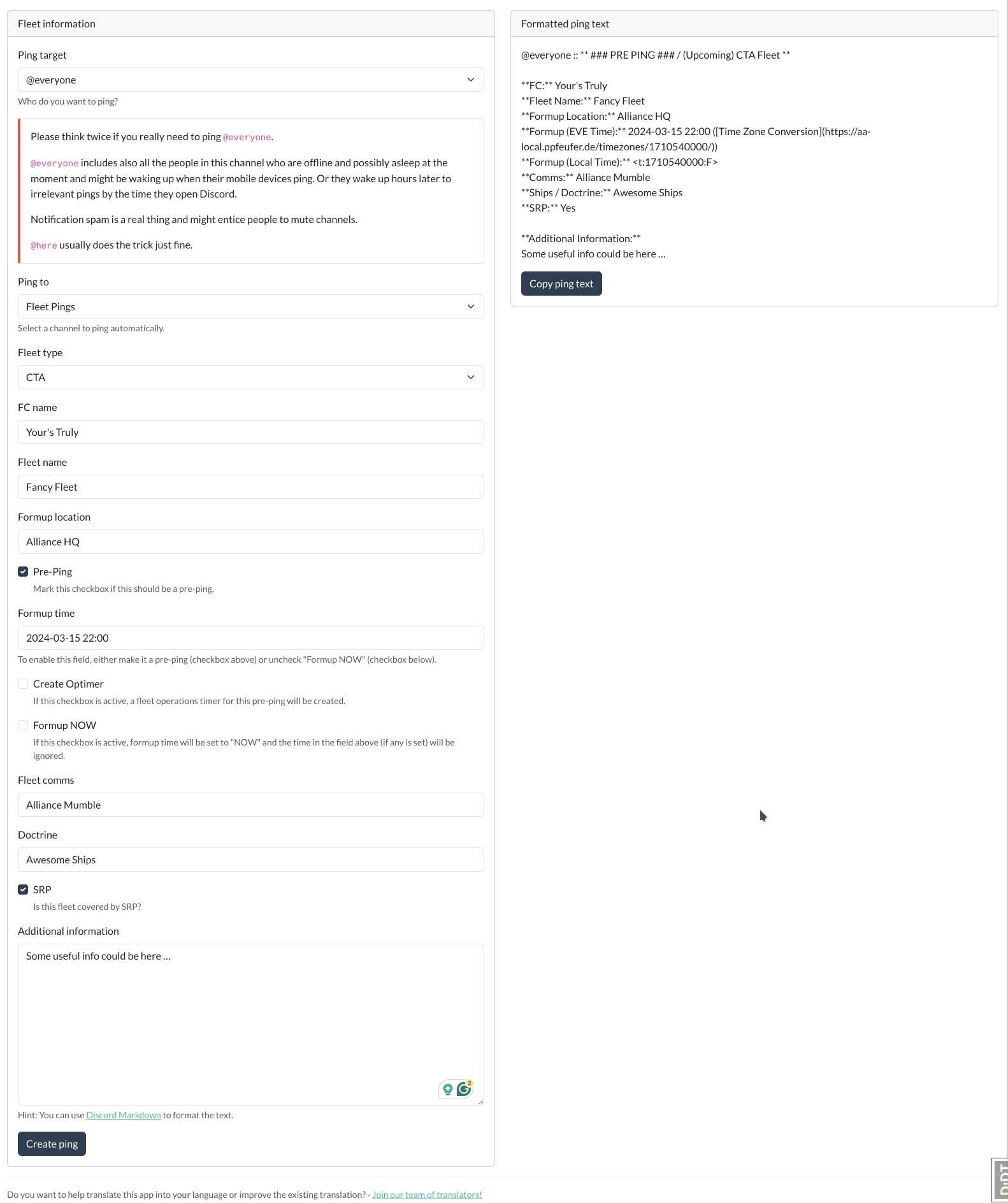
Screenshots
View in Alliance Auth
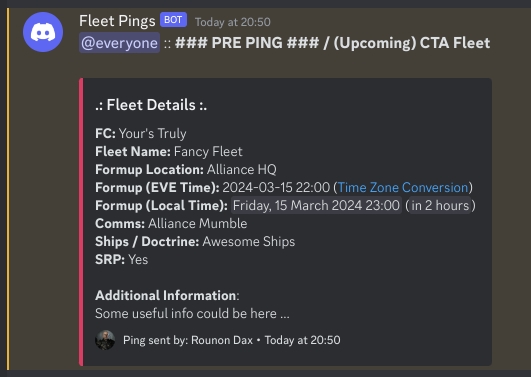
Discord Ping Examples
Pre-Ping
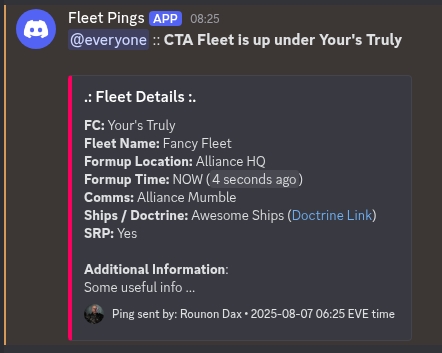
Formup: NOW
Installation
This app is a plugin for Alliance Auth. If you don't have Alliance Auth running already, please install it first before proceeding. (See the official AA installation guide for details)
Bare Metal Installation
Step 1: Install the App
Make sure you're in the virtual environment (venv) of your Alliance Auth installation. Then install the latest version:
pip install aa-fleetpings==4.2.0
Step 2: Update Your AA Settings
Configure your AA settings (local.py) as follows:
- Add
'fleetpings',toINSTALLED_APPS
Step 3: Finalizing the Installation
Copy static files and run migrations
python manage.py collectstatic
python manage.py migrate
Restart your supervisor services for AA
Continue with the common setup steps below.
Docker Installation
Step 1: Add the App
Add the app to your conf/requirements.txt:
aa-fleetpings==4.2.0
Step 2: Update Your AA Settings
Configure your AA settings (conf/local.py) as follows:
- Add
'fleetpings',toINSTALLED_APPS
Step 3: Build Auth and Restart Your Containers
Run the following commands from your AA project directory (the one that contains docker-compose.yml):
docker compose build --no-cache
docker compose --env-file=.env up -d
Step 4: Finalizing the Installation
Copy static files and run migrations
docker compose exec allianceauth_gunicorn bash

auth collectstatic
auth migrate
Continue with the common setup steps below.
Common Setup Steps
Permission Setup
Now you can set up permissions in Alliance Auth for your users.
Add fleetpings | aa fleetpings | Can access this app to the states and/or
groups you would like to have access.
App Setup
In your admin backend you'll find a new section called Fleet Pings.
This is where you set all your stuff up, like the webhooks you want to ping and who
can ping them, fleet types, comms, formup locations, and so on. It's pretty straight
forward, so you shouldn't have any issues. Go nuts!
Updating
Bare Metal Installation
To update your existing installation of AA Discord Ping Formatter, first enable your virtual environment.
Then run the following commands from your AA project directory (the one that
contains manage.py).
pip install aa-fleetpings==4.2.0

python manage.py collectstatic
python manage.py migrate
Finally, restart your AA supervisor services.
Docker Installation
To update your existing installation of AA Fleet Pings, all you need to do is to update the respective line in your conf/requirements.txt file to the latest version.
aa-fleetpings==4.2.0
Now rebuild your containers:
docker compose build --no-cache
docker compose --env-file=.env up -d
After that, run the following commands to update your database and static files:
docker compose exec allianceauth_gunicorn bash

auth collectstatic
auth migrate
Configuration
The following settings are available in the Django Admin Backend under
/admin/fleetpings/setting/:
Use Default Fleet Types
Enable or disable the default fleet types (Roaming, Home Defense, StratOP, and CTA) that are shown in the fleet type dropdown in addition to your own.
Default: True
Use Default Ping Targets
Enable or disable the default ping targets (@everyone and @here) that are shown in the ping target dropdown in addition to your own.
Default: True
Use Doctrines From Fittings Module
If you have the Fittings and Doctrines module installed, and your doctrines configured there, you don't have to re-build your doctrine list for this module. You can simply use the doctrines you already have configured in the Fittings and Doctrines module.
Default: True
Webhook Verification
If you require your pings to be sent to a webhook, that is not a standard discord webhook.
When disabling webhook verification and using non-Discord webhooks, it is up to you to make sure your webhook understands a payload that is formatted for Discord webhooks.
Default: True
Default Embed Color
The default highlight for the embed, that is used when no other highlight color is defined.
Default: #FAA61A
Changelog
See CHANGELOG.md
Translation Status

Do you want to help translate this app into your language or improve the existing translation? - Join our team of translators!
Contributing
You want to contribute to this project? That's cool!
Please make sure to read the Contribution Guidelines.
(I promise, it's not much, just some basics)
1 maintainer

Metadata
1 maintainer
Release files for aa-fleetpings 4.2.0
For a detailed explanation of source distributions (sdists) and built distributions (wheels), please see the package formats documentation.
Source distribution (sdist)
| File | Size | Uploaded | Provenance | Actions |
|---|---|---|---|---|
| aa_fleetpings-4.2.0.tar.gz | 163.1 kB | With provenance | Details for aa_fleetpings-4.2.0.tar.gz |
Built distribution (wheel)
| File | Interpreter | ABI | Platform | Actions Reset |
|---|---|---|---|---|
| aa_fleetpings-4.2.0-py3-none-any.whl | Python 3 | none | any | Details for aa_fleetpings-4.2.0-py3-none-any.whl |
Total release size: 425.0 kB
Release files / aa_fleetpings-4.2.0.tar.gz
| Download URL | aa_fleetpings-4.2.0.tar.gz |
|---|---|
| Size | 163.1 kB |
| Tags | Source |
|
SHA-256 checksum How to use checksums |
66bd1ec11e5c609928737f7b6a4eb22862aa025d1ef1d26b0f6d92160dd76c24
|
|
BLAKE2b-256 checksum How to use checksums |
5b7276c4c65ee21a14f41795a8f344df8c31c4e713eba2d9befd97ea60afbcb2
|
| Upload date | |
|
Uploaded using Trusted Publishing? What is trusted publishing? |
Yes |
| Uploaded via |
twine/7.0.0 CPython/3.13.16
|
Provenance
Provenance describes where a file came from. On PyPI, provenance is shared via attestations, which provide a verifiable record of the build or publishing details. View details, limitations and caveats.


PyPI Publish Attestation
PyPI verified that this artifact, at this checksum, originated from the publisher listed below.
Signed by GitHub Actions, verified by PyPI on Nov 18, 2026.
Transparency logRelease files / aa_fleetpings-4.2.0-py3-none-any.whl
| Download URL | aa_fleetpings-4.2.0-py3-none-any.whl |
|---|---|
| Size | 261.9 kB |
| Tags | Python 3 |
|
SHA-256 checksum How to use checksums |
74634903751f8f856fe1437a8d2f7062853223ddea075abf348eeda10ab99dc9
|
|
BLAKE2b-256 checksum How to use checksums |
fbdca94fa76eebfdd7a1699c65d44f07f985691144cf7ab2b7e96b8a9703403e
|
| Upload date | |
|
Uploaded using Trusted Publishing? What is trusted publishing? |
Yes |
| Uploaded via |
twine/7.0.0 CPython/3.13.16
|
Provenance
Provenance describes where a file came from. On PyPI, provenance is shared via attestations, which provide a verifiable record of the build or publishing details. View details, limitations and caveats.
PyPI Publish Attestation
PyPI verified that this artifact, at this checksum, originated from the publisher listed below.
Signed by GitHub Actions, verified by PyPI on Nov 18, 2026.
Transparency logSecurity for aa-fleetpings 4.2.0
Provenance
Provenance describes where a file came from. On PyPI, provenance is shared via attestations, which provide a verifiable record of the build or publishing details. View details, limitations and caveats.
Full provenance
Both files in this release have been uploaded with provenance metadata.
Attestation for aa_fleetpings-4.2.0.tar.gz
PyPI Publish Attestation
PyPI verified that this artifact, at this checksum, originated from the publisher listed below.
Signed by GitHub Actions, verified by PyPI on Nov 18, 2026.
Transparency logA note on package security
PyPI is a repository for distributing packages, not a service for auditing them. While third-party security researchers and our staff do their best to detect and remove malicious packages, PyPI cannot guarantee the quality, security or suitability of any given package.
To learn more about protecting yourself from malicious actors, visit our package security documentation.














