
Simple forum for Alliance Auth
Verified details
These details have been verified by PyPIProject links
GitHub Statistics
Maintainers

Project description
AA Forum














Simple forum app for Alliance Auth
- Before You Install This Module
- Overview
- Installation
- Changelog
- Translation Status
- Contributing
Before You Install This Module
This module needs quite some configuration done before working properly. You need to modify your Apache/Nginx configuration as well as the global URL config of Alliance Auth. So please only install if you know what you're doing/feel comfortable making these kinds of changes. For your own sanity, and mine :-)
Overview
Features
- Simple permission system. Only 2 permissions. ("has_access" and "can_manage")
- Simple administration, no maze to click through to get where you want to go.
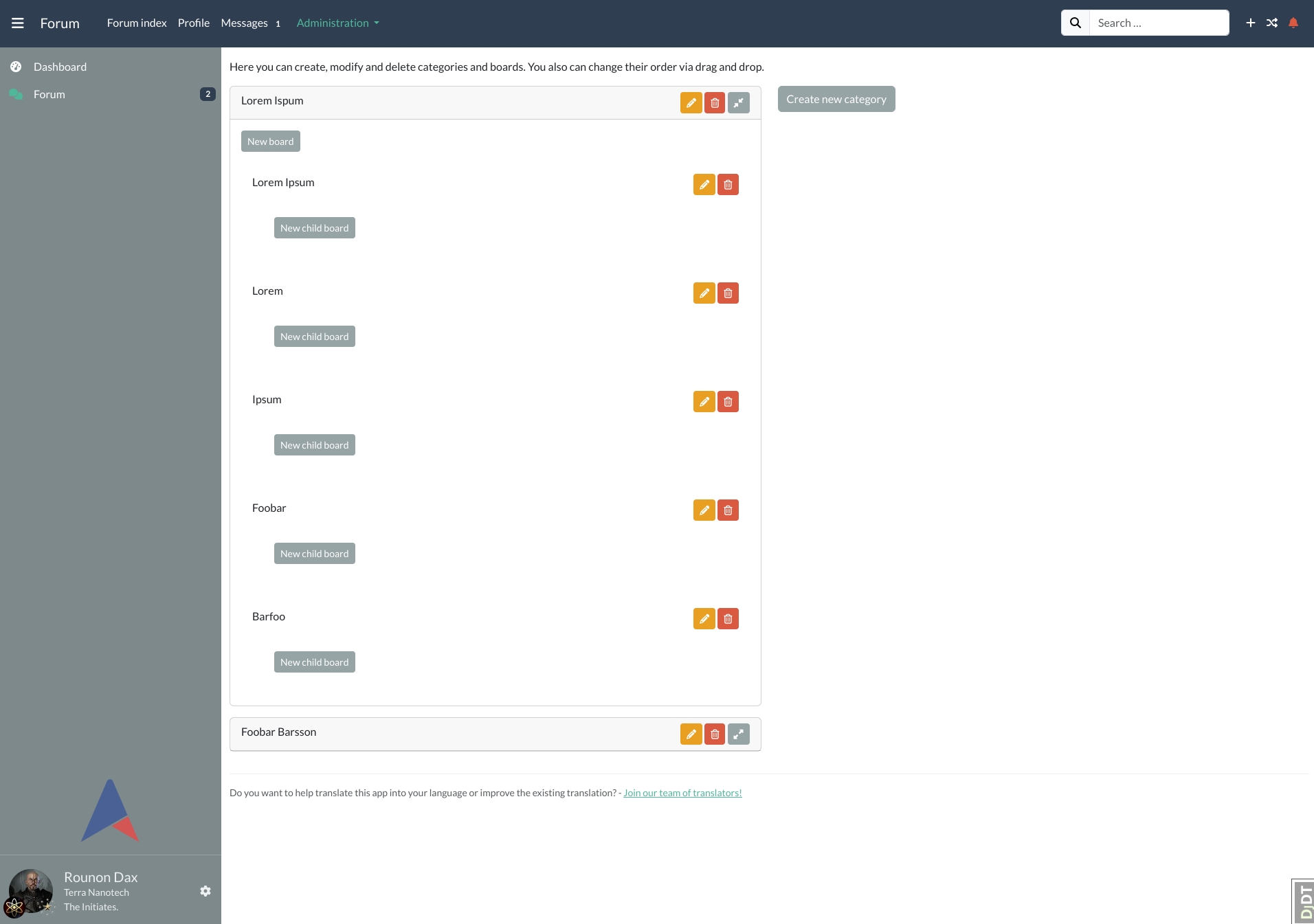
- Categories and boards are sortable via drag and drop in the admin view.
- Mass creation of boards with a new category.
- Boards can be restricted to 1 or more groups, boards without restrictions are visible for everyone who has access to the forum.
- Announcement boards where only certain users can start topics.
- Child boards (1 Level), which inherit their access restrictions from their parent.
- CKEditor with image upload.
- Unread topics counter as a number on the "Forum" link in the left navigation.
- Optional notifications about new topics in a board via Discord webhooks.
- Forum profile for each user.
- Personal Messages.
- Optional Discord PM for new personal messages.
This feature is disabled by default, can be enabled by each user in their forum profile. Needs one of the following applications installed:
- Optional Discord PM for new personal messages.
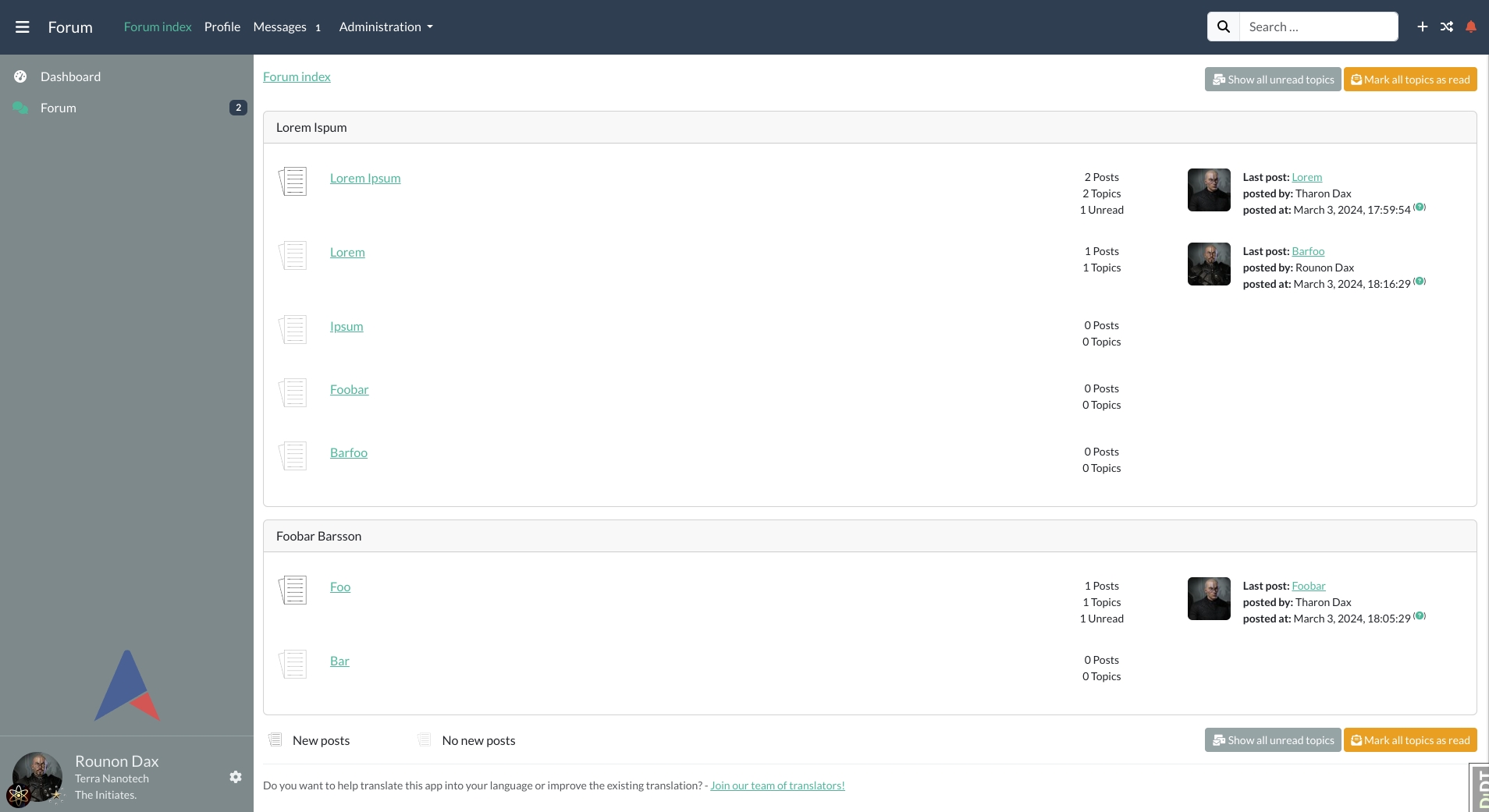
Screenshots
Forum Index
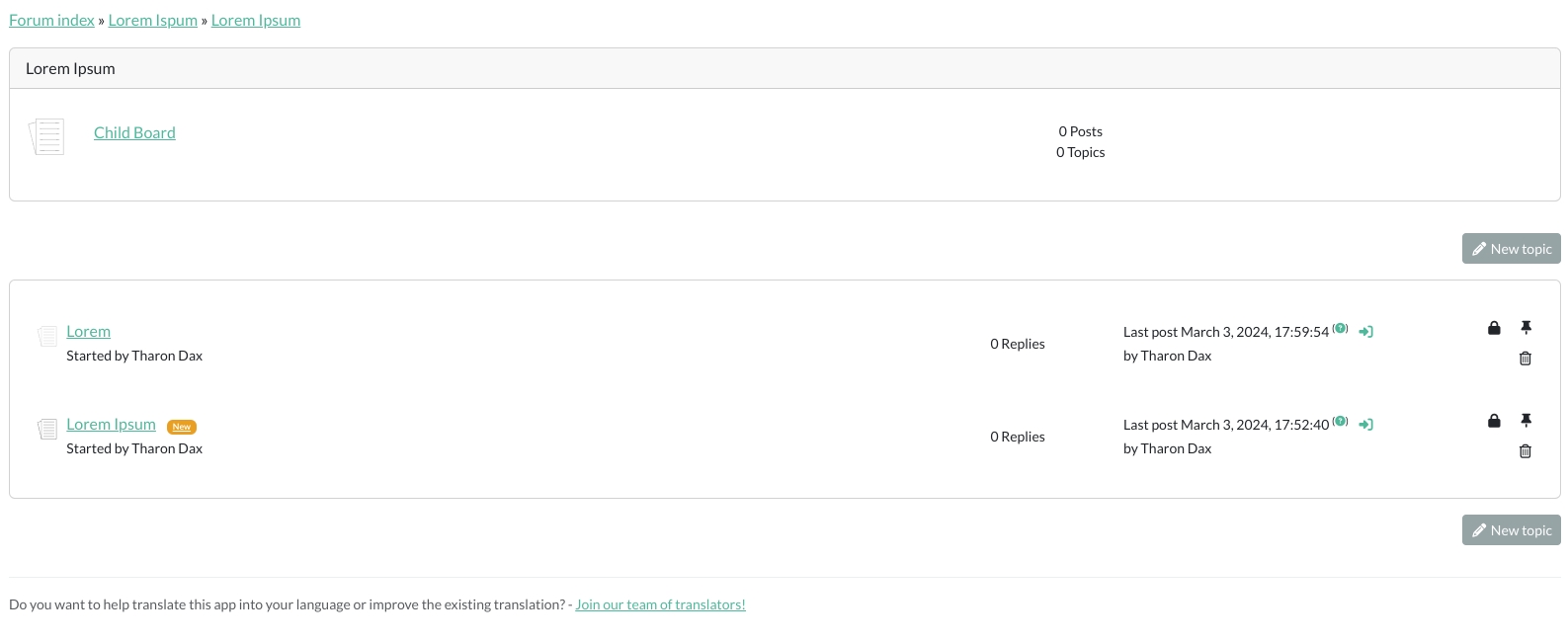
Topic Overview / Board Index
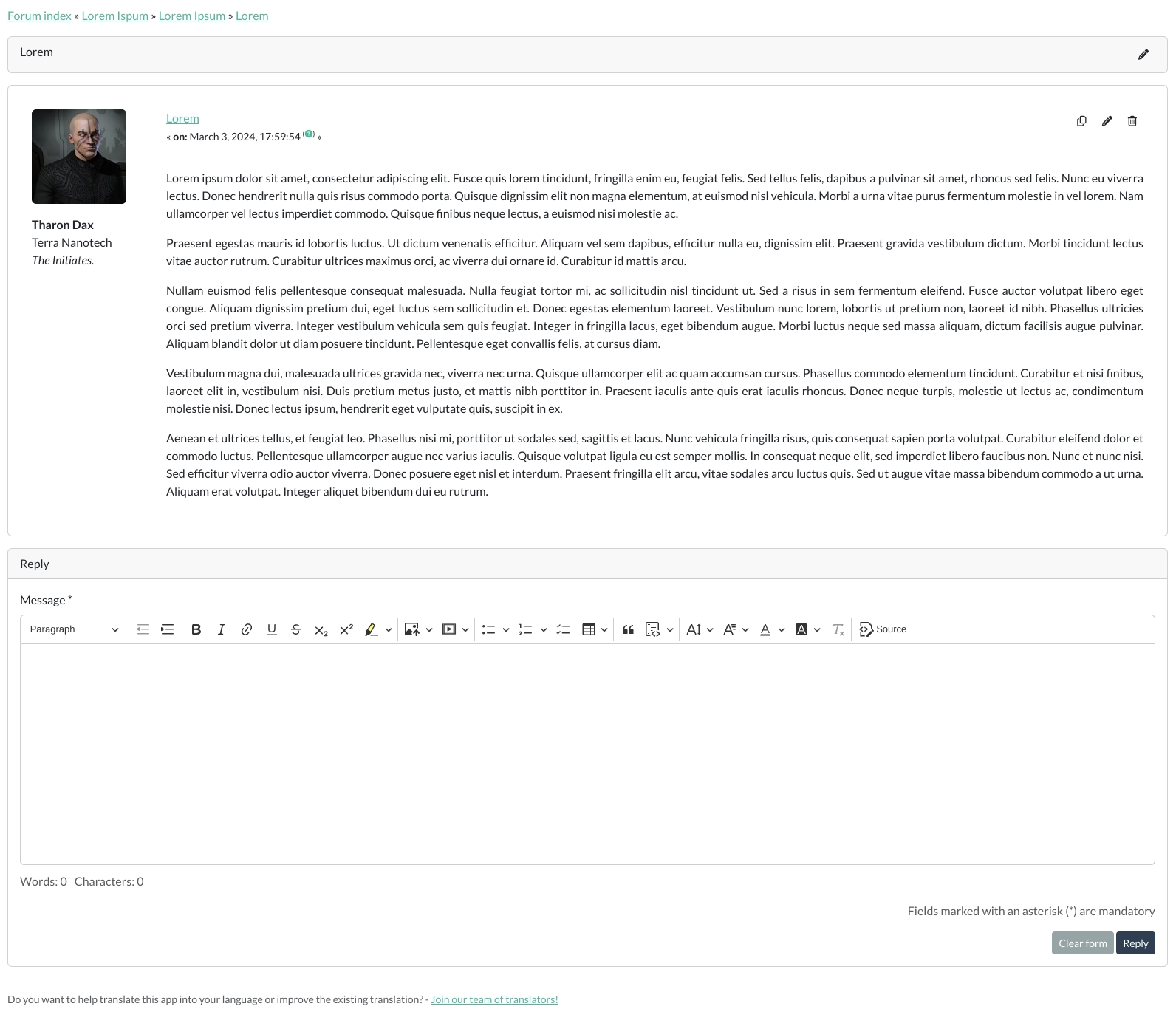
Topic View
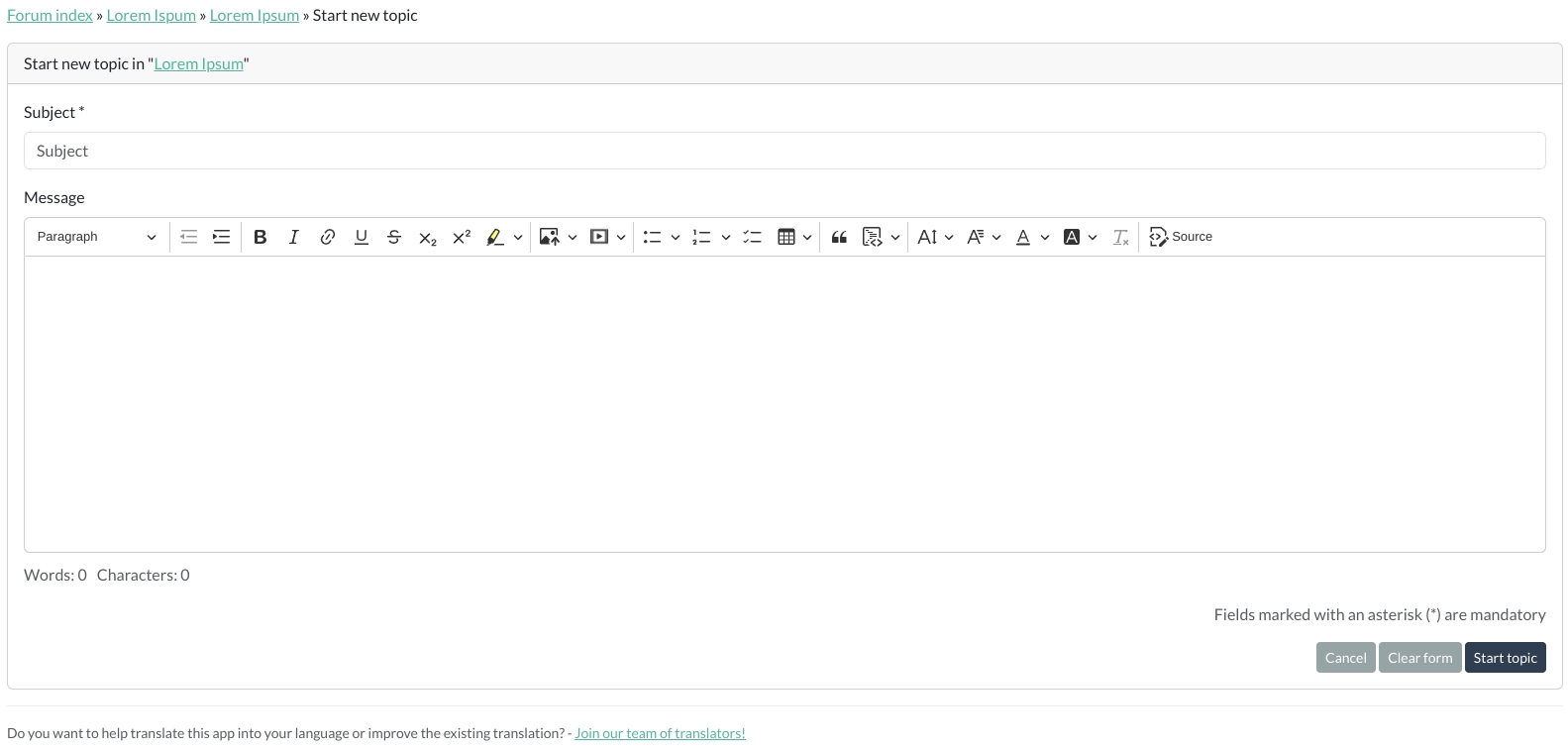
Start New Topic (ckEditor)
Admin View
Installation
[!NOTE]
AA Forum >= 2.0.0 needs at least Alliance Auth v4!
Please make sure to update your Alliance Auth instance before you install this module or update to the latest version, otherwise an update to Alliance Auth will be pulled in unsupervised.
The last version of AA Forum that supports Alliance Auth v3 is
1.19.5.
Important: Please make sure you meet all preconditions before you proceed:
- AA Forum is a plugin for Alliance Auth. If you don't have Alliance Auth running already, please install it first before proceeding. (see the official AA installation guide for details)
- AA Forum needs a couple of changes made to your Webserver and Alliance Auth configuration. So make sure you know how to do so. The steps needed will be described in this document, but you need to understand what will be changed.
Step 1: Install the Package
Make sure you're in the virtual environment (venv) of your Alliance Auth installation Then install the latest release directly from PyPi.
pip install aa-forum==2.15.0
Step 2: Configure Alliance Auth
Settings in /home/allianceserver/myauth/myauth/settings/local.py
This is fairly simple, configure your AA settings (local.py) as follows:
# AA Forum
INSTALLED_APPS += [
    "django_ckeditor_5",  # https://github.com/hvlads/django-ckeditor-5
    "aa_forum",  # https://github.com/ppfeufer/aa-forum
]

# Django CKEditor 5 Configuration
if "django_ckeditor_5" in INSTALLED_APPS:
    # CKEditor 5 File Upload Configuration
    CKEDITOR_5_FILE_UPLOAD_PERMISSION = (
        "authenticated"  # Possible values: "staff", "authenticated", "any"
    )

    MEDIA_URL = "/media/uploads/"
    MEDIA_ROOT = "/var/www/myauth/media/uploads"

    customColorPalette = [
        {"color": "hsl(4, 90%, 58%)", "label": "Red"},
        {"color": "hsl(340, 82%, 52%)", "label": "Pink"},
        {"color": "hsl(291, 64%, 42%)", "label": "Purple"},
        {"color": "hsl(262, 52%, 47%)", "label": "Deep Purple"},
        {"color": "hsl(231, 48%, 48%)", "label": "Indigo"},
        {"color": "hsl(207, 90%, 54%)", "label": "Blue"},
    ]

    CKEDITOR_5_CONFIGS = {
        "default": {
            "toolbar": [
                "heading",
                "|",
                "bold",
                "italic",
                "link",
                "bulletedList",
                "numberedList",
                "blockQuote",
            ],
        },
        "extends": {
            "blockToolbar": [
                "paragraph",
                "heading1",
                "heading2",
                "heading3",
                "|",
                "bulletedList",
                "numberedList",
                "|",
                "blockQuote",
            ],
            "toolbar": [
                "heading",
                "|",
                "outdent",
                "indent",
                "|",
                "bold",
                "italic",
                "link",
                "underline",
                "strikethrough",
                "subscript",
                "superscript",
                "highlight",
                "|",
                "insertImage",
                "mediaEmbed",
                "|",
                "bulletedList",
                "numberedList",
                "todoList",
                "insertTable",
                "|",
                "blockQuote",
                "codeBlock",
                "|",
                "fontSize",
                "fontFamily",
                "fontColor",
                "fontBackgroundColor",
                "removeFormat",
                "|",
                "sourceEditing",
            ],
            "image": {
                "toolbar": [
                    "imageTextAlternative",
                    "|",
                    "imageStyle:alignLeft",
                    "imageStyle:alignRight",
                    "imageStyle:alignCenter",
                    "imageStyle:side",
                    "|",
                ],
                "styles": [
                    "full",
                    "side",
                    "alignLeft",
                    "alignRight",
                    "alignCenter",
                ],
            },
            "table": {
                "contentToolbar": [
                    "tableColumn",
                    "tableRow",
                    "mergeTableCells",
                    "tableProperties",
                    "tableCellProperties",
                ],
                "tableProperties": {
                    "borderColors": customColorPalette,
                    "backgroundColors": customColorPalette,
                },
                "tableCellProperties": {
                    "borderColors": customColorPalette,
                    "backgroundColors": customColorPalette,
                },
            },
            "heading": {
                "options": [
                    {
                        "model": "paragraph",
                        "title": "Paragraph",
                        "class": "ck-heading_paragraph",
                    },
                    {
                        "model": "heading1",
                        "view": "h1",
                        "title": "Heading 1",
                        "class": "ck-heading_heading1",
                    },
                    {
                        "model": "heading2",
                        "view": "h2",
                        "title": "Heading 2",
                        "class": "ck-heading_heading2",
                    },
                    {
                        "model": "heading3",
                        "view": "h3",
                        "title": "Heading 3",
                        "class": "ck-heading_heading3",
                    },
                ]
            },
        },
        "list": {
            "properties": {
                "styles": "true",
                "startIndex": "true",
                "reversed": "true",
            }
        },
    }
Settings in /home/allianceserver/myauth/myauth/urls.py
Now let's move on to editing the global URL configuration of Alliance Auth. To do so,
you need to open /home/allianceserver/myauth/myauth/urls.py and change the
following block right before the handler definitions:
from django.apps import apps  # Only if not already imported earlier
from django.conf import settings  # Only if not already imported earlier
from django.conf.urls.static import static  # Only if not already imported earlier
from django.urls import path  # Only if not already imported earlier

# If django_ckeditor_5 is loaded
if apps.is_installed("django_ckeditor_5"):
    # URL configuration for CKEditor 5
    urlpatterns = (
        [
            path("ckeditor5/", include("django_ckeditor_5.urls")),
        ]
        + static(settings.MEDIA_URL, document_root=settings.MEDIA_ROOT)
        + urlpatterns
    )
After this, your urls.py should look similar to this:
from django.apps import apps
from django.conf import settings
from django.conf.urls.static import static
from django.urls import include, path, re_path

from allianceauth import urls

# Alliance auth urls
urlpatterns = [
    path(r"", include(urls)),
]

# If django_ckeditor_5 is loaded
if apps.is_installed("django_ckeditor_5"):
    # URL configuration for CKEditor 5
    urlpatterns = (
        [
            path("ckeditor5/", include("django_ckeditor_5.urls")),
        ]
        + static(settings.MEDIA_URL, document_root=settings.MEDIA_ROOT)
        + urlpatterns
    )

handler500 = "allianceauth.views.Generic500Redirect"
handler404 = "allianceauth.views.Generic404Redirect"
handler403 = "allianceauth.views.Generic403Redirect"
handler400 = "allianceauth.views.Generic400Redirect"
Step 3: Configure Your Webserver
Your webserver needs to know from where to serve the uploaded images, of course, so we have to tell it.
Apache
In your vhost configuration, you have a line ProxyPassMatch ^/static !, which tells
the server where to find all the static files. We're adding a similar line for the
media, right below that one.
Add the following right below the static proxy match:
ProxyPassMatch ^/media !
Now we also need to let the server know where to find the media directory we just
configured the proxy for. To do so, add a new Alias to your configuration. This can
be done right below the already existing Alias for /static:
Alias "/media" "/var/www/myauth/media/"
At last, a "Directory" rule is needed as well. Add the following code below the already existing Directory rule for the static files:
<Directory "/var/www/myauth/media/">
    Require all granted
</Directory>
So the whole block should now look like this:
ProxyPassMatch ^/static !
ProxyPassMatch ^/media !  # *** NEW proxy rule
ProxyPass / http://127.0.0.1:8000/
ProxyPassReverse / http://127.0.0.1:8000/
ProxyPreserveHost On

Alias "/static" "/var/www/myauth/static/"
Alias "/media" "/var/www/myauth/media/"

<Directory "/var/www/myauth/static/">
    Require all granted
</Directory>

<Directory "/var/www/myauth/media/">
    Require all granted
</Directory>
Restart your Apache webserver.
Nginx
In order to let Nginx know where to find the uploaded files, you need to add a new location rule to the configuration. Add the following right below the definition for your "static" location.
location /media {
    alias /var/www/myauth/media;
    autoindex off;
}
Restart your Nginx webserver.
Step 4: Finalizing the Installation
Run static files collection and migrations
python manage.py collectstatic
python manage.py migrate
Restart your supervisor services for Auth
Step 5: Setting up Permissions
Now it's time to set up access permissions for your new module. You can do so in your admin backend.
| ID | Description | Notes |
|---|---|---|
basic_access |
Can access the AA-Forum module | Grants access to the forum |
manage_forum |
Can manage the AA-Forum module (Categories, topics and messages) | Users with this permission can create, edit and delete boards and categories in the "Administration" view. They can also modify and delete messages and topics in the "Forum" view. Users with this permission are not bound by group restrictions and have access to all boards and topics, so choose wisely who is getting this permission. |
Step 6: (Optional) Settings for Discord Proxy (If Used)
If you are using discordproxy to send Discord messages, you can configure the host and port in your local.py settings.
| Name | Description | Default |
|---|---|---|
DISCORDPROXY_HOST |
Hostname used to communicate with Discord Proxy. | localhost |
DISCORDPROXY_PORT |
Port used to communicate with Discord Proxy. | 50051 |
Changelog
See CHANGELOG.md
Translation Status
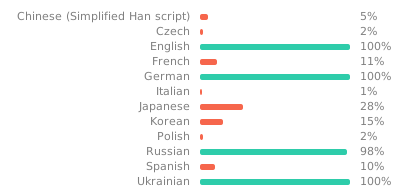
Do you want to help translate this app into your language or improve the existing translation? - Join our team of translators!
Contributing
Do you want to contribute to this project? That's cool!
Please make sure to read the Contribution Guidelines. (I promise, it's not much, just some basics)
Project details
Verified details
These details have been verified by PyPIProject links
GitHub Statistics
Maintainers
Release history Release notifications | RSS feed


Download files
Download the file for your platform. If you're not sure which to choose, learn more about installing packages.
Source Distribution
Built Distribution
Filter files by name, interpreter, ABI, and platform.
If you're not sure about the file name format, learn more about wheel file names.
Copy a direct link to the current filters
File details
Details for the file aa_forum-2.15.0.tar.gz.
File metadata
- Download URL: aa_forum-2.15.0.tar.gz
- Upload date:
- Size: 428.5 kB
- Tags: Source
- Uploaded using Trusted Publishing? Yes
- Uploaded via: twine/6.1.0 CPython/3.13.12
File hashes
| Algorithm | Hash digest | |
|---|---|---|
| SHA256 |
3c18f09533f8f56c9be60abbcab4fe45cb5ad23f3c3e44d8bfef439fbccf619f
|
|
| MD5 |
542634a814212eed2ab199955790ffd1
|
|
| BLAKE2b-256 |
3901960d8a61cf06802fac5d8b686481b5f49e3102dd2511560fcfee0c272585
|
Provenance
The following attestation bundles were made for aa_forum-2.15.0.tar.gz:
Publisher:
release.yml on ppfeufer/aa-forum
-
Statement:
-
Statement type:
https://in-toto.io/Statement/v1 -
Predicate type:
https://docs.pypi.org/attestations/publish/v1 -
Subject name:
aa_forum-2.15.0.tar.gz -
Subject digest:
3c18f09533f8f56c9be60abbcab4fe45cb5ad23f3c3e44d8bfef439fbccf619f - Sigstore transparency entry: 1702997688
- Sigstore integration time:
-
Permalink:
ppfeufer/aa-forum@c7260f7b11b0235492ff6da2d86db8e87e12872b -
Branch / Tag:
refs/tags/v2.15.0 - Owner: https://github.com/ppfeufer
-
Access:
public
-
Token Issuer:
https://token.actions.githubusercontent.com -
Runner Environment:
github-hosted -
Publication workflow:
release.yml@c7260f7b11b0235492ff6da2d86db8e87e12872b -
Trigger Event:
release
-
Statement type:
File details
Details for the file aa_forum-2.15.0-py3-none-any.whl.
File metadata
- Download URL: aa_forum-2.15.0-py3-none-any.whl
- Upload date:
- Size: 541.0 kB
- Tags: Python 3
- Uploaded using Trusted Publishing? Yes
- Uploaded via: twine/6.1.0 CPython/3.13.12
File hashes
| Algorithm | Hash digest | |
|---|---|---|
| SHA256 |
98ab6ad8a5b0c04ee5bbcfefd67b0946427365539ae373e7982be749197ff983
|
|
| MD5 |
2a005be641710be6e88a3965dde440c2
|
|
| BLAKE2b-256 |
6d42f34d9f76acddf092e8468d924e50a8ea173784e4a610be5b1b00ea1ffdb9
|
Provenance
The following attestation bundles were made for aa_forum-2.15.0-py3-none-any.whl:
Publisher:
release.yml on ppfeufer/aa-forum
-
Statement:
-
Statement type:
https://in-toto.io/Statement/v1 -
Predicate type:
https://docs.pypi.org/attestations/publish/v1 -
Subject name:
aa_forum-2.15.0-py3-none-any.whl -
Subject digest:
98ab6ad8a5b0c04ee5bbcfefd67b0946427365539ae373e7982be749197ff983 - Sigstore transparency entry: 1702997787
- Sigstore integration time:
-
Permalink:
ppfeufer/aa-forum@c7260f7b11b0235492ff6da2d86db8e87e12872b -
Branch / Tag:
refs/tags/v2.15.0 - Owner: https://github.com/ppfeufer
-
Access:
public
-
Token Issuer:
https://token.actions.githubusercontent.com -
Runner Environment:
github-hosted -
Publication workflow:
release.yml@c7260f7b11b0235492ff6da2d86db8e87e12872b -
Trigger Event:
release
-
Statement type:






