
Memberaudit Doctrine Checker for AllianceAuth.










A Doctrine Checker Addon for Memberaudit
Features
- Memberaudit Doctrine Checker
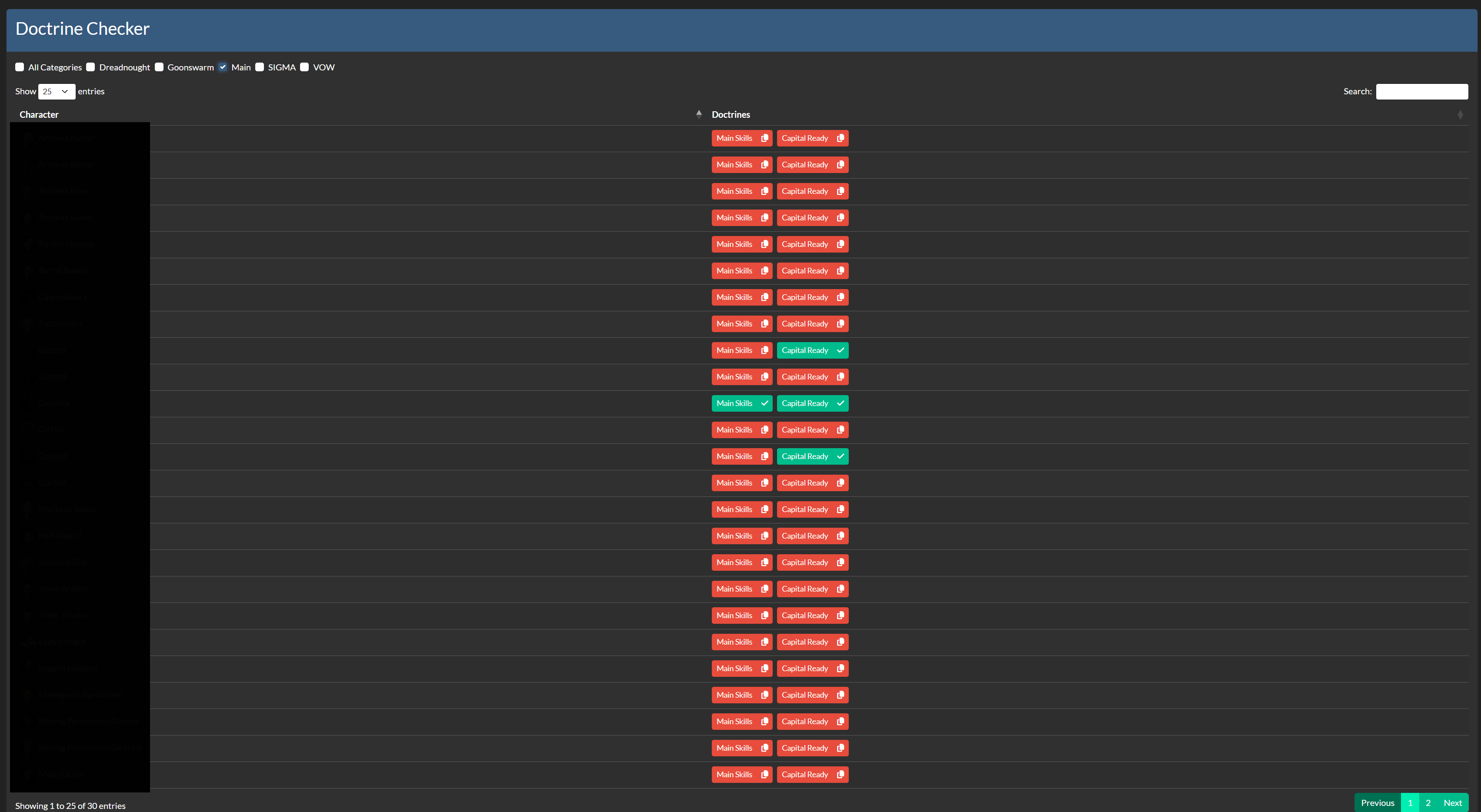
- Doctrine Overview
- Check if Character met criteria for Doctrines
- Ingame supported copy clipboard skill-queue
- Copy Clipboard
missingSkills - Search for specific Doctrine per Search Field
- Filter by Category example: (Capital, Black OP Group, Mining)
- Account Overview
- Corporation Overview
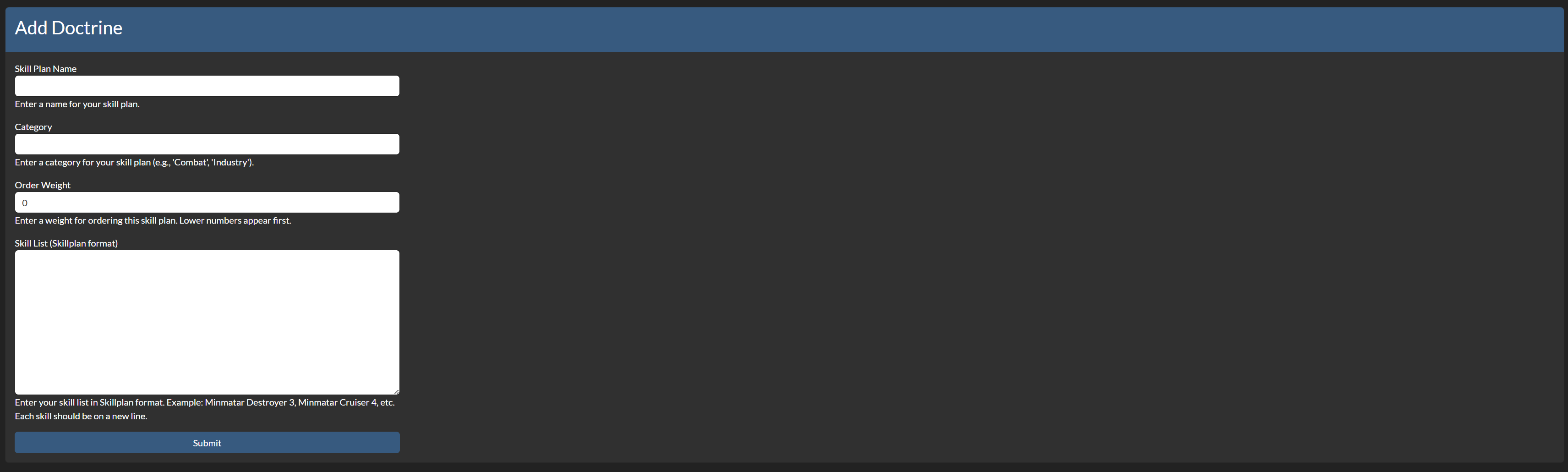
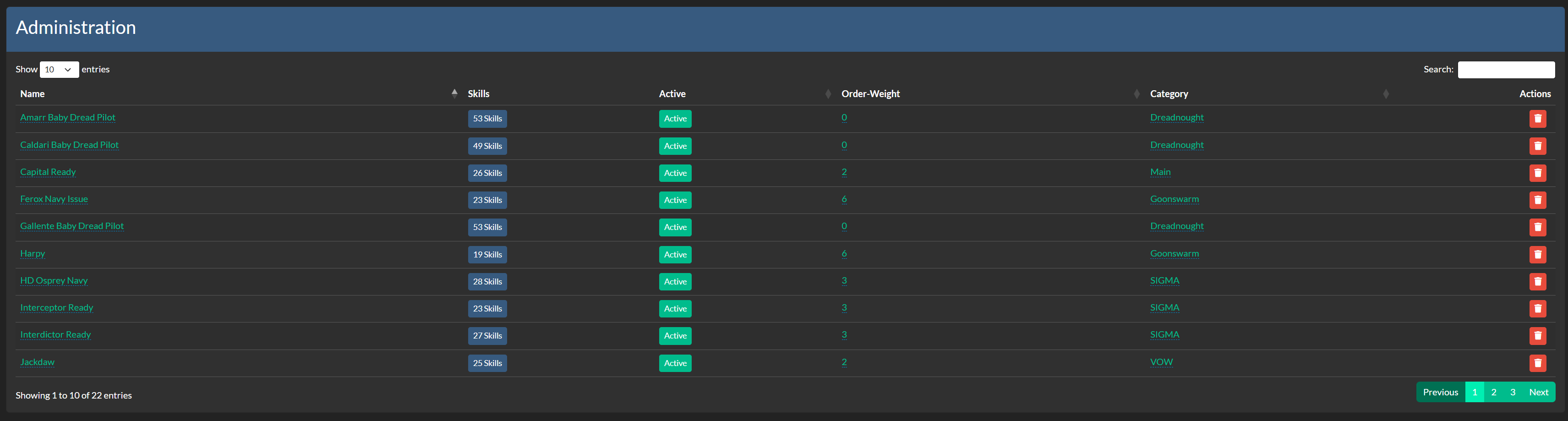
- Doctrine Administration
- Simple Add Skill-Plans per Copy/Paste via Ingame Plans (copy to clipboard)
- Language Localized Supported (Test Phase)
- Doctrine Overview
- Order-Weight
- Doctrine Overview
Upcoming
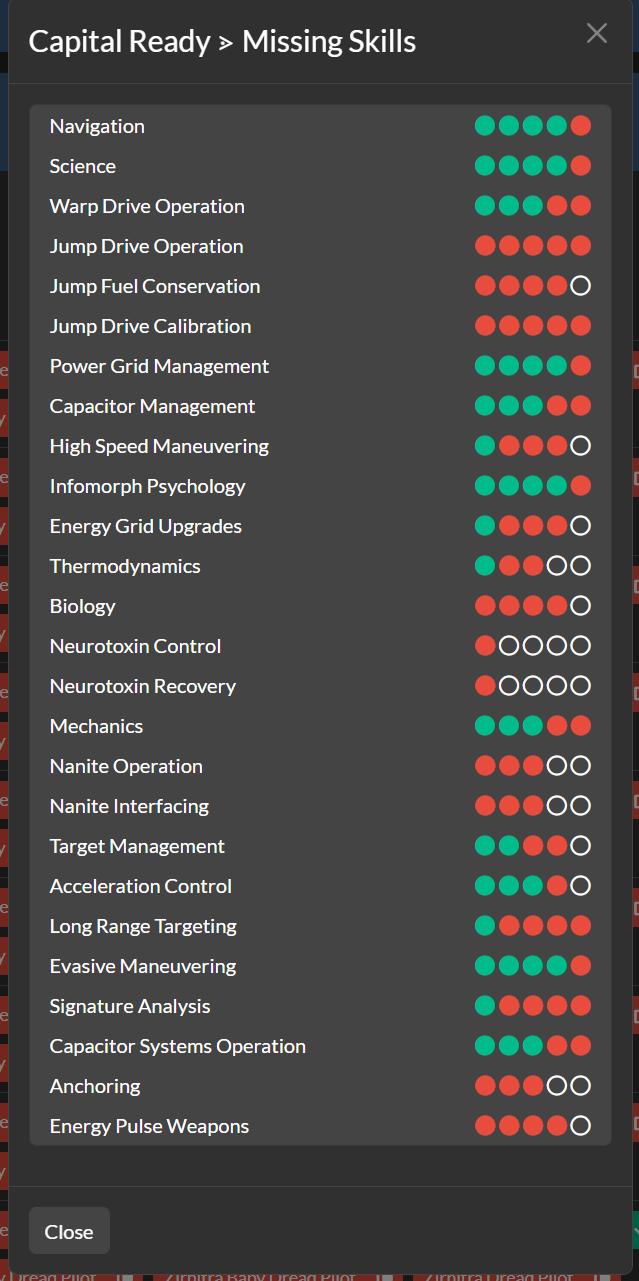
- Detailed Modal-Overview for missing Skills
- Display min. req and recommended skill level
- Multi-Language Translation
Screenshots
Installation
Step 1 - Install the Package
Make sure you're in your virtual environment (venv) of your Alliance Auth then install the pakage.
pip install aa-memberaudit-dc
Step 2 - Configure Alliance Auth
Configure your Alliance Auth settings (local.py) as follows:
INSTALLED_APPS = [
    # other apps
    "eveuniverse",  # only if it not already existing
    "madc",
    # other apps?
]
Step 3 - (Optional) Add own Logger File
To set up the Logger add following code to your local.py
Ensure that you have writing permission in logs folder.
if "madc" in INSTALLED_APPS:
    LOGGING["handlers"]["madc_file"] = {
        "level": "INFO",
        "class": "logging.handlers.RotatingFileHandler",
        "filename": os.path.join(BASE_DIR, "log/madc.log"),
        "formatter": "verbose",
        "maxBytes": 1024 * 1024 * 5,
        "backupCount": 5,
    }
    LOGGING["loggers"]["extensions.madc"] = {
        "handlers": ["madc_file", "console", "extension_file"],
        "level": "DEBUG",
    }
Step 4 - Migration to AA
python manage.py collectstatic
python manage.py migrate
Step 5 - Setting up Permissions
With the Following IDs you can set up the permissions for the AA Memberaudit Doctrine Checker
| ID | Description | |
|---|---|---|
basic_access |
Can access the Memberaudit Doctrine Checker. | All Members with the Permission can access the MADC. |
corp_access |
Can view Characters from own Corporation. | Users with this can view all characters from own corp. |
alliance_access |
Can view Characters from own Alliance. | Users with this can view all characters from own ally. |
manage_access |
Can manage this app, Memberaudit Doctrine Checker. | Users with this permission can manage the MADC. |
admin_access |
Gives full access to this app, Memberaudit Doctrine Checker. | Users with this permission have full access. |
Step 6 - (Optional) Setting up Compatibilies
The Following Settings can be setting up in the local.py
- AA_DC_APP_NAME:
"YOURNAME"- Set the name of the APP
Translations

Help us translate this app into your language or improve existing translations. Join our team!"
Contributing
You want to improve the project? Please ensure you read the contribution guidelines
1 maintainer

Metadata
1 maintainer
Release files for aa-memberaudit-dc 0.4.0
For a detailed explanation of source distributions (sdists) and built distributions (wheels), please see the package formats documentation.
Source distribution (sdist)
| File | Size | Uploaded | Provenance | |
|---|---|---|---|---|
| aa_memberaudit_dc-0.4.0.tar.gz | 660.8 kB | With provenance | Details |
Built distribution (wheel)
| File | Interpreter | ABI | Platform | Reset |
|---|---|---|---|---|
| aa_memberaudit_dc-0.4.0-py3-none-any.whl | Python 3 | none | any | Details |
Total release size: 1.4 MB
Release files / aa_memberaudit_dc-0.4.0.tar.gz
| Download URL | aa_memberaudit_dc-0.4.0.tar.gz |
|---|---|
| Size | 660.8 kB |
| Tags | Source |
|
SHA-256 checksum How to use checksums |
00eee365d05ad78f6c044df693aa4d46c106824aa9f651dbfd36ec5ce0a124de
|
|
BLAKE2b-256 checksum How to use checksums |
eb7f9a4e443bc80ee7a579298c8d7b9a89abde84b28030ba21eff8a171ba4aef
|
| Upload date | |
|
Uploaded using Trusted Publishing? What is trusted publishing? |
Yes |
| Uploaded via |
twine/6.1.0 CPython/3.13.12
|
Provenance
Provenance describes where a file came from. On PyPI, provenance is shared via attestations, which provide a verifiable record of the build or publishing details. View details, limitations and caveats.


PyPI Publish Attestation
PyPI verified that this artifact, at this checksum, originated from the publisher listed below.
Signed by GitHub Actions, verified by PyPI on Jul 10, 2026.
Transparency logRelease files / aa_memberaudit_dc-0.4.0-py3-none-any.whl
| Download URL | aa_memberaudit_dc-0.4.0-py3-none-any.whl |
|---|---|
| Size | 717.7 kB |
| Tags | Python 3 |
|
SHA-256 checksum How to use checksums |
3d921cd701956761b6709dc727b1dafd8fdd82168a0987365ee2a8b89618fe58
|
|
BLAKE2b-256 checksum How to use checksums |
5b6c05bdc463e5b4f4f3954eef273cad6d6372583b6772432d417f82a37662eb
|
| Upload date | |
|
Uploaded using Trusted Publishing? What is trusted publishing? |
Yes |
| Uploaded via |
twine/6.1.0 CPython/3.13.12
|
Provenance
Provenance describes where a file came from. On PyPI, provenance is shared via attestations, which provide a verifiable record of the build or publishing details. View details, limitations and caveats.
PyPI Publish Attestation
PyPI verified that this artifact, at this checksum, originated from the publisher listed below.
Signed by GitHub Actions, verified by PyPI on Jul 10, 2026.
Transparency logSecurity for aa-memberaudit-dc 0.4.0
Provenance
Provenance describes where a file came from. On PyPI, provenance is shared via attestations, which provide a verifiable record of the build or publishing details. View details, limitations and caveats.
Full provenance
All 2 files in this release have been uploaded with provenance metadata.
Attestation for aa_memberaudit_dc-0.4.0.tar.gz
PyPI Publish Attestation
PyPI verified that this artifact, at this checksum, originated from the publisher listed below.
Signed by GitHub Actions, verified by PyPI on Jul 10, 2026.
Transparency logA note on package security
PyPI is a repository for distributing packages, not a service for auditing them. While third-party security researchers and our staff do their best to detect and remove malicious packages, PyPI cannot guarantee the quality, security or suitability of any given package.
To learn more about protecting yourself from malicious actors, visit our package security documentation.














