
Moon Mining
An Alliance Auth app for tracking moon extractions and scouting new moons.









Contents
Features
- Upload survey scans and research your moon database
- Monitor active extractions from your refineries
- Price estimates for potential monthly income of moons and for extractions
- Mining ledger per extraction
- Reports (e.g. potential total income of all owned moons)
- Tool for mass importing moon scans from external sources
Highlights
Research your moon database
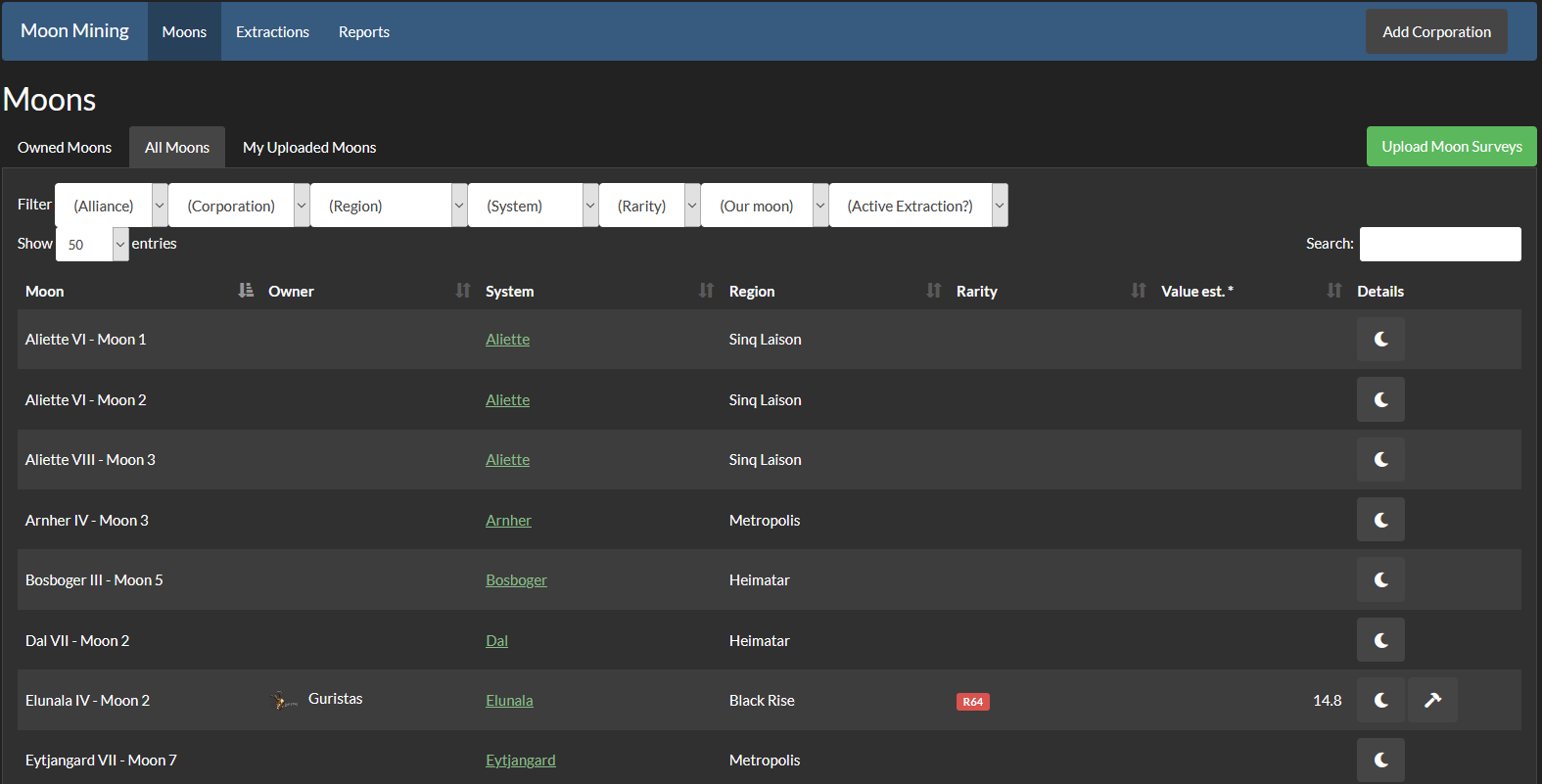
Build your own moon database from survey inputs and find the best moons for you. The moon rarity class and value are automatically calculated from your survey input.
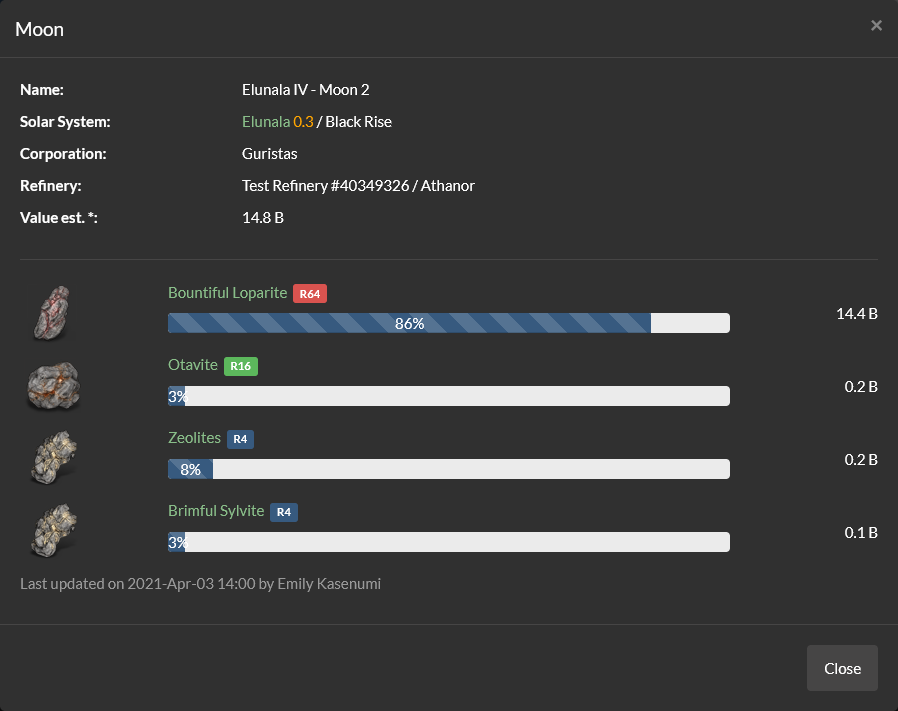
See the exact ore makeup of this moon on the details page.
Note that you can also see on this list which moons you already own. In addition an extraction button is visible, when an extraction is active for a particular moon.
Manage extractions
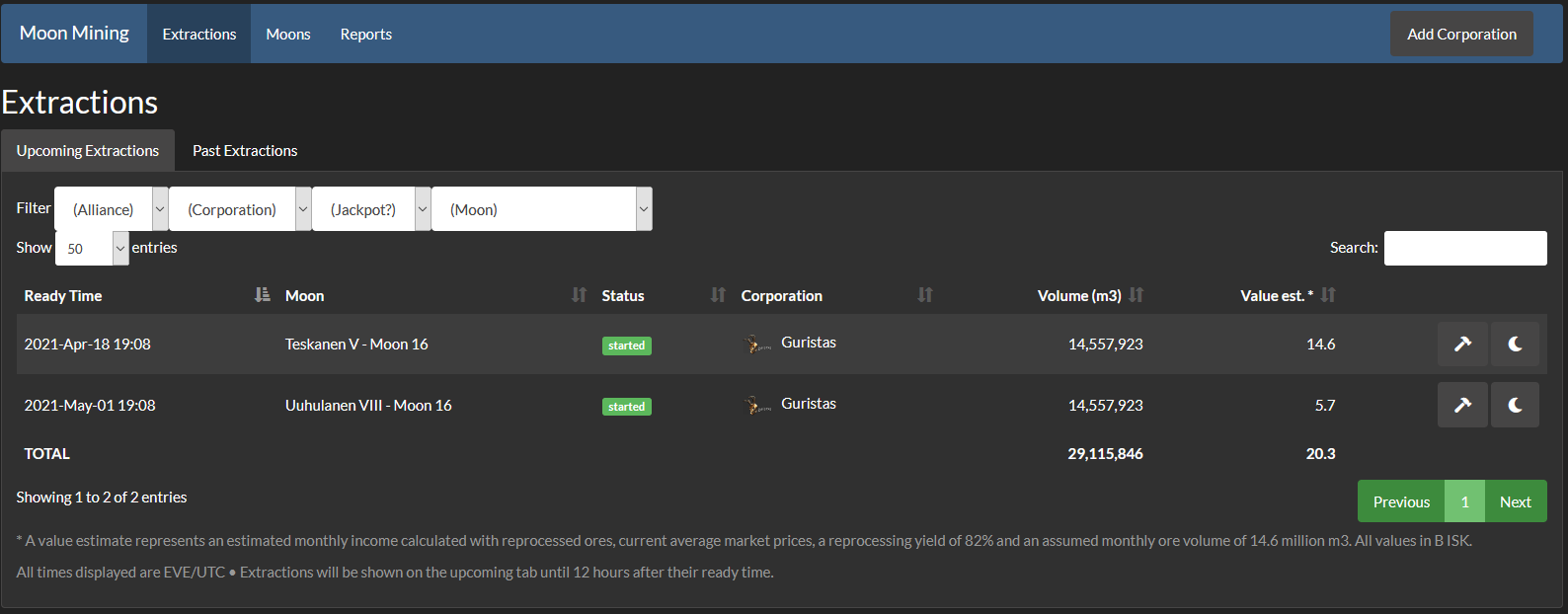
After you added your corporation you can see which moons you own and see upcoming and past extractions:
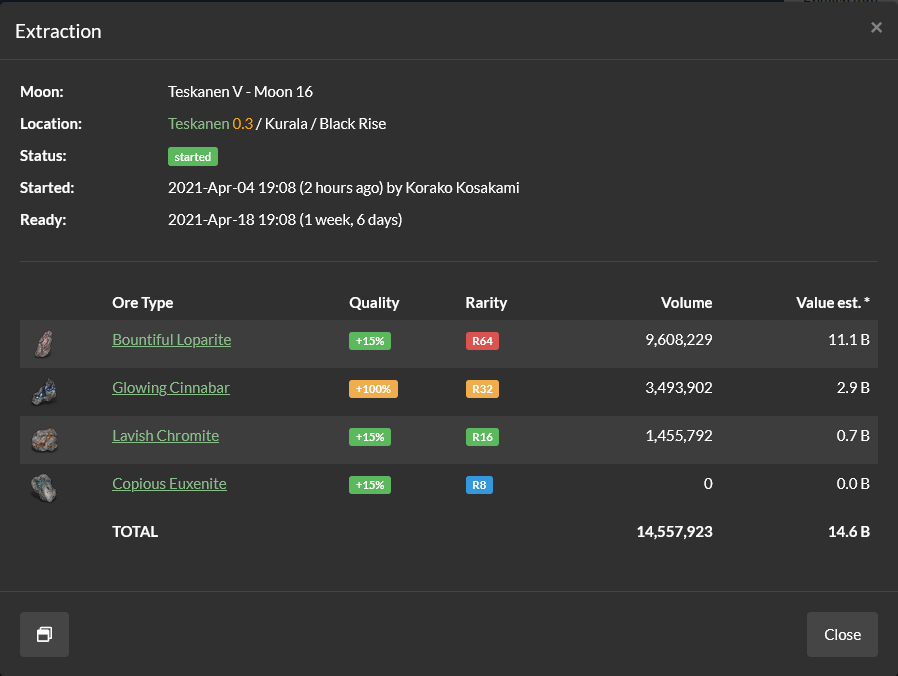
You can also review the extraction details, incl. which ore qualities you got.
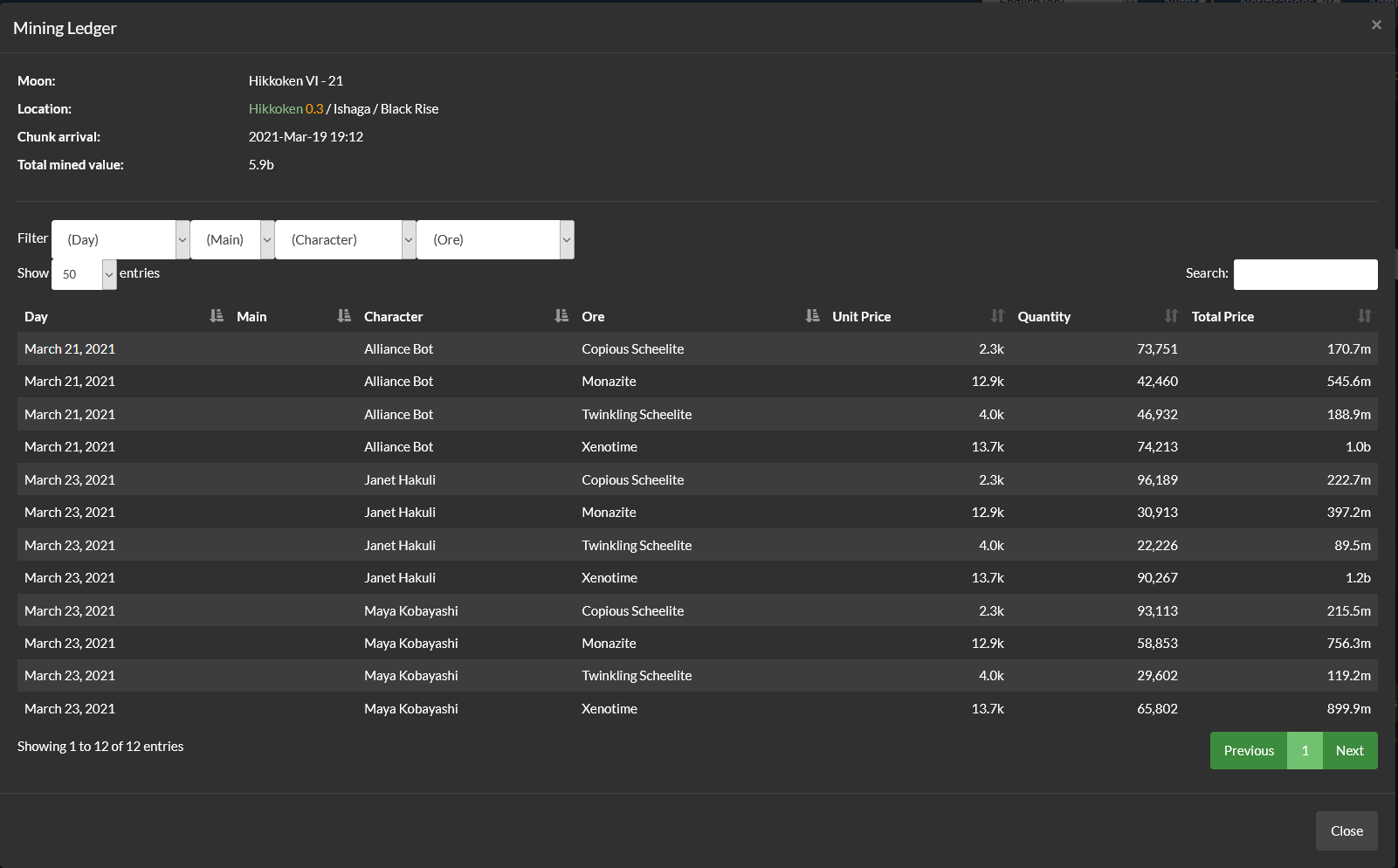
Mining ledger
See what has been minded from an extraction in the mining ledger:
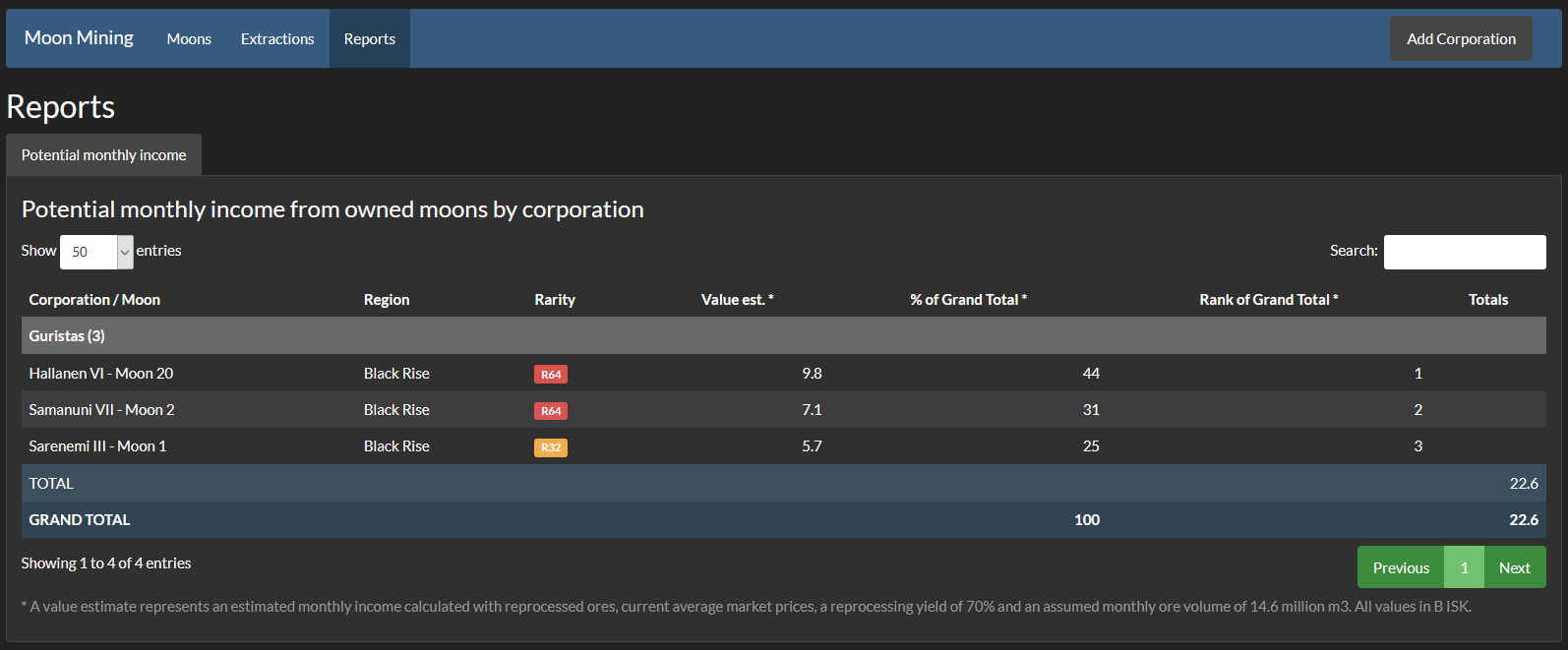
Reports
Check out the reporting section for detail reports on your operation, e.g. Breakdown by corporation and moon of your potential total gross moon income per months:
Installation
Step 1 - Check prerequisites
-
Moon Mining is a plugin for Alliance Auth. If you don't have Alliance Auth running already, please install it first before proceeding. (see the official AA installation guide for details)
-
Moon Mining needs the app django-eveuniverse to function. Please make sure it is installed, before before continuing.
Step 2 - Install app
Make sure you are in the virtual environment (venv) of your Alliance Auth installation. Then install the newest release from PyPI:
pip install aa-moonmining
Step 3 - Configure Auth settings
Configure your Auth settings (local.py) as follows:
- Add
'moonmining'toINSTALLED_APPS - Add below lines to your settings file:
CELERYBEAT_SCHEDULE['moonmining_run_regular_updates'] = {
    'task': 'moonmining.tasks.run_regular_updates',
    'schedule': crontab(minute='*/10'),
}
CELERYBEAT_SCHEDULE['moonmining_run_report_updates'] = {
    'task': 'moonmining.tasks.run_report_updates',
    'schedule': crontab(minute=30, hour='*/1'),
}
CELERYBEAT_SCHEDULE['moonmining_run_value_updates'] = {
 'task': 'moonmining.tasks.run_calculated_properties_update',
 'schedule': crontab(minute=30, hour=3)
}
Can you add additional settings if you want to change any defaults. See Settings for the full list.
Step 4 - Finalize App installation
Run migrations & copy static files
python manage.py migrate
python manage.py collectstatic --noinput
Restart your supervisor services for Auth.
Step 5 - Load ores from ESI
Please run the following management command to load all ores from ESI. This has to be done once only.
python manage.py moonmining_load_eve
Please wait until the loading is complete before continuing.
Step 6 - Load prices from ESI
In order to get the current prices from ESI initially, please run the following command (assuming the name of your Auth installation is myauth):
python manage.py moonmining_calculate_all
Please wait until the loading is complete before continuing.
Step 7 - Update EVE Online API Application
Update the Eve Online API app used for authentication in your AA installation to include the following scopes:
esi-industry.read_corporation_mining.v1esi-universe.read_structures.v1esi-characters.read_notifications.v1
Step 8 - Setup permissions
Finally you want to setup permission to define which users / groups will have access to which parts of the app. Check out permissions for details.
Congratulations! You are now ready to use Moon Mining!
User Manual
Pricing
The app uses average market prices as basis for all price calculations. Average market prices are same prices that you also see in the Eve client e.g. for the mining ledger or fitting costs. These can be slightly different from Jita prices, since they are represent an average across all of New Eden, not just Jita / The Forge.
The calculation of ore prices can be done in two different ways.
Default ore pricing
The default ore pricing uses the average market prices directly to calculate ore prices. This is the same approach that the Eve client uses in the mining ledger or when scheduling an extraction. So the main benefit of this approach that you will see the same prices in-game and in the app.
Reprocess ore pricing
The disadvantage of this approach is that average market prices for ores are not always accurate. Ores are rarely sold directly on the market, instead most people of refining their ores and selling the refined materials instead. This is because they have they are much smaller in volume making them easier to transport. The total value of the refined materials is also often higher then the value of the ore.
Therefore you can also chose to use refined ore pricing. This will give you more accurate prices, but the values will be very different from what you may be used to see in the Eve client. For this approach the app calculates the price for a unit of ore as the sum total of it's refined materials. For the materials again the average market price is used.
Please see the settings MOONMINING_USE_REPROCESS_PRICING and MOONMINING_REPROCESSING_YIELD for configuring the ore pricing approach.
After you changed the settings for price calculation, you please restart your AA services so that the changes to your settings become effective. Next please run the following command to recalculate all prices:
python manage.py moonmining_calculate_all
Labels
To help with organizing your moons you can label them. For example you might have some of your moons rented out to a third party. Just add a label "Rented out to X" to those moons and the moons and related extractions will show that label allowing you to quickly recognize which are related to your renters.
Labels are created on the admin site under Label and can then be assigned under Moon.
Permissions
Here is an overview of all permissions:
| Name | Description |
|---|---|
moonmining.basic_access |
This is access permission, users without this permission will be unable to access the plugin. |
moonmining.upload_moon_scan |
This permission allows users to upload moon scan data. |
moonmining.extractions_access |
User can access extractions and view owned moons. |
moonmining.reports_access |
User can access reports. |
moonmining.view_all_moons |
User can view all moons in the database and see own moons. |
moonmining.add_refinery_owner |
This permission is allows users to add their tokens to be pulled from when checking for new extraction events. |
moonmining.view_moon_ledgers |
Users with this permission can view the mining ledgers from past extractions from moons they have access to. |
Settings
Here is a list of available settings for this app. They can be configured by adding them to your AA settings file (local.py).
Note that all settings are optional and the app will use the documented default settings if they are not used.
| Name | Description | Default |
|---|---|---|
MOONMINING_ADMIN_NOTIFICATIONS_ENABLED |
whether admins will get notifications about important events like when someone adds a structure owner | True |
MOONMINING_COMPLETED_EXTRACTIONS_HOURS_UNTIL_STALE |
Number of hours an extractions that has passed its ready time is still shown on the upcoming extractions tab. | 12 |
MOONMINING_REPROCESSING_YIELD |
Reprocessing yield used for calculating all values | 0.85 |
MOONMINING_USE_REPROCESS_PRICING |
Whether to calculate prices from it's reprocessed materials or not. Will use direct ore prices when switched off | False |
MOONMINING_VOLUME_PER_DAY |
Maximum ore volume per day used for calculating moon values. | 960400 |
MOONMINING_DAYS_PER_MONTH |
Average days per months used for calculating moon values. | 30.4 |
MOONMINING_OVERWRITE_SURVEYS_WITH_ESTIMATES |
Whether uploaded survey are automatically overwritten by product estimates from extractions to keep the moon values current | False |
Management Commands
The following management commands are available to perform administrative tasks:
| Name | Description |
|---|---|
moonmining_calculate_all |
Calculate all properties for moons and extractions. |
moonmining_export_moons |
Export all moons to a file in CSV format. Note: The file can be imported with the import command. |
moonmining_import_moons |
Import moons from a CSV file. |
moonmining_load_eve |
Pre-loads data required for this app from ESI to improve app performance. |
moonstuff_export_moons |
Export all moons from aa-moonstuff v1 to a CSV file, which can later be used to import the moons into the Moon Mining app with the moonmining_import_moons command. |
CSV Format
Example of the CSV format used by moonmining_export_moons, moonmining_import_moons and moonstuff_export_moons:
moon_id,ore_type_id,amount
40002768,45512,0.191399
40002768,46685,0.0928981
40002768,46678,0.463296
40002768,46679,0.252407
40002788,46681,0.170678
40002788,46687,0.335634
40002788,46683,0.40017
40002788,45511,0.0935172
FAQ
Extractions
- Q: Why does the tool not show values and ores for all my extractions?
- A: Unfortunately, the Eve Online API does only provide basic information for extractions. Additional information like the list of ores are retrieved by trying to match moon mining notifications to extractions. However, that process it not 100% reliable. For example the API returns the latest notifications only, so notifications for extractions that have been setup weeks ago might no longer be available.
Prices
- Q: How are the prices and values of ores calculated?
- A: All ore prices are average prices (not Jita prices), which are the current average price of an item accross all of New Eden and the same that the in-game client is showing, e.g. for price estimates when scheduling an extraction.
History
This project started as a fork from aa-moonstuff in 2019, but as diverged heavily since then through two major iterations. The first iteration was called Moon Planner and used internally. It had a very different data model build upon allianceauth-evesde. The current version is the second iteration and is build upon django-eveuniverse. We like to take the opportunity to thank @colcrunch for providing a great starting point with moonstuff.
1 maintainer

Metadata
1 maintainer
Release files for aa-moonmining 3.2.0
For a detailed explanation of source distributions (sdists) and built distributions (wheels), please see the package formats documentation.
Source distribution (sdist)
| File | Size | Uploaded | |
|---|---|---|---|
| aa_moonmining-3.2.0.tar.gz | 246.2 kB | Details |
Built distribution (wheel)
| File | Interpreter | ABI | Platform | Reset |
|---|---|---|---|---|
| aa_moonmining-3.2.0-py3-none-any.whl | Python 3 | none | any | Details |
Total release size: 571.5 kB
Release files / aa_moonmining-3.2.0.tar.gz
| Download URL | aa_moonmining-3.2.0.tar.gz |
|---|---|
| Size | 246.2 kB |
| Tags | Source |
|
SHA-256 checksum How to use checksums |
3732794299eb0734d99f782f48ffcac0df6fc444823571af05fe511ba8bd3655
|
|
BLAKE2b-256 checksum How to use checksums |
5576696b6493e0e88d9c5fe0077fd9277bb8c6ac1441e3b22c14ea0fcbcd6375
|
| Upload date | |
|
Uploaded using Trusted Publishing? What is trusted publishing? |
No |
| Uploaded via |
python-requests/2.34.2
|
Release files / aa_moonmining-3.2.0-py3-none-any.whl
| Download URL | aa_moonmining-3.2.0-py3-none-any.whl |
|---|---|
| Size | 325.3 kB |
| Tags | Python 3 |
|
SHA-256 checksum How to use checksums |
f64574739efa3ff4e54d70ec94d906535fde74969a896716cb5e6e31797cd9f2
|
|
BLAKE2b-256 checksum How to use checksums |
137c8b6efd4b542489d7a5e4d61eb4ded30bc86470a302b3b9be46a31d8d2546
|
| Upload date | |
|
Uploaded using Trusted Publishing? What is trusted publishing? |
No |
| Uploaded via |
python-requests/2.34.2
|














