
Quick connect links to your Mumble server channels
Verified details
These details have been verified by PyPIProject links
GitHub Statistics
Maintainers

Project description
AA Mumble Quick Connect













App for Alliance Auth to provide quick connect links for Mumble channels.
Screenshots
Mumble Quick Connect

Installation
[!NOTE]
To use this app, you need to have Alliance Auth installed, and the Mumble Service enabled.
Bare Metal Installation
Step 1: Install the App
Install the app using pip:
pip install aa-mumble-quick-connect==1.1.2
Step 2: Update Your AA Settings
Add the app to your INSTALLED_APPS in your local.py:
INSTALLED_APPS += [
    "aa_mumble_quick_connect",  # https://github.com/ppfeufer/aa-mumble-quick-connect
]
Step 3: Finalizing the Installation
Copy static files and run migrations
python manage.py migrate mumble_quick_connect
python manage.py collectstatic --noinput
Docker Installation
Step 1: Add the App
Add the app to your conf/requirements.txt:
aa-mumble-quick-connect==1.1.2
Step 2: Update Your AA Settings
Add the app to your INSTALLED_APPS in your conf/local.py:
INSTALLED_APPS += [
    "aa_mumble_quick_connect",  # https://github.com/ppfeufer/aa-mumble-quick-connect
]
Step 3: Build Auth and Restart Your Containers
docker compose build --no-cache
docker compose --env-file=.env up -d
Step 4: Finalizing the Installation
Copy static files and run migrations
docker compose exec allianceauth_gunicorn bash

auth collectstatic
auth migrate
Permissions
The app comes with a default permission aa_mumble_quick_connect | general | Can access this app that allows
users to view the Mumble Quick Connect page.
Changelog
See CHANGELOG.md for a list of changes.
Translation Status
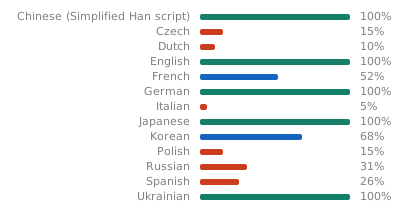
Do you want to help translate this app into your language or improve the existing translation? - Join our team of translators!
Contributing
Do you want to contribute to this project? That's cool!
Please make sure to read the Contribution Guidelines.
(I promise, it's not much, just some basics)
Project details
Verified details
These details have been verified by PyPIProject links
GitHub Statistics
Maintainers
Release history Release notifications | RSS feed


Download files
Download the file for your platform. If you're not sure which to choose, learn more about installing packages.
Source Distribution
Built Distribution
Filter files by name, interpreter, ABI, and platform.
If you're not sure about the file name format, learn more about wheel file names.
Copy a direct link to the current filters
File details
Details for the file aa_mumble_quick_connect-1.1.2.tar.gz.
File metadata
- Download URL: aa_mumble_quick_connect-1.1.2.tar.gz
- Upload date:
- Size: 54.4 kB
- Tags: Source
- Uploaded using Trusted Publishing? Yes
- Uploaded via: twine/6.1.0 CPython/3.13.7
File hashes
| Algorithm | Hash digest | |
|---|---|---|
| SHA256 |
d2472635f2198477c0887564f907949b38c07e7889848e7130aa45f59d07ca72
|
|
| MD5 |
1987535afa9113e2b1b5ed2bca11b189
|
|
| BLAKE2b-256 |
0714fc4263831cdb1b28a1dcfa5c417c1636cad440ac64888fdf92300cb18c7e
|
Provenance
The following attestation bundles were made for aa_mumble_quick_connect-1.1.2.tar.gz:
Publisher:
release.yml on ppfeufer/aa-mumble-quick-connect
-
Statement:
-
Statement type:
https://in-toto.io/Statement/v1 -
Predicate type:
https://docs.pypi.org/attestations/publish/v1 -
Subject name:
aa_mumble_quick_connect-1.1.2.tar.gz -
Subject digest:
d2472635f2198477c0887564f907949b38c07e7889848e7130aa45f59d07ca72 - Sigstore transparency entry: 908325651
- Sigstore integration time:
-
Permalink:
ppfeufer/aa-mumble-quick-connect@f52465e96d93b456f55e646a4c39a0d76cfec52d -
Branch / Tag:
refs/tags/v1.1.2 - Owner: https://github.com/ppfeufer
-
Access:
public
-
Token Issuer:
https://token.actions.githubusercontent.com -
Runner Environment:
github-hosted -
Publication workflow:
release.yml@f52465e96d93b456f55e646a4c39a0d76cfec52d -
Trigger Event:
release
-
Statement type:
File details
Details for the file aa_mumble_quick_connect-1.1.2-py3-none-any.whl.
File metadata
- Download URL: aa_mumble_quick_connect-1.1.2-py3-none-any.whl
- Upload date:
- Size: 91.1 kB
- Tags: Python 3
- Uploaded using Trusted Publishing? Yes
- Uploaded via: twine/6.1.0 CPython/3.13.7
File hashes
| Algorithm | Hash digest | |
|---|---|---|
| SHA256 |
0c345ad0be1cfcebfbe30d8ace5ae294ffdcf82761ce415373edf0efdad7a5de
|
|
| MD5 |
68c9260da62e69a7eedcc86301354e44
|
|
| BLAKE2b-256 |
111be529deed25feff1b38e68a37f88feb9cd186991d0188340493b847d34407
|
Provenance
The following attestation bundles were made for aa_mumble_quick_connect-1.1.2-py3-none-any.whl:
Publisher:
release.yml on ppfeufer/aa-mumble-quick-connect
-
Statement:
-
Statement type:
https://in-toto.io/Statement/v1 -
Predicate type:
https://docs.pypi.org/attestations/publish/v1 -
Subject name:
aa_mumble_quick_connect-1.1.2-py3-none-any.whl -
Subject digest:
0c345ad0be1cfcebfbe30d8ace5ae294ffdcf82761ce415373edf0efdad7a5de - Sigstore transparency entry: 908325662
- Sigstore integration time:
-
Permalink:
ppfeufer/aa-mumble-quick-connect@f52465e96d93b456f55e646a4c39a0d76cfec52d -
Branch / Tag:
refs/tags/v1.1.2 - Owner: https://github.com/ppfeufer
-
Access:
public
-
Token Issuer:
https://token.actions.githubusercontent.com -
Runner Environment:
github-hosted -
Publication workflow:
release.yml@f52465e96d93b456f55e646a4c39a0d76cfec52d -
Trigger Event:
release
-
Statement type:






