
Event calendar plugin app for Alliance Auth

Project description
Operation Calendar
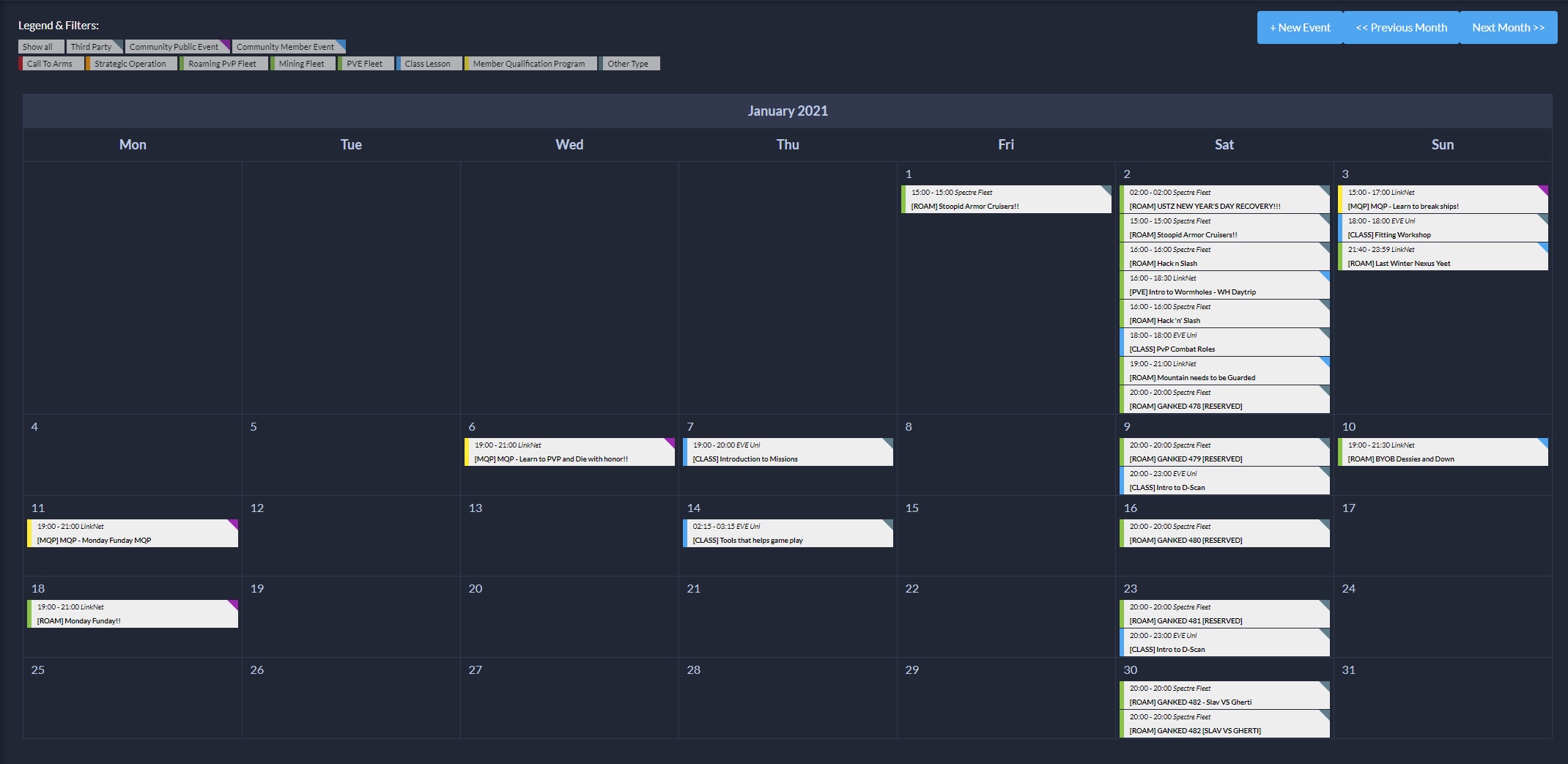
An operation calendar app for Alliance Auth to display fleet operations and other events.


Includes:
- Calendar type view of events and fleets
- Custom event categories
- Custom hosts
- Public and member restricted events
- Detailed view for events
- Webhook for discord notifications
- Importing NPSI fleets from public sources
- Importing fleets from corporation ingame calendar
Installation
- Install the Repo
pip install aa-opcalendar - Add
'opcalendar',to yourINSTALLED_APPSin your projectslocal.py - run migrations and restart auth
- setup your perms as documented below
Permissions
| Perm | Auth Site |
|---|---|
| opcalendar basic_access | Can view the calendar page. |
| opcalendar view_public | Can view events with public visibility. |
| opcalendar view_member | Can view events with member only visibility. |
| opcalendar view_ingame | Can view events that have been imported from the ingame calendars |
| add_ingame_calendar_owner | Can add feeds for ingame calendar events |
| opcalendar create_event | Can create events. |
Usage
In order to use the calendar and create event you will need to create event hosts and event categories.
- Go to the admin site
- Add a Host. The first host is most likely your own alliance/corporation. Fill in at least the community name ie. your alliance name. This name will be displayed on the calendar view on the event block. You may fill in additional information which will be displayed on the detailed view for the event.
- Add a category. Next you will need to add at least one category for your events. Categories can be whatever you want to have such as STRATOP, mining, roam etc. The ticker for the event will be displayed both on the calendar view event block and on the detailed view for the event.
- Webhook for discord notifications (optional). If you want to receive notifications about your events (created/modified/deleted) on your discord you can add a webhook for the channel in discord you want to receive the notifications to. Add a webhook and connect it to the fleet signals.
- Add new event. To add new events simply go to the operation calendar and click on the add event button. Fill in the information for your event.
Importing NPSI fleets
Opcalendar has the ability to import predetermined NPSI fleets directly into your calendar. These operations will be labeled as imported operations.
Opcalendar is currently supporting imports for the following NPSI fleets:
- Spectre fleet
- Eve University (classes only)
To start importing fleets:
- Go to admin panel and select Event Imports
- Create a host for each import and fill in the needed details for them.
- Add a new import by pressing on the add event import button
- Select the source where you want to fetch the fleets.
- Determine operation type for each fetched fleet.
WARNING: Running the import function will delete all fleets labaled with the import label to get rid of possibly deleted operations.
To schedule the import runs either add the following line in your local.py file or set up a perioduc task for the opcalendar.tasks.import_fleets task on your admin menu
CELERYBEAT_SCHEDULE['import_fleets'] = {
    'task': 'opcalendar.tasks.import_fleets',
    'schedule': crontab(minute=0, hour='*'),
}
Importing fleets from ingame calendar
You can import events that have been created in the ingame calendar. As the fields on the ingame calendar are limited the events will not be as detailed as when created directly from the calendar.
- Give the add_ingame_calendar_owner role for the user
- Navigate to the opcalendar page and press the
Add Ingame Calendar Feedbutton - Log in with the character that holds the calendar
- Add the following into your local.py setting file or set up a periodic task for the
opcalendar.tasks.update_all_ingame_events
CELERYBEAT_SCHEDULE['update_all_ingame_events'] = {
    'task': 'opcalendar.tasks.update_all_ingame_events',
    'schedule': crontab(minute=0, hour='*'),
}
Contributing
Make sure you have signed the License Agreement by logging in at https://developers.eveonline.com before submitting any pull requests. All bug fixes or features must not include extra superfluous formatting changes.
Release history Release notifications | RSS feed


Download files
Download the file for your platform. If you're not sure which to choose, learn more about installing packages.
Source Distribution
Built Distribution
Filter files by name, interpreter, ABI, and platform.
If you're not sure about the file name format, learn more about wheel file names.
Copy a direct link to the current filters
File details
Details for the file aa-opcalendar-1.0.1.tar.gz.
File metadata
- Download URL: aa-opcalendar-1.0.1.tar.gz
- Upload date:
- Size: 25.9 kB
- Tags: Source
- Uploaded using Trusted Publishing? No
- Uploaded via: twine/3.3.0 pkginfo/1.6.1 requests/2.24.0 setuptools/50.3.2 requests-toolbelt/0.9.1 tqdm/4.55.1 CPython/3.6.9
File hashes
| Algorithm | Hash digest | |
|---|---|---|
| SHA256 |
b3114a8a499ad87d317b004c31c3d91c318f63f7619dc661dc8ed4272fe372dd
|
|
| MD5 |
220dac008130c4b7a95c41f97610bca1
|
|
| BLAKE2b-256 |
28359c295f32e8c81ec42483bf976ad564062a36bff43f628572bf041bcab23a
|
File details
Details for the file aa_opcalendar-1.0.1-py3-none-any.whl.
File metadata
- Download URL: aa_opcalendar-1.0.1-py3-none-any.whl
- Upload date:
- Size: 44.1 kB
- Tags: Python 3
- Uploaded using Trusted Publishing? No
- Uploaded via: twine/3.3.0 pkginfo/1.6.1 requests/2.24.0 setuptools/50.3.2 requests-toolbelt/0.9.1 tqdm/4.55.1 CPython/3.6.9
File hashes
| Algorithm | Hash digest | |
|---|---|---|
| SHA256 |
156126f559cc8cc02a330f5f3dcda32a36cd8d0cb2d4433b71719cd8afa3d2f0
|
|
| MD5 |
4e1327cab4cc63b465219376af97cba9
|
|
| BLAKE2b-256 |
237511d8d532d4af7cb77f64fb2fbf02c7e5cc6f02c98c77a2aebdfba32055c6
|






