
AA Permission Management














Django Permission Management in the Alliance Auth Frontend
- Overview
- Installation
- Changelog
- Translation Status
- Contributing
Overview
This module provides a user interface for managing permissions within the Alliance Auth application. It allows to assign and revoke permissions for groups, and states.
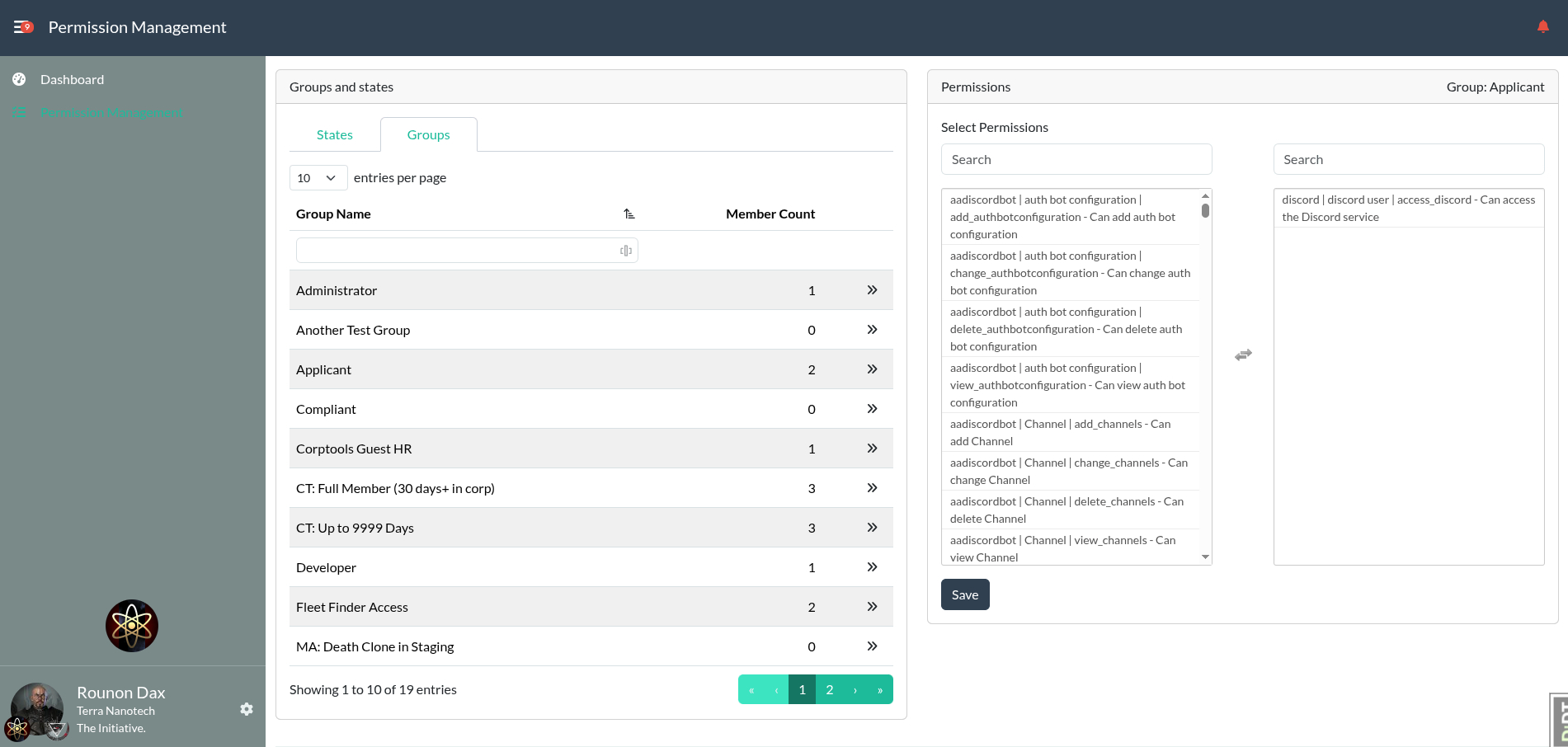
For EVE Online alliances, the number of people in a group or state can grow quite large, which can lead to performance issues when trying to manage permissions through the admin backend. This module provides a more efficient way to manage permissions for large groups and states in the Alliance Auth frontend.
[!WARNING]
This module provides a user interface for managing permissions, which is an administrative task.
Please ensure to only grant access to this module to trusted users!
Installation
To install the AA Permission Management module, follow these steps:
Bare Metal Installation
Step 1: Install the Module
Make sure you're in the virtual environment (venv) of your Alliance Auth installation Then install the latest release directly from PyPi.
pip install aa-permission-management==1.2.0
Step 2: Configure Alliance Auth
Add aa_permission_management to the INSTALLED_APPS in your local.py file.
INSTALLED_APPS += [
    # ...
    "aa_permission_management",  # https://github.com/ppfeufer/aa-permission-management
    # ...
]
Step 3: Run Static Collection, Migrations, and Restart Alliance Auth
After adding the module to your configuration, run the following commands:
python manage.py collectstatic --noinput
python manage.py migrate aa_permission_management

sudo systemctl restart supervisor
Docker Installation
Step 1: Add the App
Add the app to your conf/requirements.txt:
aa-permission-management==1.2.0
Step 2: Configure Alliance Auth
Add aa_permission_management to the INSTALLED_APPS in your local.py file.
INSTALLED_APPS += [
    # ...
    "aa_permission_management",  # https://github.com/ppfeufer/aa-permission-management
    # ...
]
Step 3: Build Auth and Restart Your Containers
After adding the module to your requirements and updating the configuration, build your Docker images and restart your containers to apply the changes.
docker compose build --no-cache
docker compose --env-file=.env up -d
Step 4: Finalize the Installation
After the containers are up and running, run the migrations for the new module.
docker compose exec allianceauth_gunicorn bash

auth collectstatic
auth migrate
Changelog
See CHANGELOG.md
Translation Status

Do you want to help translate this app into your language or improve the existing translation? - Join our team of translators!
Contributing
You want to contribute to this project? That's cool!
Please make sure to read the Contribution Guidelines.
(I promise, it's not much, just some basics)
1 maintainer

Metadata
1 maintainer
Release files for aa-permission-management 1.2.0
For a detailed explanation of source distributions (sdists) and built distributions (wheels), please see the package formats documentation.
Source distribution (sdist)
| File | Size | Uploaded | |
|---|---|---|---|
| aa_permission_management-1.2.0.tar.gz | 81.1 kB | Details |
Built distribution (wheel)
| File | Interpreter | ABI | Platform | Reset |
|---|---|---|---|---|
| aa_permission_management-1.2.0-py3-none-any.whl | Python 3 | none | any | Details |
Total release size: 204.5 kB
Release files / aa_permission_management-1.2.0.tar.gz
| Download URL | aa_permission_management-1.2.0.tar.gz |
|---|---|
| Size | 81.1 kB |
| Tags | Source |
|
SHA-256 checksum How to use checksums |
4683796da3c821ed5a979243287e406cbf4b857598753e92b8d5be71f66ee453
|
|
BLAKE2b-256 checksum How to use checksums |
6c0036713ebabdde2e488ea07b569e0cdd1133f01a0384e300671bdb05d05a6a
|
| Upload date | |
|
Uploaded using Trusted Publishing? What is trusted publishing? |
Yes |
| Uploaded via |
twine/7.0.0 CPython/3.13.14
|
Provenance
Provenance describes where a file came from. On PyPI, provenance is shared via attestations, which provide a verifiable record of the build or publishing details. View details, limitations and caveats.


PyPI Publish Attestation
PyPI verified that this artifact, at this checksum, originated from the publisher listed below.
Signed by GitHub Actions, verified by PyPI on Aug 4, 2026.
Transparency logRelease files / aa_permission_management-1.2.0-py3-none-any.whl
| Download URL | aa_permission_management-1.2.0-py3-none-any.whl |
|---|---|
| Size | 123.4 kB |
| Tags | Python 3 |
|
SHA-256 checksum How to use checksums |
db8e1df261bc87c71eaa6c9f58963cbfddff98954648ed46492cda81b61e1972
|
|
BLAKE2b-256 checksum How to use checksums |
035595dad0cd13443cf0e81b218eb49918f3220e7196e5b37be2edfc923a8b71
|
| Upload date | |
|
Uploaded using Trusted Publishing? What is trusted publishing? |
Yes |
| Uploaded via |
twine/7.0.0 CPython/3.13.14
|
Provenance
Provenance describes where a file came from. On PyPI, provenance is shared via attestations, which provide a verifiable record of the build or publishing details. View details, limitations and caveats.
PyPI Publish Attestation
PyPI verified that this artifact, at this checksum, originated from the publisher listed below.
Signed by GitHub Actions, verified by PyPI on Aug 4, 2026.
Transparency log













