






AA Planetary Operations for Alliance Auth
Plan your planetary industry across your main and alts, build the production network, and see its Jita buy value per pull.
Contents
- Features
- Upcoming
- Highlights
- Installation
- Settings
- Using the planner
- Translations
- Contributing
- License and credits
Features
- Main and alt planning — combine up to ten AA-authenticated characters in one operation.
- Automatic PI skill reads — use active skill levels and existing colonies to determine available capacity.
- P0 through P4 — choose any of the 83 PI commodities as your finished product.
- Import tiers — extract from P0 or start with supplied P1, P2, or P3 materials.
- Region selection — use real planet types, resources, recipes, and stargate connections from CCP's static data.
- One system first — try single-system layouts before expanding into nearby systems.
- Character assignments — fit colonies and facilities within each character's skill limits.
- Build sheets — see each planet, command-center level, extractor, processor, and required material.
- Logistics plans — get import quantities, local routes, character handoffs, hauling volumes, and regional gate paths.
- Extraction schedules — set the pull duration, output target, assumed extraction yield, and extractor head count.
- Jita buy valuation — estimate gross ISK per pull, day, and week from Jita 4-4 buy orders and available order volume.
- Saved operations — keep private plans, adjust a copy, refresh prices, or export the build sheet.
Upcoming
Future possibilities beyond V1:
- Discord alerts.
- Alliance-wide collaborative production and suppliers.
- Advanced POCO tools.
- Historical production and market analytics.
Highlights
Characters and operation planner
Select your authenticated characters and configure the production chain in one place.
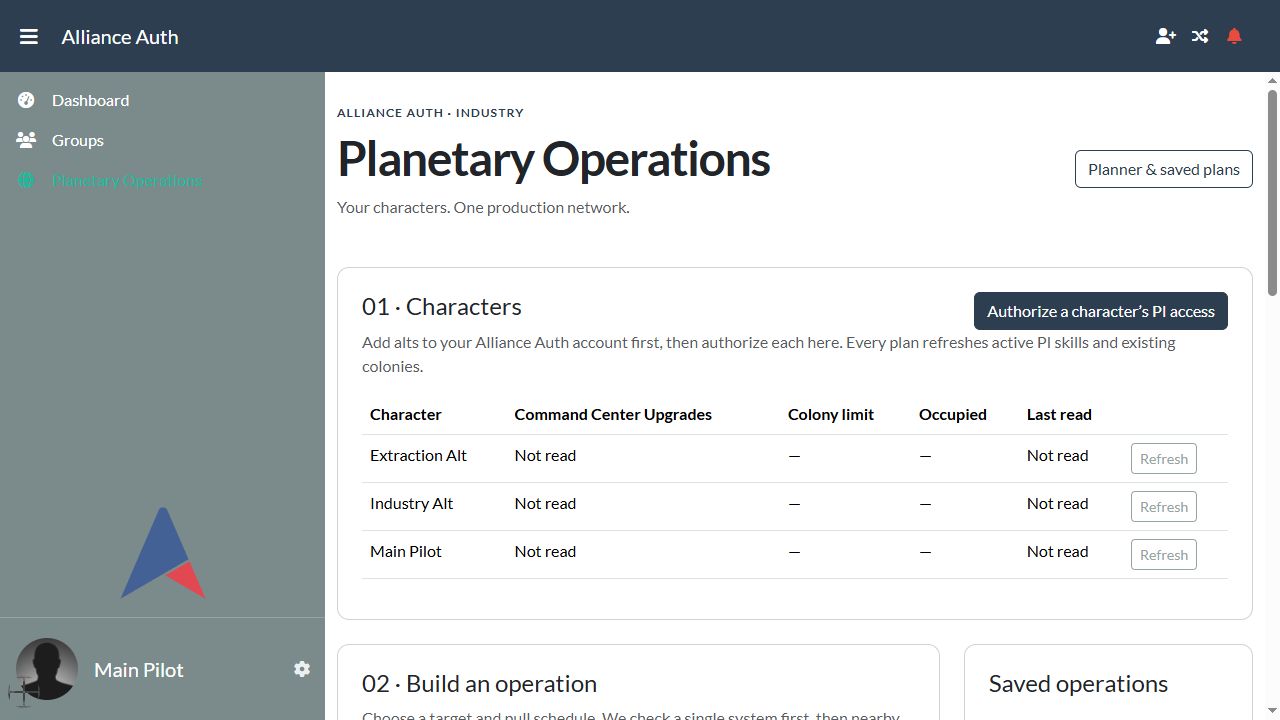
Production overview
Review estimated output, deployment size, and the Jita valuation status for a saved operation.
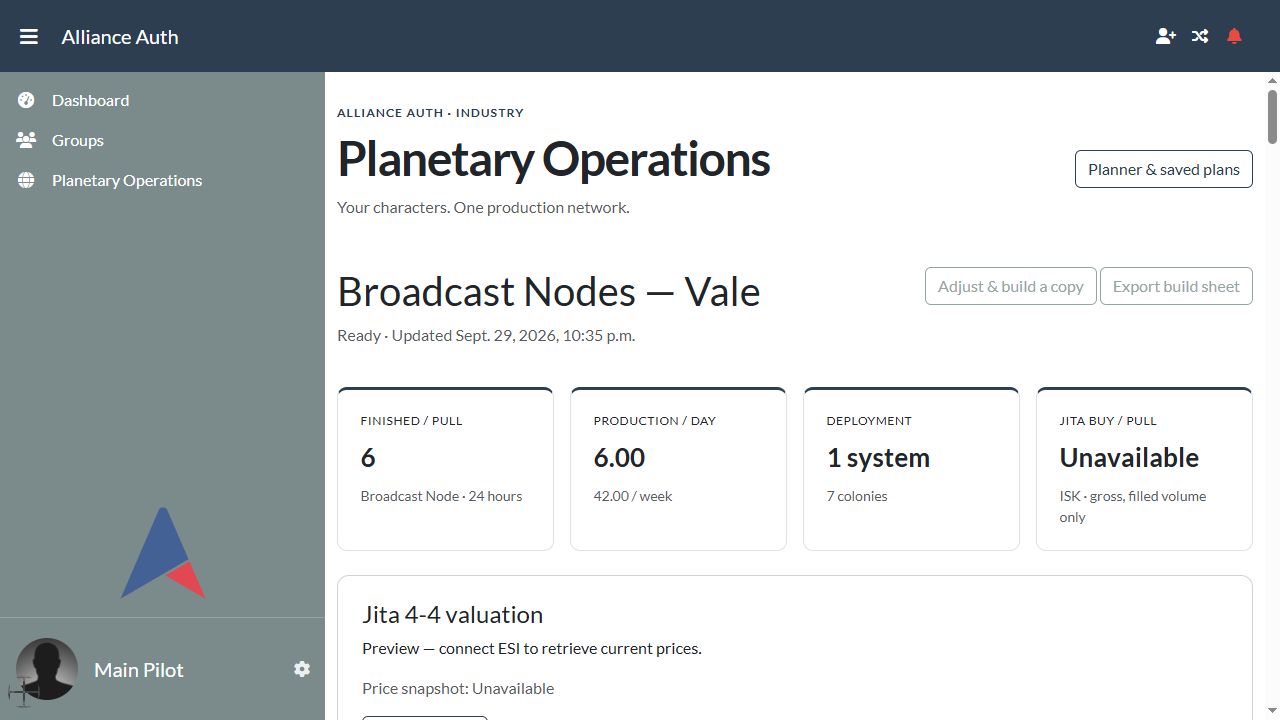
Screenshots show a local demonstration using sample characters. Market pricing is unavailable in the pictured preview; the live public ESI check is recorded in Verification.
Installation
Requirements: Alliance Auth v5, Python 3.11+, and your existing Auth database, Redis/Valkey, and Celery worker.
Version 0.1.0 is ready for staging evaluation. Install it directly into your Alliance Auth virtual environment. Complete a real SSO authorization and worker run on your server before rollout.
Step 1 — Install the package
Activate the virtual environment used by your Alliance Auth installation, then install the supplied wheel:
python -m pip install /path/to/aa_planetary_operations-0.1.0-py3-none-any.whl
Alternatively, install from the source directory:
python -m pip install /path/to/aa-planetary-operations
PyPI publication is pending. Maintainers can follow the Publishing guide to configure the first release.
Step 2 — Configure Alliance Auth
Add the app in your Auth project's settings/local.py:
INSTALLED_APPS += [
    "planetary_operations",
]
Set a User-Agent that identifies your deployment and administrator contact:
PLANETARY_OPERATIONS_USER_AGENT = "AA-Planetary-Operations/0.1.0 (your administrator contact)"
PLANETARY_OPERATIONS_SEARCH_SECONDS = 30
The package includes its PI and universe catalog. A separate SDE app or initial data download is not required.
Step 3 — Configure ESI access
Enable the following scopes on the EVE developer application used by your Auth installation:
| Scope | Purpose |
|---|---|
esi-skills.read_skills.v1 |
Read each character's active PI skill levels. |
esi-planets.manage_planets.v1 |
Read existing colonies and occupied planet IDs. |
Keep your existing AA SSO callback URL. Users grant these scopes through Authorize a character’s PI access. The plugin only reads ESI, including the scope named “manage”; it makes no in-game changes.
Step 4 — Run migrations and collect static files
From your Auth project directory:
python manage.py migrate
python manage.py collectstatic --noinput
python manage.py check
Restart your existing Auth web processes and Celery workers through your normal service manager.
Plan calculations use the task planetary_operations.tasks.calculate_plan on the existing AA worker. No additional Celery Beat schedule is required.
Step 5 — Set up permissions
Grant this permission to the appropriate AA group or state:
| Permission | Description | Access |
|---|---|---|
planetary_operations.basic_access |
Can use Planetary Operations | Opens the app and allows users to create and manage their own plans. |
The sidebar entry appears for permitted users. Saved plans are private to their owner.
Step 6 — Authorize characters and build a plan
- Open Planetary Operations from the AA sidebar.
- Attach any missing alts to your AA account.
- Use Authorize a character’s PI access for each character.
- Select the characters, finished product, import tier, and region.
- Set the pull duration and output target. Enter an extraction estimate based on your in-game program.
- Select Build & save plan. The result page updates when the worker finishes.
Settings
Optional settings in settings/local.py:
| Setting | Description | Default |
|---|---|---|
PLANETARY_OPERATIONS_USER_AGENT |
Identifies your application to ESI. Set it to include your administrator contact. | AA-Planetary-Operations/0.1.0 |
PLANETARY_OPERATIONS_SEARCH_SECONDS |
Solver search budget in seconds, limited to 5–120. | 30 |
Using the planner
Existing colonies reduce available slots by default. Enable Plan a replacement for my existing colonies if you intend to rebuild them in game. Saved plans are alternative layouts; they do not reserve colony slots against each other.
Read estimates as steady-state targets. The planner checks factory cycles and fitting budgets against your requested output. Future extraction yield, resource hotspots, exact link placement, startup buffers, sovereignty, and POCO access need an in-game check. Nearby-system results report a feasible network without claiming a global regional optimum.
Jita estimates are gross value. Imported materials, taxes, fees, and hauling costs are excluded. Unfilled buy-order volume is reported. Day/week figures extrapolate the current pull valuation; future liquidity can change.
For the full assumptions, operating instructions, catalog updates, and troubleshooting, see the Operating guide.
Translations
The V1 interface is currently in English. Translation support is not included in this release.
Contributing
Development uses a standard Python virtual environment. See the Development guide for setup and verification commands.
- Architecture — modules, planning constraints, and ownership checks.
- Verification — completed tests, AA version checks, and live-data results.
- Operating guide — behavior to preserve when changing the planner.
Include relevant tests with changes to production calculations, character permissions, or market handling.
License and credits
Source code is available under the MIT License.
Built for Alliance Auth using Django-ESI token management, CCP's Static Data Export, and the EVE ESI API.
EVE Online and its game data belong to CCP. See NOTICE.md.
1 maintainer

Metadata
1 maintainer
Release files for aa-planetary-operations 0.1.0
For a detailed explanation of source distributions (sdists) and built distributions (wheels), please see the package formats documentation.
Source distribution (sdist)
| File | Size | Uploaded | Provenance | |
|---|---|---|---|---|
| aa_planetary_operations-0.1.0.tar.gz | 819.0 kB | With provenance | Details |
Built distribution (wheel)
| File | Interpreter | ABI | Platform | Reset |
|---|---|---|---|---|
| aa_planetary_operations-0.1.0-py3-none-any.whl | Python 3 | none | any | Details |
Total release size: 1.5 MB
Release files / aa_planetary_operations-0.1.0.tar.gz
| Download URL | aa_planetary_operations-0.1.0.tar.gz |
|---|---|
| Size | 819.0 kB |
| Tags | Source |
|
SHA-256 checksum How to use checksums |
6cdd71abe07d7bdcfd97ab5787e5a516d9786884e7675c47ee1e1f5bea790df0
|
|
BLAKE2b-256 checksum How to use checksums |
e80c343f90b0d7790fa3707472be01bffe442f147b3f7e26869abb9b11a6dace
|
| Upload date | |
|
Uploaded using Trusted Publishing? What is trusted publishing? |
Yes |
| Uploaded via |
twine/7.0.0 CPython/3.13.14
|
Provenance
Provenance describes where a file came from. On PyPI, provenance is shared via attestations, which provide a verifiable record of the build or publishing details. View details, limitations and caveats.


PyPI Publish Attestation
PyPI verified that this artifact, at this checksum, originated from the publisher listed below.
Signed by GitHub Actions, verified by PyPI on Sep 30, 2026.
Transparency logRelease files / aa_planetary_operations-0.1.0-py3-none-any.whl
| Download URL | aa_planetary_operations-0.1.0-py3-none-any.whl |
|---|---|
| Size | 705.9 kB |
| Tags | Python 3 |
|
SHA-256 checksum How to use checksums |
0eb81843cd604d5be45b2f3bfb0981fc571b1aa621859506ef14f29ed799c400
|
|
BLAKE2b-256 checksum How to use checksums |
f6a16664d62dfce13f71dba5cd2ad4561d1d583892db1a82c69cec99532d5835
|
| Upload date | |
|
Uploaded using Trusted Publishing? What is trusted publishing? |
Yes |
| Uploaded via |
twine/7.0.0 CPython/3.13.14
|
Provenance
Provenance describes where a file came from. On PyPI, provenance is shared via attestations, which provide a verifiable record of the build or publishing details. View details, limitations and caveats.
PyPI Publish Attestation
PyPI verified that this artifact, at this checksum, originated from the publisher listed below.
Signed by GitHub Actions, verified by PyPI on Sep 30, 2026.
Transparency logSecurity for aa-planetary-operations 0.1.0
Provenance
Provenance describes where a file came from. On PyPI, provenance is shared via attestations, which provide a verifiable record of the build or publishing details. View details, limitations and caveats.
Full provenance
All 2 files in this release have been uploaded with provenance metadata.
Attestation for aa_planetary_operations-0.1.0.tar.gz
PyPI Publish Attestation
PyPI verified that this artifact, at this checksum, originated from the publisher listed below.
Signed by GitHub Actions, verified by PyPI on Sep 30, 2026.
Transparency logA note on package security
PyPI is a repository for distributing packages, not a service for auditing them. While third-party security researchers and our staff do their best to detect and remove malicious packages, PyPI cannot guarantee the quality, security or suitability of any given package.
To learn more about protecting yourself from malicious actors, visit our package security documentation.














