
Alliance Auth app for cloning alliance standings and war targets to alts.
Verified details
These details have been verified by PyPIProject links
GitHub Statistics
Maintainers

Project description
Standings Sync
Alliance Auth app for cloning alliance standings and war targets to alts.






Note: This is a fork of aa-standingssync maintained at github.com/guarzo/aa-standingssync-zoo
Content
- Features
- Screenshot
- How it works
- Contact Sync Modes
- Installation
- Updating
- Settings
- Permissions
- Admin Functions
- Feedback
- Change Log
Features
The main purpose of this app is to enable non-alliance characters to have the same standings view of other pilots in game as their alliance main. This e.g. allows non-alliance scouts to correctly report blues and non-blues. Or JF pilots can see which other non-alliance characters on grid not blues and therefore a potential threat.
Here is an high level overview of the main features:
- Synchronize alliance contacts to chosen non-alliance characters
- Supports coalition usage with multiple alliances in the same Alliance Auth installation
- Synchronize alliance war targets as contacts with terrible standing
- Automatically deactivates synchronization when a user ceases to be eligible (e.g. main left the alliance)
Screenshot
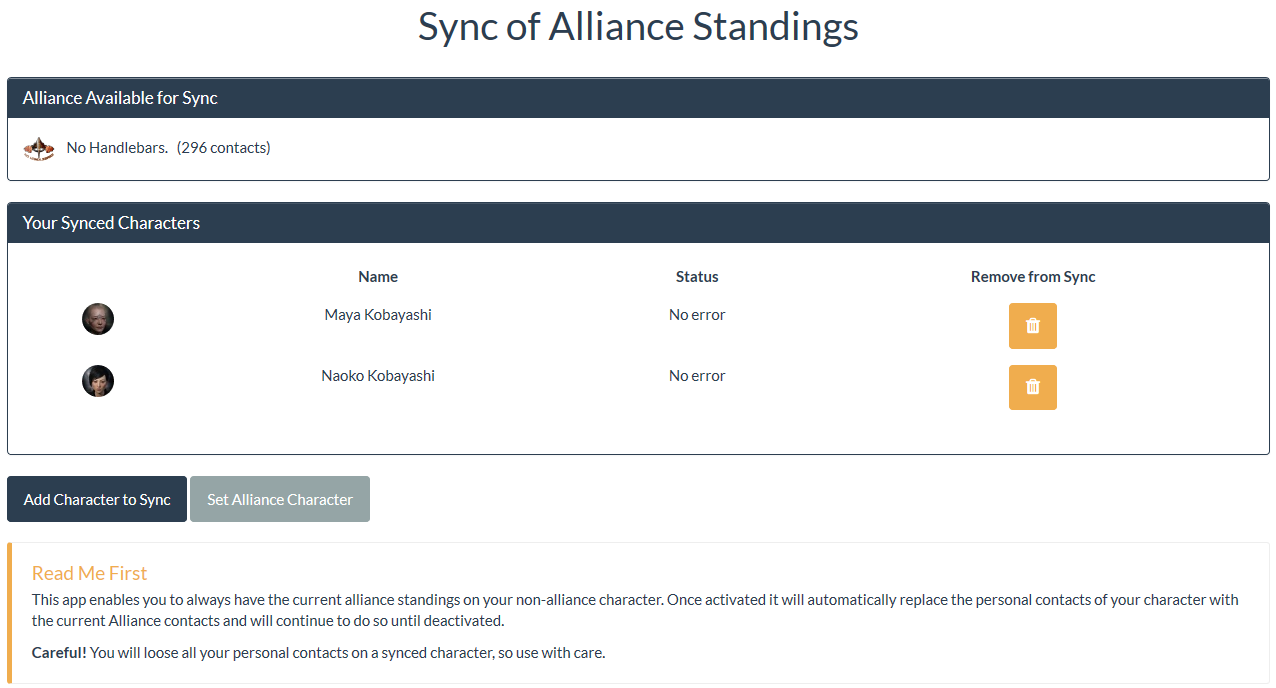
Here is a screenshot of the main screen.
How it works
To enable non-alliance members to use alliance standings the personal contact of that character are replaced with the alliance contacts.
Contact Sync Modes
Standings Sync supports three contact synchronization modes:
Replace Mode (Default)
STANDINGSSYNC_REPLACE_CONTACTS = True or "replace"
Behavior:
- Deletes ALL character contacts
- Replaces with alliance contacts only
- Personal contacts are NOT preserved
Use Case: Strict alliance-only contact lists
Preserve Mode
STANDINGSSYNC_REPLACE_CONTACTS = False or "preserve"
Behavior:
- Keeps ALL character contacts unchanged
- Does NOT sync alliance contacts
- Only updates war targets (if enabled)
Use Case: Manual contact management, no alliance sync
Merge Mode
STANDINGSSYNC_REPLACE_CONTACTS = "merge"
Behavior:
- Preserves personal contacts
- Adds new alliance contacts with +5.0 standing
- Removes alliance contacts when removed from alliance list
- Updates alliance contact standings to +5.0
- Handles war targets normally (if enabled)
Use Case: Automatic alliance sync while keeping personal contacts
Example:
# In your Django settings (local.py)
STANDINGSSYNC_REPLACE_CONTACTS = "merge"
How It Works:
- Alliance contacts are tracked using the "ALLIANCE" label (similar to "WAR TARGETS" label)
- All alliance contacts are automatically marked with the ALLIANCE label and +5.0 standing
- Personal contacts (without ALLIANCE label) are never modified
- When an entity leaves the alliance, their contact is automatically removed (identified by label)
- When an entity joins the alliance, their contact is automatically added with the ALLIANCE label
Requirements:
- You must create an "ALLIANCE" contact label in-game for each synced character
- The label name is case-insensitive and can be configured via
STANDINGSSYNC_ALLIANCE_CONTACTS_LABEL_NAMEsetting - Without the label, merge mode will still add/update alliance contacts, but cannot remove old ones
Migration Guide
Existing Users:
- Boolean values (
True/False) continue to work for backward compatibility Trueis automatically converted to"replace"modeFalseis automatically converted to"preserve"mode
To Enable Merge Mode:
# In your local.py or settings file
STANDINGSSYNC_REPLACE_CONTACTS = "merge"
Installation
Step 1 - Check Preconditions
Please make sure you meet all preconditions before proceeding:
-
Standings Sync is a plugin for Alliance Auth. If you don't have Alliance Auth running already, please install it first before proceeding. (see the official AA installation guide for details)
-
Standings Sync needs the app django-eveuniverse to function. Please make sure it is installed, before continuing.
Step 2 - Install app
Install into AA virtual environment with PIP install from PyPI:
pip install aa-standingssync-zoo
Step 3 - Update Eve Online app
Update the Eve Online app used for authentication in your AA installation to include the following scopes:
esi-characters.read_contacts.v1
esi-characters.write_contacts.v1
esi-alliances.read_contacts.v1
Step 4 - Configure AA settings
Configure your AA settings (local.py) as follows:
Add 'standingssync' to INSTALLED_APPS
Add these lines add to bottom of your settings file:
# settings for standingssync
CELERYBEAT_SCHEDULE['standingssync.run_regular_sync'] = {
    'task': 'standingssync.tasks.run_regular_sync',
    'schedule': crontab(minute=0, hour='*/2')
}
Please also see the settings section for more configuration options. For example a setting is required to enable syncing war targets.
Step 5 - Finalize installation into AA
Run migrations & copy static files
python manage.py migrate
python manage.py collectstatic --noinput
Restart your supervisor services for AA
Step 6 - Setup permissions
Now you can access Alliance Auth and setup permissions for your users. See section "Permissions" below for details.
Step 7 - Setup alliance character
Finally you need to set the alliance character that will be used for fetching the alliance contacts / standing. Just click on "Set Alliance Character" and add the requested token. Note that only users with the appropriate permission will be able to see and use this function.
Once an alliance character is set the app will immediately start fetching alliance contacts. Wait a minute and then reload the page to see the result.
That's it. The Standing Sync app is fully installed and ready to be used.
Updating
To update your existing installation of Alliance Freight first enable your virtual environment.
Then run the following commands from your AA project directory (the one that contains manage.py).
pip install -U aa-standingssync-zoo
python manage.py migrate
python manage.py collectstatic --noinput
Finally restart your AA supervisor services.
Settings
Here is a list of available settings for this app. They can be configured by adding them to your AA settings file (local.py). If they are not set the defaults are used.
| Name | Description | Default |
|---|---|---|
STANDINGSSYNC_ADD_WAR_TARGETS |
When enabled will automatically add or set war targets with standing = -10 to synced characters. | False |
STANDINGSSYNC_ALLIANCE_CONTACTS_LABEL_NAME |
Name of EVE contact label for alliance contacts in merge mode. Needs to be created by the user for each synced character when using merge mode. Required to ensure that old alliance contacts are removed when entities leave the alliance. Not case sensitive. | ALLIANCE |
STANDINGSSYNC_CHAR_MIN_STANDING |
Minimum standing a character needs to have in order to get alliance contacts. Any char with a standing smaller than this value will be rejected. Set to 0.0 if you want to allow neutral alts to sync. |
0.1 |
STANDINGSSYNC_REPLACE_CONTACTS |
Contact sync mode. Options: True or "replace" (replace all contacts with alliance contacts), False or "preserve" (preserve all contacts, don't sync alliance), "merge" (merge alliance contacts with personal contacts). See Contact Sync Modes for details. |
True |
STANDINGSSYNC_STORE_ESI_CONTACTS_ENABLED |
Wether to store contacts received from ESI to disk. This is for debugging. | False |
STANDINGSSYNC_SYNC_TIMEOUT |
Duration in minutes after which a delayed sync for managers and characters is reported as down. This value should be aligned with the frequency of the sync task. | 180 |
STANDINGSSYNC_WAR_TARGETS_LABEL_NAME |
Name of EVE contact label for war targets. Needs to be created by the user for each synced character. Required to ensure that war targets are deleted once they become invalid. Not case sensitive. | WAR TARGETS |
Permissions
This app only uses two permission. One for enabling this app for users and one for enabling users to add alliances for syncing.
| Name | Purpose | Code |
|---|---|---|
| Can add synced character | Enabling the app for a user. This permission should be enabled for everyone who is allowed to use the app (e.g. Member state) | add_syncedcharacter |
| Can add alliance manager | Enables adding alliances for syncing by setting the character for fetching alliance contacts. This should be limited to users with admins / leadership privileges. | add_syncmanager |
Admin functions
Admins will find a "Standings Sync" section on the admin page. This section provides the following features:
-
See a list of all setup alliances with their sync status
-
See a list of all enabled characters with their current sync status
-
Manually remove characters / alliances from sync
-
Manually start the sync process for characters / alliances
Feedback
If you encounter any bugs or would like to request a new feature please open an issue on GitHub.
Project details
Verified details
These details have been verified by PyPIProject links
GitHub Statistics
Maintainers


Download files
Download the file for your platform. If you're not sure which to choose, learn more about installing packages.
Source Distribution
Built Distribution
Filter files by name, interpreter, ABI, and platform.
If you're not sure about the file name format, learn more about wheel file names.
Copy a direct link to the current filters
File details
Details for the file aa_standingssync_zoo-1.10.4.tar.gz.
File metadata
- Download URL: aa_standingssync_zoo-1.10.4.tar.gz
- Upload date:
- Size: 137.1 kB
- Tags: Source
- Uploaded using Trusted Publishing? Yes
- Uploaded via: twine/6.1.0 CPython/3.13.7
File hashes
| Algorithm | Hash digest | |
|---|---|---|
| SHA256 |
74a934e0f804e8ca727e66088a3fc0c3129f673aca0c70650d90b6af59c14e58
|
|
| MD5 |
5cf88caab8fd2dd00332bee42971a4a2
|
|
| BLAKE2b-256 |
c833188225c013b87822c4cb9081af9597a03512114ca38bc640ca0cde34798a
|
Provenance
The following attestation bundles were made for aa_standingssync_zoo-1.10.4.tar.gz:
Publisher:
publish.yml on guarzo/aa-standingssync-zoo
-
Statement:
-
Statement type:
https://in-toto.io/Statement/v1 -
Predicate type:
https://docs.pypi.org/attestations/publish/v1 -
Subject name:
aa_standingssync_zoo-1.10.4.tar.gz -
Subject digest:
74a934e0f804e8ca727e66088a3fc0c3129f673aca0c70650d90b6af59c14e58 - Sigstore transparency entry: 653194881
- Sigstore integration time:
-
Permalink:
guarzo/aa-standingssync-zoo@05621fd9eb8450d0d430e7681c5077f5a929c5fa -
Branch / Tag:
refs/tags/v0.10.4 - Owner: https://github.com/guarzo
-
Access:
public
-
Token Issuer:
https://token.actions.githubusercontent.com -
Runner Environment:
github-hosted -
Publication workflow:
publish.yml@05621fd9eb8450d0d430e7681c5077f5a929c5fa -
Trigger Event:
release
-
Statement type:
File details
Details for the file aa_standingssync_zoo-1.10.4-py3-none-any.whl.
File metadata
- Download URL: aa_standingssync_zoo-1.10.4-py3-none-any.whl
- Upload date:
- Size: 62.5 kB
- Tags: Python 3
- Uploaded using Trusted Publishing? Yes
- Uploaded via: twine/6.1.0 CPython/3.13.7
File hashes
| Algorithm | Hash digest | |
|---|---|---|
| SHA256 |
87cd55799a92b7d7fae30b98cdd44e2f1ad4df87a7ae6b1ce6ea58a95a260041
|
|
| MD5 |
d2aefba9db1eee84d4b90bb8d8728bf3
|
|
| BLAKE2b-256 |
c989f6cc7f3da9de3d5dab1d0f8453cea5f7e134675fce897ef27857fcad9c9a
|
Provenance
The following attestation bundles were made for aa_standingssync_zoo-1.10.4-py3-none-any.whl:
Publisher:
publish.yml on guarzo/aa-standingssync-zoo
-
Statement:
-
Statement type:
https://in-toto.io/Statement/v1 -
Predicate type:
https://docs.pypi.org/attestations/publish/v1 -
Subject name:
aa_standingssync_zoo-1.10.4-py3-none-any.whl -
Subject digest:
87cd55799a92b7d7fae30b98cdd44e2f1ad4df87a7ae6b1ce6ea58a95a260041 - Sigstore transparency entry: 653194900
- Sigstore integration time:
-
Permalink:
guarzo/aa-standingssync-zoo@05621fd9eb8450d0d430e7681c5077f5a929c5fa -
Branch / Tag:
refs/tags/v0.10.4 - Owner: https://github.com/guarzo
-
Access:
public
-
Token Issuer:
https://token.actions.githubusercontent.com -
Runner Environment:
github-hosted -
Publication workflow:
publish.yml@05621fd9eb8450d0d430e7681c5077f5a929c5fa -
Trigger Event:
release
-
Statement type:






