
Alliance Auth plugin for monitoring celery tasks

Project description
Task Monitor
An Alliance Auth app for monitoring celery tasks.









Contents
Features
Task Monitor enables administrators to monitor celery tasks running on their system.
-
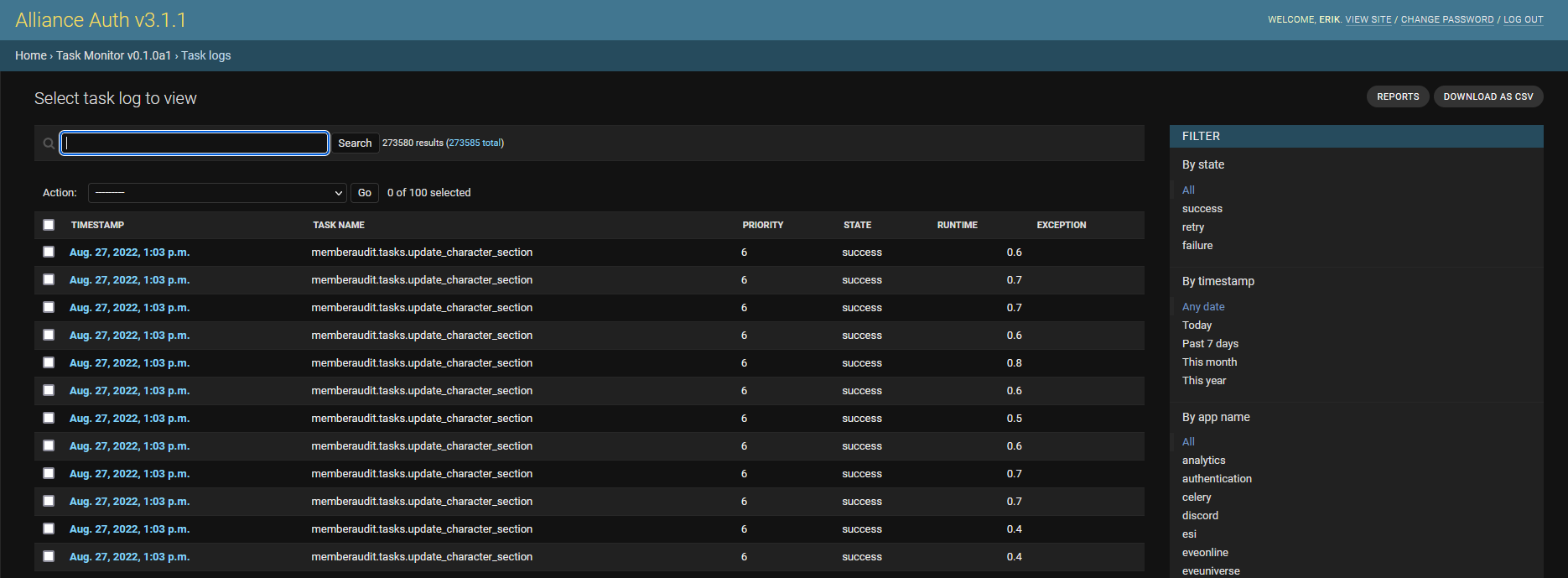
Stores full log with details of all recently executed celery tasks including failed and retried tasks.
-
Keeps the storage needs in check by automatically deleting older task logs
-
Admins can investigate task log with search & filters
-
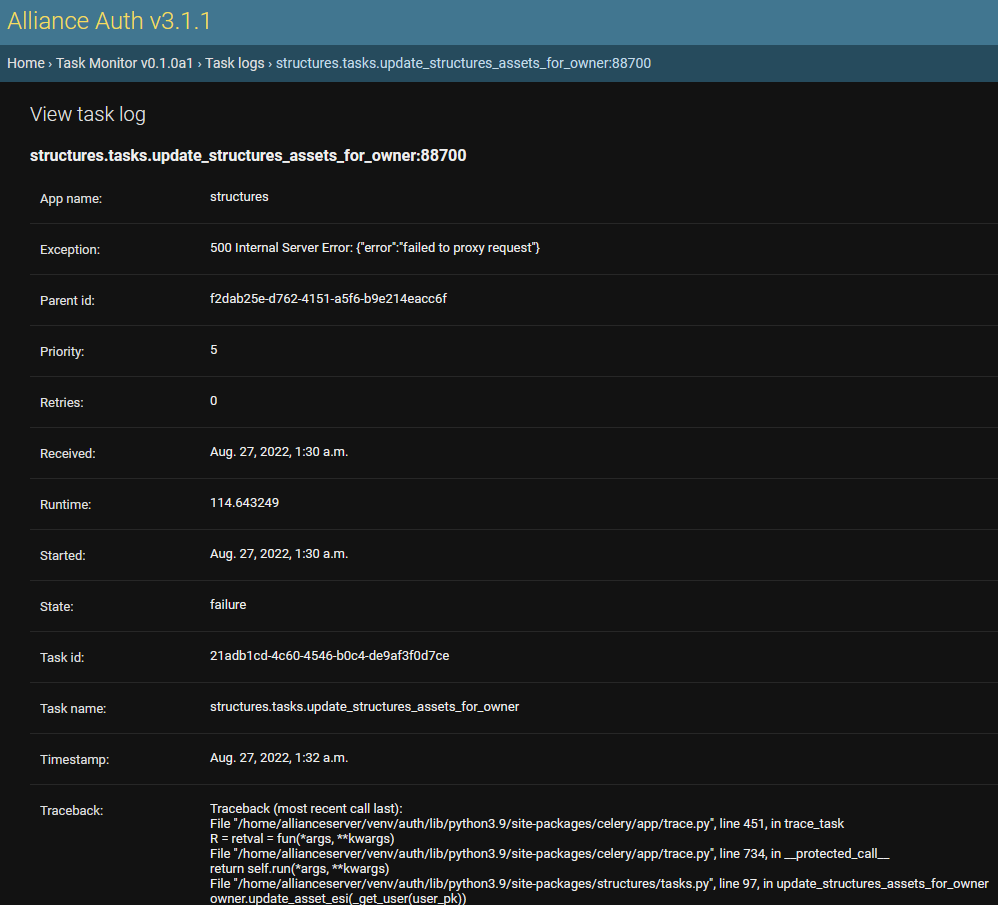
Admins can view details for each task incl. exceptions and trace logs
-
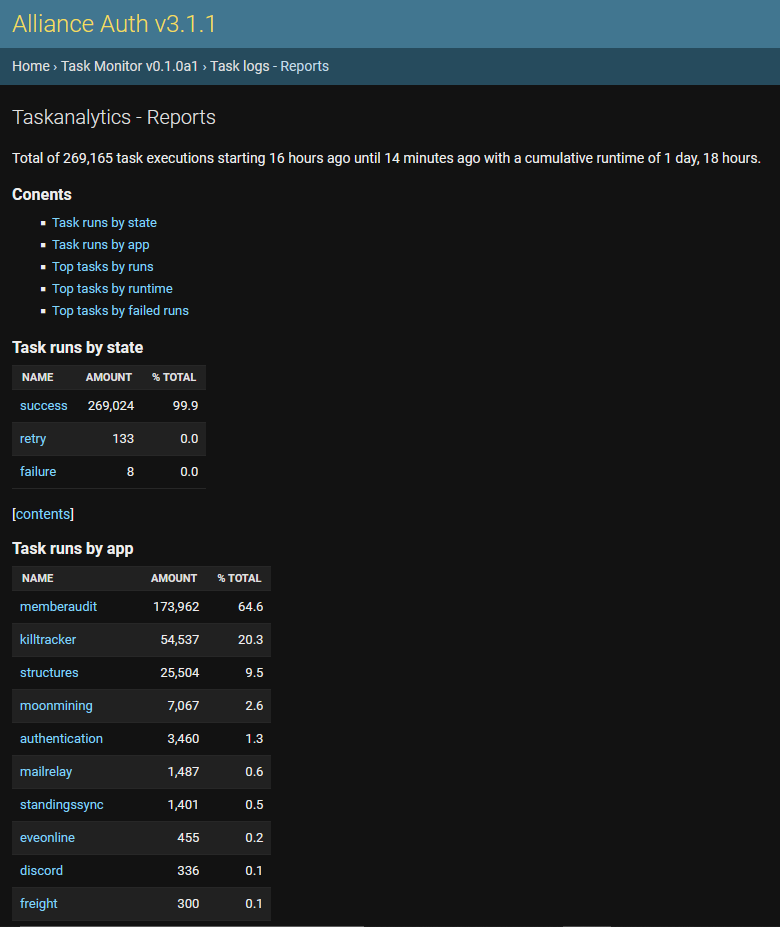
Admins can review reports providing answers to common questions, e.g:
- How many tasks have failed/retried?
- How many tasks where run by each of my apps?
- Which are the most frequent tasks?
- Which tasks have the longest runtime?
- Which tasks failed the most?
-
Admins can export all task logs to a CSV file for further analysis with 3rd party tools (e.g. Google sheets)
Screenshots
Full log of all recently executed tasks
View details for each task incl. exception tracelogs
The start of the reports page
Installation
Step 1 - Check prerequisites
Task Monitor is a plugin for Alliance Auth. If you don't have Alliance Auth running already, please install it first before proceeding. (see the official AA installation guide for details)
Step 2 - Install app
Make sure you are in the virtual environment (venv) of your Alliance Auth installation. Then install the newest release from PyPI:
pip install aa-taskmonitor
Step 3 - Configure Auth settings
Configure your Auth settings (local.py) as follows:
- Add
'taskmonitor'toINSTALLED_APPS - Optional: Add additional settings if you want to change any defaults. See Settings for the full list.
Step 4 - Finalize App installation
Run migrations & copy static files
python manage.py migrate
python manage.py collectstatic --noinput
Restart your supervisor services for Auth.
Settings
Here is a list of available settings for this app. They can be configured by adding them to your AA settings file (local.py).
Note that all settings are optional and the app will use the documented default settings if they are not used.
| Name | Description | Default |
|---|---|---|
TASKMONITOR_DATA_MAX_AGE |
Max age of logged tasks in hours. Older logs be deleted automatically. | 24 |
TASKMONITOR_HOUSEKEEPING_FREQUENCY |
Frequency of house keeping runs in minutes. | 15 |
TASKMONITOR_REPORTS_MAX_AGE |
Max age of cached reports in minutes. | 15 |
TASKMONITOR_REPORTS_MAX_TOP |
Max items to show in the top reports. e.g. 10 will shop the top ten items. | 15 |
FAQ
Is it possible to store task logs longer then for just 24 hours?
Yes, there is a setting, which you can increase according to your needs. However, please keep in mind that your storage needs will increase accordingly. The current approx. usage is 0.5 KB per entry, so e.g. you need approx. 500 MB to store 1.000.000 task logs.
How is this app different from celery analytics?
Celery Analytics seams to be designed mainly as data source for reports on Grafana. It apparently works great if you want to integrate analysis about your task executions into a Grafana dashboards. But it's usability without Grafana is limited.
Task Monitor on the other hand aims to be fully functional standalone by providing reports and many useful features for analyzing your task logs directly on the admin site. It also provides a more complete picture, since Celery Analytics ignores retried tasks.
How is this app different from celery's flower?
Flower offers more detailed and technical information about task runs and might therefore be more most for developers. However, it not designed to store a larger number of task logs (default is only 10K) and is appears therefore to be less suited for Alliance Auth, where you typically have 100K+ tasks per day.
Release history Release notifications | RSS feed


Download files
Download the file for your platform. If you're not sure which to choose, learn more about installing packages.
Source Distribution
Built Distribution
Filter files by name, interpreter, ABI, and platform.
If you're not sure about the file name format, learn more about wheel file names.
Copy a direct link to the current filters
File details
Details for the file aa-taskmonitor-0.2.1.tar.gz.
File metadata
- Download URL: aa-taskmonitor-0.2.1.tar.gz
- Upload date:
- Size: 18.4 kB
- Tags: Source
- Uploaded using Trusted Publishing? No
- Uploaded via: twine/4.0.1 CPython/3.8.14
File hashes
| Algorithm | Hash digest | |
|---|---|---|
| SHA256 |
4df68eaba8f9cbcd050e4a6e8368661b1f8b88ccad82d48da5e2f170c3bc37a0
|
|
| MD5 |
b2cea2477769638207105e9a35c9a301
|
|
| BLAKE2b-256 |
bfc95f71e1745fe71de648bbd28290ad59da7280cbabd13e23fed41772e897e6
|
File details
Details for the file aa_taskmonitor-0.2.1-py3-none-any.whl.
File metadata
- Download URL: aa_taskmonitor-0.2.1-py3-none-any.whl
- Upload date:
- Size: 31.7 kB
- Tags: Python 3
- Uploaded using Trusted Publishing? No
- Uploaded via: twine/4.0.1 CPython/3.8.14
File hashes
| Algorithm | Hash digest | |
|---|---|---|
| SHA256 |
a4416c79e0a4fbe28553317c886c8d2aa2923b4098533dd7dd8a5cd2dc31e4cb
|
|
| MD5 |
d32690b197456c29bfa031bad72b6f4f
|
|
| BLAKE2b-256 |
ff53e394b8e11399db1108b8a95539cd56e053f7d524c97d626c06d5bcafb7e8
|






