
Time Zones Overview for Alliance Auth
Verified details
These details have been verified by PyPIProject links
GitHub Statistics
Maintainers

Project description
AA Time Zones














App for displaying different time zones with Alliance Auth
- Installation
- (Optional) Public Views
- Updating
- Configure the Timezone Panels
- Adjusting Time
- Discord Bot Command
- Changelog
- Translation Status
- Contributing
Installation
[!NOTE]
AA Time Zones >= 2.0.0 needs at least Alliance Auth v4.0.0!
Please make sure to update your Alliance Auth instance before you install this module or update to the latest version, otherwise an update to Alliance Auth will be pulled in unsupervised.
The last version compatible with Alliance Auth v3 is
1.16.2.
Step 1: Install the App
Make sure you're in the virtual environment (venv) of your Alliance Auth installation. Then install the latest version:
pip install aa-timezones==2.6.1
Step 2: Update Your Alliance Auth Settings
Configure your AA settings (local.py) as follows:
- Add
'timezones',toINSTALLED_APPS
Step 3: Finalizing the Installation
Run migrations & copy static files
python manage.py collectstatic
python manage.py migrate
Restart your supervisor services for AA
Once done, it's time to add all the time zone information, so you can define your own set of panels later. To do so, simply run:
python manage.py timezones_load_tz_data
(Optional) Public Views
This app supports AA's feature of public views, since time zones conversion is not
any mission-critical information. To allow users to view the time zone conversion page
without the need to log in, please add "timezones", to the list of
APPS_WITH_PUBLIC_VIEWS in your local.py:
# By default, apps are prevented from having public views for security reasons.
# To allow specific apps to have public views, add them to APPS_WITH_PUBLIC_VIEWS
#   » The format is the same as in INSTALLED_APPS
#   » The app developer must also explicitly allow public views for their app
APPS_WITH_PUBLIC_VIEWS = [
    "timezones",  # https://github.com/ppfeufer/aa-timezones
]
Note
If you don't have a list for
APPS_WITH_PUBLIC_VIEWSyet, then add the whole block from here. This feature has been added in Alliance Auth v3.6.0 so you might not yet have this list in yourlocal.py.
Updating
To update your existing installation of AA Time Zones, first enable your virtual environment.
Then run the following commands from your AA project directory (the one that
contains manage.py).
pip install aa-timezones==2.6.1
python manage.py collectstatic
python manage.py migrate
Now restart your AA supervisor services.
Configure the Timezone Panels
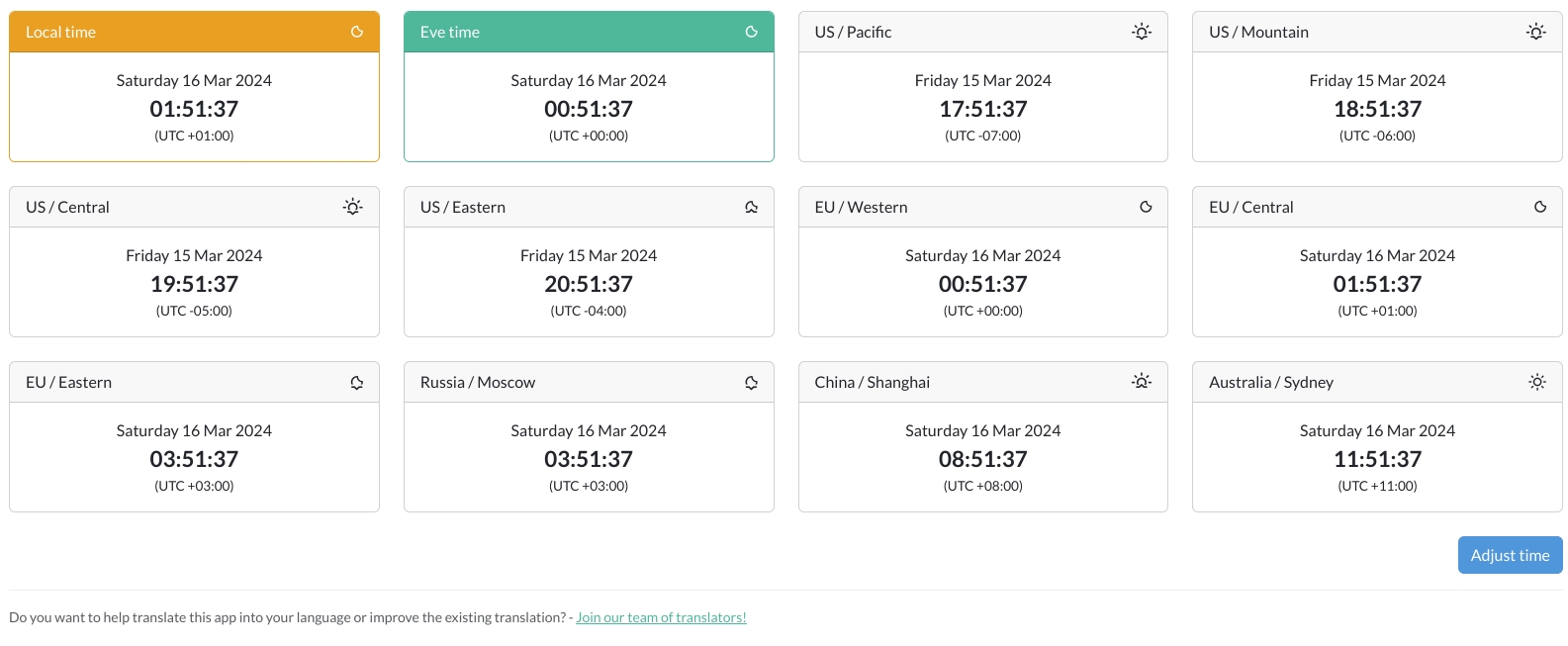
Per default, there are 10 additional time zone panels that are displayed (see first image). If you want to change those, you can create your own set of panels in your admin backend.
NOTE: "Local time" and "EVE time" will always be displayed as the first two panels, no matter what.
Adjusting Time
You can easily adjust the time that is displayed for all timezones. This is useful for reinforcement timers or pre-planned fleets. To do so, click on the "Adjust Time" button below the time zone panels, and you will see 2 different ways to set a new time.
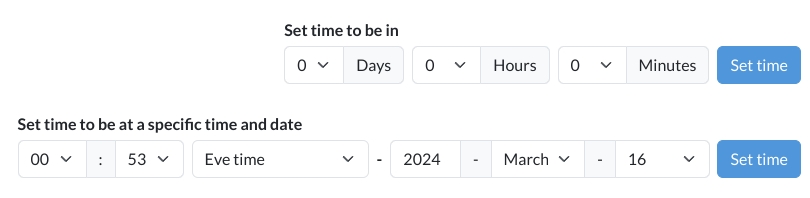
The first one is meant for timers, like reinforcement timers, anchoring timers or the like. Its maximum is 7 days, 59 minutes and 59 seconds into the future. That should cover pretty much all timers you can find in Eve Online.
The second one is best suited for pre-planned fleets. Here you can set a fixed date and time based on the selected time zone. The default selected time zone is "EVE time" but you can change it to all the available options. Keep in mind the selected time zone is the one the time and date will be adjusted to. So if you are going to use it to plan fleets, it is recommended to keep this set to "EVE time".
To set the adjusted time, simply click on "Set Time" in the row you altered. This will then adjust all time zone panels to the time you selected and will also alter the link in your browser, so you can share it with others directly.
Discord Bot Command
For this to work, you'll need to have allianceauth-discordbot installed, configured
and running. (See this link)
| Command | Effect |
|---|---|
/time |
Displays the current EVE time and what time it is in the configured time zones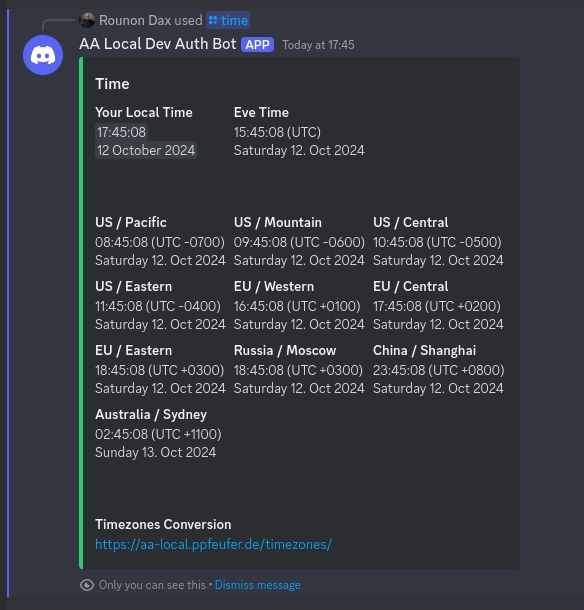 |
Changelog
See CHANGELOG.md
Translation Status
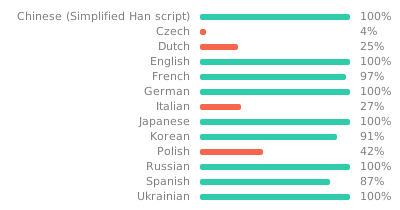
Do you want to help translate this app into your language or improve the existing translation? - Join our team of translators!
Contributing
Do you want to contribute to this project? That's cool!
Please make sure to read the Contribution Guidelines.
(I promise, it's not much, just some basics)
Project details
Verified details
These details have been verified by PyPIProject links
GitHub Statistics
Maintainers
Release history Release notifications | RSS feed


Download files
Download the file for your platform. If you're not sure which to choose, learn more about installing packages.
Source Distribution
Built Distribution
Filter files by name, interpreter, ABI, and platform.
If you're not sure about the file name format, learn more about wheel file names.
Copy a direct link to the current filters
File details
Details for the file aa_timezones-2.6.1.tar.gz.
File metadata
- Download URL: aa_timezones-2.6.1.tar.gz
- Upload date:
- Size: 519.5 kB
- Tags: Source
- Uploaded using Trusted Publishing? Yes
- Uploaded via: twine/6.1.0 CPython/3.13.12
File hashes
| Algorithm | Hash digest | |
|---|---|---|
| SHA256 |
306be1d399c08a180f706b418b4bf7adea50145811da0ead5111de1ca6a52c8e
|
|
| MD5 |
8901896108a17e90073d0be3f6e2063e
|
|
| BLAKE2b-256 |
7357115b36fdbeba0285d5fc1f5a862aa1af527161bdec3181fc472cbc1d0673
|
Provenance
The following attestation bundles were made for aa_timezones-2.6.1.tar.gz:
Publisher:
release.yml on ppfeufer/aa-timezones
-
Statement:
-
Statement type:
https://in-toto.io/Statement/v1 -
Predicate type:
https://docs.pypi.org/attestations/publish/v1 -
Subject name:
aa_timezones-2.6.1.tar.gz -
Subject digest:
306be1d399c08a180f706b418b4bf7adea50145811da0ead5111de1ca6a52c8e - Sigstore transparency entry: 1254650793
- Sigstore integration time:
-
Permalink:
ppfeufer/aa-timezones@834040cc8a0b8509656403d401e83bc9f17fc737 -
Branch / Tag:
refs/tags/v2.6.1 - Owner: https://github.com/ppfeufer
-
Access:
public
-
Token Issuer:
https://token.actions.githubusercontent.com -
Runner Environment:
github-hosted -
Publication workflow:
release.yml@834040cc8a0b8509656403d401e83bc9f17fc737 -
Trigger Event:
release
-
Statement type:
File details
Details for the file aa_timezones-2.6.1-py3-none-any.whl.
File metadata
- Download URL: aa_timezones-2.6.1-py3-none-any.whl
- Upload date:
- Size: 720.6 kB
- Tags: Python 3
- Uploaded using Trusted Publishing? Yes
- Uploaded via: twine/6.1.0 CPython/3.13.12
File hashes
| Algorithm | Hash digest | |
|---|---|---|
| SHA256 |
e4aafa60b6dd7460419b228c8c91dbfc8f05d1e16b615dea350e3028d7a3204c
|
|
| MD5 |
e869d7c791e16ab116b9cbc812bb12cb
|
|
| BLAKE2b-256 |
27913a0c2e7f551e078f25c9b8c6fe992ae10be3a4b39ce6d225895968a2ca4c
|
Provenance
The following attestation bundles were made for aa_timezones-2.6.1-py3-none-any.whl:
Publisher:
release.yml on ppfeufer/aa-timezones
-
Statement:
-
Statement type:
https://in-toto.io/Statement/v1 -
Predicate type:
https://docs.pypi.org/attestations/publish/v1 -
Subject name:
aa_timezones-2.6.1-py3-none-any.whl -
Subject digest:
e4aafa60b6dd7460419b228c8c91dbfc8f05d1e16b615dea350e3028d7a3204c - Sigstore transparency entry: 1254650890
- Sigstore integration time:
-
Permalink:
ppfeufer/aa-timezones@834040cc8a0b8509656403d401e83bc9f17fc737 -
Branch / Tag:
refs/tags/v2.6.1 - Owner: https://github.com/ppfeufer
-
Access:
public
-
Token Issuer:
https://token.actions.githubusercontent.com -
Runner Environment:
github-hosted -
Publication workflow:
release.yml@834040cc8a0b8509656403d401e83bc9f17fc737 -
Trigger Event:
release
-
Statement type:






