
Input processing tools for AlphaFold3, Boltz, Chai-1 and Protenix


Project description
ABCFold


Scripts to run AlphaFold3, Boltz, Chai-1 and Protenix with MMseqs2 Multiple sequence alignments (MSAs) and custom templates.
Table of Contents
Installation
We recommend installing this package in a micromamba environment. Python 3.11 is recommended, but the package should work with Python 3.9 and above. For instructions on installing micromamba, check their website here.
To set up a micromamba environment, run:
micromamba env create -n abcfold python=3.11 -y
micromamba activate abcfold
Environment note
- Your main Python environment can be Conda, micromamba, or virtualenv.
abcfoldwill automatically create internal micromamba environments to run Boltz, Chai-1 and Protenix safely, therefore a micromamba installation is required.- This prevents package conflicts with your main environment and ensures reproducible results.
To install the package from PyPI, run:
python -m pip install abcfold
Or, to install the package from source, first clone the repository and then run:
python -m pip install .
Development
If you wish to help develop this package, you can install the development dependencies by running:
python -m pip install -e .
python -m pip install -r requirements-dev.txt
python -m pre_commit install
Usage
Running ABCfold
ABCFold will run Alphafold3, Boltz, Chai-1 and Protenix consecutively. The program takes an input of a JSON in the Alphafold3 format (For full instruction on how to format this, click here). An example JSON is shown below:
{
  "name": "2PV7",
  "sequences": [
    {
      "protein": {
        "id": ["A", "B"],
        "sequence": "GMRESYANENQFGFKTINSDIHKIVIVGGYGKLGGLFARYLRASGYPISILDREDWAVAESILANADVVIVSVPINLTLETIERLKPYLTENMLLADLTSVKREPLAKMLEVHTGAVLGLHPMFGADIASMAKQVVVRCDGRFPERYEWLLEQIQIWGAKIYQTNATEHDHNMTYIQALRHFSTFANGLHLSKQPINLANLLALSSPIYRLELAMIGRLFAQDAELYADIIMDKSENLAVIETLKQTYDEALTFFENNDRQGFIDAFHKVRDWFGDYSEQFLKESRQLLQQANDLKQG"
      }
    }
  ],
  "modelSeeds": [1],
  "dialect": "alphafold3",
  "version": 1
}
Please make sure you have AlphaFold3 installed on your system (Instructions here) and have procured the model parameters. Boltz and Chai-1 are installed upon runtime.
For the majority of jobs, ABCFold can be run as follows:
abcfold <input_json> <output_dir> -abcp --mmseqs2 --model_params <path_to_af3_model_params>
[!NOTE]
--model_paramsis stored after the first run, therefore subsequent ABCFold jobs don't require this flag.
[!NOTE] If you wish to run ABCFold with the AlphaFold3 JACKHMMER MSA search, you need to remove the
--mmseqs2flag and provide the--databaseflag with the path to the directory containing the AlphaFold3 databases. The--databasepath will also be stored after the first run and won't be required in subsequent ABCFold jobs.
[!WARNING] When using the
--mmseqs2flag, AlphaFold3 will be run without pairedMSA information. If this is important for your target (e.g. modelling a complex), we recommend running the AlphaFold3 JACKHMMER MSA search as the pairedMSA is automatically generated.
[!WARNING]
--model_paramsand--databasewill need to be provided again if you do a fresh install.
However, there you may wish to use the following flags to add run time options such as the use of templates, or the number of models to create.
Main arguments
<input_json>: Path to the input AlphaFold3 JSON file.<output_dir>: Path to the output directory.-a,-b,-c,-p(--alphafold3,--boltz,--chai1,--protenix): Flags to run Alphafold3, Boltz, Chai-1 and Protenix respectively. If none of these flags are provided, Alphafold3 will be run by default.--mmseqs2: [optional] Flag to use MMseqs2 MSAs and templates (if specified).--mmseqs_database: [optional] The path to the database used by a local copy of MMSeqs2, provided mmseqs is installed, the inclusion of this flag allows MMseqs2 to be run locally.--override: [optional] Flag to override the existing output directory.--save_input: [optional] Flag to save the input JSON file in the output directory.
Alphafold3 arguments
--model_params: Path to the directory containing the AlphaFold3 model parameters.--database: [optional] Path to the directory containing the AlphaFold3 databases #Note: This is not used if using the--mmseqs2flag.--af3_sif_path: [optional] Path to sif file if using an AlphaFold3 singularity instead of Docker--use_af3_template_search[optional] If providing your own custom MSA or you've ran--mmseqs2, allow Alphafold3 to search for templates
Template arguments
-
--templates: Flag to enable a template search -
--num_templates: [optional] The number of templates to use (default: 20) -
--custom_template: [optional] Path to a custom template file in mmCIF format or a list of custom templates. A more detailed decription on how to use the custom template argument can be found below Visualisation arguments. -
--custom_template_chain: [conditionally required] The chain ID of the chain to use in your custom template, only required if using a multi-chain template. If providing a list of custom templates, you will need to provide a list of custom template chains. -
--target_id: [conditionally required] The ID of the sequence the custom template relates to, only required if modelling a complex. If providing a list of custom templates, you can provide a single target ID if they all relate to the same target. Otherwise, you should provide a list of target IDs corresponding to the list of custom templates.
Visualisation arguments
--no_server: [optional] Flag to not run the server for the output page (see below) but the pages are created , useful for running on a cluster.--no_visuals: [optional] Flag to not generate any output pages or PAE plots and only output the models.
Custom template usage
If you wanted to provide a custom template, custom_a.pdb for your protein sequence with the ID A and you have your template has two chains: chain A and chain B and chain B is what you want the template to be, you could run:
abcfold <input_json> <output_dir> -abcp --mmseqs2 --custom_template custom_a.pdb --custom_template_chain B --target_id A
If you had multiple IDs in your input sequence, multiple template files and you wanted to provide 3 custom templates, chain A from custom_a.pdb, chain B from custom_b.pdb, and chain B from custom_c.pdb, where custom_a.pdb and custom_b.pdb correspond to the ID A and custom_c.pdb corresponds to the ID B, you could run:
abcfold <input_json> <output_dir> -abcp --mmseqs2 --custom_template custom_a.pdb custom_b.pdb custom_c.pdb --custom_template_chain A B B --target_id A A B
Output
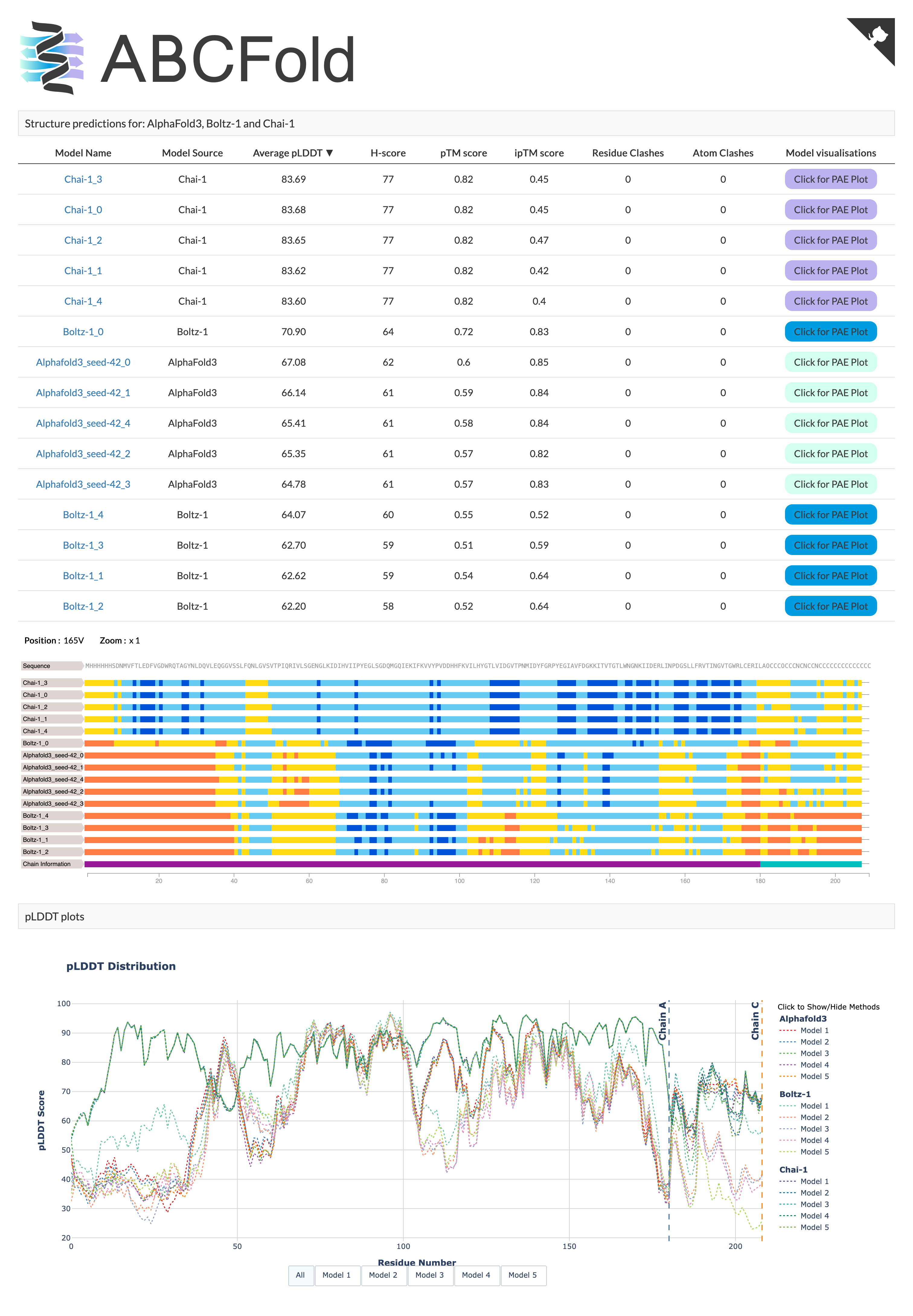
ABCFold will output the AlphaFold, Boltz and/or Chai models in the <output_dir>, it will also produce an output page containing a results table and informative PAE viewer. This is opened automatically in your default browser unless the --no_server or --no_visuals flags are used.
Unless the --no_visuals flag is used, you can then open the output pages by running:
cd <output_dir>
python open_output.py
Main Page Example
PAE Viewer example
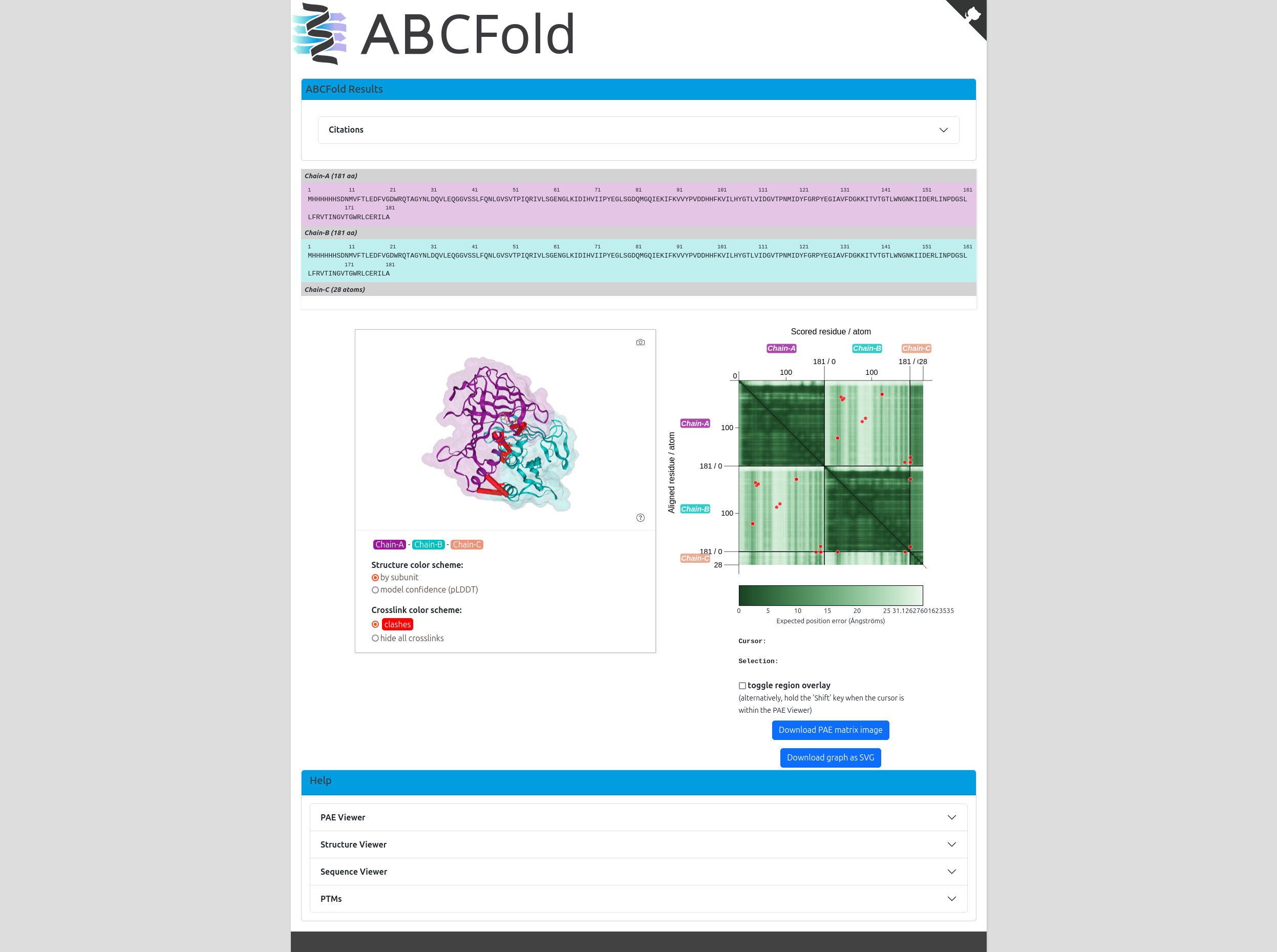
The output page will be available on http://localhost:8000/index.html. If you need to rerun the server to create the output,
you will find open_output.py in your <output_dir>. This needs to be run from your <output_dir>.
Extra Features
Below are scripts for adding MMseqs2 MSAs and custom templates to AlphaFold3 input JSON files.
[!WARNING] These scripts will only modify the input JSON files, I.E. they will NOT run AlphaFold3, Boltz, Chai-1 and Protenix.
Adding MMseqs2 MSAs and templates
To add MMseqs2 MSAs and templates to the AlphaFold3 input JSON, you can use the mmseqs2msa:
With Templates
To run the script with templates, use the following command:
mmseqs2msa --input_json <input_json> --output_json <output_json> --templates --num_templates <num_templates>
<input_json>: Path to the input AlphaFold3 JSON file.<output_json>: [optional] Path to the output JSON file (default:<input_json_stem>_mmseqs.json).<num_templates>: [optional] The number of templates to use (default: 20)<mmseqs_database>: [optional] The path to the database used by a local copy of MMSeqs2, provided mmseqs is installed, the inclusion of this flag allows MMseqs2 to be run locally.
[!NOTE] If you need to install the mmseqs databases you can use setup_mmseqs_databases.sh This replicates the MMSeqs2 database setup from ColabFold
bash
MMSEQS_NO_INDEX=1 ./setup_mmseqs_databases.sh /path/to/db_folder
Without Templates
To run the script without templates, use the following command:
mmseqs2msa --input_json <input_json> --output_json <output_json>
<input_json>: Path to the input AlphaFold3 JSON file.<output_json>: [optional] Path to the output JSON file (default:<input_json_stem>_mmseqs.json).
Adding custom templates
You may wish to add custom templates to your AlphaFold3 job, e.g. homologues which have yet to be deposited in the PDB. You can do so in two ways:
add_custom_template.py
If you just wish to add a custom template, you can use custom_templates:
custom_templates --input_json <input_json> --output_json <output_json> --custom_template <custom_template> --custom_template_chain <custom_template_chain> --target_id <target_id>
<input_json>: Path to the input AlphaFold3 JSON file.<output_json>: [optional] Path to the output JSON file (default:<input_json_stem>_custom_template.json).<custom_template>: [optional] Path to a custom template file in mmCIF format or a list of custom templates.<custom_template_chain>: [conditionally required] The chain ID of the chain to use in your custom template, only required if using a multi-chain template. If providing a list of custom templates, you will need to provide a list of custom template chains.<target_id>: [conditionally required] The ID of the sequence the custom template relates to, only required if modelling a complex. If providing a list of custom templates, you can provide a single target ID if they all relate to the same target. Otherwise, you should provide a list of target IDs corresponding to the list of custom templates.
add_mmseqs_msa.py
If you wish to add a custom template and generate an MMseqs2 MSA/templates, you can use mmseqs2msa:
mmseqs2msa --input_json <input_json> --output_json <output_json> --templates --num_templates <num_templates> --custom_template <custom_template> --custom_template_chain <custom_template_chain> --target_id <target_id>
<input_json>: Path to the input AlphaFold3 JSON file.<output_json>: [optional] Path to the output JSON file (default:<input_json_stem>_mmseqs.json).<num_templates>: [optional] The number of templates to use (default: 20)<custom_template>: [optional] Path to a custom template file in mmCIF format or a list of custom templates.<custom_template_chain>: [conditionally required] The chain ID of the chain to use in your custom template, only required if using a multi-chain template. If providing a list of custom templates, you will need to provide a list of custom template chains.<target_id>: [conditionally required] The ID of the sequence the custom template relates to, only required if modelling a complex. If providing a list of custom templates, you can provide a single target ID if they all relate to the same target. Otherwise, you should provide a list of target IDs corresponding to the list of custom templates.
Possible Issues
Using --target_id with homo-oligomer
Below is an example of a hetero-3-mer. When modelling a homo-oligomer, id is given as a list, you should select 1 of the identifiers in the list.
{
  "name": "7ZYH",
  "sequences": [
    {
      "protein": {
        "id": "A",
        "sequence": "SNAESKIKDCPWYDRGFCKHGPLCRHRHTRRVICVNYLVGFCPEGPSCKFMHPRFELPMGTTEQ"
      }
    },
    {
      "protein": {
        "id": ["B", "C"],
        "sequence": "SNAGSINGVPLLEVDLDSFEDKPWRKPGADLSDYFNYGFNEDTWKAYCEKQKRIRMGLEVIPVTSTTNK"
      }
    }
  ],
  "modelSeeds": [1],
  "dialect": "alphafold3",
  "version": 1
}
If you want to add a custom template to the first sequence, you can use --target_id A. If you wish to add a custom template to the second sequence, use --target_id B or --target_id C.
Boltz limitations
If modelling multiple copies of the same sequence in Boltz, the input JSON must be set up as follows:
{
  "name": "7ZYH",
  "sequences": [
    {
      "protein": {
        "id": ["A", "B"],
        "sequence": "SNAESKIKDCPWYDRGFCKHGPLCRHRHTRRVICVNYLVGFCPEGPSCKFMHPRFELPMGTTEQ"
      }
    },
  ],
  "modelSeeds": [1],
  "dialect": "alphafold3",
  "version": 1
}
If the identical sequences are given as seperate entities (as shown below) you will encounter an error.
{
  "name": "7ZYH",
  "sequences": [
    {
      "protein": {
        "id": "A",
        "sequence": "SNAESKIKDCPWYDRGFCKHGPLCRHRHTRRVICVNYLVGFCPEGPSCKFMHPRFELPMGTTEQ"
      }
    },
    {
      "protein": {
        "id": "B",
        "sequence": "SNAESKIKDCPWYDRGFCKHGPLCRHRHTRRVICVNYLVGFCPEGPSCKFMHPRFELPMGTTEQ"
      }
    }
  ],
  "modelSeeds": [1],
  "dialect": "alphafold3",
  "version": 1
}
Additionally, Boltz currently lacks the ability to create linked-ligands and therefore covalent bonds between the chain/ligand will be missing.
Contributing
Contributions are welcome! Please open an issue or submit a pull request.
Release history Release notifications | RSS feed


Download files
Download the file for your platform. If you're not sure which to choose, learn more about installing packages.
Source Distribution
Built Distribution
Filter files by name, interpreter, ABI, and platform.
If you're not sure about the file name format, learn more about wheel file names.
Copy a direct link to the current filters
File details
Details for the file abcfold-1.1.0.tar.gz.
File metadata
- Download URL: abcfold-1.1.0.tar.gz
- Upload date:
- Size: 3.9 MB
- Tags: Source
- Uploaded using Trusted Publishing? No
- Uploaded via: twine/6.1.0 CPython/3.10.16
File hashes
| Algorithm | Hash digest | |
|---|---|---|
| SHA256 |
1458602462911a7fc3bb3ae7b02f92836dfb5a7955dc0a8580080b83970ab617
|
|
| MD5 |
625de7b8de3b3e51118473d6e0d8e0b2
|
|
| BLAKE2b-256 |
78f32d1ae9c7c6b425cccb9fd52b203fde54f7b44f759e79cb321c2561140d98
|
File details
Details for the file abcfold-1.1.0-py3-none-any.whl.
File metadata
- Download URL: abcfold-1.1.0-py3-none-any.whl
- Upload date:
- Size: 3.9 MB
- Tags: Python 3
- Uploaded using Trusted Publishing? No
- Uploaded via: twine/6.1.0 CPython/3.10.16
File hashes
| Algorithm | Hash digest | |
|---|---|---|
| SHA256 |
acd8e8e21ab82eac1f4e40d2bd873387f97e88534a4755e9747d6d03a75602bd
|
|
| MD5 |
4a8d63ccdf9f827b26d72ac31274bcc6
|
|
| BLAKE2b-256 |
13fe5f9d4600cca815665abe83dbb262b4ac01974f841111844470b8afa54636
|






