
abcoder
Agentic backend coder - A Jupyter notebook manager with MCP (Model Context Protocol) integration for AI-assisted code execution and bioinformatics workflows.
Supports multiple Jupyter kernels (Python, R, etc.) for parallel notebook management.
🪩 What can it do?
- Jupyter Notebook Management: Create, switch between, and manage multiple Jupyter notebooks
- Multi-kernel Support: Manage and run code in multiple Jupyter kernels (e.g., Python, R) simultaneously
- Code Execution: Execute single-step or multi-step code in Jupyter kernels
- Variable Backup: Safely backup variables before code execution to prevent data loss
- API Documentation: Query function and API documentation directly from the kernel
- Output Handling: Capture and display execution results, errors, and generated figures
- Bioinformatics Integration: Designed for bioinformatics workflows with support for common libraries like scanpy, pandas, numpy, etc.
❓ Who is this for?
- Bioinformaticians who want AI assistance in their Jupyter workflows
- AI developers building agents that need to execute code in Jupyter environments
- Researchers who want to integrate AI tools with their computational notebooks
- Anyone who wants to use natural language to control Jupyter notebook execution
🌐 Where to use it?
You can use abcoder in most AI clients, plugins, or agent frameworks that support the MCP:
- AI clients: Cherry Studio, Claude Desktop, etc.
- Plugins: Cline, etc.
- Agent frameworks: Agno, etc.
🎬 Demo
A demo showing AI-assisted bioinformatics analysis in a Jupyter notebook using natural language commands through abcoder.
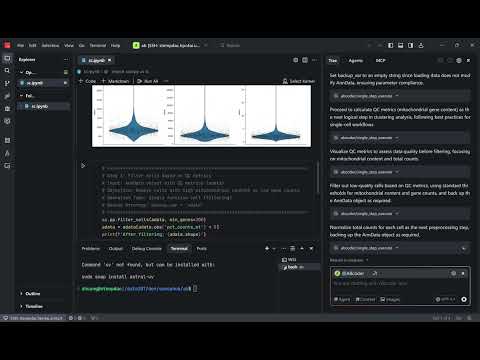
Click the image above to watch the demo video
📚 Documentation
For complete documentation, visit: https://github.com/huang-sh/abcoder
🏎️ Quickstart
Install
Install from PyPI:
pip install abcoder
Test the installation:
abcoder run
Configuration
Run abcoder locally
First, check the installation path:
which abcoder
# Example output: /home/user/bin/abcoder
Configure your MCP client:
{
  "mcpServers": {
    "abcoder": {
      "command": "/home/user/bin/abcoder",
      "args": ["run"]
    }
  }
}
Run abcoder remotely
Start the server on your remote machine:
abcoder run --transport shttp --port 8000
Configure your local MCP client:
{
  "mcpServers": {
    "abcoder": {
      "url": "http://localhost:8000/mcp"
    }
  }
}
🛠️ Available Tools
Notebook Management
create_notebook: Create a new Jupyter notebook with specified ID and pathswitch_active_notebook: Switch between different notebooks
Code Execution
single_step_execute: Execute a single code blockmulti_step_execute: Execute multiple code steps with cell additionquery_api_doc: Query function documentation from the kernel
Features
- Variable Backup: Automatically backup variables before execution
- Error Handling: Comprehensive error capture and reporting
- Output Display: Support for text, images, and other display data
- Kernel Management: Automatic kernel lifecycle management
🤝 Contributing
If you have any questions, welcome to submit an issue, or contact me(hsh-me@outlook.com). Contributions to the code are also welcome!
1 maintainer

Metadata
1 maintainer
Release files for abcoder 0.4.0
For a detailed explanation of source distributions (sdists) and built distributions (wheels), please see the package formats documentation.
Source distribution (sdist)
| File | Size | Uploaded | Provenance | |
|---|---|---|---|---|
| abcoder-0.4.0.tar.gz | 210.5 kB | With provenance | Details |
Built distribution (wheel)
| File | Interpreter | ABI | Platform | Reset |
|---|---|---|---|---|
| abcoder-0.4.0-py3-none-any.whl | Python 3 | none | any | Details |
Total release size: 251.0 kB
Release files / abcoder-0.4.0.tar.gz
| Download URL | abcoder-0.4.0.tar.gz |
|---|---|
| Size | 210.5 kB |
| Tags | Source |
|
SHA-256 checksum How to use checksums |
6ef46edbc1ad679628e58ce85ab492b79b0cf72b8fe0fc37ad77126bfa63efa8
|
|
BLAKE2b-256 checksum How to use checksums |
d7cf15b88b2d4f71dfbecde8770ba856dba960c033984d36f2f1e43697597cb4
|
| Upload date | |
|
Uploaded using Trusted Publishing? What is trusted publishing? |
Yes |
| Uploaded via |
twine/6.1.0 CPython/3.13.12
|
Provenance
Provenance describes where a file came from. On PyPI, provenance is shared via attestations, which provide a verifiable record of the build or publishing details. View details, limitations and caveats.


PyPI Publish Attestation
PyPI verified that this artifact, at this checksum, originated from the publisher listed below.
Signed by GitHub Actions, verified by PyPI on Jul 15, 2026.
Transparency logRelease files / abcoder-0.4.0-py3-none-any.whl
| Download URL | abcoder-0.4.0-py3-none-any.whl |
|---|---|
| Size | 40.5 kB |
| Tags | Python 3 |
|
SHA-256 checksum How to use checksums |
5400e22ced4224db28bdaf598568937b4575287f90e79bbbbfd9660a762fc8df
|
|
BLAKE2b-256 checksum How to use checksums |
fcc46aaeadd2ca3406d7b22adb203751f5be42abd6792f9654e63064a6c5900a
|
| Upload date | |
|
Uploaded using Trusted Publishing? What is trusted publishing? |
Yes |
| Uploaded via |
twine/6.1.0 CPython/3.13.12
|
Provenance
Provenance describes where a file came from. On PyPI, provenance is shared via attestations, which provide a verifiable record of the build or publishing details. View details, limitations and caveats.
PyPI Publish Attestation
PyPI verified that this artifact, at this checksum, originated from the publisher listed below.
Signed by GitHub Actions, verified by PyPI on Jul 15, 2026.
Transparency logSecurity for abcoder 0.4.0
Provenance
Provenance describes where a file came from. On PyPI, provenance is shared via attestations, which provide a verifiable record of the build or publishing details. View details, limitations and caveats.
Full provenance
All 2 files in this release have been uploaded with provenance metadata.
Attestation for abcoder-0.4.0.tar.gz
PyPI Publish Attestation
PyPI verified that this artifact, at this checksum, originated from the publisher listed below.
Signed by GitHub Actions, verified by PyPI on Jul 15, 2026.
Transparency logA note on package security
PyPI is a repository for distributing packages, not a service for auditing them. While third-party security researchers and our staff do their best to detect and remove malicious packages, PyPI cannot guarantee the quality, security or suitability of any given package.
To learn more about protecting yourself from malicious actors, visit our package security documentation.














