
CLI tool and async Python library for free web AI services

Project description
AI Bridge Interface & Gateway Abstraction Layer
Abigail is a powerful Command-Line Interface (CLI) tool and Python library for accessing free web AI services (chat models & image generation) directly from your terminal or Python code-with zero API keys required.

Language: English · Bahasa Indonesia
[!CAUTION] Disclaimer: This package accesses third-party public web AI interfaces. Please use it responsibly and in accordance with each service's Terms of Service.
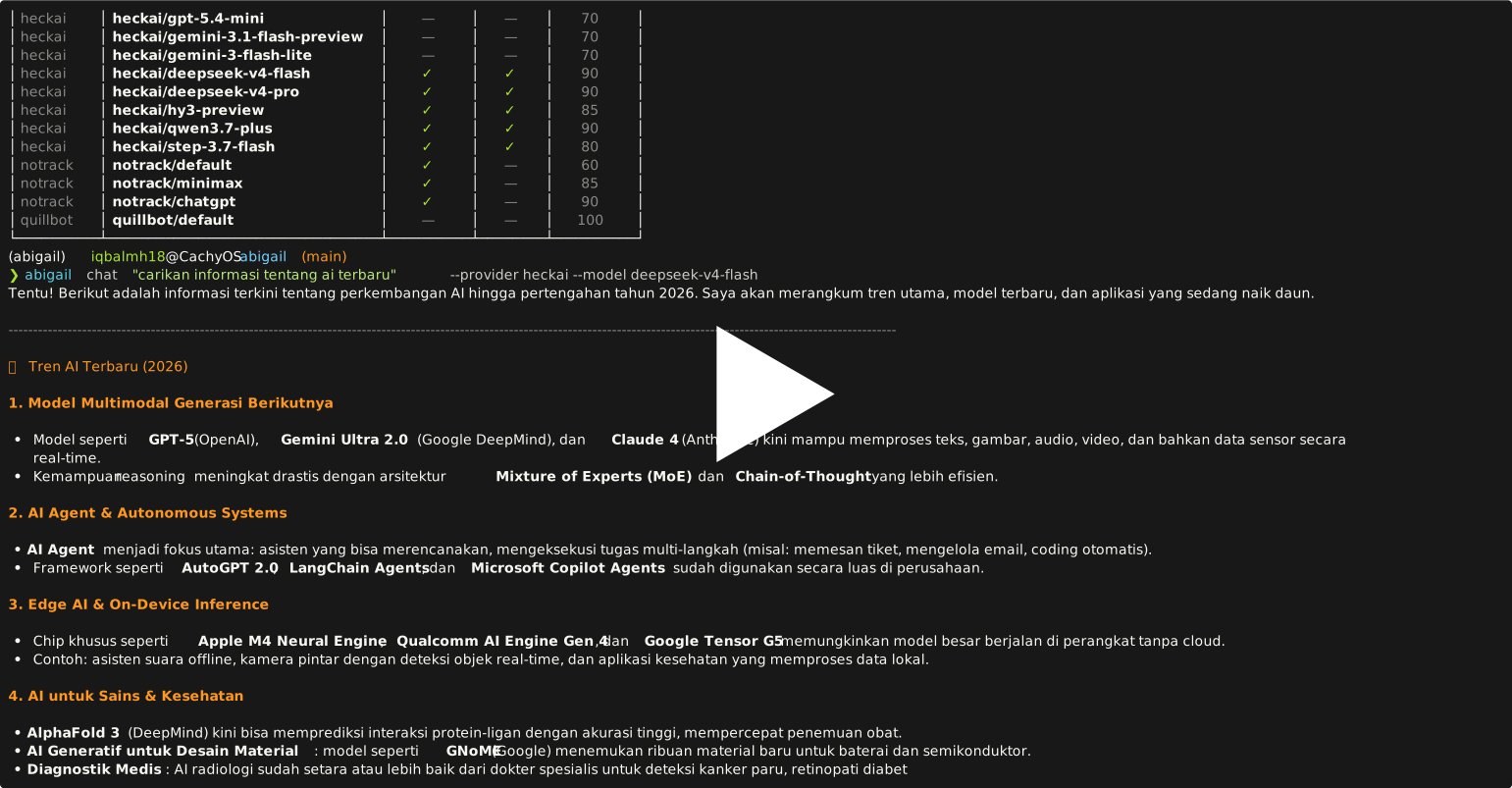
Quick Start
Installation
Requires Python ≥ 3.12.
Install as CLI tool:
pip install abigail
# or with uv:
uv tool install abigail
Install as dependency in your Python project:
pip install abigail
# or with uv:
uv add abigail
Install from source (for development):
git clone https://github.com/iqbalmh18/abigail.git
cd abigail
uv sync
source .venv/bin/activate
Dependencies
All dependencies are installed automatically with pip install abigail or uv add abigail.
| Package | Version | Purpose |
|---|---|---|
pydantic |
≥ 2.13.4 | Request/response models and config validation. |
typer |
≥ 0.14.0 | CLI framework. |
curl-cffi |
≥ 0.15.0 | HTTP client with TLS fingerprint spoofing. |
tomli-w |
≥ 1.2.0 | Writing TOML config files. |
quickjs |
≥ 1.19.4 | Embedded JavaScript runtime for challenge solving. |
nodriver |
≥ 0.50.3 | Headless browser automation (required for ImageClient). |
term-image |
≥ 0.7.2 | Rendering images inline in the terminal. |
rich |
≥ 15.0.0 | Terminal formatting and output rendering. |
pillow |
≥ 10.4.0 | Image processing. |
[!NOTE]
nodriveris required forImageClient(image generation). It drives a real Chromium browser in the background to solve browser challenges. On headless servers, make sure Chromium and its dependencies are available, or setheadless=false/abigail config set headless falseif you need a visible browser window for debugging.
CLI Usage
Abigail features a rich command-line tool (abigail) so you can stream AI responses, generate images, or pipe terminal data directly into LLMs without writing code.
Quick Commands Overview
# 1. Ask a question & stream response to stdout
abigail chat "Explain quantum computing in simple terms"

# 2. Generate an image
abigail imagen "a cute sleeping cat on a cozy rug"

# 3. Enter interactive terminal chat mode
abigail shell
All Available CLI Commands
| Command | Description |
|---|---|
abigail chat PROMPT |
Send a prompt to an AI model and stream the response to terminal. |
abigail imagen PROMPT |
Generate images using AI providers (e.g., Perchance). |
abigail shell |
Start an interactive chat session (/help, /exit). |
abigail providers |
List all registered AI providers and their capabilities. |
abigail models |
List all supported AI models and aliases. |
abigail inspect <provider> |
Display provider metadata (capabilities, models, aliases). |
abigail benchmark [PROMPT] |
Benchmark providers & models with success rate and latency stats. |
abigail config get|set|unset|reset |
View or manage local CLI config (~/.config/abigail/config.toml). |
Supported Providers & Models
Capabilities are listed per model (✓ = supported, - = not supported).
| Provider | Alias | Capability | Thinking | Search | Priority |
|---|---|---|---|---|---|
| deepai | deepai/default | Chat | - | - | 100 |
| deepai | deepai/deepseek-v3.2 | Chat | - | - | 100 |
| deepai | deepai/llama-4-scout | Chat | - | - | 100 |
| deepai | deepai/gpt-oss-120b | Chat | ✓ | - | 100 |
| deepai | deepai/gemini-2.5-flash-lite | Chat | - | - | 100 |
| deepai | deepai/gemma-4 | Chat | - | - | 100 |
| deepai | deepai/gpt-4.1-nano | Chat | - | - | 100 |
| deepai | deepai/gpt-5-nano | Chat | - | - | 100 |
| deepai | deepai/llama-3.3-70b-instruct | Chat | - | - | 100 |
| deepai | deepai/llama-3.1-8b-instant | Chat | - | - | 100 |
| heckai | heckai/gpt-5.4-mini | Chat | - | - | 100 |
| heckai | heckai/gemini-3.1-flash-preview | Chat | - | - | 100 |
| heckai | heckai/gemini-3-flash-lite | Chat | - | - | 100 |
| heckai | heckai/deepseek-v4-flash | Chat | ✓ | ✓ | 100 |
| heckai | heckai/deepseek-v4-pro | Chat | ✓ | ✓ | 100 |
| heckai | heckai/hy3-preview | Chat | ✓ | ✓ | 100 |
| heckai | heckai/qwen3.7-plus | Chat | ✓ | ✓ | 100 |
| heckai | heckai/step-3.7-flash | Chat | ✓ | ✓ | 100 |
| notrack | notrack/default | Chat | ✓ | - | 100 |
| notrack | notrack/minimax | Chat | ✓ | - | 100 |
| notrack | notrack/chatgpt | Chat | ✓ | - | 100 |
| perchance | perchance/text-to-image | Chat | - | - | 100 |
| quillbot | quillbot/default | Chat | - | - | 100 |
| unlimitedai | unlimitedai/default | Image | - | - | 100 |
CLI Examples & Tips
chat Examples
# Stream response using a specific provider & model
abigail chat "Explain quantum computing" -p heckai -m heckai/gpt-5.4-mini

# Use the notrack provider to upload & analyze files or PDFs
abigail chat "Describe this image" -p notrack -f /path/to/image.jpg
abigail chat "Summarize this PDF" -p notrack -f sample.pdf

# Non-streaming JSON output
abigail chat "Hello" --no-stream --json

# Enable thinking/reasoning and live web search
abigail chat "Latest AI news" --thinking --search --timeout 60 --proxy socks5://host:port
[!NOTE] Auto file routing: When passing
-f/--fileswithprovider="auto", Abigail automatically picks a provider that supports file attachments (likenotrack).
Unix Pipelines (stdin)
abigail chat and abigail imagen natively accept piped data from standard input (stdin):
# Pipe code into Abigail for review
cat main.py | abigail chat "Review this file in depth"

# Pipe git diff to write a commit message
git diff | abigail chat "Write a concise commit message for this diff"

# Chain LLM prompt output into image generation
abigail chat "Write a detailed prompt for a fantasy castle" | abigail imagen -r 1024x1024

# Stdin only (no prompt argument needed)
echo "Explain what a monad is" | abigail chat
imagen Examples
# Generate image with default resolution (512x768)
abigail imagen "a cute sleeping cat"

# Custom resolution, guidance scale, and output path
abigail imagen "a futuristic cyberpunk city" -r 1024x1024 -g 9.0 -o city.jpeg

# Pipe prompt via stdin
echo "a majestic dragon flying over mountains" | abigail imagen -r 768x768

# Disable headless mode (shows browser window, useful for debugging)
abigail imagen "a cute cat" --no-headless
Configuration (abigail config)
CLI preferences are saved in ~/.config/abigail/config.toml and applied automatically:
# Set default provider & model
abigail config set provider notrack
abigail config set model notrack/ChatGPT

# General options
abigail config set timeout 120.0
abigail config set stream true
abigail config set verbose true

# Headless mode for browser-based providers (default: true)
abigail config set headless false

# View or reset all config
abigail config get
abigail config reset
All available config keys:
| Key | Default | Description |
|---|---|---|
provider |
(not set) | Default provider (auto if unset). |
model |
(not set) | Default model (auto if unset). |
proxy |
(not set) | Proxy URL or @path/to/proxies.txt. |
timeout |
(not set) | Request timeout in seconds (no limit if unset). |
stream |
true |
Stream responses by default. |
thinking |
false |
Enable chain-of-thought reasoning by default. |
search |
false |
Enable web search by default. |
verbose |
false |
Show metadata and debug info by default. |
failover |
(not set) | true / false / "provider1,provider2" — see below. |
headless |
true |
Run browser-based providers in headless mode. |
resolution |
512x768 |
Default image resolution for imagen. |
guidance_scale |
7.0 |
Default guidance scale for imagen. |
seed |
-1 |
Default seed for imagen (-1 = random). |
negative_prompt |
(empty) | Default negative prompt for imagen. |
To reset a single key back to its default:
abigail config unset provider
abigail config unset headless
abigail config unset negative_prompt
Proxy & Failover Settings
# Set a single proxy or proxy pool file
abigail config set proxy "http://127.0.0.1:8080"
abigail config set proxy proxies.txt

# Failover: restrict & order the failover chain
abigail config set failover "quillbot,heckai"   # explicit order
abigail config set failover true                 # auto failover to all
abigail config set failover false                # never fail over

# Override per command
abigail chat "Hi" --no-failover
abigail chat "Hi" --failover-order quillbot,heckai
When a specific --provider is set, Abigail automatically boosts that provider's score and penalises others so it stays at the top of the failover chain.
Python Library Usage
Abigail is also a fully typed, asynchronous Python library (asyncio).
1. Stream Chat (Recommended)
import asyncio
from abigail import ChatClient

async def main():
    async with ChatClient() as client:
        async for chunk in client.stream_chat("Explain machine learning"):
            if chunk.event == "content":
                print(chunk.text, end="", flush=True)

asyncio.run(main())
2. Non-Streaming Chat
import asyncio
from abigail import ChatClient

async def main():
    async with ChatClient() as client:
        response = await client.chat("What is Python?")
        print(response.text)
        print("thinking:", response.thinking)

asyncio.run(main())
3. Image Generation (ImageClient)
import asyncio
from abigail import ImageClient

async def main():
    async with ImageClient() as client:
        res = await client.generate_image(
            prompt="a cute sleeping cat",
            resolution="512x768",
            guidance_scale=7.0,
        )
        img = res.images[0]
        with open("cat.jpeg", "wb") as f:
            f.write(img.image_bytes)
        print(f"Saved image from provider: {res.provider}, seed: {img.seed}")

asyncio.run(main())
4. Advanced Capabilities: Thinking & Web Search
# Enable CoT (Chain of Thought) reasoning
await client.chat("Solve: if 2x + 3 = 11, what is x?", thinking=True)

# Enable web search / live internet access
await client.chat("Latest tech news?", search=True)
Parsing SSE event stream with thinking & search:
from abigail import ChatEventType

async for chunk in client.stream_chat("Latest AI news", thinking=True, search=True):
    match chunk.event:
        case ChatEventType.thinking:
            print(chunk.thinking, end="")
        case ChatEventType.content:
            print(chunk.text, end="")
        case ChatEventType.sources:
            for s in chunk.search:
                print(s.title, s.url)
5. Specific Provider / Model Selection
await client.chat("Hello!", provider="quillbot")
await client.chat("Explain quantum computing", provider="heckai", model="heckai/openai/gpt-5.4-mini")
6. File Attachments
# Pass local file paths directly
await client.chat("Describe this image", files=["/path/to/image.jpg"])

# Or use the Attachment model for raw bytes
from abigail.types.requests import Attachment

my_file = Attachment(name="data.csv", data=b"a,b,c\n1,2,3")
await client.chat("Analyze this data", files=[my_file])
7. Built-in Resilience & Failover
ChatClient automatically retries transient errors (429, 5xx, connection resets) and fails over across providers when provider="auto" is used. Circuit breaker temporary skips unhealthy providers automatically.
Architecture & Internals (For Contributors)
This section explains internal mechanics for developers interested in contributing or adding new providers.
Request Flow & Failover Logic
flowchart TD
    A["_failover_chain(provider, model, thinking, search)"] --> B{"provider == auto?"}
    B -->|yes| C["providers by priority, filtered by circuit breaker + capabilities"]
    B -->|explicit| D["single provider, no failover"]
    C --> E["for each provider: resolve model"]
    D --> E["round-robin provider models"]
    E --> F["provider._select_models() (per-provider)"]
    F --> G["filter by supports_thinking / supports_search"]
    G --> H["rotate start by next(_rr_counter)"]
    H --> I["loop POST each candidate model"]
    I -->|429 / 5xx| J["next model"]
    J --> I
    I -->|200| K["stream + parse"]
    I -->|all models failed| L["RetryableError"]
    L -->|retries left| I
    L -->|retries exhausted| M{"provider == auto?"}
    M -->|yes| N["fail over to next provider"]
    N --> E
    M -->|explicit| O["raise last error"]
    L -->|all providers exhausted| O
Adding a New Provider
To add a provider, create a package under abigail/providers/<name>/ (metadata.py, session.py, parser.py, provider.py) and register it using @register_provider. Both ChatClient and the CLI will auto-discover it without requiring edits to CLI core files.
Running Tests
uv run pytest tests/ -v
uv run pytest tests/ --cov=abigail --cov-report=term-missing
License
MIT License.
Release history Release notifications | RSS feed


Download files
Download the file for your platform. If you're not sure which to choose, learn more about installing packages.
Source Distribution
Built Distribution
Filter files by name, interpreter, ABI, and platform.
If you're not sure about the file name format, learn more about wheel file names.
Copy a direct link to the current filters
File details
Details for the file abigail-0.1.4.tar.gz.
File metadata
- Download URL: abigail-0.1.4.tar.gz
- Upload date:
- Size: 66.4 kB
- Tags: Source
- Uploaded using Trusted Publishing? Yes
- Uploaded via: twine/6.1.0 CPython/3.13.14
File hashes
| Algorithm | Hash digest | |
|---|---|---|
| SHA256 |
f14e05affd7a0af3a5745c04b4cf076e08fd17ce5e319edc04bfce17c73e8e40
|
|
| MD5 |
3a5fc2a6acba33e8369d25de91523c7f
|
|
| BLAKE2b-256 |
071e5608d0e5f5cb132077e6f77cd2f93871359021c210570d8c8aa1685e0099
|
Provenance
The following attestation bundles were made for abigail-0.1.4.tar.gz:
Publisher:
publish.yml on iqbalmh18/abigail
-
Statement:
-
Statement type:
https://in-toto.io/Statement/v1 -
Predicate type:
https://docs.pypi.org/attestations/publish/v1 -
Subject name:
abigail-0.1.4.tar.gz -
Subject digest:
f14e05affd7a0af3a5745c04b4cf076e08fd17ce5e319edc04bfce17c73e8e40 - Sigstore transparency entry: 2227728998
- Sigstore integration time:
-
Permalink:
iqbalmh18/abigail@d9e3ef2a336b57188ffd301a8d0ba2c7f678ab71 -
Branch / Tag:
refs/tags/v0.1.4 - Owner: https://github.com/iqbalmh18
-
Access:
public
-
Token Issuer:
https://token.actions.githubusercontent.com -
Runner Environment:
github-hosted -
Publication workflow:
publish.yml@d9e3ef2a336b57188ffd301a8d0ba2c7f678ab71 -
Trigger Event:
release
-
Statement type:
File details
Details for the file abigail-0.1.4-py3-none-any.whl.
File metadata
- Download URL: abigail-0.1.4-py3-none-any.whl
- Upload date:
- Size: 81.6 kB
- Tags: Python 3
- Uploaded using Trusted Publishing? Yes
- Uploaded via: twine/6.1.0 CPython/3.13.14
File hashes
| Algorithm | Hash digest | |
|---|---|---|
| SHA256 |
e0eb6221529fda9b5ffb5ed72b082392eb85d574082733ee2b73d731637793ac
|
|
| MD5 |
d1ea9cc0099c18944a2ec411eb300fc9
|
|
| BLAKE2b-256 |
29385a3efe197f7962861cdf9f0f4c76e9544a69281f9b2f535068a5d951407d
|
Provenance
The following attestation bundles were made for abigail-0.1.4-py3-none-any.whl:
Publisher:
publish.yml on iqbalmh18/abigail
-
Statement:
-
Statement type:
https://in-toto.io/Statement/v1 -
Predicate type:
https://docs.pypi.org/attestations/publish/v1 -
Subject name:
abigail-0.1.4-py3-none-any.whl -
Subject digest:
e0eb6221529fda9b5ffb5ed72b082392eb85d574082733ee2b73d731637793ac - Sigstore transparency entry: 2227729086
- Sigstore integration time:
-
Permalink:
iqbalmh18/abigail@d9e3ef2a336b57188ffd301a8d0ba2c7f678ab71 -
Branch / Tag:
refs/tags/v0.1.4 - Owner: https://github.com/iqbalmh18
-
Access:
public
-
Token Issuer:
https://token.actions.githubusercontent.com -
Runner Environment:
github-hosted -
Publication workflow:
publish.yml@d9e3ef2a336b57188ffd301a8d0ba2c7f678ab71 -
Trigger Event:
release
-
Statement type:






