
Python Ability Hand Python Wrapper
This PSYONIC Ability Hand wrapper is a asynchronous multithreaded library that can send position, velocity, current and duty messages to the hand and parse its position, velocity, current and touch sensor feedback.
Install Python
The Python package requires a Python 3.10 or higher. Check your version using:
python3 --version
Install Pip Package
Preferably using a virtual env install the pip package using:
python3 -m pip install ability-hand
If you are wanting to use the simulator it is best to clone the repository and work with the raw files.
git clone git@github.com:psyonicinc/ability-hand-api.git
Enable UART & Byte Stuffing using App
The Python wrapper uses serial communication and requires byte stuffing to be enabled. It is recommended to use byte stuffing, for more info see section 3.5.5 in the API Documentation.
To enable UART and byte stuffing from the PSYONIC app select:
Scan ➡️ SELECT HAND ➡️ Gear Icon ⚙️ (Top Right) ➡️ Troubleshoot ➡️ Developer Mode
and issue the following commands individually.
We16
We46
We47
Run examples
Motor Example With Postion Velcocity and Torque Feedback
Run the motor plot example by entering the following into a terminal:
Linux / macOS
plot_motors
Windows (If the above does not work)
python3 -m ah_examples.plot_motors
Touch Sensors Example
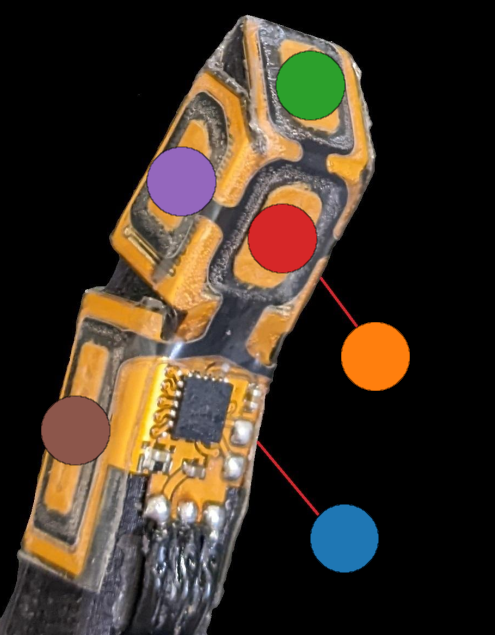
The Ability Hand also has 30 touch sensors (6 per finger) which you can see responding in real time by running the example
Linux / macOS
plot_touch_sensors
Windows (If the above does not work)
python3 -m ah_examples.plot_touch_sensors
Below is a map of each sensor and it's associated plot color.
Motor Example Without Plots
Running examples with plotting in real time using python uses alot of processing power, and you may see some stutters. Run the hand wave without plots using.
Linux / macOS
hand_wave
Windows (If the above does not work)
python3 -m ah_examples.hand_wave
You can press Ctrl + c to stop
Run in Terminal / Integrate with Code
You can look at the AHSerialClient documentation to see available commands and arguments associated with the class but below is a break-down and examples you can run.
Create Client
First open a python terminal and import the wrapper and AHSerialClient class
from ah_wrapper import AHSerialClient
and create a client instance:
client = AHSerialClient()
This will automatically find a serial connection to the hand and start a thread for writing and reading data from the hand. Any time you issue a set function (i.e. set_position, set_duty, set_command) the command that the write thread issues will be updated, i.e. the client will repeatedly send the most recent target / command. The hand must receive a command every 300ms or else it will exit its API control mode.
Set and Send Position Targets
Update the command with a position target using:
client.set_position([50,50,50,50,50,-50])
This will set all fingers to this desired position. Note that finger indexes
always follow the following pattern [index, middle, ring, pinky, thumb flexor, thumb rotator]. Note that the thumb rotator operates in a [0,-100] range and
the rest of the fingers are in a [0,100] range.
Understanding Hand class
You can ensure that the feedback from the hand class is correct by issuing:
client.hand.get_position()
Each client has its own Hand class. You can see all the public Hand class commands for reading values here
Set and Send Duty Targets
You can also pass a single argument to a set command, and it will apply it to each of the fingers. For example to set a -10% duty (valid range is [-100,100]) to all fingers, issue.
client.set_duty(-10)
Any of the set commands can take either one argument or will take an array of six values as seen above. If you pass a single value it will apply it to all fingers equally.
Set and Send Torque Targets
Try sending a small amount of torque and notice that the fingers will stop moving if anything gets in their way.
client.set_torque([0.1,0.1,0.1,0.1,0.1,-0.1])
client.set_torque(-0.1)
You can also verify the current draw is not going over the desired set_torque amount.
client.hand.get_current()
Reply Modes
If you issue a client.hand.get_velocity() command you will notice it returns
nothing, this is because we have only been sending reply_mode=0 as default, and
we have never received any velocity feedback.
The reply modes are as following starting with a 0 index.
- Finger position, current, touch sensors
- Finger position, rotor velocity, touch sensor
- Finger position, current, rotor velocity
Simply pass the reply_mode argument to any set_ command.
client.set_position(30, reply_mode=1)
Send Grip Commands
Lastly you can send individual grip commands from the datasheet.
client.set_grip(0x10)
Closing Client
Lastly finish any session using
client.close()
This will stop any threads sending and receiving commands to the ability hand.
Further examples
In most typical integrations you will create your own write thread and send messages manually using AHSerialClient.send_command() see hand_wave.py or plot_motors.py for examples on how to do that.
Note that in this above example a write thread was constantly sending the current target at 500hz and a read thread was parsing feedback responses. See AHSerialClient for more details
You can update the target that send_command sends using any of the set_ commands, or you can build the message manually and pass that as an argument to the send command.
1 maintainer

Metadata
1 maintainer
Release files for ability-hand 0.2.2
For a detailed explanation of source distributions (sdists) and built distributions (wheels), please see the package formats documentation.
Source distribution (sdist)
| File | Size | Uploaded | |
|---|---|---|---|
| ability_hand-0.2.2.tar.gz | 56.3 kB | Details |
Built distribution (wheel)
| File | Interpreter | ABI | Platform | Reset |
|---|---|---|---|---|
| ability_hand-0.2.2-py3-none-any.whl | Python 3 | none | any | Details |
Total release size: 117.1 kB
Release files / ability_hand-0.2.2.tar.gz
| Download URL | ability_hand-0.2.2.tar.gz |
|---|---|
| Size | 56.3 kB |
| Tags | Source |
|
SHA-256 checksum How to use checksums |
a114f2de20ac83effbdad86cd1865f86e7730d261d8e0931b1c60449930d3c35
|
|
BLAKE2b-256 checksum How to use checksums |
6fc3347ac5a14a62949b76069ce21ce74df258180d3175454400ad420a2ee18f
|
| Upload date | |
|
Uploaded using Trusted Publishing? What is trusted publishing? |
No |
| Uploaded via |
twine/6.1.0 CPython/3.10.12
|
Release files / ability_hand-0.2.2-py3-none-any.whl
| Download URL | ability_hand-0.2.2-py3-none-any.whl |
|---|---|
| Size | 60.8 kB |
| Tags | Python 3 |
|
SHA-256 checksum How to use checksums |
b58540ac848e7a81e2340b2d0d9716da61e0c31a96c667907cbceaec55b0c122
|
|
BLAKE2b-256 checksum How to use checksums |
71c66f7bbda5cc573737bb357e3f5125dcea84edc6f3502e09da8846bc293b7e
|
| Upload date | |
|
Uploaded using Trusted Publishing? What is trusted publishing? |
No |
| Uploaded via |
twine/6.1.0 CPython/3.10.12
|














