
Abductive Learning (ABL) toolkit


Project description









🧰 ABLkit: A Toolkit for Abductive Learning 📊📐
ABLkit is an efficient Python toolkit for Abductive Learning (ABL). ABL is a novel paradigm that integrates machine learning and logical reasoning in a unified framework. It is suitable for tasks where both data and (logical) domain knowledge are available.
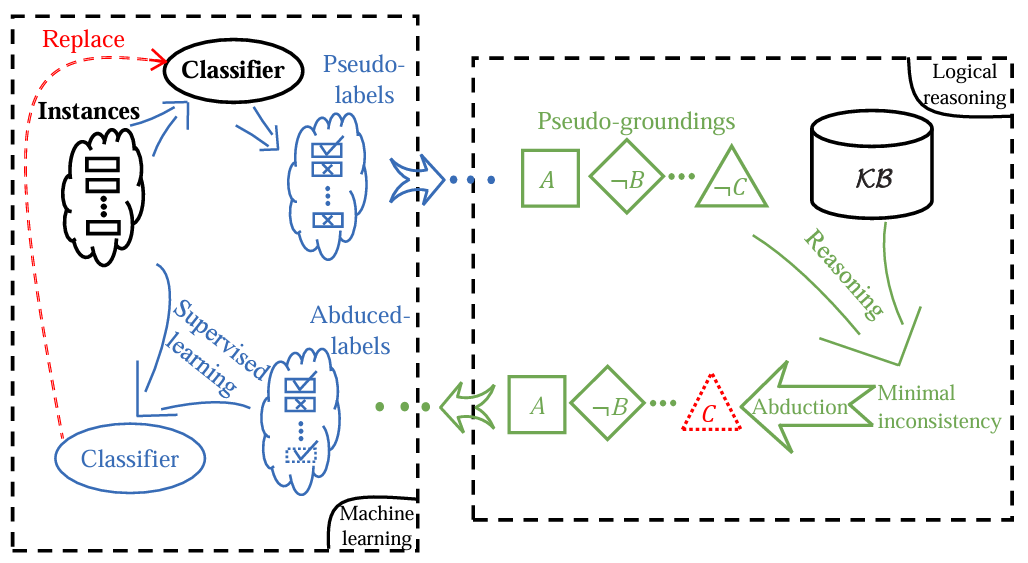
Key Features of ABLkit:
- High Flexibility: Compatible with various machine learning modules and logical reasoning components.
- Easy-to-Use Interface: Provide data, model, and knowledge, and get started with just a few lines of code.
- Optimized Performance: Optimization for high performance and accelerated training speed.
ABLkit encapsulates advanced ABL techniques, providing users with an efficient and convenient toolkit to develop dual-driven ABL systems, which leverage the power of both data and knowledge.
🛠️ Installation
Install from PyPI
The easiest way to install ABLkit is using pip:
pip install ablkit
Install from Source
Alternatively, to install from source code, sequentially run following commands in your terminal/command line.
git clone https://github.com/AbductiveLearning/ABLkit.git
cd ABLkit
pip install -v -e .
(Optional) Install SWI-Prolog
If the use of a Prolog-based knowledge base is necessary, please also install SWI-Prolog:
For Linux users:
sudo apt-get install swi-prolog
For Windows and Mac users, please refer to the SWI-Prolog Install Guide.
⚡ Quick Start
We use the MNIST Addition task as a quick start example. In this task, pairs of MNIST handwritten images and their sums are given, alongwith a domain knowledge base which contains information on how to perform addition operations. Our objective is to input a pair of handwritten images and accurately determine their sum.
Working with Data
ABLkit requires data in the format of (X, gt_pseudo_label, Y) where X is a list of input examples containing instances, gt_pseudo_label is the ground-truth label of each example in X and Y is the ground-truth reasoning result of each example in X. Note that gt_pseudo_label is only used to evaluate the machine learning model's performance but not to train it.
In the MNIST Addition task, the data loading looks like:
# The 'datasets' module below is located in 'examples/mnist_add/'
from datasets import get_dataset

# train_data and test_data are tuples in the format of (X, gt_pseudo_label, Y)
train_data = get_dataset(train=True)
test_data = get_dataset(train=False)
Building the Learning Part
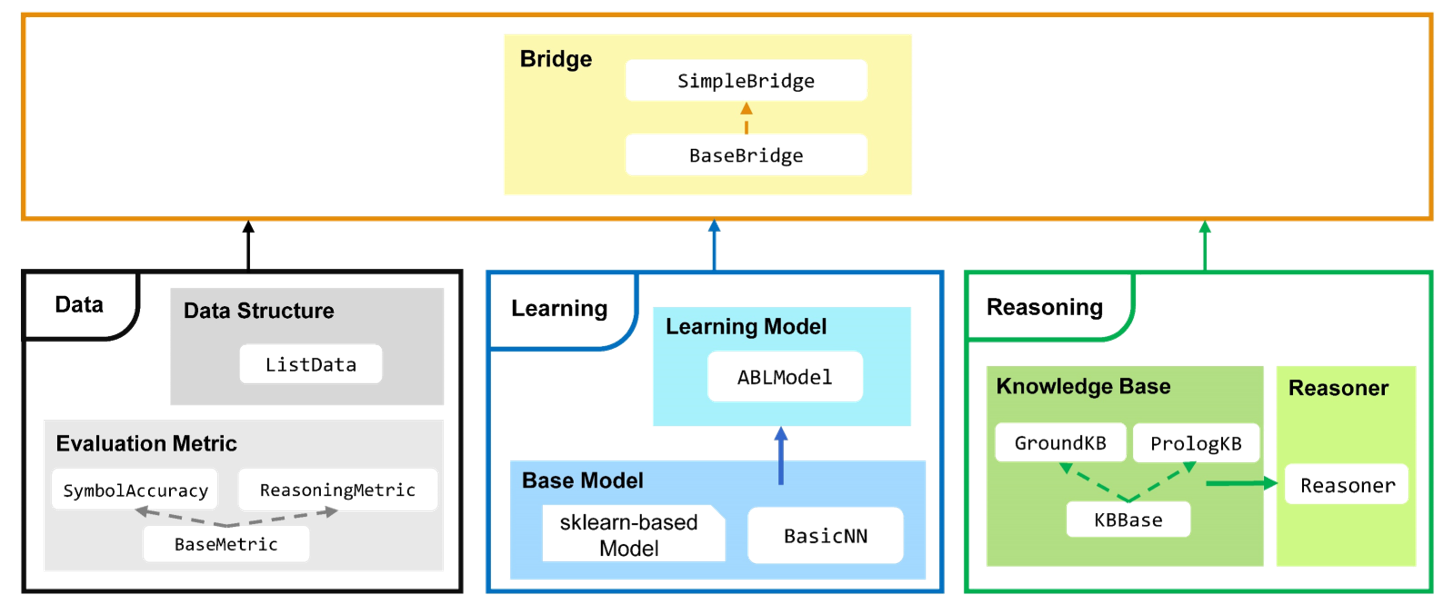
Learning part is constructed by first defining a base model for machine learning. ABLkit offers considerable flexibility, supporting any base model that conforms to the scikit-learn style (which requires the implementation of fit and predict methods), or a PyTorch-based neural network (which has defined the architecture and implemented forward method). In this example, we build a simple LeNet5 network as the base model.
# The 'models' module below is located in 'examples/mnist_add/'
from models.nn import LeNet5

cls = LeNet5(num_classes=10)
To facilitate uniform processing, ABLkit provides the BasicNN class to convert a PyTorch-based neural network into a format compatible with scikit-learn models. To construct a BasicNN instance, aside from the network itself, we also need to define a loss function, an optimizer, and the computing device.
import torch
from ablkit.learning import BasicNN
loss_fn = torch.nn.CrossEntropyLoss()
optimizer = torch.optim.RMSprop(cls.parameters(), lr=0.001, alpha=0.9)
device = torch.device("cuda" if torch.cuda.is_available() else "cpu")
base_model = BasicNN(model=cls, loss_fn=loss_fn, optimizer=optimizer, device=device)
The base model built above is trained to make predictions on instance-level data (e.g., a single image), while ABL deals with example-level data. To bridge this gap, we wrap the base_model into an instance of ABLModel. This class serves as a unified wrapper for base models, facilitating the learning part to train, test, and predict on example-level data, (e.g., images that comprise an equation).
from ablkit.learning import ABLModel
model = ABLModel(base_model)
Building the Reasoning Part
To build the reasoning part, we first define a knowledge base by creating a subclass of KBBase. In the subclass, we initialize the pseudo_label_list parameter and override the logic_forward method, which specifies how to perform (deductive) reasoning that processes pseudo-labels of an example to the corresponding reasoning result. Specifically, for the MNIST Addition task, this logic_forward method is tailored to execute the sum operation.
from ablkit.reasoning import KBBase
class AddKB(KBBase):
def __init__(self, pseudo_label_list=list(range(10))):
super().__init__(pseudo_label_list)
def logic_forward(self, nums):
return sum(nums)
kb = AddKB()
Next, we create a reasoner by instantiating the class Reasoner, passing the knowledge base as a parameter. Due to the indeterminism of abductive reasoning, there could be multiple candidate pseudo-labels compatible to the knowledge base. In such scenarios, the reasoner can minimize inconsistency and return the pseudo-label with the highest consistency.
from ablkit.reasoning import Reasoner
reasoner = Reasoner(kb)
Building Evaluation Metrics
ABLkit provides two basic metrics, namely SymbolAccuracy and ReasoningMetric, which are used to evaluate the accuracy of the machine learning model's predictions and the accuracy of the logic_forward results, respectively.
from ablkit.data.evaluation import ReasoningMetric, SymbolAccuracy
metric_list = [SymbolAccuracy(), ReasoningMetric(kb=kb)]
Bridging Learning and Reasoning
Now, we use SimpleBridge to combine learning and reasoning in a unified ABL framework.
from ablkit.bridge import SimpleBridge
bridge = SimpleBridge(model, reasoner, metric_list)
Finally, we proceed with training and testing.
bridge.train(train_data, loops=1, segment_size=0.01)
bridge.test(test_data)
To explore detailed tutorials and information, please refer to: Documentation on Read the Docs.
🧪 Examples
We provide several examples in examples/. Each example is stored in a separate folder containing a README file.
📚 References
For more information about ABL, please refer to: Zhou, 2019 and Zhou and Huang, 2022.
@article{zhou2019abductive,
  title     = {Abductive learning: towards bridging machine learning and logical reasoning},
  author    = {Zhou, Zhi-Hua},
  journal   = {Science China Information Sciences},
  volume    = {62},
  number    = {7},
  pages     = {76101},
  year      = {2019}
}

@incollection{zhou2022abductive,
  title     = {Abductive Learning},
  author    = {Zhou, Zhi-Hua and Huang, Yu-Xuan},
  booktitle = {Neuro-Symbolic Artificial Intelligence: The State of the Art},
  editor    = {Pascal Hitzler and Md. Kamruzzaman Sarker},
  publisher = {{IOS} Press},
  pages     = {353--369},
  address   = {Amsterdam},
  year      = {2022}
}
📝 Citation
To cite ABLkit, please cite the following paper: Huang et al., 2024.
@article{ABLkit2024,
  author     = {Huang, Yu-Xuan and Hu, Wen-Chao and Gao, En-Hao and Jiang, Yuan},
  title      = {ABLkit: a Python toolkit for abductive learning},
  journal    = {Frontiers of Computer Science},
  volume     = {18},
  number     = {6},
  pages      = {186354},
  year       = {2024}
}
✨ Contributors
We would like to thank the following contributors for their efforts on this project: (*: current maintainer)
En-Hao Gao |
Yu-Xuan Huang |

Wen-Chao Hu * |

Qi-Jie Li |

Yang Hang * |
We also thank the following users for their helpful suggestions and feedback:


Download files
Download the file for your platform. If you're not sure which to choose, learn more about installing packages.
Source Distribution
Built Distribution
Filter files by name, interpreter, ABI, and platform.
If you're not sure about the file name format, learn more about wheel file names.
Copy a direct link to the current filters
File details
Details for the file ablkit-1.0.0.tar.gz.
File metadata
- Download URL: ablkit-1.0.0.tar.gz
- Upload date:
- Size: 66.8 kB
- Tags: Source
- Uploaded using Trusted Publishing? No
- Uploaded via: twine/4.0.2 CPython/3.8.13
File hashes
| Algorithm | Hash digest | |
|---|---|---|
| SHA256 |
b217b130cdf8a010baa9d487cf6245a7b0b5f94b89195ba0c3ba6a972dda4a54
|
|
| MD5 |
e1d6c3f13573e6c4fc6e0ff3a5a46cf7
|
|
| BLAKE2b-256 |
5704382ad8920826d5439557263b573232309989ce6b914a13ccc92e53851a38
|
File details
Details for the file ablkit-1.0.0-py3-none-any.whl.
File metadata
- Download URL: ablkit-1.0.0-py3-none-any.whl
- Upload date:
- Size: 73.7 kB
- Tags: Python 3
- Uploaded using Trusted Publishing? No
- Uploaded via: twine/4.0.2 CPython/3.8.13
File hashes
| Algorithm | Hash digest | |
|---|---|---|
| SHA256 |
3739c62dade9e87bb9bd30d6961d76aab9b783f406c4bc58b53d026498da3a2e
|
|
| MD5 |
04bf90497f2ad50742244768eeab7f3d
|
|
| BLAKE2b-256 |
0c45ad4343d58ba8e778b929b5355a4d91ccbb156e04c17d9d3dfbdfe39cd606
|






