
Package with tools for AB testing
Verified details
These details have been verified by PyPIProject links
GitHub Statistics
Maintainers

Project description
ABToolkit
Set of tools for AA and AB tests, sample size estimation, confidence intervals estimation. For continuous and discrete variables.
Install using pip:
pip install abtoolkit
Continuous variables analysis
Sample size estimation:
from abtoolkit.continuous.utils import estimate_sample_size_by_mde

estimate_sample_size_by_mde(
    std=variable.std(),
    alpha=alpha_level,
    power=power,
    mde=mde,
    alternative="two-sided"
)
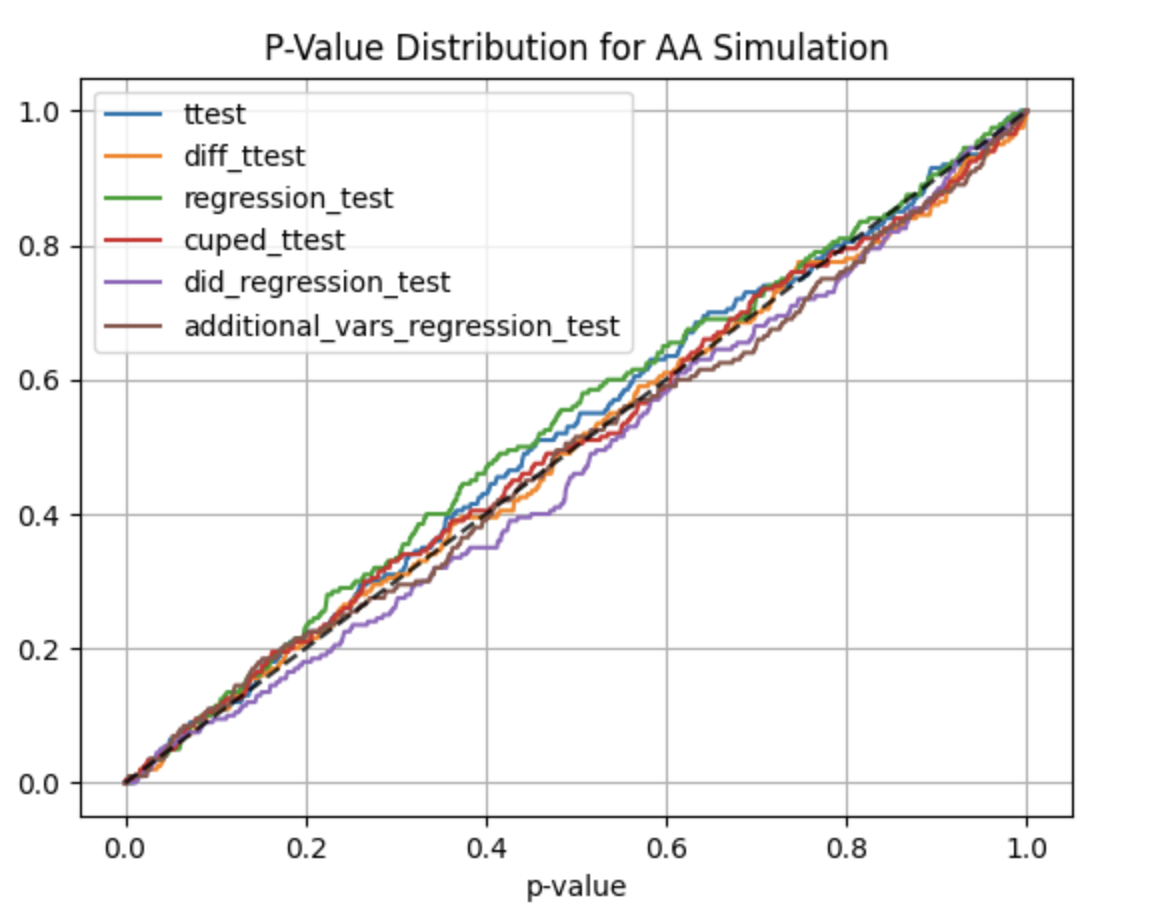
AA and AB tests simulation:
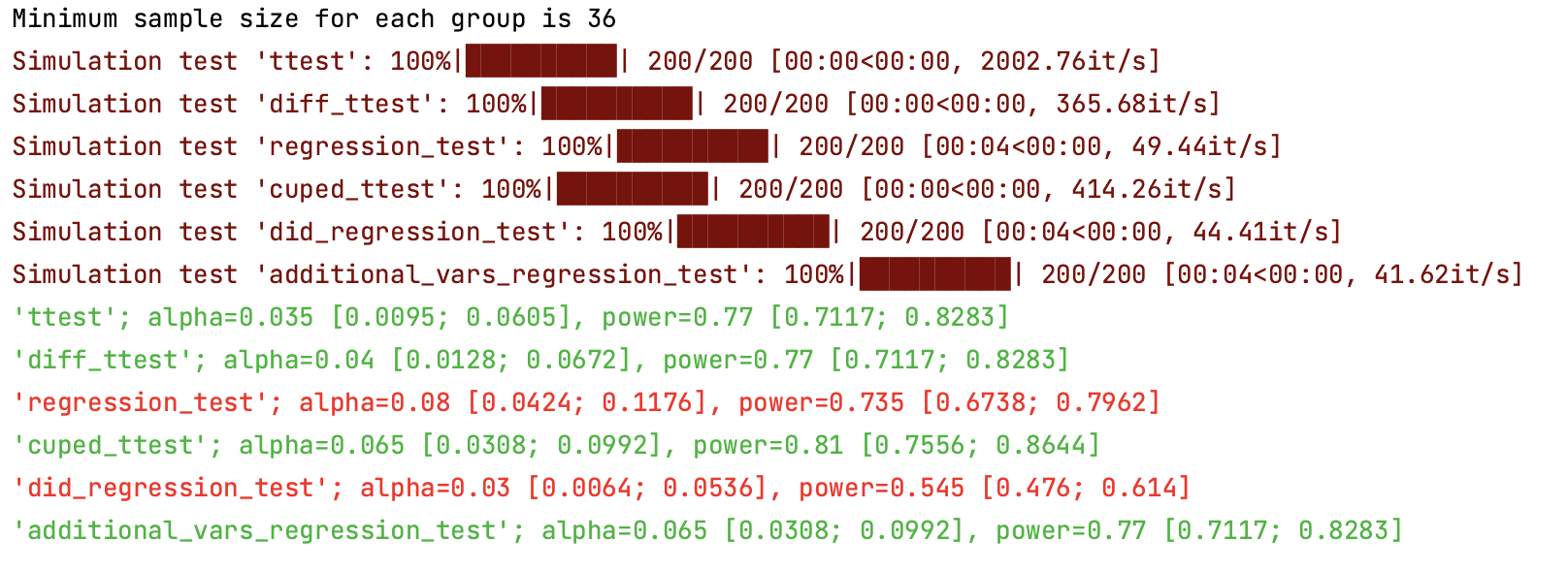
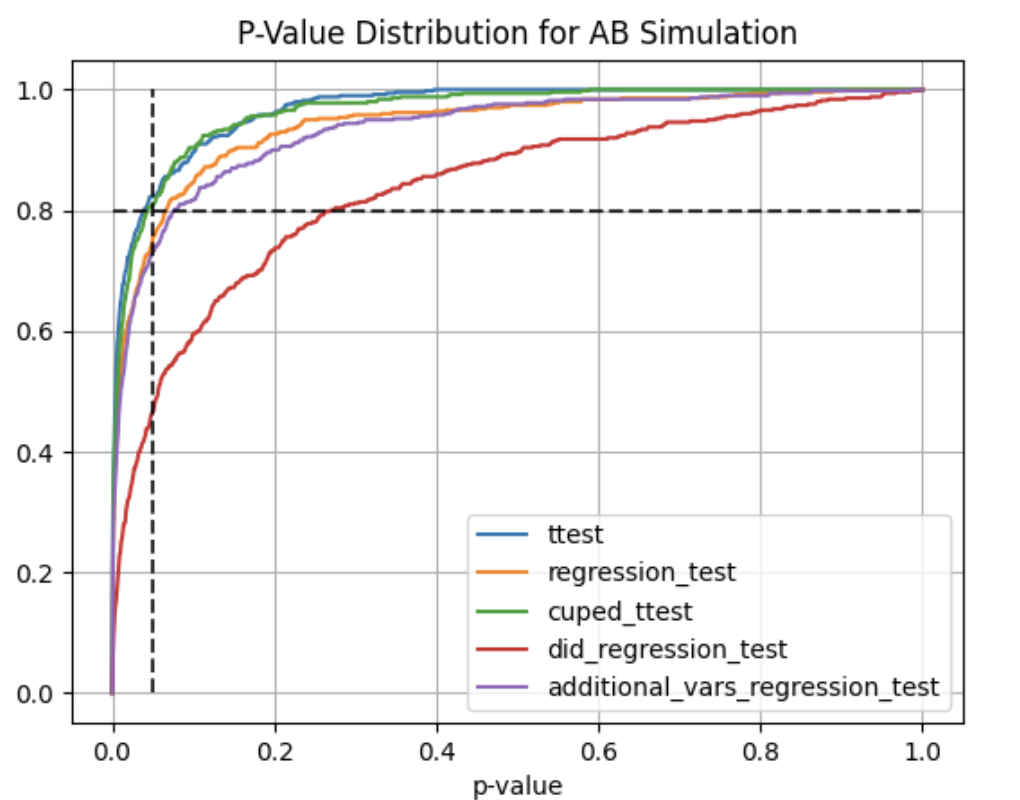
Using abtoolkit.continuous.simulation.StatTestsSimulation class you can simulate and check different stat-test,
compare them in terms of stat test power to choose the best test for your data. As result of simulation for each
stat test you will get the 1-st Type error estimation with confidence interval, 2-nd Type error estimation with
confidence interval and plot of p-value distribution for different tests.
from abtoolkit.continuous.simulation import StatTestsSimulation
simulation = StatTestsSimulation(
        variable,
        stattests_list=[
            "ttest",
            "diff_ttest",
            "regression_test",
            "cuped_ttest",
            "did_regression_test",
            "additional_vars_regression_test",
        ],
        alternative=alternative,
        experiments_num=experiments_num,
        treatment_sample_size=sample_size,
        treatment_split_proportion=0.2,
        mde=mde,
        alpha_level=alpha_level,

        previous_values=previous_value,
        cuped_covariant=previous_value,
        additional_vars=[previous_value],
    )
simulation.run()  # Run simulation
simulation.print_results()  # Print results of simulation
simulation.plot_p_values()  # Plot p-values distribution
Output:
Full example of usage you can find in examples/continuous_var_analysis.py script.
Next stat tests implemented for treatment effect estimation:
- T-Test - estimates treatment effect by comparing variables between treatment and control groups.
- Difference T-Test - estimates treatment effect by comparing difference between actual and previous values of variables in treatment and control groups.
- Regression Test - estimates treatment effect using linear regression by tested predicting variable.
Fact of treatment represented in model as binary flag (treated or not). Weight for this flag show significant
of treatment impact.
y = bias + w * treated - Regression Difference-in-Difference Test - estimates treatment effect using linear regression by predicting
difference between treatment and control groups whist represented as difference between current variable value and
previous period variable value (two differences). Weight for treated and current variable values shows
significant of treatment.
y = bias + w0 * treated + w1 * after + w2 * treated * after - CUPED - estimates treatment effect by comparing variables between treatment and control groups
and uses covariant to reduce variance and speedup test.
y = y - Q * covariant, whereQ = cov(y, covariant) / var(covariant). Cuped variable has same mean value (unbiased), but smaller variance, that speedup test. - Regression with Additional Variables - estimates treatment effect using linear regression by predicting
tested variable with additional variables, which describe part of main variable variance and speedup test.
Fact of treatment represented in model as binary flag (treated or not). Weight for this flag show significant
of treatment impact.
y = bias + w0 * treated + w1 * additional_variable1 + w2 * additional_variable2 + ...
Discrete variables analysis
Sample size estimation:
from abtoolkit.discrete.utils import estimate_sample_size_by_mde

estimate_sample_size_by_mde(
    p=p,
    alpha=alpha_level,
    power=power,
    mde=mde,
    alternative="two-sided",
)
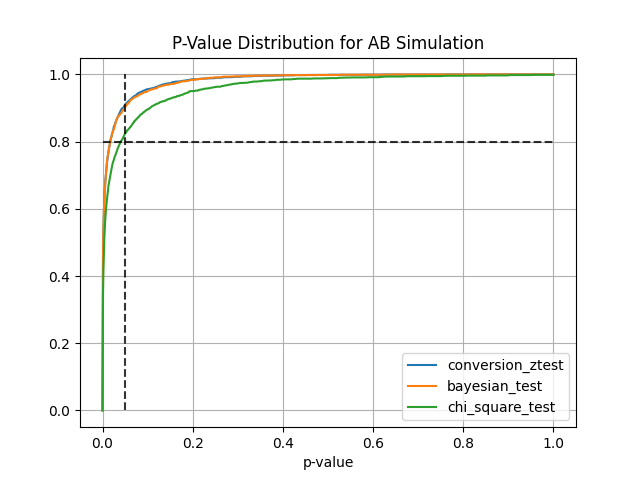
AA and AB tests simulation:
from abtoolkit.discrete.simulation import StatTestsSimulation

sim = StatTestsSimulation(
    count=variable.sum(),
    objects_num=variable.count(),
    stattests_list=["conversion_ztest", "bayesian_test", "chi_square_test"],
    alternative=alternative,
    experiments_num=experiments_num,  # Run each stattest 10 times
    treatment_sample_size=sample_size,
    treatment_split_proportion=0.5,
    mde=mde,  # Trying to detect this effect (very big for our simulated data)
    alpha_level=alpha_level,  # Fix alpha level on 5%
    power=power,
    bayesian_prior_positives=1,
    bayesian_prior_negatives=1,
)
info = sim.run()  # Get dictionary with information about tests
sim.print_results()  # Print results of simulation
sim.plot_p_values()  # Plot p-values distribution
Output:

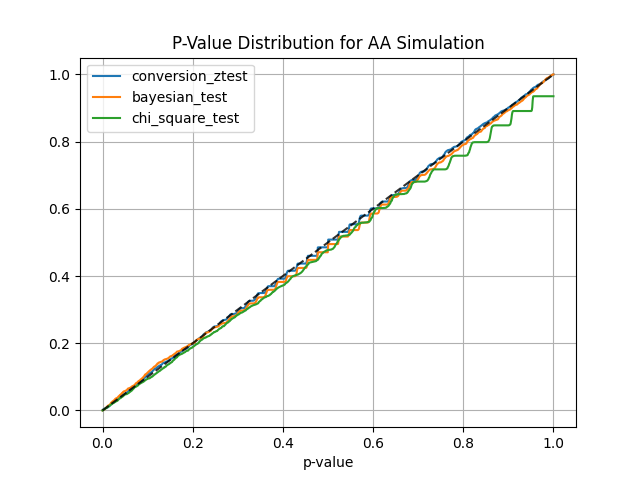
Next stat tests implemented for treatment effect estimation:
- Conversion Z-Test estimates treatment effect on conversion variable using z-test
- Bayesian Test estimates probability of difference between conversions according to prior knowledge
- Chi-Square Test estimates the significance of association between two categorical variables
Another tools
Central Limit Theorem check
Helps you check if your variable meets the Central Limit Theorem and what sample size you need for it to meet.
from abtoolkit.utils import check_clt
import numpy as np

var = np.random.chisquare(df=2, size=10000)
p_value = check_clt(var, do_plot_distribution=True)

You can find examples of toolkit usage in examples/ directory.
Automatic publishing to PyPI (GitHub Actions)
This repository includes .github/workflows/publish-pypi.yml.
How it works:
- Trigger: when a GitHub Release is published.
- Build: creates
sdistandwheel. - Publish: uploads package to PyPI via Trusted Publishing (
pypa/gh-action-pypi-publish).
Required one-time setup:
- In PyPI project settings, configure a Trusted Publisher for this GitHub repository/workflow.
- In GitHub, keep workflow permissions as configured (
id-token: writein the publish job).
Project details
Verified details
These details have been verified by PyPIProject links
GitHub Statistics
Maintainers
Release history Release notifications | RSS feed


Download files
Download the file for your platform. If you're not sure which to choose, learn more about installing packages.
Source Distribution
Built Distribution
Filter files by name, interpreter, ABI, and platform.
If you're not sure about the file name format, learn more about wheel file names.
Copy a direct link to the current filters
File details
Details for the file abtoolkit-2.0.1.tar.gz.
File metadata
- Download URL: abtoolkit-2.0.1.tar.gz
- Upload date:
- Size: 16.9 kB
- Tags: Source
- Uploaded using Trusted Publishing? Yes
- Uploaded via: twine/6.1.0 CPython/3.13.7
File hashes
| Algorithm | Hash digest | |
|---|---|---|
| SHA256 |
a9b817c2bef9176c25a4e63df2649a2b26dae02181c370f8a16cd76a32bfb423
|
|
| MD5 |
c9b4acc1aab202b6c61699b34ca8fa1e
|
|
| BLAKE2b-256 |
ab234cba3e662015d0a138a06841c3be4fe5a5b1f64d352f01def1e0e91ad9ad
|
Provenance
The following attestation bundles were made for abtoolkit-2.0.1.tar.gz:
Publisher:
publish-pypi.yml on nikitosl/abtoolkit
-
Statement:
-
Statement type:
https://in-toto.io/Statement/v1 -
Predicate type:
https://docs.pypi.org/attestations/publish/v1 -
Subject name:
abtoolkit-2.0.1.tar.gz -
Subject digest:
a9b817c2bef9176c25a4e63df2649a2b26dae02181c370f8a16cd76a32bfb423 - Sigstore transparency entry: 1019462829
- Sigstore integration time:
-
Permalink:
nikitosl/abtoolkit@9c8a28b123cf60f1ee755b15981d7f6bb0c3a252 -
Branch / Tag:
refs/tags/v2.0.2 - Owner: https://github.com/nikitosl
-
Access:
public
-
Token Issuer:
https://token.actions.githubusercontent.com -
Runner Environment:
github-hosted -
Publication workflow:
publish-pypi.yml@9c8a28b123cf60f1ee755b15981d7f6bb0c3a252 -
Trigger Event:
release
-
Statement type:
File details
Details for the file abtoolkit-2.0.1-py3-none-any.whl.
File metadata
- Download URL: abtoolkit-2.0.1-py3-none-any.whl
- Upload date:
- Size: 22.9 kB
- Tags: Python 3
- Uploaded using Trusted Publishing? Yes
- Uploaded via: twine/6.1.0 CPython/3.13.7
File hashes
| Algorithm | Hash digest | |
|---|---|---|
| SHA256 |
3e8d02cedf3e5e93de134a8f9dfb0c7c85b6b4dffe8ed98ee2e0b92c48140e0b
|
|
| MD5 |
716a103e38b6c996ce6498617389aaba
|
|
| BLAKE2b-256 |
4c6acabc2bd38cfa86a7d206232afc2d054b7972af65eb27115f2ecd4ed5a3e5
|
Provenance
The following attestation bundles were made for abtoolkit-2.0.1-py3-none-any.whl:
Publisher:
publish-pypi.yml on nikitosl/abtoolkit
-
Statement:
-
Statement type:
https://in-toto.io/Statement/v1 -
Predicate type:
https://docs.pypi.org/attestations/publish/v1 -
Subject name:
abtoolkit-2.0.1-py3-none-any.whl -
Subject digest:
3e8d02cedf3e5e93de134a8f9dfb0c7c85b6b4dffe8ed98ee2e0b92c48140e0b - Sigstore transparency entry: 1019462907
- Sigstore integration time:
-
Permalink:
nikitosl/abtoolkit@9c8a28b123cf60f1ee755b15981d7f6bb0c3a252 -
Branch / Tag:
refs/tags/v2.0.2 - Owner: https://github.com/nikitosl
-
Access:
public
-
Token Issuer:
https://token.actions.githubusercontent.com -
Runner Environment:
github-hosted -
Publication workflow:
publish-pypi.yml@9c8a28b123cf60f1ee755b15981d7f6bb0c3a252 -
Trigger Event:
release
-
Statement type:






