







A simple web interface for academic research and experimentation using GPT-3.5.
This is the forked version from the project
If you like this project, please give it a star. If you have come up with more useful academic shortcuts, feel free to open an issue or pull request.
Features
- Automatic paper abstract generation based on a provided LaTeX file
- Automatic code summarization and documentation generation
- C++ project header file analysis
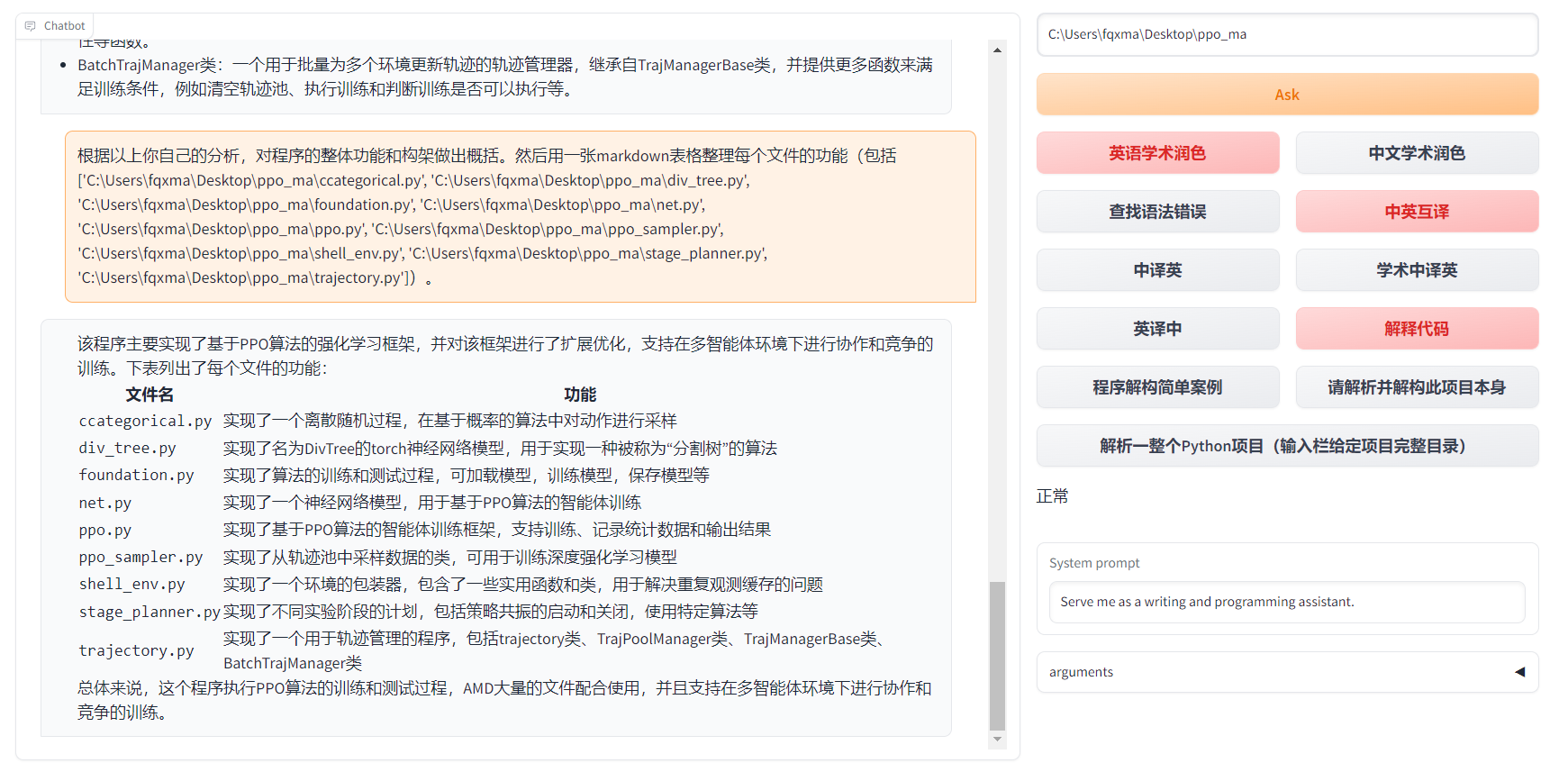
- Python project analysis
- Self-code interpretation and dissection
- Experimental function template
| Function | Description |
|---|---|
| One-click polishing | Supports one-click polishing and finding grammar errors in papers |
| One-click Chinese-English translation | One-click Chinese-English translation |
| One-click code interpretation | Can display code correctly and interpret code |
| Custom shortcut keys | Supports custom shortcut keys |
| Configure proxy server | Supports configuring proxy server |
| Modular design | Supports customizable high-order experimental functions |
| Self-program analysis | [Experimental feature] One-click to understand the source code of this project |
| Program analysis | [Experimental feature] One-click to analyze other Python/C++ projects |
| Reading papers | [Experimental feature] One-click to read the full text of a latex paper and generate an abstract |
| Batch comment generation | [Experimental feature] One-click to generate function comments in batches |
| chat analysis report generation | [Experimental feature] Automatically generates summary reports after running |
| Formula display | Can display the tex form and rendering form of the formula at the same time |
| Image display | Can display images in markdown |
| Supports markdown tables generated by GPT | Supports markdown tables generated by GPT |
- New interface

- All buttons are dynamically generated by reading functional.py, and custom functions can be freely added to free the clipboard

- Code display is also natural https://www.bilibili.com/video/BV1F24y147PD/

- Supports markdown tables generated by GPT

- If the output contains formulas, it will be displayed in both tex and rendering forms at the same time for easy copying and reading

- Too lazy to look at the project code? Just show off the chatgpt mouth
Usage
Prerequisites
- OpenAI API key (can be obtained from here)
- Python 3.9 or higher
Setup
$pip install academic-chatgpt
Run
- Set your OpenAI API key and other configurations in
chataca.tomlor~/.config/chataca/chataca.toml
The configuration file will locate at current working directory or ~/.config/chataca/.
The example of chataca.toml
API_KEY = "sk-zH**********************************************"
API_URL = "https://api.openai.com/v1/chat/completions"
USE_PROXY = false
TIMEOUT_SECONDS = 30
WEB_PORT = 8080
MAX_RETRY = 3
LLM_MODEL = "gpt-3.5-turbo"
If you are in China, you need to set up an overseas agent to use the OpenAI API.
- Start the server:
chataca
Experimental features
C++ project header file analysis
In the project path area, enter the project path and click on "[Experimental] Analyze entire C++ project (input the root directory of the project)
LaTeX project abstract generation
In the project path area, enter the project path and click on "[Experimental] Read LaTeX paper and write abstract (input the root directory of the project)
Python project analysis
In the project path area, enter the project path and click on "[Experimental] Analyze entire Python project (input the root directory of the project)"
1 maintainer

Metadata
1 maintainer
Release files for academic-chatgpt 0.4.1
For a detailed explanation of source distributions (sdists) and built distributions (wheels), please see the package formats documentation.
Source distribution (sdist)
| File | Size | Uploaded | |
|---|---|---|---|
| academic_chatgpt-0.4.1.tar.gz | 31.4 kB | Details |
Built distribution (wheel)
| File | Interpreter | ABI | Platform | Reset |
|---|---|---|---|---|
| academic_chatgpt-0.4.1-py3-none-any.whl | Python 3 | none | any | Details |
Total release size: 67.5 kB
Release files / academic_chatgpt-0.4.1.tar.gz
| Download URL | academic_chatgpt-0.4.1.tar.gz |
|---|---|
| Size | 31.4 kB |
| Tags | Source |
|
SHA-256 checksum How to use checksums |
3fae2875a19546903ca284b408c498a2b30090b24e20c8765f088fbb1b976fef
|
|
BLAKE2b-256 checksum How to use checksums |
267f38131163eaad80a65c1efa8024e6126eae622eb1178e3d7afdd928498f3e
|
| Upload date | |
|
Uploaded using Trusted Publishing? What is trusted publishing? |
No |
| Uploaded via |
twine/4.0.2 CPython/3.9.16
|
Release files / academic_chatgpt-0.4.1-py3-none-any.whl
| Download URL | academic_chatgpt-0.4.1-py3-none-any.whl |
|---|---|
| Size | 36.1 kB |
| Tags | Python 3 |
|
SHA-256 checksum How to use checksums |
1c6f078f85b00b39c4834387acb89fc82f5dd4de13a4e5f3a2c7c0a06b8726f6
|
|
BLAKE2b-256 checksum How to use checksums |
994b54c4a74e83954522c6da6e596369a612097c2c0ea658b67c8d3fcb6f3ab8
|
| Upload date | |
|
Uploaded using Trusted Publishing? What is trusted publishing? |
No |
| Uploaded via |
twine/4.0.2 CPython/3.9.16
|














