
Accrue
The enrichment pipeline engine.



Define a pipeline. Point it at your data. Get structured results. Accrue is a Python library for enriching datasets with LLMs. Compose multi-step pipelines, run them across hundreds to tens of thousands of rows, and get validated, structured output back -- with caching, retries, and parallel execution handled for you.
No platform. No markup. Just a pipeline you can version-control, iterate on, and reason about.
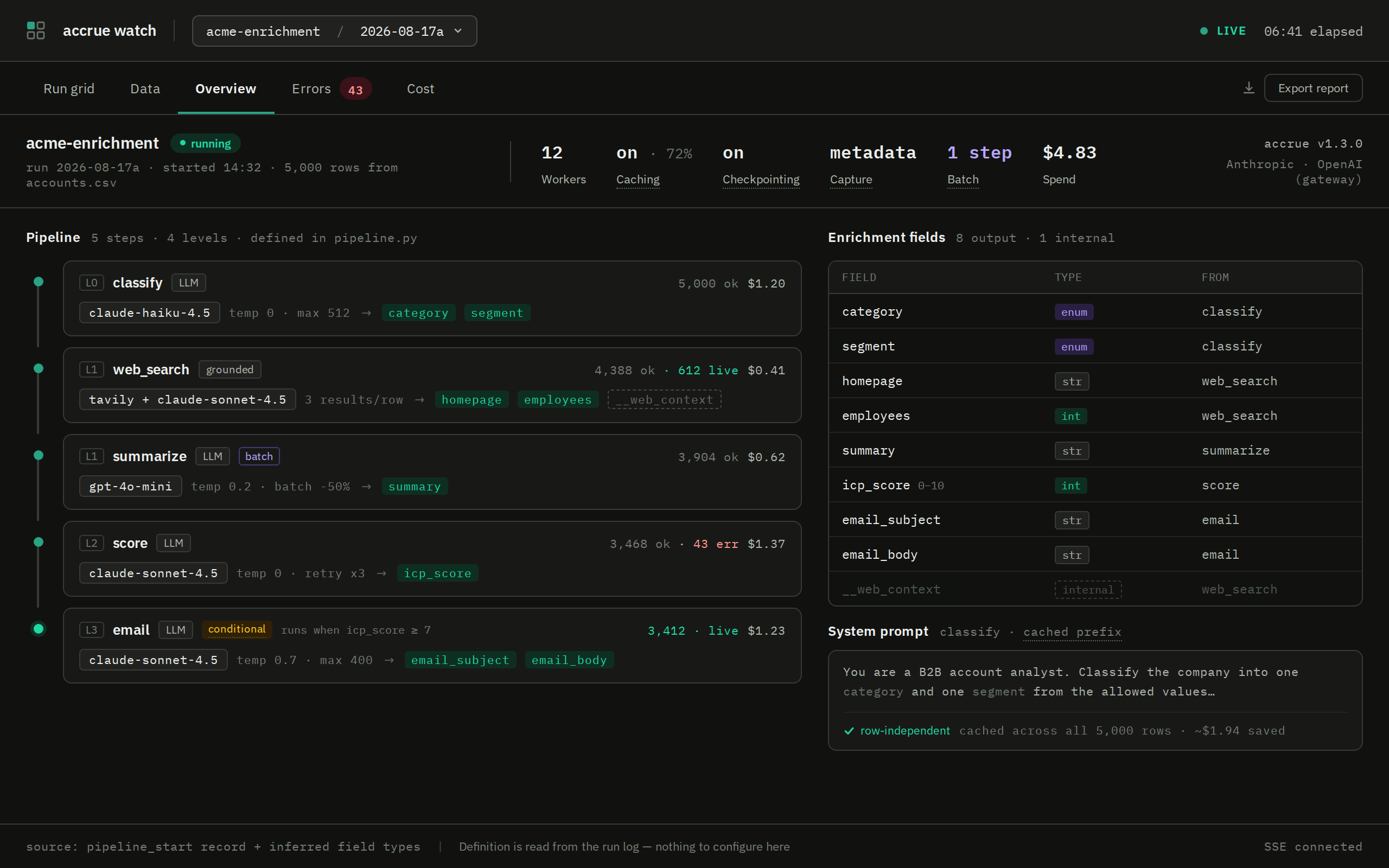
A 5,000-row run in Accrue Watch -- every step, model, field, and dollar, read live from the run log.
from accrue import Pipeline, LLMStep

pipeline = Pipeline([
    LLMStep("analyze", fields={
        "market_size": "Estimate total addressable market in billions USD",
        "competition": {
            "prompt": "Rate competitive intensity with key competitors",
            "enum": ["Low", "Medium", "High"],
            "examples": ["High - Competes with AWS, Google Cloud"],
        },
        "growth_potential": {
            "prompt": "Assess 5-year growth trajectory",
            "type": "String",
            "format": "X% CAGR - reasoning",
        },
    })
])

result = pipeline.run(df)  # DataFrame in, DataFrame out
print(result.data.head())
print(f"Tokens used: {result.cost.total_tokens:,}")
Install
Requires Python 3.10+.
pip install accrue
Set your API key:
export OPENAI_API_KEY=sk-...
That's it. OpenAI is the default provider (zero config, structured outputs auto-enabled). Anthropic and Google are optional:
pip install accrue[anthropic]  # Claude
pip install accrue[google]     # Gemini
Claude Code Skill
If you use Claude Code, Accrue ships with a built-in /accrue skill that guides you through building pipelines interactively. It designs fields, picks models, estimates costs, and writes your script -- you just review and run.
> /accrue
> I have 500 companies in accounts.csv, I need to qualify them for ICP fit
The skill walks you through field design, model selection, pipeline architecture, and configuration before writing a production-ready script. See Using the Claude Code Skill for details.
Why Accrue
You have a spreadsheet of companies, leads, or entities. You need structured fields added to every row -- classifications, summaries, scores, extracted data. You could write a for loop and call the OpenAI API, but then you're building retry logic, rate limiting, caching, progress tracking, and crash recovery. You could use Clay, but you'd pay $500/month for something you can't version-control.
Accrue is the pipeline between a single API call and a full platform:
| Raw API calls | Accrue | Clay | |
|---|---|---|---|
| Scope | One call at a time | Pipeline of steps across rows | Full SaaS platform |
| Multi-step | Manual orchestration | DAG with parallel execution | Sequential drag-and-drop |
| Caching | Build it yourself | SQLite, auto-invalidates on prompt change | Platform-managed |
| Crash recovery | Start over | Checkpoint + row-level cache resume | Platform-managed |
| Iterate on prompts | Re-run everything | Only re-process changed steps/rows | Re-run everything |
| Cost | API costs | API costs | $$$$/month + API costs |
| Version control | Yes | Yes | No |
Quick Example
Chain steps together with depends_on. Use web_search() to ground LLM answers in live data:
from accrue import Pipeline, FunctionStep, LLMStep, web_search

pipeline = Pipeline([
    FunctionStep("research",
        fn=web_search("Research {company}: market position, competitors, recent news"),
        fields=["__web_context", "sources"],
    ),
    LLMStep("analyze",
        fields={
            "market_size": "Estimate TAM in billions USD",
            "competitors": {"prompt": "List top 3 competitors", "type": "List[String]"},
            "investment_thesis": "One-paragraph investment thesis",
        },
        depends_on=["research"],
    ),
])

result = pipeline.run(companies_df)
Watch It Run
Accrue Watch (accrue-ui) is a local dashboard for a running pipeline -- rows x steps as a live grid, every cell's values and errors, failures grouped by cause, cost by step. It reads the JSONL run log Accrue writes; there is nothing else to configure. The Overview tab is at the top of this page; this is the run grid:
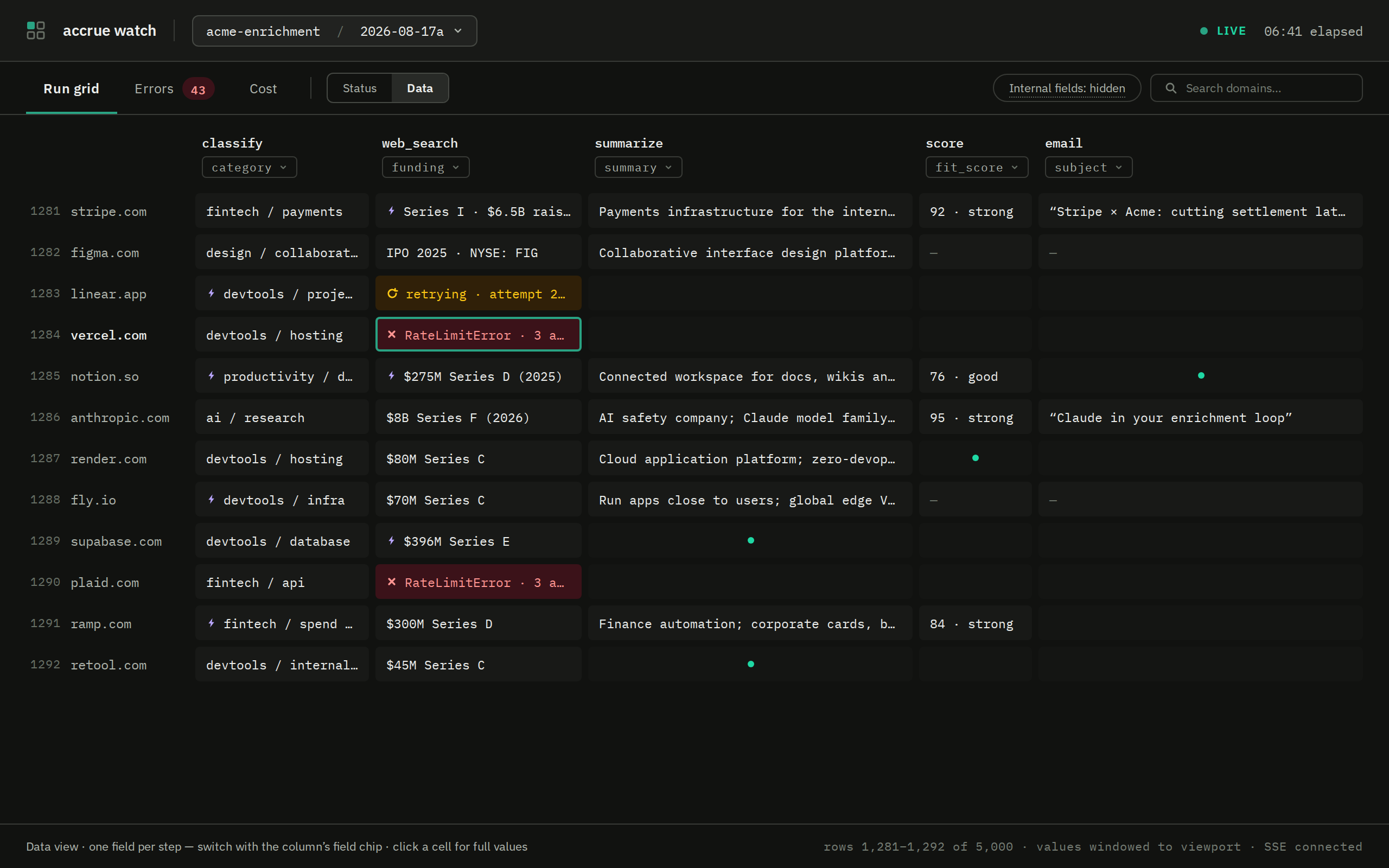
Run grid, data view -- one field per step, filling in as rows complete; retries and failures show in place.
Turn on the run log, then point the dashboard at it:
result = pipeline.run(companies_df, run_log=True) # writes .accrue/runs/<run_id>.jsonl
pip install 'accrue[ui]'   # the dashboard, alongside the engine
accrue watch               # opens the latest run in your browser
accrue watch is a thin stub that delegates to accrue-ui. Add --pipeline module:attr to enable one-click retry of failed rows from the dashboard. Run log guide
Features
-
Multi-step pipelines -- Chain LLM steps and function steps into a DAG with automatic dependency resolution and parallel execution. Quickstart
-
Provider-agnostic -- OpenAI, Anthropic (with automatic prompt caching), and Google ship as adapters. Any OpenAI-compatible API works via
base_url. Custom providers implement one async method. Providers guide -
7-key field specs -- Control LLM output with
prompt,type,format,enum,examples,bad_examples, anddefault. Drives structured outputs and Pydantic validation automatically. Field specs guide -
Caching and checkpointing -- SQLite input-hash cache auto-invalidates on prompt changes. Checkpointing saves after each step for crash recovery. Caching guide
-
Batch API --
LLMStep(batch=True)for 50% cost savings via OpenAI and Anthropic batch endpoints. Cache-aware, auto-chunking, realtime fallback on failures. Batch guide -
Web search and grounding --
web_search()factory for search-then-analyze pipelines, orgrounding=Truefor native provider web search with normalized citations. Web search guide -
Attachments --
LLMStep(attachments="documents")sends each row's PDFs to the model as document blocks instead of making you extract the text first. Cached by content, placeholdered in run logs. Anthropic today. Attachments guide -
Conditional steps --
run_if/skip_ifpredicates for per-row branching. Skipped rows get defaults, never hit the API. Conditional steps guide -
Hooks -- Typed lifecycle events for observability. Sync and async callables, never crash the pipeline. Hooks guide
-
Run logs --
run(..., run_log=True)streams the run as append-only JSONL (schema v1): per-step and per-row events with status, errors, and token usage. Crash-safe,tail -f-able. Run log guide -
Run diffs --
accrue.compare(result_a, result_b)diffs two runs (e.g. before/after a prompt tweak) -- changed rows, per-field churn, distribution shift, and cost delta -- no labels needed. Compare guide -
Merging repeated runs --
accrue.merge_runs([run_a, run_b, run_c])combines independent runs over the same rows into one answer per cell by majority vote, with per-cell agreement, the cells that need review, and cost summed across runs. Pluggable per-field resolvers for rules like "prefer the run with a verified quote". Merge guide -
provider_kwargs-- Escape hatch for provider-specific features (extended thinking, effort control, etc.) without waiting for first-class support.
Sweet Spot
Accrue is built for 100 to 50,000 rows -- too many for manual work or single-call tools, too few to justify big data infrastructure.
| Rows | Time (3 steps, 10 workers) | Cost (gpt-4.1-mini) |
|---|---|---|
| 100 | ~30s | ~$0.20 |
| 1,000 | ~5 min | ~$2 |
| 10,000 | ~50 min | ~$20 |
| 50,000 | ~50 min (50 workers) | ~$100 |
With batch=True, halve the API costs. Cached steps re-run in seconds.
Documentation
| Section | Description |
|---|---|
| Getting Started | Installation, first pipeline, core concepts |
| Claude Code Skill | Interactive pipeline builder via /accrue |
| Guides | Field specs, providers, caching, batch API, grounding, attachments, hooks, run logs, errors, configuration |
| Cookbook | End-to-end examples: company enrichment, lead scoring, content analysis, batch processing |
| API Reference | Complete reference for every public export |
Contributing
git clone https://github.com/matt-house-e/accrue.git
cd accrue
pip install -e ".[dev]"
pytest
License
MIT
1 maintainer

Metadata
1 maintainer
Release files for accrue 1.5.2
For a detailed explanation of source distributions (sdists) and built distributions (wheels), please see the package formats documentation.
Source distribution (sdist)
| File | Size | Uploaded | Provenance | |
|---|---|---|---|---|
| accrue-1.5.2.tar.gz | 152.6 kB | With provenance | Details |
Built distribution (wheel)
| File | Interpreter | ABI | Platform | Reset |
|---|---|---|---|---|
| accrue-1.5.2-py3-none-any.whl | Python 3 | none | any | Details |
Total release size: 309.1 kB
Release files / accrue-1.5.2.tar.gz
| Download URL | accrue-1.5.2.tar.gz |
|---|---|
| Size | 152.6 kB |
| Tags | Source |
|
SHA-256 checksum How to use checksums |
7892711e3edfc0a2cd8b15765b9cf27d2d135acdc9465f8f1661b574cd59e475
|
|
BLAKE2b-256 checksum How to use checksums |
ea25f0a0986217bc90132bf2113e6826ef10e0096eaf6592c416b83ba2515680
|
| Upload date | |
|
Uploaded using Trusted Publishing? What is trusted publishing? |
Yes |
| Uploaded via |
twine/7.0.0 CPython/3.13.14
|
Provenance
Provenance describes where a file came from. On PyPI, provenance is shared via attestations, which provide a verifiable record of the build or publishing details. View details, limitations and caveats.


PyPI Publish Attestation
PyPI verified that this artifact, at this checksum, originated from the publisher listed below.
Signed by GitHub Actions, verified by PyPI on Oct 13, 2026.
Transparency logRelease files / accrue-1.5.2-py3-none-any.whl
| Download URL | accrue-1.5.2-py3-none-any.whl |
|---|---|
| Size | 156.5 kB |
| Tags | Python 3 |
|
SHA-256 checksum How to use checksums |
5c3b43d4bc5e2c3d1b61f9a99469560ef1351ddc52e6f38b13279422d6d05725
|
|
BLAKE2b-256 checksum How to use checksums |
a62feafc332d0590d9d41ba05b0fac367060652779799fa169fe5b69b24d5dbd
|
| Upload date | |
|
Uploaded using Trusted Publishing? What is trusted publishing? |
Yes |
| Uploaded via |
twine/7.0.0 CPython/3.13.14
|
Provenance
Provenance describes where a file came from. On PyPI, provenance is shared via attestations, which provide a verifiable record of the build or publishing details. View details, limitations and caveats.
PyPI Publish Attestation
PyPI verified that this artifact, at this checksum, originated from the publisher listed below.
Signed by GitHub Actions, verified by PyPI on Oct 13, 2026.
Transparency logSecurity for accrue 1.5.2
Provenance
Provenance describes where a file came from. On PyPI, provenance is shared via attestations, which provide a verifiable record of the build or publishing details. View details, limitations and caveats.
Full provenance
All 2 files in this release have been uploaded with provenance metadata.
Attestation for accrue-1.5.2.tar.gz
PyPI Publish Attestation
PyPI verified that this artifact, at this checksum, originated from the publisher listed below.
Signed by GitHub Actions, verified by PyPI on Oct 13, 2026.
Transparency logA note on package security
PyPI is a repository for distributing packages, not a service for auditing them. While third-party security researchers and our staff do their best to detect and remove malicious packages, PyPI cannot guarantee the quality, security or suitability of any given package.
To learn more about protecting yourself from malicious actors, visit our package security documentation.














