
Python wrapper for Accelerated Text
Installation
$ python -m pip install acctext
Usage
from acctext import AcceleratedText

at = AcceleratedText(host='http://127.0.0.1:3001')
Make sure Accelerated Text application is running. Refer to documentation for launch instructions.
at.health()
{'health': 'Ok'}
Interacting with Dictionary
items = [{'key': 'house',
          'category': 'N',
          'forms': ['house', 'houses']},
         {'key': 'hill',
          'category': 'N',
          'forms': ['hill', 'hills']},
         {'key': 'on',
          'forms': ['on'],
          'category': 'Prep',
          'attributes': {'Operation': 'Syntax.on_Prep/Prep'}},
         {'key': 'the',
          'forms': ['the'],
          'category': 'Det',
          'attributes': {'Operation': 'Syntax.the_Det/Det'}}]

for item in items:
    at.create_dictionary_item(**item)

items = at.list_dictionary_items()
items
[{'id': 'the_Det_Eng',
  'key': 'the',
  'forms': ['the'],
  'category': 'Det',
  'language': 'Eng',
  'attributes': {'Operation': 'Syntax.the_Det/Det'}},
 {'id': 'hill_N_Eng',
  'key': 'hill',
  'forms': ['hill', 'hills'],
  'category': 'N',
  'language': 'Eng',
  'attributes': {}},
 {'id': 'house_N_Eng',
  'key': 'house',
  'forms': ['house', 'houses'],
  'category': 'N',
  'language': 'Eng',
  'attributes': {}},
 {'id': 'on_Prep_Eng',
  'key': 'on',
  'forms': ['on'],
  'category': 'Prep',
  'language': 'Eng',
  'attributes': {'Operation': 'Syntax.on_Prep/Prep'}}]
Working with Data
Upload a local file
at.upload_data_file('example_data.csv')
{'message': 'Succesfully uploaded file', 'id': 'example_data.csv'}
Create a data file from scratch
at.create_data_file('example_data_2.csv', ['a', 'b'], [['1', '2'], ['3', '4']])
{'id': 'example_data_2.csv'}
List available data files
[x['id'] for x in at.list_data_files()]
['example_data.csv', 'example_data_2.csv']
Fetch data file
at.get_data_file('example_data_2.csv')
{'id': 'example_data_2.csv',
 'filename': 'example_data_2.csv',
 'header': ['a', 'b'],
 'rows': [['1', '2'], ['3', '4']]}
Delete data file
at.delete_data_file('example_data_2.csv')
{'message': 'Succesfully deleted file', 'id': 'example_data_2.csv'}
Languages and Readers
Fetch existing language properties
at.get_language('Eng')
{'id': 'Eng', 'name': 'English', 'flag': '🇬🇧', 'default': True}
Add new language
at.add_language('Ger', 'German')
{'id': 'Ger', 'name': 'German', 'flag': '🇩🇪', 'default': False}
List available languages
at.list_languages()
[{'id': 'Eng', 'name': 'English', 'flag': '🇬🇧', 'default': True},
 {'id': 'Ger', 'name': 'German', 'flag': '🇩🇪', 'default': False}]
Create new reader type
at.create_reader('Dc', 'Discount Customer', '(DC)')
{'id': 'Dc', 'name': 'Discount Customer', 'flag': '(DC)', 'default': False}
at.create_reader('Lc', 'Loyal Customer', '(LC)')
{'id': 'Lc', 'name': 'Loyal Customer', 'flag': '(LC)', 'default': False}
List available readers
at.list_readers()
[{'id': 'Dc', 'name': 'Discount Customer', 'flag': '(DC)', 'default': False},
 {'id': 'Lc', 'name': 'Loyal Customer', 'flag': '(LC)', 'default': False}]
Document plans
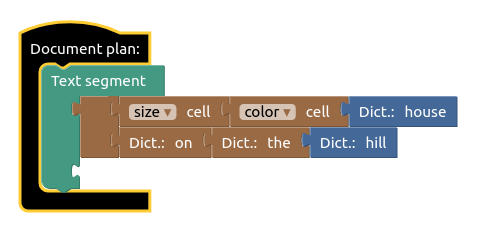
Open Accelerated Text document plan editor (http://127.0.0.1:8080 by default) and create a new document plan named "House description". More detailed instructions can be found in documentation.
Fetch single document plan
dp = at.get_document_plan(name='House description')
dp['documentPlan']
{'type': 'Document-plan',
 'segments': [{'children': [{'modifier': {'name': 'size',
      'type': 'Cell-modifier',
      'srcId': 'B-D0i/`TL4@ja%{U!?2G',
      'child': {'name': 'color',
       'type': 'Cell-modifier',
       'srcId': '!2b?}PBIB?i]%*/(~?XM',
       'child': {'name': 'house',
        'type': 'Dictionary-item',
        'srcId': '+5JLY;_/2/zEOcZ._$,4',
        'kind': 'N',
        'itemId': 'house_N_Eng'}}},
     'type': 'Modifier',
     'srcId': '`62!swypAqp_jK_lr1Ow',
     'child': {'name': 'on',
      'type': 'Dictionary-item-modifier',
      'srcId': ']MNfAFBjxy,c?G55a04@',
      'kind': 'Prep',
      'child': {'name': 'the',
       'type': 'Dictionary-item-modifier',
       'srcId': '62%#$13DP}Gj8=n4NCI.',
       'kind': 'Det',
       'child': {'name': 'hill',
        'type': 'Dictionary-item',
        'srcId': 'Ol68tPXKblg(pUghVhb@',
        'kind': 'N',
        'itemId': 'hill_N_Eng'},
       'itemId': 'the_Det_Eng'},
      'itemId': 'on_Prep_Eng'}}],
   'type': 'Segment',
   'srcId': ']H[rfMhNu,^(wX6[%.+w'}],
 'srcId': 'Li$gv+b_9o-n$z^FnSl~'}
Delete document plan
at.delete_document_plan(dp['id'])
True
Restore document plan
at.create_document_plan(**dp)['name']
'House description'
List document plans
[x['name'] for x in at.list_document_plans(kind='Document')]
['House description']
Text generation
result = at.generate('House description', data={"size": "small", "color": "red"})
result['variants']
['Small red house on the hill.']
Bulk generation
results = at.generate_bulk('House description', data=[{"size": "small", "color": "red"},
                                                      {"size": "big", "color": "green"}])
[x['variants'] for x in results]
[['Small red house on the hill.'], ['Big green house on the hill.']]
Fetch specific result
at.get_result(result['resultId'])
{'resultId': 'a364335f-5021-443d-9c77-fe40c296ecef',
 'offset': 0,
 'totalCount': 1,
 'ready': True,
 'updatedAt': 1628173135,
 'variants': ['Small red house on the hill.']}
Working with state
Export
at.export_state('state.zip')
Clear
at.clear_state()
Restore
at.restore_state('state.zip')
1 maintainer

Metadata
1 maintainer
Release files for acctext 0.9.2
For a detailed explanation of source distributions (sdists) and built distributions (wheels), please see the package formats documentation.
Source distribution (sdist)
| File | Size | Uploaded | |
|---|---|---|---|
| acctext-0.9.2.tar.gz | 10.3 kB | Details |
Built distribution (wheel)
| File | Interpreter | ABI | Platform | Reset |
|---|---|---|---|---|
| acctext-0.9.2-py3-none-any.whl | Python 3 | none | any | Details |
Total release size: 19.3 kB
Release files / acctext-0.9.2.tar.gz
| Download URL | acctext-0.9.2.tar.gz |
|---|---|
| Size | 10.3 kB |
| Tags | Source |
|
SHA-256 checksum How to use checksums |
a99e35e99f480bd213c380f70fcf2c8065a688ffec651f108baf7223b2741937
|
|
BLAKE2b-256 checksum How to use checksums |
14f02cd46191a5067555b7804e48006bdcabd930a9594c16207e6994d32588b4
|
| Upload date | |
|
Uploaded using Trusted Publishing? What is trusted publishing? |
No |
| Uploaded via |
twine/3.4.2 importlib_metadata/4.6.3 pkginfo/1.7.1 requests/2.26.0 requests-toolbelt/0.9.1 tqdm/4.62.0 CPython/3.8.10
|
Release files / acctext-0.9.2-py3-none-any.whl
| Download URL | acctext-0.9.2-py3-none-any.whl |
|---|---|
| Size | 9.0 kB |
| Tags | Python 3 |
|
SHA-256 checksum How to use checksums |
cc56f68ed29ad1cae41d2ecdfbe95dfc9e85720f5f7c9e3217786d2ba8ce3c6b
|
|
BLAKE2b-256 checksum How to use checksums |
d358a1fe3b44ca41b9d4a4c025aa5219a6088eea8467beb47b763a0ee0521cc9
|
| Upload date | |
|
Uploaded using Trusted Publishing? What is trusted publishing? |
No |
| Uploaded via |
twine/3.4.2 importlib_metadata/4.6.3 pkginfo/1.7.1 requests/2.26.0 requests-toolbelt/0.9.1 tqdm/4.62.0 CPython/3.8.10
|














