
AceDataCloud CLI
Unified command-line interface for all AceDataCloud AI services — images, videos, music, and search.
Get your Ace Data Cloud API key
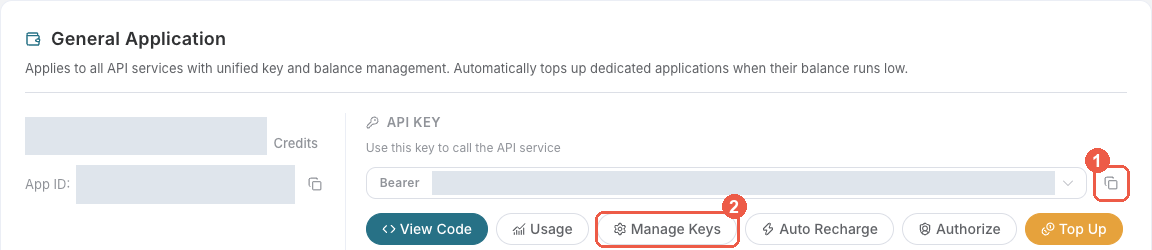
- Open Ace Data Cloud → Applications. Sign in, or register an account first.
- Find General application. If it has not been created, choose Initialize General Application. A general key can use the services available to your account; a dedicated application's key is limited to its service. Check the required service/model access and current pricing.
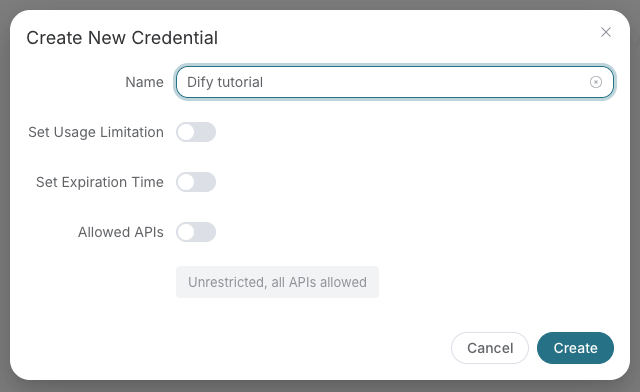
- Copy the API Key from the application card, or open Keys / Manage Keys → Create to create a separate key for this integration. Give it a recognizable name so you can revoke or rotate it independently.
- When creating a key, review Expiration Time, Set Usage Limitation, and Allowed APIs. Enable only the restrictions you need, allow the operations you will call, then click Create and copy the token from the key list. Task lookup does not grant permission to submit a generation. Confirm the application's balance can cover your first request; any trial allowance is whatever your account currently displays.
- Copy only the token value, without quotation marks, spaces, or
Bearer. An API Key / API Token field expects this raw value; only a manually configured HTTPAuthorizationheader needs theBearerprefix. Aplatform-...account-management token cannot replace a generation API key.
Save the key in the client's credential store or the environment variable shown below. Never put it in a prompt, shared workflow, screenshot, or Git commit. If authentication fails, check the full copied value, application/service access, expiration, usage limit, and balance before creating another key.
Installation
pip install acedatacloud-cli
Quick Start
# Save your API token
adc auth login

# Generate an image
adc image "A sunset over mountains, photorealistic"

# Generate a video
adc video "A cinematic ocean scene"

# Generate music
adc music "Upbeat electronic dance track"

# Search the web
adc search "artificial intelligence"

# Check task status
adc task abc123 -s flux

# Wait for completion
adc wait abc123 -s flux
Configuration
Get your API token at platform.acedata.cloud.
# Option 1: Login command (saves to ~/.config/adc/config)
adc auth login

# Option 2: Environment variable
export ACEDATACLOUD_API_TOKEN=your_token

# Option 3: Per-command flag
adc --token your_token image "A sunset"
Commands
Image Generation
adc image "A sunset over mountains"                        # Flux (default)
adc image "Logo design" --service seedream                  # Seedream
adc image "Add sunglasses" --image-url https://...         # Edit with Flux
adc image "A landscape" -m flux-pro-1.1-ultra -s 16:9     # Custom model & size
Video Generation
adc video "A cinematic sunset"                              # Luma (default)
adc video "A rocket launching" --service sora               # Sora
adc video "Clouds moving" --service veo                     # Veo
adc video "Dance scene" --service seedance                  # Seedance
adc video "Cat playing" --loop -a 16:9                      # Loop + aspect ratio
Music Generation
adc music "An upbeat electronic dance track"
adc music "Calm piano jazz" --instrumental
Web Search
adc search "artificial intelligence"
adc search "tech news" -t news --time-range qdr:d
adc search "sunset photos" -t images -c us
Task Management
adc task abc123 -s flux          # Check task status
adc task def456 -s luma --json   # JSON output
adc wait abc123 -s flux          # Wait for completion
adc wait def456 -s suno --interval 10 --timeout 300
Info & Auth
adc services                     # List all available services
adc config                       # Show configuration
adc auth login                   # Save API token
adc auth status                  # Check auth status
JSON Output
All commands support --json for machine-readable output:
adc image "A sunset" --json | jq '.task_id'
adc search "test query" --json | jq '.organic[].title'
Supported Services
| Service | Type | Command |
|---|---|---|
| Flux | Image | adc image --service flux |
| Seedream | Image | adc image --service seedream |
| NanoBanana | Image | adc image --service nanobanana |
| Suno | Music | adc music |
| Luma | Video | adc video --service luma |
| Sora | Video | adc video --service sora |
| Veo | Video | adc video --service veo |
| Seedance | Video | adc video --service seedance |
| SERP | Search | adc search |
Development
# Install with dev dependencies
pip install -e ".[all]"

# Run tests
pytest

# Lint
ruff check .
ruff format --check .
License
MIT
1 maintainer

Metadata
1 maintainer
Release files for acedatacloud-cli 2026.10.12.0
For a detailed explanation of source distributions (sdists) and built distributions (wheels), please see the package formats documentation.
Source distribution (sdist)
| File | Size | Uploaded | Provenance | |
|---|---|---|---|---|
| acedatacloud_cli-2026.10.12.0.tar.gz | 16.6 kB | Without provenance | Details |
Built distribution (wheel)
| File | Interpreter | ABI | Platform | Reset |
|---|---|---|---|---|
| acedatacloud_cli-2026.10.12.0-py3-none-any.whl | Python 3 | none | any | Details |
Total release size: 34.4 kB
Release files / acedatacloud_cli-2026.10.12.0.tar.gz
| Download URL | acedatacloud_cli-2026.10.12.0.tar.gz |
|---|---|
| Size | 16.6 kB |
| Tags | Source |
|
SHA-256 checksum How to use checksums |
8b326f9ef43f7ad7a62c63d67dab73db2168e7d6650e37a8707e843e848f03bb
|
|
BLAKE2b-256 checksum How to use checksums |
896ed494c524f45ca8624e5f43a24340994fe5d0919081da9fe7de5a3628e3e5
|
| Upload date | |
|
Uploaded using Trusted Publishing? What is trusted publishing? |
No |
| Uploaded via |
twine/7.0.0 CPython/3.12.3
|
Release files / acedatacloud_cli-2026.10.12.0-py3-none-any.whl
| Download URL | acedatacloud_cli-2026.10.12.0-py3-none-any.whl |
|---|---|
| Size | 17.9 kB |
| Tags | Python 3 |
|
SHA-256 checksum How to use checksums |
aee1bfd171e34dd8bd25f0b0bb8efed217ef4612d9f24c4b4cbd5c3669e9420e
|
|
BLAKE2b-256 checksum How to use checksums |
59622a3b37d2dd8f21d4ce09230f9178f510d251e3dfe7b0348797f5fd39ffeb
|
| Upload date | |
|
Uploaded using Trusted Publishing? What is trusted publishing? |
No |
| Uploaded via |
twine/7.0.0 CPython/3.12.3
|
Security for acedatacloud-cli 2026.10.12.0
Provenance
Provenance describes where a file came from. On PyPI, provenance is shared via attestations, which provide a verifiable record of the build or publishing details. View details, limitations and caveats.
No provenance found
None of the files in this release were uploaded with provenance metadata.
A note on package security
PyPI is a repository for distributing packages, not a service for auditing them. While third-party security researchers and our staff do their best to detect and remove malicious packages, PyPI cannot guarantee the quality, security or suitability of any given package.














