
AceDataCloud Python SDK
Official Python client for the AceDataCloud API.
Get your Ace Data Cloud API key
- Open Ace Data Cloud → Applications. Sign in, or register an account first.
- Find General application. If it has not been created, choose Initialize General Application. A general key can use the services available to your account; a dedicated application's key is limited to its service. Check the required service/model access and current pricing.
- Copy the API Key from the application card, or open Keys / Manage Keys → Create to create a separate key for this integration. Give it a recognizable name so you can revoke or rotate it independently.
- When creating a key, review Expiration Time, Set Usage Limitation, and Allowed APIs. Enable only the restrictions you need, allow the operations you will call, then click Create and copy the token from the key list. Task lookup does not grant permission to submit a generation. Confirm the application's balance can cover your first request; any trial allowance is whatever your account currently displays.
- Copy only the token value, without quotation marks, spaces, or
Bearer. An API Key / API Token field expects this raw value; only a manually configured HTTPAuthorizationheader needs theBearerprefix. Aplatform-...account-management token cannot replace a generation API key.
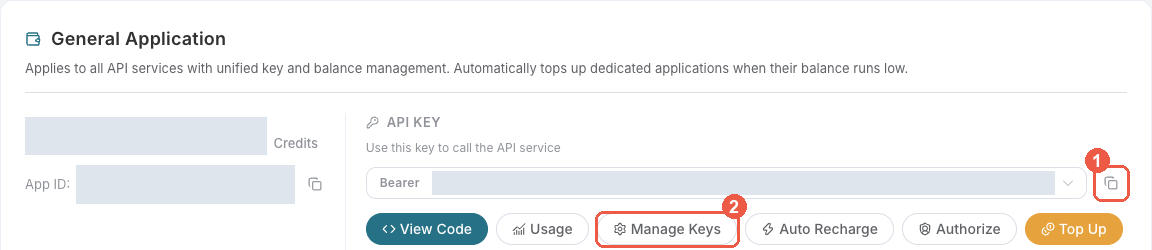
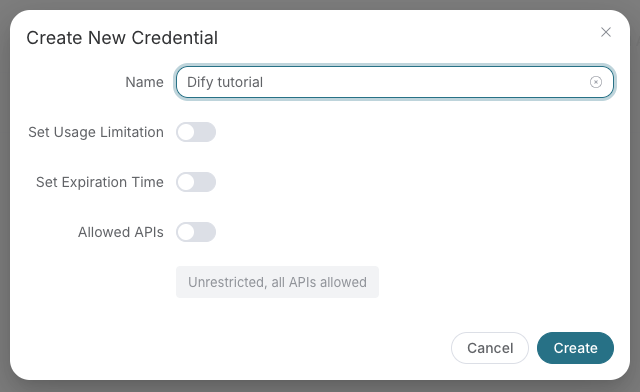
Save the key in the client's credential store or the environment variable shown below. Never put it in a prompt, shared workflow, screenshot, or Git commit. If authentication fails, check the full copied value, application/service access, expiration, usage limit, and balance before creating another key.
Use this application key for API requests. SDK account-management methods require the separate credential described in their management documentation; do not interchange it with the API key. The optional x402 payment flow below is a separate way to pay for supported requests.
Installation
pip install acedatacloud
Quick Start
from acedatacloud import AceDataCloud

client = AceDataCloud(api_token="your-token")

# OpenAI-compatible chat completions
response = client.openai.chat.completions.create(
    model="gpt-4o",
    messages=[{"role": "user", "content": "Hello!"}],
)
print(response["choices"][0]["message"]["content"])

# Streaming
for chunk in client.openai.chat.completions.create(
    model="gpt-4o",
    messages=[{"role": "user", "content": "Tell me a story"}],
    stream=True,
):
    print(chunk.get("choices", [{}])[0].get("delta", {}).get("content", ""), end="")
Async Usage
For a runnable LlamaIndex workflow, see search, extraction and cited retrieval (中文). It uses the published SDK, runs offline by default, and includes a read-only hosted MCP discovery command.
import asyncio
from acedatacloud import AsyncAceDataCloud


async def main():
    client = AsyncAceDataCloud(api_token="your-token")
    result = await client.search.google(query="Python SDK")
    print(result)
    await client.close()


asyncio.run(main())
Resources
| Resource | Description |
|---|---|
client.openai |
OpenAI-compatible chat completions and responses |
client.chat |
Native chat messages |
client.images |
Image generation (Flux, Seedream, Nano Banana, etc.) |
client.audio |
Music generation (Suno) |
client.video |
Video generation (Luma, Sora, Veo, etc.) |
client.search |
Web search (Google SERP) |
client.face |
Face analysis & transformation (swap, beautify, age, cartoon) |
client.shorturl |
Short URL creation |
client.tasks |
Cross-service async task polling |
client.files |
File uploads |
client.platform |
Applications, credentials, models management |
Chat usage and billing
Accepted model requests through Chat Completions, Responses, and Messages are
billed by the selected model's input, output, and cache usage, not a fixed fee
per request. Switching protocol formats does not change this to per-call billing
or guarantee that a model accepts that format. Consult current model prices and
usage.cost for the charge; the SDK preserves reported usage without recalculating it.
- Chat Completions
prompt_tokensincludes reported cached tokens. - Responses
input_tokensincludes reported cached tokens. - Messages
input_tokensexcludes separately reportedcache_read_input_tokensandcache_creation_input_tokens; those dimensions are charged separately.
Do not add cached tokens to the input total again for Chat Completions or Responses, or treat Messages input alone as the full input/cache usage.
Public Chat Completions models
Pass these public IDs to client.openai.chat.completions.create(model=..., messages=...)
(or await with AsyncAceDataCloud); use stream=True for streaming. The SDK
passes model-specific fields through without rewriting model IDs or enforcing a catalog.
gpt-6.1-terra: supports text/image input, streaming, function tools, and structured output. Usereasoning_effort="low"initially; supported levels arelow,medium,high,xhigh, andmax, notnoneorminimal. Responses usesreasoning={"effort": "low"}instead. Inputs over 272,000 tokens use long-context pricing; consult current prices and reported usage.claude-opus-5-5: supports text and streaming Chat Completions withn=1. Omittemperatureandtop_pto use model defaults; do not set temperature below 1 or a non-default top-p. Usetool_choice="auto", not forced tools. For native thinking blocks, signatures, and native tool semantics, useclient.chat.messages.gemini-4-argon: supports text and streaming Chat Completions. Thinking can consume output budget; Google recommends at leastmax_tokens=32768for ordinary tasks. This does not expose Interactions background long-output functionality.kimi-k3.1-pro: always reasons; passreasoning_effort="low","high", or"max". Do not disable reasoning. Keep the full assistant message, includingreasoning_contentandtool_calls, in multi-turn and tool-call history. The existingkimi-k3alias remains available; usereasoning_effort="max"for it.
Check current account access and prices before calling. A model's advertised context size does not guarantee the platform's per-request limit.
Native Claude Messages
For structured output, pass
output_config={"format": {"type": "json_schema", "schema": your_schema}} to
client.chat.messages.create(...). Read the generated JSON from Messages content
text blocks; this does not change the response envelope or increase max_tokens.
Thinking and output configuration are passed through without SDK model-specific
enum or combination checks. The selected model determines which values it accepts.
For the beta display: "updates" mode, set the required header on a dedicated
client (client headers apply to every request):
with AceDataCloud(
    api_token="your-token",
    headers={"anthropic-beta": "thinking-display-updates-2026-08-18"},
) as client:
    response = client.chat.messages.create(
        model="claude-sonnet-5-5",
        messages=[{"role": "user", "content": "Explain this code."}],
        thinking={"type": "adaptive", "display": "updates"},
        output_config={"effort": "high"},
    )
AsyncAceDataCloud accepts the same header and fields. Streaming and
client.chat.messages.count_tokens(...) also preserve thinking configuration.
Parameter pass-through does not guarantee model support; API errors are returned
through the SDK's normal error handling.
OpenAI Embeddings
result = client.openai.embeddings.create(
    model="text-embedding-3-small",
    input="The food was delicious and the waiter...",
)
Supported models are text-embedding-3-small and text-embedding-3-large.
text-embedding-ada-002 is no longer available. When migrating an existing index,
regenerate its vectors and rebuild the index; do not mix old and new model vectors.
Image Generation (with Task Polling)
# Default provider (nano-banana)
task = client.images.generate(prompt="A sunset over mountains")
result = task.wait()  # polls until complete
print(result["image_url"])

# Use a specific provider
flux_task = client.images.generate(prompt="A sunset over mountains", provider="flux")
Nano Banana 2.1
Select model="nano-banana-2.1" explicitly for generation or editing at
1K, 2K, or 4K. Omitting model still uses nano-banana; there is no
nano-banana-2.1:official variant.
task = client.nano_banana.generate(
    action="generate",
    model="nano-banana-2.1",
    prompt="A blue ceramic vase on a cream background",
    resolution="2K",
    aspect_ratio="1:1",
)
task.wait()
image_urls = task.urls()

edit_task = client.nano_banana.generate(
    action="edit",
    model="nano-banana-2.1",
    prompt="Change the vase to green; preserve the background",
    image_urls=image_urls,
    resolution="4K",
)
edit_task.wait()
AsyncAceDataCloud exposes the same parameters (await generate and wait).
The public model ID also works with client.openai.images.generate(...) and
client.openai.images.edit(...); those use the OpenAI-compatible fields
(image for editing) and return response dictionaries, not task handles.
GPT Image 2.5 quality
client.openai.images.generate(...) and .edit(...) pass quality through
unchanged. GPT Image models accept auto, low, medium, and high;
only gpt-image-2.5-flare and gpt-image-2.5-sunburst (including :reverse
and :official variants) additionally accept xhigh and max.
For both methods, gpt-image-2.5-flare:reverse and
gpt-image-2.5-sunburst:reverse are explicit aliases of their unsuffixed names.
Pass the complete model ID unchanged; the SDK does not select a fallback.
The server may use GPT Image 2.5 Flare during automatic recovery for reverse
models, while preserving the requested model and per-successful-image billing.
gpt-image-2, both 2.5 models, and their :reverse aliases have a base price
of 0.19 Credits per successful image; check current account pricing and
usage records for final charges. Official-channel requests are billed by actual
token usage, not a fixed fee per image.
Maestro Video Production
Use the provider client to request one finished video in one language:
task = client.maestro.generate(
    prompt="Explain vector databases to beginners in 20 seconds",
    langs=["en"],
    aspect="9:16",
    duration=20,
    scenario="narrated",
)
result = task.wait()
langs defaults to ["zh-cn"] and must contain exactly one language; create
separate tasks for other languages. The completed result contains one video in
response.data.variants. AsyncAceDataCloud supports the same parameters;
await both generate and wait. To revise a video, use action="remix",
"edit", or "extend" with ref_task_id=task.id.
There is no quality tier: all videos use 1080p/30fps and target durations of
5–300 seconds. Successful tasks cost 0.7 Credits per actual delivered second,
with integer billed seconds capped at the requested duration (falling back to
that duration if it cannot be read). All scenarios, actions, and languages have
the same rate; failed tasks and /maestro/tasks polling are free.
style accepts a freeform visual hint as well as named presets. voice accepts
named voice presets or a 32-character hexadecimal voice reference_id; pass it
unchanged. Existing MaestroStyle and MaestroVoice type aliases remain available.
Producer action-specific inputs
client.producer.generate(action="generate", prompt="A jazz song") uses inspiration
mode (custom=False by default). For custom vocals, set custom=True and provide
lyric; for custom instrumental music, set custom=True, instrumental=True without
inventing lyrics or a prompt. Extensions require audio_id, positive continue_at
(seconds, including fractions), and lyric unless instrumental. Covers, variations,
section replacement, vocal/instrument swaps, and stems require the source audio_id.
lyric and prompt are no longer required for every action. Async clients accept
the same fields; generation still returns a task handle.
WebExtrator navigation and cache
client.webextrator.extract(...) and .render(...) accept cookies,
bypass_cache, and cache_ttl_seconds. Each cookie requires name, value, and
domain; optional fields are path, expires (Unix seconds), httpOnly, secure,
and sameSite (Strict, Lax, or None). Keep cookie values out of logs and Git.
The server defaults wait_until to load, navigation timeout to 30 seconds,
and cache TTL to 3600 seconds. timeout must be a positive integer; delay and
cache_ttl_seconds must be nonnegative integers. bypass_cache=True skips cache
reads but can still cache the fresh result; cache_ttl_seconds=0 disables caching
that result. Omitted options remain omitted; async clients use the same fields.
Kling reference-video billing
Pass video_list=[{"video_url": reference_url, "refer_type": "feature"}]
to client.kling.generate with model="kling-o1" or "kling-v3-omni".
Reference videos use a separate billing tier: 1.202 Credits/second in std
mode and 1.602 Credits/second in pro mode. For a 5-second O1 result,
std / pro cost 4.005 / 5.340 Credits without a reference video, or
6.010 / 8.010 Credits with one.
refer_type="base" (the default) edits may follow the reference video's length;
billing uses the actual output duration rounded to the nearest integer second.
refer_type="feature" uses the requested duration. Read
response["usage"]["reference_video_seconds"] for the final billed seconds;
the request-time estimate can differ from the final charge. This is response
usage, not a request parameter. Image references and first/last frames alone do
not trigger reference-video billing. Do not combine video_list with
generate_audio=True. AsyncAceDataCloud uses the same fields with await.
Suno music processing
For a private voice created by client.suno.voices(...), upload the original
song with client.suno.upload(audio_url=source_url, persona_id=persona_id).
This field is supported only for standard uploads (the default), not
mode="enhanced". After upload succeeds, use upload["data"]["audio_id"] and
the same persona_id in client.suno.generate(action="upload_cover", ...).
Do not reuse a song ID uploaded without that voice association. Voice creation,
upload, and cover must use the same service channel. vocal_gender is not
required and cannot replace persona_id. Async clients use the same fields.
Before a cover or extension, optionally call
client.suno.availability(audio_id=audio_id) (or await with AsyncAceDataCloud).
Use the song's audio_id from a completed task, not its task_id. This is a
synchronous API-token-authenticated check, currently without a Credits charge;
it returns the response dictionary directly, not a task handle to poll.
result["data"]["available"] is only True on success: it is positive evidence
on the current channel, not a guarantee that a subsequent operation will work.
An inconclusive check returns an error, including 503 availability_unknown;
never convert an error into False. Preserve the error code and trace ID.
Use client.suno.generate(custom=True, lyric=..., style=..., negative_tags=...)
for custom-mode music. negative_tags describes styles or genres to exclude;
there is currently no fixed character limit, but overly long input may still
fail, so keep it concise. The SDK passes the string through without truncation.
AsyncAceDataCloud accepts the same fields with await.
A downloadable audio file does not guarantee that its audio_id remains usable
for covers, extensions or stem separation. If processing returns
suno_processing_unavailable, keep the original task_id (the task handle's
id, when available) and the error's trace_id for support. The related codes
suno_model_unavailable and suno_processing_failed mean the selected model is
unavailable for that operation or processing returned no audio, respectively.
Suno can also return api_error with the message
the account may have been offline; this is a server error, not an SDK
authentication error.
These HTTP 500 errors retain their code, trace_id and body on APIError.
Retrieve an existing task rather than submitting a replacement generation just
to check its result.
Fish voice models
client.fish.model(title=..., voices=...) creates a reusable voice from a single
publicly downloadable audio URL string, not an array or a multipart upload.
Prefer a direct URL ending in .mp3 or .wav. Successful creation returns the
model object directly (HTTP 201); its _id can be used as reference_id in
client.fish.generate.
Created voices are stored publicly long-term and may be searched and used by
other users. Omit visibility: passing private or unlist does not make the
voice private. For temporary reference audio without creating a saved model,
use client.fish.generate(text=..., references=[{"audio": audio_url, "text": transcript}]).
client.audio.list_fish_models(self_only=True, page_size=20, page_number=1)
lists voices created and saved through this platform by the calling account,
including voices created with its other API tokens. This only filters the list;
it does not restrict public use. Results are paginated in reverse creation order;
sort_by supports created_at and task_count, and author_id can further
filter them. Do not combine self_only=True with title_language; that filter
is for the public library. Responses contain total, items, and has_more;
has_more is boolean for self queries and may be None for public-library
queries. AsyncAceDataCloud exposes the same methods with await.
File uploads
client.files.upload(file_bytes, filename="photo.jpg") uses the management-plane
account token, not a generation API key. Use a separate client configured with
that token. Uploads return file_url and mime; use the returned URL rather than
constructing one. The platform assigns an uploads/<uuid> path and preserves a
safe filename extension. Supply a filename matching the actual content: MIME
inference from the filename does not convert the file. The default single-file
limit is 100 MB. The async client supports the same upload procedure.
Multi-Provider Support
Image, video, and audio resources support a provider parameter to switch between services:
# Video — default is 'sora'
client.video.generate(prompt="A cat playing piano", provider="kling")
client.video.generate(prompt="Ocean waves", provider="luma")

# Audio — default is 'suno'
client.audio.generate(prompt="A jazz song", provider="producer")
Available providers:
| Resource | Providers |
|---|---|
client.images |
nano-banana (default), flux, seedream |
client.video |
sora (default), luma, veo, kling, hailuo, seedance, wan, pika, pixverse |
client.audio |
suno (default), producer, fish |
Error Handling
from acedatacloud import AceDataCloud, AuthenticationError, RateLimitError

client = AceDataCloud(api_token="your-token")
try:
    client.search.google(query="test")
except AuthenticationError:
    print("Invalid or expired token")
except RateLimitError:
    print("Too many requests, slow down")
Configuration
client = AceDataCloud(
    api_token="your-token",
    base_url="https://x402.acedata.cloud",  # API gateway (default)
    platform_base_url="https://platform.acedata.cloud",  # Management plane
    timeout=300.0,  # Request timeout in seconds
    max_retries=2,  # Retry count for transient errors
)
The token can also be set via the ACEDATACLOUD_API_TOKEN environment variable.
client.platform.config.get() returns features and region; the async client
uses the same method with await. region is the lowercase country/region code
detected from the request IP, or None when unknown. The endpoint accepts no
country/region override. Keep any user-selected display region in your own
application; it does not change server-side availability or security policies.
Feature keys may change; use safe defaults for missing keys and do not share
cached config across users.
Paying with X402 Instead of a Bearer Token
The SDK supports a pluggable payment_handler that is invoked when the
API returns 402 Payment Required. Any callable (or async callable)
that returns the required headers is accepted:
from acedatacloud import AceDataCloud, PaymentHandlerContext, PaymentHandlerResult


def my_payment_handler(ctx: PaymentHandlerContext) -> PaymentHandlerResult:
    # ctx["accepts"] is the list of payment requirements returned by the server.
    # Your job: sign the preferred one and return the retry header.
    x_payment = sign_and_encode(ctx["accepts"])  # your implementation
    return {"headers": {"X-Payment": x_payment}}


client = AceDataCloud(payment_handler=my_payment_handler)

# Normal SDK calls — the handler is only invoked when the server returns 402.
result = client.openai.chat.completions.create(
    model="gpt-4o-mini",
    messages=[{"role": "user", "content": "Hi"}],
)
The AsyncAceDataCloud client accepts either a synchronous or asynchronous
handler. For a ready-made signer, install acedatacloud-x402 and pass its
handler directly:
from acedatacloud import AceDataCloud
from acedatacloud_x402 import EVMAccountSigner, create_x402_payment_handler

client = AceDataCloud(
    payment_handler=create_x402_payment_handler(
        network="base",
        evm_signer=EVMAccountSigner.from_private_key("0x..."),
        prefer_scheme="upto",
    )
)
See AceDataCloud/X402Client for
network setup details. Its TypeScript/Python signers also support Arbitrum One
(network="arbitrum" or "eip155:42161") for exact payments with native USDC
(6 decimals), not bridged USDC. Availability is rolled out per network: only
select Arbitrum when the server's current accepts offers it. A configured
signer does not enable the network on the server. Use the returned payment
requirements and price rather than hard-coding an amount; the SDK forwards
accepts unchanged to the handler. The wallet must support and hold funds on
the target chain.
License
MIT
1 maintainer

Metadata
1 maintainer
Release files for acedatacloud 2026.11.3.0
For a detailed explanation of source distributions (sdists) and built distributions (wheels), please see the package formats documentation.
Source distribution (sdist)
| File | Size | Uploaded | Provenance | Actions |
|---|---|---|---|---|
| acedatacloud-2026.11.3.0.tar.gz | 71.1 kB | Without provenance | Details for acedatacloud-2026.11.3.0.tar.gz |
Built distribution (wheel)
| File | Interpreter | ABI | Platform | Actions Reset |
|---|---|---|---|---|
| acedatacloud-2026.11.3.0-py3-none-any.whl | Python 3 | none | any | Details for acedatacloud-2026.11.3.0-py3-none-any.whl |
Total release size: 138.1 kB
Release files / acedatacloud-2026.11.3.0.tar.gz
| Download URL | acedatacloud-2026.11.3.0.tar.gz |
|---|---|
| Size | 71.1 kB |
| Tags | Source |
|
SHA-256 checksum How to use checksums |
eedb254297fbeaec4126f95e097536edd26dab633c81de2a81d9b0b4e5444bc4
|
|
BLAKE2b-256 checksum How to use checksums |
0ffa28bc9e68fd5305fcd2ad0339fec57fe6493046ef55de285d49780f628855
|
| Upload date | |
|
Uploaded using Trusted Publishing? What is trusted publishing? |
No |
| Uploaded via |
twine/7.0.0 CPython/3.14.4
|
Release files / acedatacloud-2026.11.3.0-py3-none-any.whl
| Download URL | acedatacloud-2026.11.3.0-py3-none-any.whl |
|---|---|
| Size | 67.1 kB |
| Tags | Python 3 |
|
SHA-256 checksum How to use checksums |
3a3f33a9bcfdb8514174227ddf41152e5f35856a0920d67ee2c1e0e8db3f5a15
|
|
BLAKE2b-256 checksum How to use checksums |
2ec577d0d8d323bd070f7a7b87d92446b3ae2ab95c402d46c003e9ba21f27d50
|
| Upload date | |
|
Uploaded using Trusted Publishing? What is trusted publishing? |
No |
| Uploaded via |
twine/7.0.0 CPython/3.14.4
|
Security for acedatacloud 2026.11.3.0
Provenance
Provenance describes where a file came from. On PyPI, provenance is shared via attestations, which provide a verifiable record of the build or publishing details. View details, limitations and caveats.
No provenance found
None of the files in this release were uploaded with provenance metadata.
A note on package security
PyPI is a repository for distributing packages, not a service for auditing them. While third-party security researchers and our staff do their best to detect and remove malicious packages, PyPI cannot guarantee the quality, security or suitability of any given package.
To learn more about protecting yourself from malicious actors, visit our package security documentation.














