
Introduction
This repository aims to leverage the automatic renewal of SSL certificates within Azure Cloud in a secure manner.
A wrapper library is provided to automatically renew certifactes based on the ACME DNS-01 challenge by using certbot.
The library supports the usage of best practices for securely handling certificates by:
- using certbot
- removing the need of a file system for storing certificates
- Azure Key Vault for central and only storage of secrets and certificates
- enabling easy and flexible automation
Installing acme-dns-azure
acme-dns-azure is available on PyPi:
python -m pip install acme-dns-azure
For usage exampless please refer to examples
Scope
Based on the provided configuration and trigger, the wrapper library supports following flow.
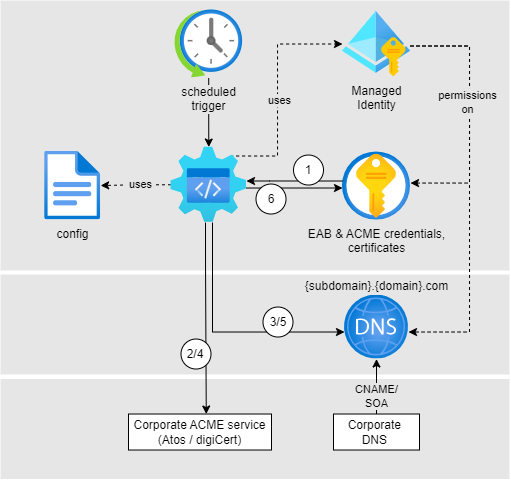
- Receive certificates, receive EAB & ACME credentials (if configured), receive ACME account information (if already present) from KeyVault. Resolve DNS and setup certbot related configuration.
- Certbot: Init renewal process to certificate authority
- Certbot: DNS Challenge - create TXT record
- Certbot: Renew certificates
- Certbot: DNS Challenge - delete TXT record
- Upload renewed certificates, create/update ACME account information as secret within KeyVault.
Note: When using DNS delegation step 3. and 5. differ as the TXT record won´t be deleted.
Features
The library handles following use cases:
- Create new certificates
- Update domain references in existing certificates
- Renew existing certificates
Auth is possible by using:
- Service Principal
- User Assigned Identity
Integration
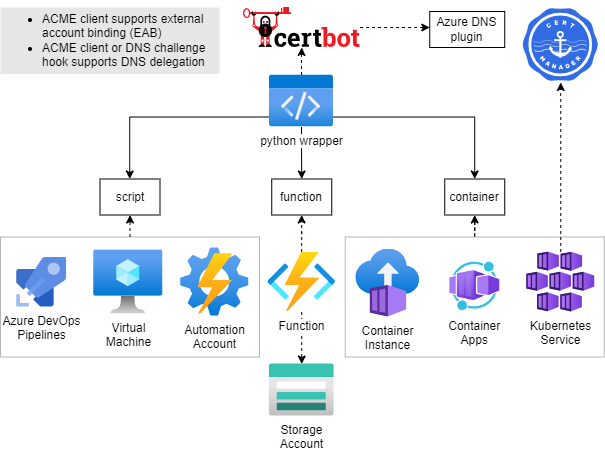
The library can be used by:
- running as script
- Python package within your app
Within examples you can find example implementations for running the python package:
- Azure function
- Container
Contribute
Fork, then clone the repo:
git clone https://github.com/ZEISS/acme-dns-azure
Install Poetry if you not have it already:
curl -sSL https://install.python-poetry.org | python3 -
Configure the virtual environment with full example support and activate it:
Install dependencies
poetry install --all-extras
source .venv/bin/activate
Lint
poetry run black .
Run unit tests
poetry run coverage run
poetry run coverage report
Run integration tests
See How to run integration tests
Release
For releasing a new version, create a PR with ONE of following labels:
minormajorpatchprepatchpreminorpremajorprerelease
Important: Add the label BEFORE merging the PR. Without the label, the release workflow will not trigger automatically.
Usage
Config
The config is written in YAML format, defined by the scheme described below. Brackets indicate that a parameter is optional. For non-list parameters the value is set to the specified default.
Generic placeholders are defined as follows:
<boolean>: a boolean that can take the valuestrueorfalse<int>: a regular integer<string>: a regular string<secret>: a regular string that is a secret, such as a password
The other placeholders are specified separately.
See examples for configuration examples.
# Azure credentials choice section. Only one of the following flags should be set to true to indicate which credentials to use. Otherwise an exception would be raised by the validator.
# These values are translated into ini file as specified here: https://docs.certbot-dns-azure.co.uk/en/latest/index.html#certbot-azure-workload-identity-ini
# If no flag is provided the program will try to use sp_client_* values to use service principal credentials first. If those are not both present it will try to use managed_identity_id.
[use_system_assigned_identity_credentials: <boolean>]
[use_azure_cli_credentials: <boolean>]
[use_workload_identity_credentials: <boolean>]
[use_managed_identity_credentials: <boolean>]
[use_provided_service_principal_credentials: <boolean>]

# Client ID of managed identity. Must be provided if use_managed_identity_credentials is true. Will be used even if all use_*_credentials flags are set to false, but only if sp_client_* values are not all provided.
[managed_identity_id: <string>]

# sp_client_* values must be provided if use_provided_service_principal_credentials is true. Will be used even if all use_*_credentials flags are set to false. User must specify id and either secret or certificate path. If both values (id and pwd/cert path) are provided and none of the flags is set to true it has precedence over the use of provided managed_identity_id.
[sp_client_id: <string>]
[sp_client_secret: <secret>]
[sp_certificate_path: <string>]
# End of Azure credentials choice section.

[azure_environment: <string> | default = "AzurePublicCloud"]

# Flag if existing certificates containing multiple domains should be renewed and updated based on the definition of the config file. If not set, mismatching certificates will be skipped.
[update_cert_domains: <boolean> | default = False]

# key vault uri for renewal of certifcate
key_vault_id : <string>

# ACME Certificate Authority
server : <string>

# Secret name within key vault for storing ACME Certificate authority account information
[keyvault_account_secret_name: <regex> | default "acme-account-$(network location of server)"]
# when server=https://example.com/something, then keyvault_account_secret_name="acme-account-example-com"

# config file content for certbot client
[certbot.ini : <string> | default = ""]
NOTE: Either managed_identity_id or sp_client_id and sp_client_secret must be specified.
NOTE: certbot.ini represents the CERTBOT configuration file and will be passed into certbot by the acme_dns_azure library as defined. Misconfiguration will lead to failures of certbot and therefore of the renewal process.
Following values will be added to the configurataion file by the acme_dns_azure library per default:
preferred-challenges: dns
authenticator: dns-azure
agree-tos: true
[<eab>]
  # External account binding configuration for ACME, with key ID and base64encoded HMAC key
  [enabled: <boolean> |  default = false]
  [kid_secret_name : <string> | default="acme-eab-kid"]
  [hmac_key_secret_name : <secret> default="acme-eab-hmac-key"]
certificates:
  - <certificate>
<certificate>
# Certbot certficate name. The name will also be used for Azure keyvault certificate name.
name: <string>
# Azure dns zone resource ID used for ACME DNS01 challenge
dns_zone_resource_id: <string>
# renewal in days before expiry for certificate to be renewed. Default is 30
[renew_before_expiry: <int>]
domains:
  - <domain>
<domain>
# domain name this certificate is valid for. Wildcard supported.
name: <string>
# Azure dns zone resource ID used for ACME DNS01 challenge
[dns_zone_resource_id: <string>]
Manual running the library
For running the module as script 'sp_client_id' and 'sp_client_secret' are required. 'managed_identity_id' is not supported.
# from config file
python acme_dns_azure/client.py --config-file-path $CONFIG_File_PATH
# from env
python acme_dns_azure/client.py --config-env-var $ENV_VAR_NAME_CONTAINING_CONFIG
Permission Handling
Best follow security recommendations from Azure.
When working with shared DNS Zones, one can work with DNS delegation with limited permissions:
Example:
| Record | Name | Value | Permission |
|---|---|---|---|
| TXT | _acme-dedicated | - | DNS Zone Contributor |
| CNAME | _acme-challenge.mysubdomain | _acme-dedicated.fqdn. | None |
The CNAME and TXT record must be created upfront to enable users to use certbot. The permissions are required on the identity triggering certbot.
With this setup, a DNS Zone owner can limit permissions and enable Users to Create/Renew certificates for their subdomain and ensuring that users cannot aquire certificates for other domains or interfer with existsing records.
1 maintainer

Metadata
1 maintainer
Release files for acme-dns-azure 1.5.0
For a detailed explanation of source distributions (sdists) and built distributions (wheels), please see the package formats documentation.
Source distribution (sdist)
| File | Size | Uploaded | |
|---|---|---|---|
| acme_dns_azure-1.5.0.tar.gz | 19.9 kB | Details |
Built distribution (wheel)
| File | Interpreter | ABI | Platform | Reset |
|---|---|---|---|---|
| acme_dns_azure-1.5.0-py3-none-any.whl | Python 3 | none | any | Details |
Total release size: 41.0 kB
Release files / acme_dns_azure-1.5.0.tar.gz
| Download URL | acme_dns_azure-1.5.0.tar.gz |
|---|---|
| Size | 19.9 kB |
| Tags | Source |
|
SHA-256 checksum How to use checksums |
e12d49e445ff75e5596ac8732774565b287b51c181df03e25ff21998d488de39
|
|
BLAKE2b-256 checksum How to use checksums |
e3b73dae8b31fd256591a46f9c362bc6df51aad709f2e1d902f4e2b3cec46064
|
| Upload date | |
|
Uploaded using Trusted Publishing? What is trusted publishing? |
No |
| Uploaded via |
poetry/2.5.1 CPython/3.13.1 Linux/6.17.0-1022-azure
|
Release files / acme_dns_azure-1.5.0-py3-none-any.whl
| Download URL | acme_dns_azure-1.5.0-py3-none-any.whl |
|---|---|
| Size | 21.1 kB |
| Tags | Python 3 |
|
SHA-256 checksum How to use checksums |
0abe3b530b6e8a0782ac5deabce06ce8e881418461da84d16a51e59710be270f
|
|
BLAKE2b-256 checksum How to use checksums |
8940e88925b747f1e3b2ed6a0838f9345e8bc343bccacebb608252c9b66879a0
|
| Upload date | |
|
Uploaded using Trusted Publishing? What is trusted publishing? |
No |
| Uploaded via |
poetry/2.5.1 CPython/3.13.1 Linux/6.17.0-1022-azure
|














