
ACP Agent Framework
Build custom AI agents using your existing subscriptions. No API keys. No vendor lock-in.


The first open-source Python framework for building agents that speak the Agent Client Protocol (ACP).
How It Works
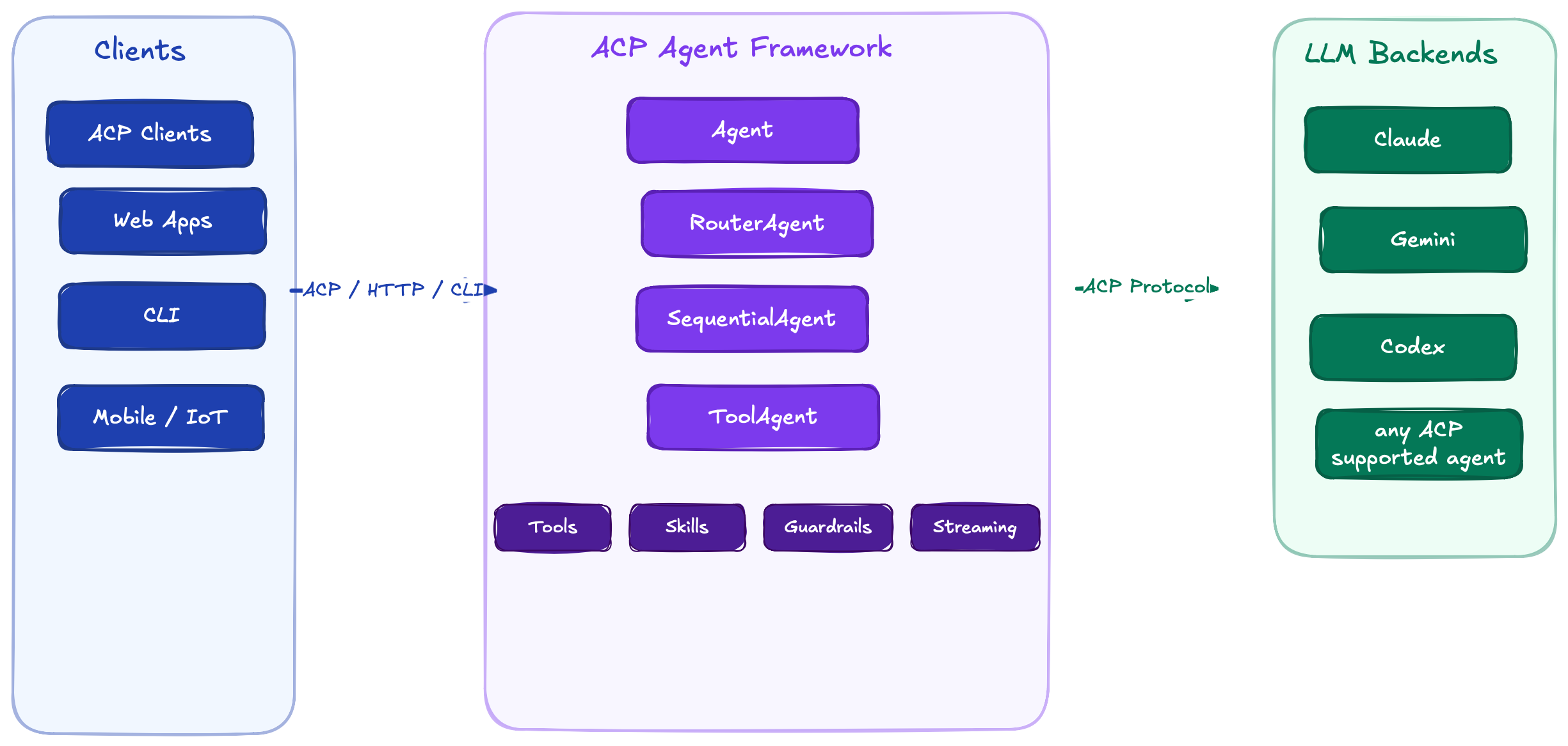
Why ACP?
| Traditional Agent Frameworks | ACP Agent Framework | |
|---|---|---|
| Auth | Manage API keys per provider | Use your existing AI subscriptions |
| Protocol | Proprietary APIs, custom integrations | Open standard (ACP) — works with any ACP client |
| Lock-in | Tied to one LLM provider | Swap backends with one line: backend="gemini" |
Features
| Feature | Description |
|---|---|
| Multi-Backend | Claude, Gemini, Codex — swap with a single parameter |
| Agent Orchestration | Sequential pipelines, keyword routing, agent-to-agent delegation |
| Tool Calling | Wrap any Python function as an MCP tool the LLM can invoke |
| Streaming | Real-time token-by-token output via async generators |
| Multi-Turn | Conversation history maintained across prompts |
| Guardrails | Input/output validation hooks — redact PII, block injections |
| Skills | Load reusable agent capabilities per agentskills.io spec |
| Serving | ACP stdio (editors), HTTP/SSE (web apps), CLI |
| State Persistence | JsonSessionStore utility to save/restore session state as JSON |
| Session-Scoped Backends | Backend processes spawn once per session and stay warm across turns |
Install
pip install acp-agent-framework
For development:
git clone https://github.com/sanjay3290/agentic-framework-acp.git
cd agentic-framework-acp
pip install -e ".[dev]"
Quick Start
Simple Agent
from acp_agent_framework import Agent, serve

agent = Agent(
    name="assistant",
    backend="claude",  # or "gemini" or "codex"
    instruction="You are a helpful coding assistant.",
)

serve(agent)  # Serves over ACP stdio
Sequential Pipeline
Chain agents — each one's output feeds into the next:

from acp_agent_framework import Agent, SequentialAgent, serve

researcher = Agent(
    name="researcher",
    backend="claude",
    instruction="Research the given topic thoroughly.",
    output_key="research",
)

summarizer = Agent(
    name="summarizer",
    backend="claude",
    instruction=lambda ctx: f"Summarize:\n\n{ctx.state.get('research', '')}",
)

pipeline = SequentialAgent(name="research-pipeline", agents=[researcher, summarizer])
serve(pipeline)
Router Agent
Route requests to specialists based on keywords:
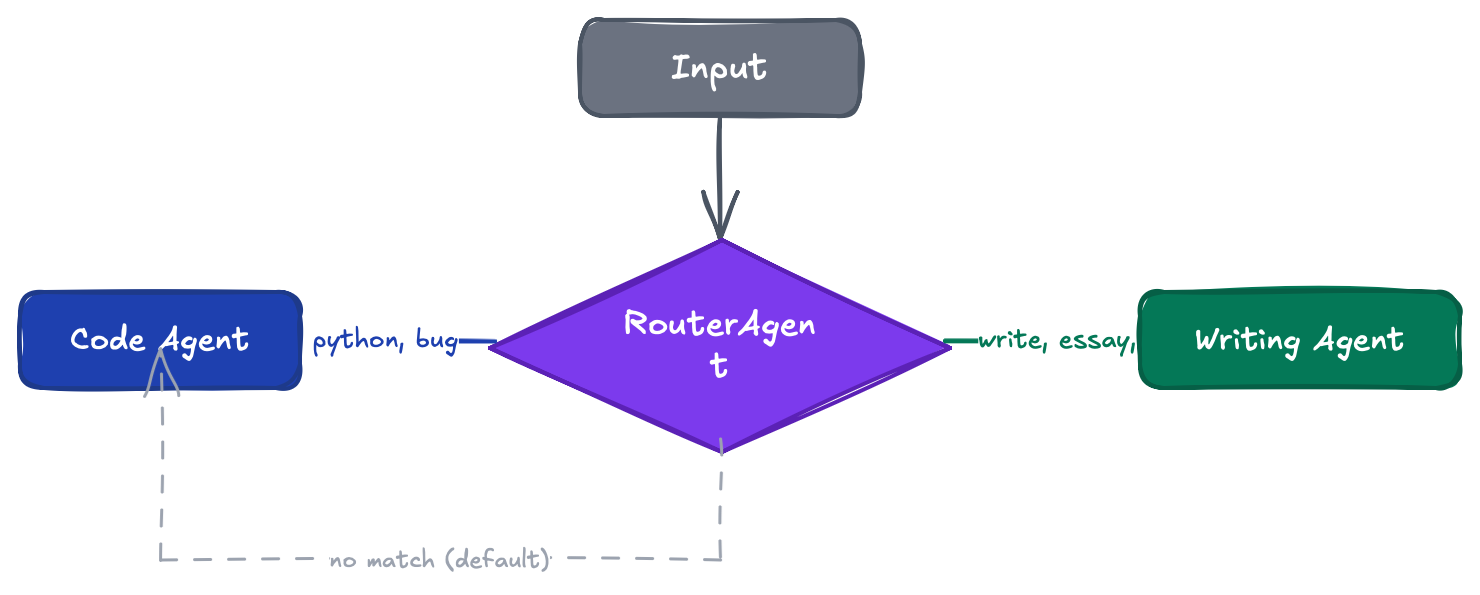
from acp_agent_framework import Agent, Route, RouterAgent, serve

code_agent = Agent(name="coder", backend="claude", instruction="Help with code.")
writing_agent = Agent(name="writer", backend="gemini", instruction="Help with writing.")

router = RouterAgent(
    name="smart-router",
    routes=[
        Route(keywords=["code", "python", "bug"], agent=code_agent),
        Route(keywords=["write", "essay", "email"], agent=writing_agent),
    ],
    default_agent=code_agent,
)

serve(router)
Custom Tools
Wrap Python functions as tools the LLM can invoke via MCP:
from acp_agent_framework import Agent, FunctionTool, serve

def search_docs(query: str) -> str:
    """Search documentation for a query."""
    return f"Results for: {query}"

agent = Agent(
    name="tool-agent",
    backend="claude",
    instruction="Use tools to help the user.",
    tools=[FunctionTool(search_docs)],
)

serve(agent)
Tools are bridged to the backend via MCP — each
FunctionToolis exposed as an MCP tool that the LLM can call during inference.
ToolAgent (No LLM Needed)
For deterministic workflows and data pipelines:
from acp_agent_framework import ToolAgent, FunctionTool, Context

async def build_report(ctx, tools):
    data = tools["fetch_data"].run({"source": "api"})
    return tools["format_report"].run({"data": data})

agent = ToolAgent(
    name="reporter",
    tools=[FunctionTool(fetch_data), FunctionTool(format_report)],
    execute=build_report,
    output_key="report",
)
Guardrails
Validate and transform inputs/outputs:
from acp_agent_framework import Agent, Guardrail, serve

agent = Agent(
    name="safe-agent",
    backend="claude",
    instruction="Be helpful.",
    input_guardrails=[
        Guardrail("pii-redact", lambda t: t.replace("SSN: 123-45-6789", "SSN: [REDACTED]")),
    ],
    output_guardrails=[
        Guardrail("length-limit", lambda t: t[:500] + "..." if len(t) > 500 else t),
    ],
)
Agent Skills
Load reusable capabilities per the agentskills.io spec:
agent = Agent(
    name="chat-agent",
    backend="claude",
    instruction="You are a helpful assistant.",
    skills=["google-chat"],  # loads from .agents/skills/google-chat/SKILL.md
)
Streaming
Real-time token-by-token output:
agent = Agent(name="storyteller", backend="gemini", instruction="Write stories.", stream=True)

async for event in agent.run(ctx):
    if event.type == "stream_chunk":
        print(event.content, end="", flush=True)
Agent-to-Agent Delegation
Wrap any agent as a tool for another agent:
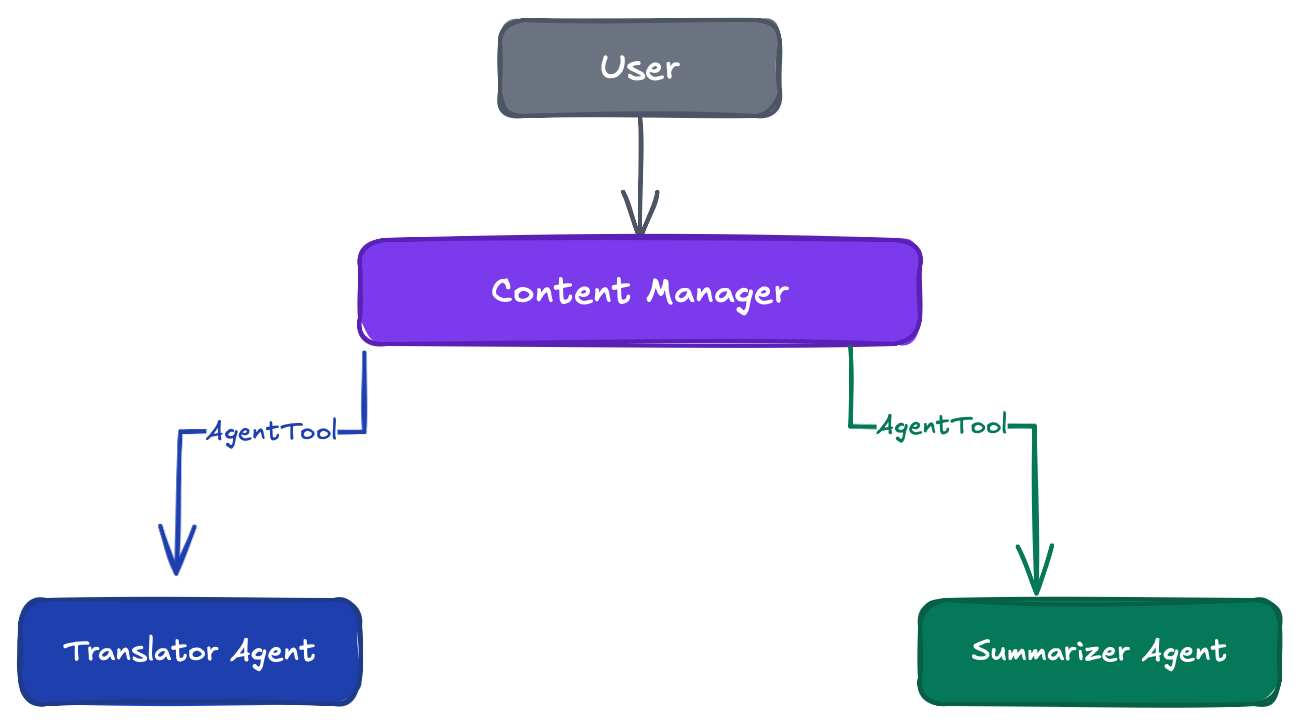
from acp_agent_framework import Agent, AgentTool, serve

translator = Agent(name="translator", backend="gemini", instruction="Translate text.")
summarizer = Agent(name="summarizer", backend="claude", instruction="Summarize text.")

manager = Agent(
    name="content-manager",
    backend="claude",
    instruction="Use translator and summarizer tools to help the user.",
    tools=[AgentTool(translator, cwd="."), AgentTool(summarizer, cwd=".")],
)

serve(manager)
Serving Agents
| Transport | Use Case | Command |
|---|---|---|
| ACP stdio | ACP-compatible clients | serve(agent) |
| HTTP/SSE | Web apps, APIs | serve(agent, transport="http", port=8000) |
| CLI | Terminal | acp-agent run module:agent |
HTTP Endpoints
| Method | Endpoint | Description |
|---|---|---|
POST |
/api/sessions |
Create session |
GET |
/api/sessions/{id} |
Get session info |
DELETE |
/api/sessions/{id} |
Delete session |
POST |
/api/sessions/{id}/prompt |
Prompt with SSE streaming |
CLI
acp-agent init my-agent                            # Scaffold a new project
acp-agent run my_agent.agent:agent                 # Run over ACP stdio
acp-agent run my_agent.agent:agent -t http -p 8000 # Run as HTTP server
Supported Backends
| Backend | Command | Install |
|---|---|---|
| Claude | claude-agent-acp |
npm i -g @agentclientprotocol/claude-agent-acp |
| Gemini | gemini --acp |
npm i -g @google/gemini-cli |
| Codex | codex-acp |
npm i -g @agentclientprotocol/codex-acp |
| GitHub Copilot | copilot --acp |
npm i -g @github/copilot |
| OpenCode | opencode acp |
npm i -g opencode-ai |
| Goose | goose acp |
block.github.io/goose |
| Qwen Code | qwen --acp |
npm i -g @qwen-code/qwen-code |
| Cursor | cursor-agent acp |
cursor.com/cli |
| Grok Build | grok agent stdio |
npm i -g @xai-official/grok |
| Cline | cline --acp |
npm i -g cline |
| Auggie | auggie --acp |
npm i -g @augmentcode/auggie |
| Kilo | kilo acp |
npm i -g @kilocode/cli |
| Devin | devin acp |
devin.ai |
| Kimi CLI | kimi acp |
kimi.com |
Any other agent from the ACP Registry can be used by registering its launch command.
Register custom backends:
from acp_agent_framework import BackendConfig, BackendRegistry

registry = BackendRegistry()
registry.register("my-backend", BackendConfig(
    command="my-agent-binary",
    args=["--acp"],
))
Architecture
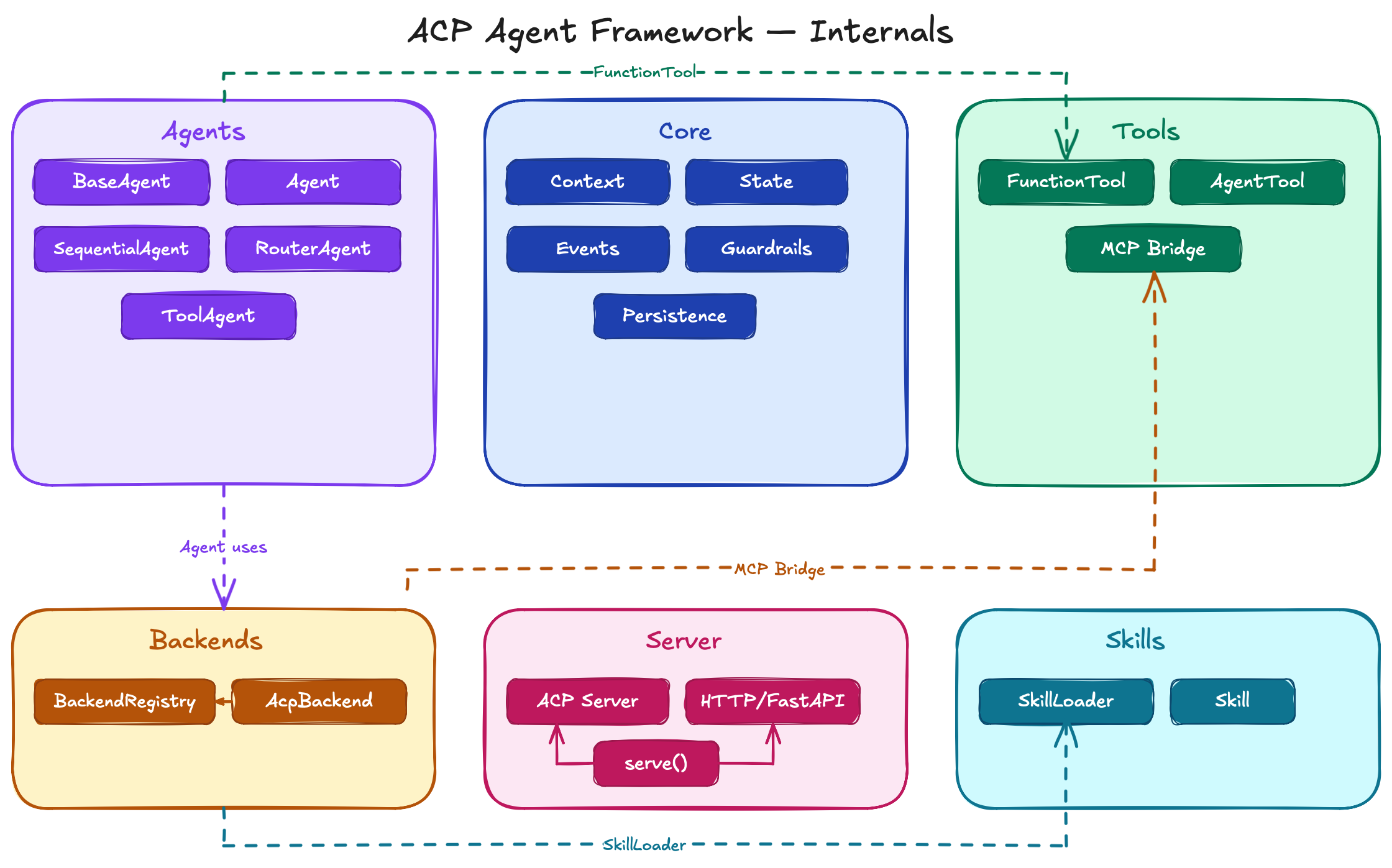
Testing
# Unit tests (174 tests)
pytest tests/ -v

# Integration tests (requires backends installed)
pytest tests/ -v -m integration

# Lint
ruff check src/ tests/
Examples
Check the examples/ directory for complete working agents:
| Example | Description |
|---|---|
simple_agent |
Minimal agent with a single backend |
function_tools |
Weather, calculator, and unit converter tools |
tool_agent |
Hacker News digest without an LLM |
guardrails |
PII redaction and injection blocking |
streaming |
Real-time token streaming |
multi_turn |
Conversational agent with history |
router_agent |
Keyword-based routing |
sequential_pipeline |
Multi-step agent chain |
agent_to_agent |
Manager delegating to specialists |
Contributing
See CONTRIBUTING.md for development setup and guidelines.
License
1 maintainer

Metadata
1 maintainer
Release files for acp-agent-framework 0.2.0
For a detailed explanation of source distributions (sdists) and built distributions (wheels), please see the package formats documentation.
Source distribution (sdist)
| File | Size | Uploaded | |
|---|---|---|---|
| acp_agent_framework-0.2.0.tar.gz | 996.2 kB | Details |
Built distribution (wheel)
| File | Interpreter | ABI | Platform | Reset |
|---|---|---|---|---|
| acp_agent_framework-0.2.0-py3-none-any.whl | Python 3 | none | any | Details |
Total release size: 1.0 MB
Release files / acp_agent_framework-0.2.0.tar.gz
| Download URL | acp_agent_framework-0.2.0.tar.gz |
|---|---|
| Size | 996.2 kB |
| Tags | Source |
|
SHA-256 checksum How to use checksums |
fb4beaba7ce9221de55f329959362f1534f22f90ef6b806c71619eb7872ad9b5
|
|
BLAKE2b-256 checksum How to use checksums |
9b50b6525b347c2af83f3ce168441e701856b443cc98274f8ab5adb6b35a1f28
|
| Upload date | |
|
Uploaded using Trusted Publishing? What is trusted publishing? |
Yes |
| Uploaded via |
twine/6.1.0 CPython/3.13.12
|
Provenance
Provenance describes where a file came from. On PyPI, provenance is shared via attestations, which provide a verifiable record of the build or publishing details. View details, limitations and caveats.


PyPI Publish Attestation
PyPI verified that this artifact, at this checksum, originated from the publisher listed below.
Signed by GitHub Actions, verified by PyPI on Jul 14, 2026.
Transparency logRelease files / acp_agent_framework-0.2.0-py3-none-any.whl
| Download URL | acp_agent_framework-0.2.0-py3-none-any.whl |
|---|---|
| Size | 39.3 kB |
| Tags | Python 3 |
|
SHA-256 checksum How to use checksums |
08b4ad82bc8d05d5d913af999517c7b20cb05845a6b913b9d92a9f25c6d57b7d
|
|
BLAKE2b-256 checksum How to use checksums |
c70445b8f8c3591bf83036f4b73394aaf9bbdb50615e1bbf3a1fa03e48cf5af1
|
| Upload date | |
|
Uploaded using Trusted Publishing? What is trusted publishing? |
Yes |
| Uploaded via |
twine/6.1.0 CPython/3.13.12
|
Provenance
Provenance describes where a file came from. On PyPI, provenance is shared via attestations, which provide a verifiable record of the build or publishing details. View details, limitations and caveats.
PyPI Publish Attestation
PyPI verified that this artifact, at this checksum, originated from the publisher listed below.
Signed by GitHub Actions, verified by PyPI on Jul 14, 2026.
Transparency log













