
acptui



















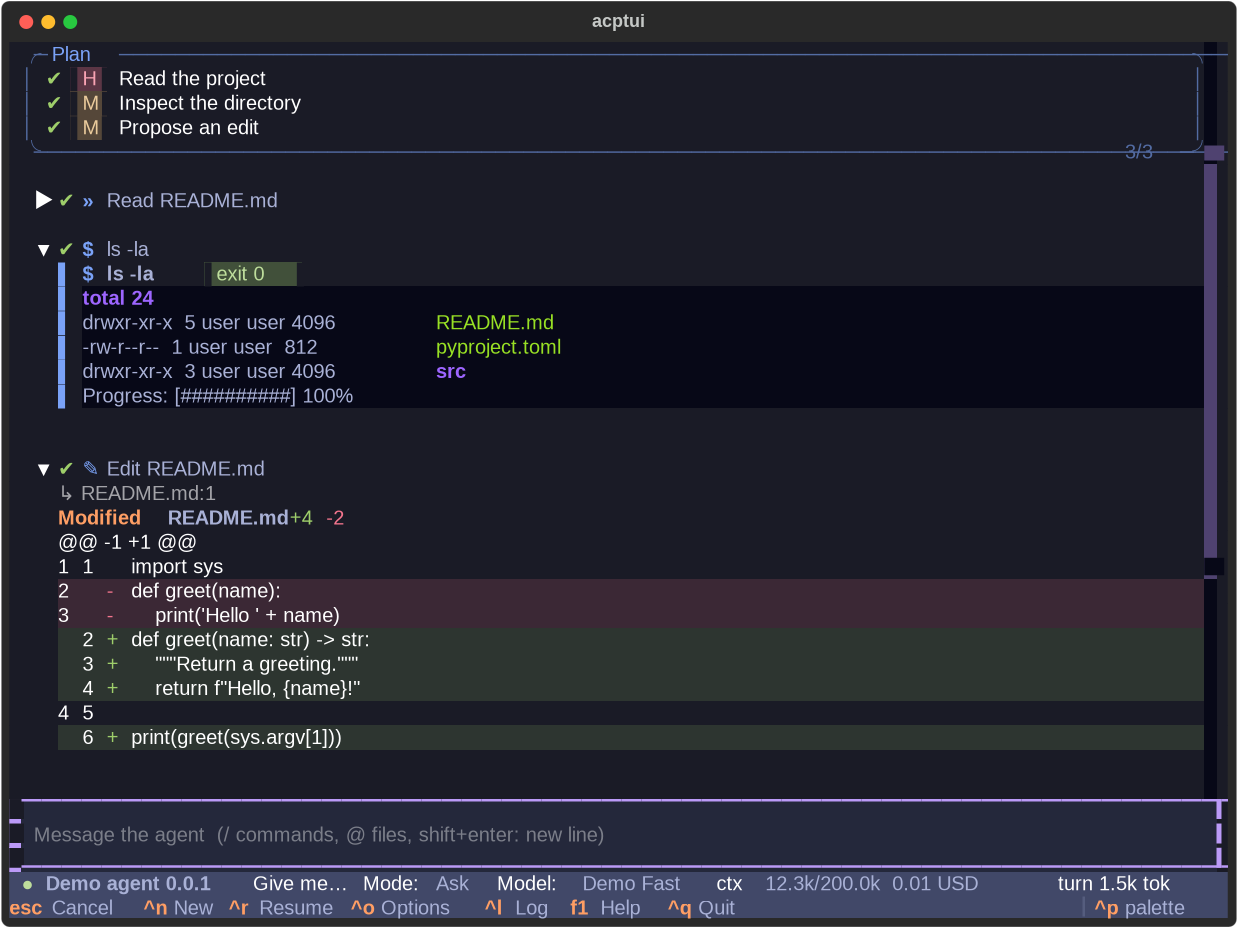
acptui is a terminal UI for AI coding agents that speak the Agent Client Protocol (ACP), built on the draft ACP v2 and nothing else. Talk to Claude Code, Codex or any other v2 agent in your terminal: streaming Markdown, tool calls with diffs and live terminals, permission prompts, plans, subagents, forms the agent asks you to fill in, session history, modes and models.
The protocol layer is aclientp's typed v2 client; the UI is Textual. In spirit it is close to toad; see differences.
Install
uv tool install acptui     # or: pipx install acptui
acptui                     # pick an agent
acptui run demo            # the bundled demo agent: no LLM, no API key
Python 3.13+.
Usage
acptui                                   # agent picker (or `default_agent` from the config)
acptui run claude                        # an agent from the registry
acptui run -- my-agent --acp             # any command that speaks ACP v2 on stdio
acptui connect https://host/acp -H "Authorization: Bearer ${TOKEN}"   # Streamable HTTP
acptui connect wss://host/acp            # WebSocket
acptui run codex --resume SESSION_ID     # resume a session (with history replay)
acptui -o model=opus -o mode=plan run claude   # initial session options
acptui --add-dir ../lib --system-prompt "Be terse." run codex
acptui options codex                     # print an agent's options and commands
acptui agents                            # the registry and what is installed
In the app: enter sends, shift+enter / ctrl+j adds a line, / completes the
agent's commands, @ completes file paths (the files are attached), escape
cancels the turn, shift+tab switches the mode, ctrl+o shows mode / model /
other options, ctrl+n / ctrl+r / ctrl+f start, resume and fork sessions,
ctrl+l shows the agent's stderr and the protocol traffic, ctrl+p opens the
command palette (login, providers, everything else) and f1 the help.
Supported agents
ACP v2 is a draft; agents get v2 support one by one. acptui negotiates the version in
initialize and stops with a clear message if the agent answers with another one.
| id | Agent | Command | ACP v2 |
|---|---|---|---|
claude |
Claude Code | claude-agent-acp |
yes (0.108+) |
codex |
Codex | codex-acp |
yes (2.7+) |
gemini |
Gemini CLI | gemini --experimental-acp |
not yet |
opencode |
OpenCode | opencode acp |
not yet (v1) |
agentpool |
AgentPool | agentpool serve-acp |
yes (2.11+) |
demo |
Demo agent | python -m acptui.demo |
yes |
Add your own agents (or override these) in config.toml in the platform config
directory (acptui config prints the path):
default_agent = "codex"
theme = "tokyo-night"
diff_view = "auto"                 # unified, split or auto
system_prompt = "Prefer small commits."
additional_directories = ["~/src/shared"]

[agents.my-agent]
name = "My agent"
command = ["my-agent", "--acp"]
env = { MY_FLAG = "1" }

[agents.remote]
url = "https://example.com/acp"
headers = { Authorization = "Bearer ${MY_TOKEN}" }

[agent_options.claude]             # initial session config options
model = "opus"

[[mcp_servers]]                    # passed to every session (stdio or http)
name = "docs"
command = "docs-mcp"
ACP v2 coverage
acptui implements the whole client side of ACP v2 (schema v2.0.0-beta.3): every
session update kind, all content blocks (text, images, audio, resource links,
embedded resources, skills), tool calls with diffs and agent-owned terminals,
permissions, form and URL elicitation, plans, config options (modes, models),
commands and skills, sessions (new, list, resume with replay, fork at cursors,
close, delete, archive, status, options, title), subagent sessions and messages
between sessions, auth (agent and terminal login, logout, status), LLM providers,
prompt suggestions, compactions, background work, usage and cost, MCP servers,
system prompts, additional directories and cancellation. The
coverage table maps each spec item
to the code and the test.
v2 moved file system access and command execution to the agent: there are no
fs/* or client-side terminal/* methods in v2. Terminals are agent-owned and
display-only; acptui renders them live and can cancel them.
Differences from toad
- ACP v2 only, through aclientp's typed models end to end (toad speaks v1 with hand-written dicts). No v1 fallback.
- The full v2 client surface: subagents, elicitation, cursors and forking, providers, auth status, session archive / delete / status, prompt suggestions, compactions.
- Type safe:
tyreports nothing, no untyped code paths. - Smaller: no shell mode, no agent store, no web serving. A built-in demo agent shows every feature without an API key.
License
AGPL-3.0-or-later, like toad. Some UI pieces are adapted from toad (Copyright (c) Will McGugan, AGPL-3.0); see NOTICE.
1 maintainer

Metadata
1 maintainer
Release files for acptui 0.1.2
For a detailed explanation of source distributions (sdists) and built distributions (wheels), please see the package formats documentation.
Source distribution (sdist)
| File | Size | Uploaded | Provenance | Actions |
|---|---|---|---|---|
| acptui-0.1.2.tar.gz | 96.7 kB | With provenance | Details for acptui-0.1.2.tar.gz |
Built distribution (wheel)
| File | Interpreter | ABI | Platform | Actions Reset |
|---|---|---|---|---|
| acptui-0.1.2-py3-none-any.whl | Python 3 | none | any | Details for acptui-0.1.2-py3-none-any.whl |
Total release size: 204.2 kB
Release files / acptui-0.1.2.tar.gz
| Download URL | acptui-0.1.2.tar.gz |
|---|---|
| Size | 96.7 kB |
| Tags | Source |
|
SHA-256 checksum How to use checksums |
56a935e7193304e2613689cfa7742cb6f2d741312a2ebbd553454a7394c33299
|
|
BLAKE2b-256 checksum How to use checksums |
91ac8fda9c023f766b151b47aeb81c72460b7c4c42053be41f9fdbd090a655ac
|
| Upload date | |
|
Uploaded using Trusted Publishing? What is trusted publishing? |
Yes |
| Uploaded via |
twine/7.0.0 CPython/3.13.16
|
Provenance
Provenance describes where a file came from. On PyPI, provenance is shared via attestations, which provide a verifiable record of the build or publishing details. View details, limitations and caveats.


PyPI Publish Attestation
PyPI verified that this artifact, at this checksum, originated from the publisher listed below.
Signed by GitHub Actions, verified by PyPI on Nov 23, 2026.
Transparency logRelease files / acptui-0.1.2-py3-none-any.whl
| Download URL | acptui-0.1.2-py3-none-any.whl |
|---|---|
| Size | 107.5 kB |
| Tags | Python 3 |
|
SHA-256 checksum How to use checksums |
c3b4e9ff3ec007edca59868b3e487a3d55d9113671fda3cd2f552836e70ff522
|
|
BLAKE2b-256 checksum How to use checksums |
cd98129e4c31f03fbe10c4191d591ba527a5d3adfff6cb7747e6436a1e853d83
|
| Upload date | |
|
Uploaded using Trusted Publishing? What is trusted publishing? |
Yes |
| Uploaded via |
twine/7.0.0 CPython/3.13.16
|
Provenance
Provenance describes where a file came from. On PyPI, provenance is shared via attestations, which provide a verifiable record of the build or publishing details. View details, limitations and caveats.
PyPI Publish Attestation
PyPI verified that this artifact, at this checksum, originated from the publisher listed below.
Signed by GitHub Actions, verified by PyPI on Nov 23, 2026.
Transparency logSecurity for acptui 0.1.2
Provenance
Provenance describes where a file came from. On PyPI, provenance is shared via attestations, which provide a verifiable record of the build or publishing details. View details, limitations and caveats.
Full provenance
Both files in this release have been uploaded with provenance metadata.
Attestation for acptui-0.1.2.tar.gz
PyPI Publish Attestation
PyPI verified that this artifact, at this checksum, originated from the publisher listed below.
Signed by GitHub Actions, verified by PyPI on Nov 23, 2026.
Transparency logA note on package security
PyPI is a repository for distributing packages, not a service for auditing them. While third-party security researchers and our staff do their best to detect and remove malicious packages, PyPI cannot guarantee the quality, security or suitability of any given package.
To learn more about protecting yourself from malicious actors, visit our package security documentation.














