
Official ActivitySmith Python SDK
Verified details
These details have been verified by PyPIProject links
GitHub Statistics
Maintainers

Project description
ActivitySmith Python Library
The ActivitySmith Python library provides convenient access to the ActivitySmith API from Python applications.
Documentation
See the API reference.
Installation
This package is available on PyPI:
pip install activitysmith
Alternatively, install from source with:
python -m pip install .
Setup
import os
from activitysmith import ActivitySmith

activitysmith = ActivitySmith(
    api_key=os.environ["ACTIVITYSMITH_API_KEY"],
)
Usage
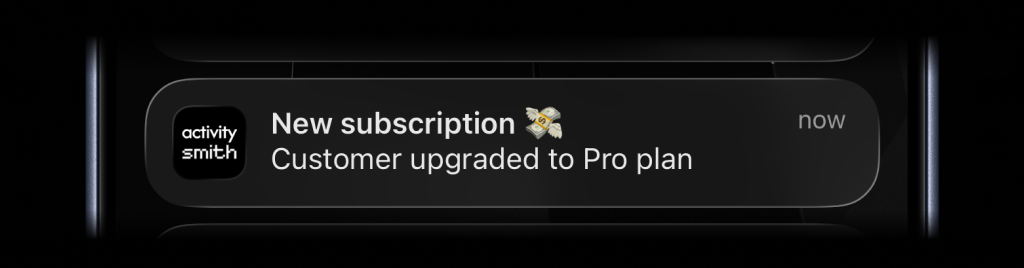
Send a Push Notification
response = activitysmith.notifications.send(
    {
        "title": "New subscription 💸",
        "message": "Customer upgraded to Pro plan",
    }
)

print(response.success)
print(response.devices_notified)
Live Activities
Live Activities come in two UI types, but the lifecycle stays the same:
start the activity, keep the returned activity_id, update it as state
changes, then end it when the work is done.
segmented_progress: best for jobs tracked in stepsprogress: best for jobs tracked as a percentage or numeric range
Shared flow
- Call
activitysmith.live_activities.start(...). - Save the returned
activity_id. - Call
activitysmith.live_activities.update(...)as progress changes. - Call
activitysmith.live_activities.end(...)when the work is finished.
Segmented Progress Type
Use segmented_progress when progress is easier to follow as steps instead of a
raw percentage. It fits jobs like backups, deployments, ETL pipelines, and
checklists where "step 2 of 3" is more useful than "67%".
number_of_steps is dynamic, so you can increase or decrease it later if the
workflow changes.
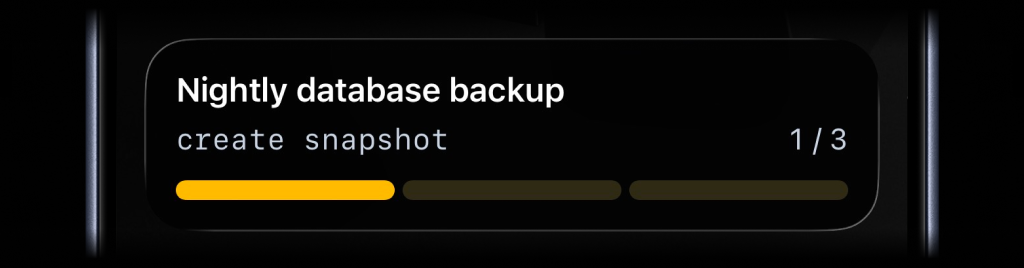
Start
start = activitysmith.live_activities.start(
    {
        "content_state": {
            "title": "Nightly database backup",
            "subtitle": "create snapshot",
            "number_of_steps": 3,
            "current_step": 1,
            "type": "segmented_progress",
            "color": "yellow",
        },
        "channels": ["devs", "ops"],  # Optional
    }
)

activity_id = start.activity_id
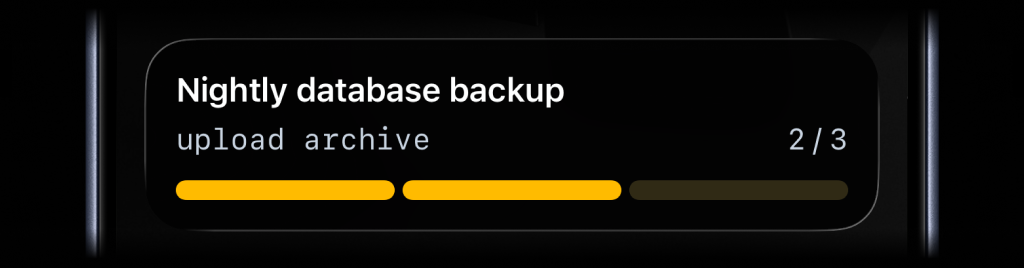
Update
update = activitysmith.live_activities.update(
    {
        "activity_id": activity_id,
        "content_state": {
            "title": "Nightly database backup",
            "subtitle": "upload archive",
            "number_of_steps": 4,
            "current_step": 2,
        }
    }
)

print(update.devices_notified)
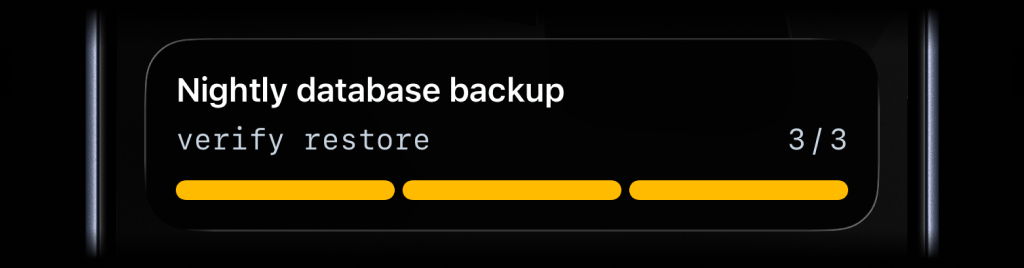
End
end = activitysmith.live_activities.end(
    {
        "activity_id": activity_id,
        "content_state": {
            "title": "Nightly database backup",
            "subtitle": "verify restore",
            "number_of_steps": 4,
            "current_step": 4,
            "auto_dismiss_minutes": 2,
        }
    }
)

print(end.success)
Progress Type
Use progress when the state is naturally continuous. It fits charging,
downloads, sync jobs, uploads, timers, and any flow where a percentage or
numeric range is the clearest signal.
Start
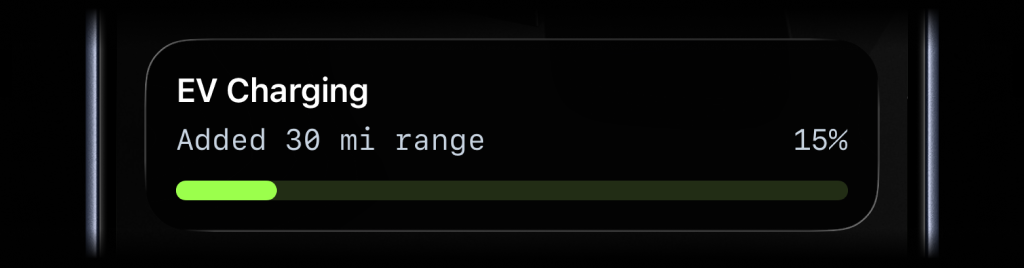
start = activitysmith.live_activities.start(
    {
        "content_state": {
            "title": "EV Charging",
            "subtitle": "Added 30 mi range",
            "type": "progress",
            "percentage": 15,
            "color": "lime",
        }
    }
)

activity_id = start.activity_id
Update
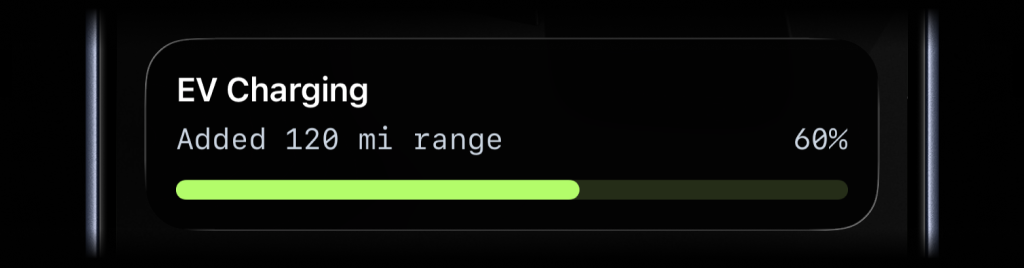
activitysmith.live_activities.update(
    {
        "activity_id": activity_id,
        "content_state": {
            "title": "EV Charging",
            "subtitle": "Added 120 mi range",
            "percentage": 60,
        }
    }
)
End
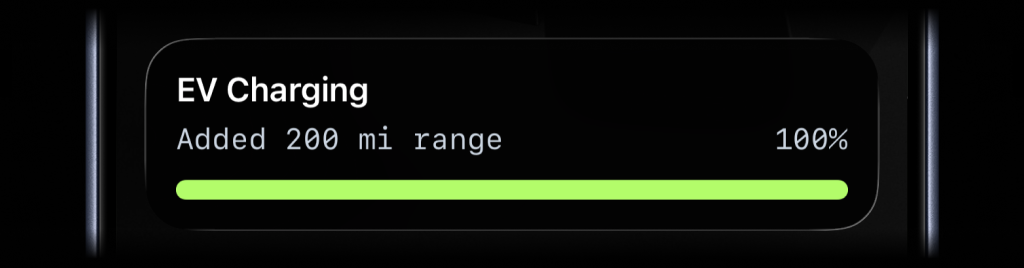
activitysmith.live_activities.end(
    {
        "activity_id": activity_id,
        "content_state": {
            "title": "EV Charging",
            "subtitle": "Added 200 mi range",
            "percentage": 100,
            "auto_dismiss_minutes": 2,
        }
    }
)
Channels
Channels are used to target specific team members or devices. Can be used for both push notifications and live activities.
response = activitysmith.notifications.send(
    {
        "title": "New subscription 💸",
        "message": "Customer upgraded to Pro plan",
        "channels": ["sales", "customer-success"],  # Optional
    }
)
Push Notification Redirection and Actions
Push notification redirection and actions are optional and can be used to redirect the user to a specific URL when they tap the notification or to trigger a specific action when they long-press the notification. Webhooks are executed by ActivitySmith backend.
response = activitysmith.notifications.send(
    {
        "title": "New subscription 💸",
        "message": "Customer upgraded to Pro plan",
        "redirection": "https://crm.example.com/customers/cus_9f3a1d",  # Optional
        "actions": [  # Optional (max 4)
            {
                "title": "Open CRM Profile",
                "type": "open_url",
                "url": "https://crm.example.com/customers/cus_9f3a1d",
            },
            {
                "title": "Start Onboarding Workflow",
                "type": "webhook",
                "url": "https://hooks.example.com/activitysmith/onboarding/start",
                "method": "POST",
                "body": {
                    "customer_id": "cus_9f3a1d",
                    "plan": "pro",
                },
            },
        ],
    }
)
Error Handling
try:
    activitysmith.notifications.send(
        {
            "title": "New subscription 💸",
        }
    )
except Exception as err:
    print("Request failed:", err)
Request/response models are included and can be imported from activitysmith_openapi.models.
Requirements
- Python 3.9 or newer
License
MIT
Project details
Verified details
These details have been verified by PyPIProject links
GitHub Statistics
Maintainers
Release history Release notifications | RSS feed


Download files
Download the file for your platform. If you're not sure which to choose, learn more about installing packages.
Source Distribution
Built Distribution
Filter files by name, interpreter, ABI, and platform.
If you're not sure about the file name format, learn more about wheel file names.
Copy a direct link to the current filters
File details
Details for the file activitysmith-0.1.7.tar.gz.
File metadata
- Download URL: activitysmith-0.1.7.tar.gz
- Upload date:
- Size: 33.2 kB
- Tags: Source
- Uploaded using Trusted Publishing? Yes
- Uploaded via: twine/6.1.0 CPython/3.13.7
File hashes
| Algorithm | Hash digest | |
|---|---|---|
| SHA256 |
b2ec964ee83df5c514156808b356a46292c24051f6e80fe0d1a940167ea0504b
|
|
| MD5 |
8a106cbcc1f5db0e651582e32f934153
|
|
| BLAKE2b-256 |
1c8d2ed7dae6cbb2dd7c50fb52fe4e21428446d622598beaf4f13b6716cbfdab
|
Provenance
The following attestation bundles were made for activitysmith-0.1.7.tar.gz:
Publisher:
publish.yml on ActivitySmithHQ/activitysmith-python
-
Statement:
-
Statement type:
https://in-toto.io/Statement/v1 -
Predicate type:
https://docs.pypi.org/attestations/publish/v1 -
Subject name:
activitysmith-0.1.7.tar.gz -
Subject digest:
b2ec964ee83df5c514156808b356a46292c24051f6e80fe0d1a940167ea0504b - Sigstore transparency entry: 1076752472
- Sigstore integration time:
-
Permalink:
ActivitySmithHQ/activitysmith-python@d1c559a7990d73d3f13ff6edf442c30fc8065d4b -
Branch / Tag:
refs/tags/v0.1.7 - Owner: https://github.com/ActivitySmithHQ
-
Access:
public
-
Token Issuer:
https://token.actions.githubusercontent.com -
Runner Environment:
github-hosted -
Publication workflow:
publish.yml@d1c559a7990d73d3f13ff6edf442c30fc8065d4b -
Trigger Event:
push
-
Statement type:
File details
Details for the file activitysmith-0.1.7-py3-none-any.whl.
File metadata
- Download URL: activitysmith-0.1.7-py3-none-any.whl
- Upload date:
- Size: 82.8 kB
- Tags: Python 3
- Uploaded using Trusted Publishing? Yes
- Uploaded via: twine/6.1.0 CPython/3.13.7
File hashes
| Algorithm | Hash digest | |
|---|---|---|
| SHA256 |
b8b285b6b8285d62d590f9f7593d08451f2ee58e3efba114da6866993f64d5db
|
|
| MD5 |
f017285df024e99f01858850c6ae8a7a
|
|
| BLAKE2b-256 |
dc7ecf82b4423f2df7e404ad6d7e0f635497e542fa737b6ea82f6e726fdd9dec
|
Provenance
The following attestation bundles were made for activitysmith-0.1.7-py3-none-any.whl:
Publisher:
publish.yml on ActivitySmithHQ/activitysmith-python
-
Statement:
-
Statement type:
https://in-toto.io/Statement/v1 -
Predicate type:
https://docs.pypi.org/attestations/publish/v1 -
Subject name:
activitysmith-0.1.7-py3-none-any.whl -
Subject digest:
b8b285b6b8285d62d590f9f7593d08451f2ee58e3efba114da6866993f64d5db - Sigstore transparency entry: 1076752485
- Sigstore integration time:
-
Permalink:
ActivitySmithHQ/activitysmith-python@d1c559a7990d73d3f13ff6edf442c30fc8065d4b -
Branch / Tag:
refs/tags/v0.1.7 - Owner: https://github.com/ActivitySmithHQ
-
Access:
public
-
Token Issuer:
https://token.actions.githubusercontent.com -
Runner Environment:
github-hosted -
Publication workflow:
publish.yml@d1c559a7990d73d3f13ff6edf442c30fc8065d4b -
Trigger Event:
push
-
Statement type:






