






VERification Of Neural Architectures (VERONA)
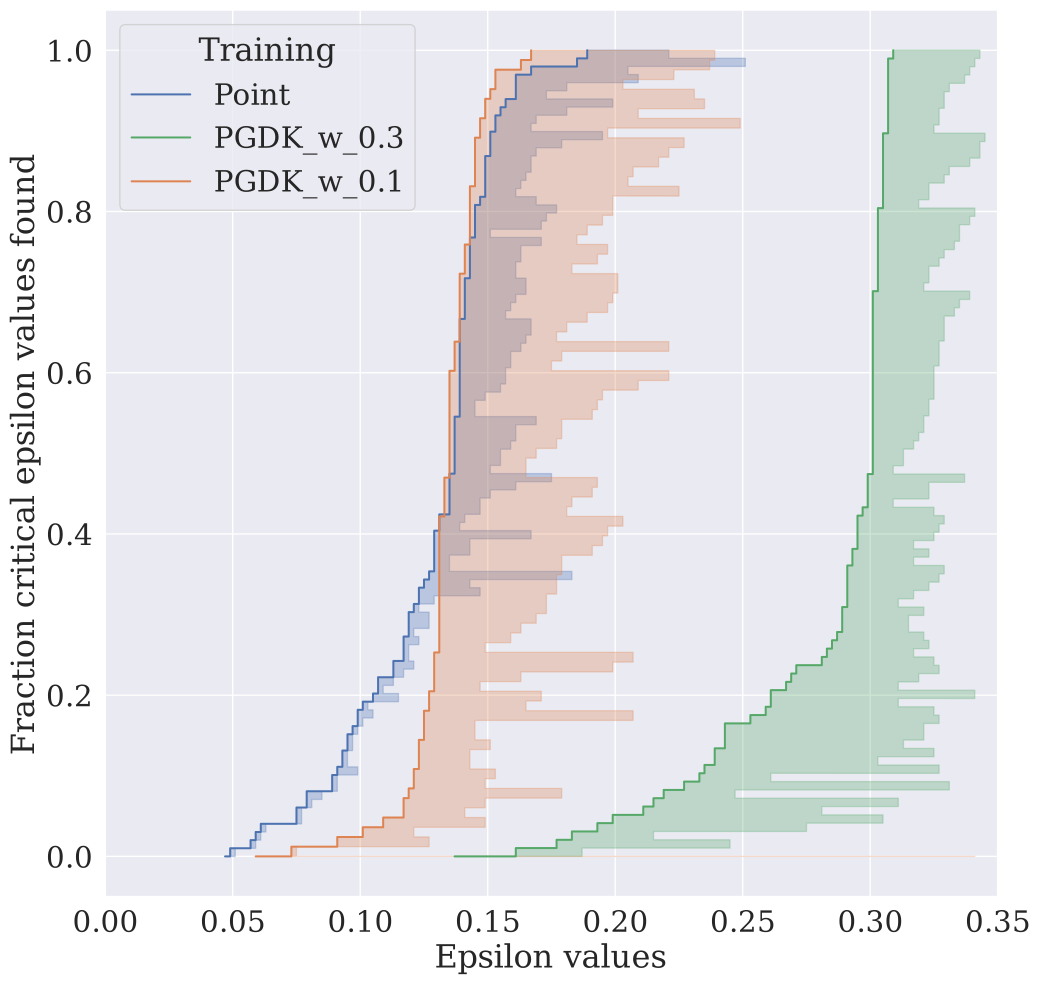
VERONA simplifies your experiment pipeline for performing local robustness verification on your networks and datasets. VERONA is class-based, which means that extending the existing configurations is accessible and easy. With one script it is possible to run an entire experiment with various networks, images and perturbation magnitudes (epsilons).
Example use cases of the VERONA package include creating robustness distributions Bosman, Berger, Hoos and van Rijn, 2025, empirically measuring robustness of networks using adversarial attacks and verifying networks with formal verification tools using the external auto-verify package.
Authors
This package was created and is maintained by members the ADA Research Group, which focuses on the development of AI techniques that complement human intelligence and automated algorithm design. The current core team includes:
- Annelot Bosman (LIACS, Leiden University)
- Aaron Berger (TU Delft)
- Hendrik Baacke (AIM, RWTH Aachen University)
- Holger H. Hoos (AIM, RWTH Aachen University)
- Jan van Rijn (LIACS, Leiden University)
Installation and Environment Setup
We recommend to have a look at the Documentation.
Create Virtual Environment and install ada-verona
The python package for VERONA is called ada-verona, as our research group is called ADA.
To run ada-verona, we recommend to set up a conda environment. We also recommend using miniforge as the package manager and using uv for dependency management.
Create a new conda environment named verona_env:
conda create -n verona_env python=3.10
conda activate verona_env
Installing the package
Inside the conda environment, install the ada-verona package:
uv pip install ada-verona
GPU-version Installation
Note that the default installation is CPU-only, and that we recommend to install the GPU version for full functionality, as, e.g. AB-CROWN, heavily relies on GPU parallelization for practical performance. The package resolver will automatically resolve the correct version of the package for your system, depending on whether you have a GPU available, but you can also explicitly install the GPU version with the following command:
uv pip install ada-verona[gpu]
Local installation
If you want to install ada-verona locally using git:
git clone https://github.com/ADA-research/VERONA.git
cd VERONA
uv pip install -e .
uv pip install -e .[dev]  # to include development dependencies
Optional: AutoAttack Installation
To use the AutoAttack adversarial attack wrapper (AutoAttackWrapper), you need to install AutoAttack from its GitHub repository:
uv pip install git+https://github.com/fra31/auto-attack
This package provides ensemble-based adversarial attacks for robustness evaluation, as described in the paper by Croce and Hein (2020).
Optional: AutoVerify Installation
To use the auto-verify verifiers, you need to additionally install auto-verify:
Note: On macOS (and sometimes on Linux), you may need to install swig first with conda install -c conda-forge swig.
uv pip install auto-verify>=0.1.4
This package provides a framework for integrating verifiers. Please refer to the auto-verify documentation for details about auto-verify.
Guides
To help you get up and running with ada-verona, we provide a tutorial notebook and a collection of example scripts in the folder examples :
-
Main Guide:
- The primary resource for learning how to use VERONA is the Jupyter notebook found in the
notebooksfolder. This tutorial notebook offers an overview of the package components, step-by-step instructions, and practical demonstrations of typical workflows. We highly recommend starting here to understand the core concepts and capabilities of the package.
- The primary resource for learning how to use VERONA is the Jupyter notebook found in the
-
Quick-Start Example Scripts:
- The
scriptsfolder contains a variety of example scripts designed to help you get started quickly with ada-verona. These scripts cover common use cases and can be run directly (from within thescriptsfolder) to see how to perform tasks such as:- Running VERONA with a custom dataset and ab-crown (
create_robustness_distribution_from_test_dataset.py). - Loading a PyTorch dataset and running VERONA with one-to-any or one-to-one verification (
create_robustness_dist_on_pytorch_dataset.py). - Distributing jobs across multiple nodes using SLURM for large-scale experiments (
multiple_jobsfolder), including distributing tasks over CPU and GPU for different verifiers in the same experiment. - Using auto-verify integration (
create_robustness_dist_with_auto_verify.py).
- Running VERONA with a custom dataset and ab-crown (
- The
The notebook is your main entry point for learning and understanding the package, while the scripts serve as practical templates and quick-start resources for your own experiments.
Datasets
The package was tested on the MNIST, GTRSB and the CIFAR-10 datasets. Example scripts for executing the package on MNIST or a custom dataset can be found in the scripts folder.
Related Papers and Citation
This package was created to simplify reproducing and extending the results of different lines of work of the ADA research group. For more information about the ADA research group, please refer to the official website.
Robustness distributions
Please cite this paper when you have used VERONA in your experiments:
@article{BosEtAl25,
author = {Annelot W Bosman, Aaron Berger, Holger H Hoos, Jan N van Rijn},
title = {Robustness Distributions in Neural Network Verification},
booktitle = {Journal of Artificial Intelligence Research}.
year = {2025}
}
Acknowledgements
This package makes use of the following tools and libraries:
-
AutoAttack (GitHub)
- F. Croce and M. Hein, "Mind the box: l_1 -APGD for sparse adversarial attacks on image classifiers," in International Conference on Machine Learning, PMLR, 2021, pp. 2201–2211. [Online]. Available: https://proceedings.mlr.press/v139/croce21a.html
- F. Croce and M. Hein, "Reliable evaluation of adversarial robustness with an ensemble of diverse parameter-free attacks," in International conference on machine learning, PMLR, 2020, pp. 2206–2216. [Online]. Available: https://proceedings.mlr.press/v119/croce20b.html
-
auto-verify (GitHub)
- For integrating verifiers nnenum, AB-Crown, VeriNet, and Oval-Bab. Please refer to the auto-verify documentation for details about auto-verify.
We thank the authors and maintainers of these projects, as well as the authors and maintainers of the verifiers for their contributions to the robustness research community.
4 maintainers


Metadata
4 maintainers
Release files for ada-verona 1.0.3
For a detailed explanation of source distributions (sdists) and built distributions (wheels), please see the package formats documentation.
Source distribution (sdist)
| File | Size | Uploaded | Provenance | Actions |
|---|---|---|---|---|
| ada_verona-1.0.3.tar.gz | 114.5 kB | Without provenance | Details for ada_verona-1.0.3.tar.gz |
Built distribution (wheel)
| File | Interpreter | ABI | Platform | Actions Reset |
|---|---|---|---|---|
| ada_verona-1.0.3-py3-none-any.whl | Python 3 | none | any | Details for ada_verona-1.0.3-py3-none-any.whl |
Total release size: 174.8 kB
Release files / ada_verona-1.0.3.tar.gz
| Download URL | ada_verona-1.0.3.tar.gz |
|---|---|
| Size | 114.5 kB |
| Tags | Source |
|
SHA-256 checksum How to use checksums |
43cf37caba2fa8a0cab789486c8d70536374960aa6106e14a3bc643ba1b630ce
|
|
BLAKE2b-256 checksum How to use checksums |
cbbdc0af95950a10b0d23429fb0a2f50f39f254bedfa6a2107f409f3eda24a7b
|
| Upload date | |
|
Uploaded using Trusted Publishing? What is trusted publishing? |
Yes |
| Uploaded via |
uv/0.9.9 {"installer":{"name":"uv","version":"0.9.9"},"python":null,"implementation":{"name":null,"version":null},"distro":{"name":"Ubuntu","version":"24.04","id":"noble","libc":null},"system":{"name":null,"release":null},"cpu":null,"openssl_version":null,"setuptools_version":null,"rustc_version":null,"ci":true}
|
Release files / ada_verona-1.0.3-py3-none-any.whl
| Download URL | ada_verona-1.0.3-py3-none-any.whl |
|---|---|
| Size | 60.3 kB |
| Tags | Python 3 |
|
SHA-256 checksum How to use checksums |
bbbd6daa94195fc304dc744e2b4c38c58e4c720bb59f807b654eb3e61521c899
|
|
BLAKE2b-256 checksum How to use checksums |
d3ce987d9c103cff718c9d13533b827d71ecef5b34f0842733e3af3716a7ff7a
|
| Upload date | |
|
Uploaded using Trusted Publishing? What is trusted publishing? |
Yes |
| Uploaded via |
uv/0.9.9 {"installer":{"name":"uv","version":"0.9.9"},"python":null,"implementation":{"name":null,"version":null},"distro":{"name":"Ubuntu","version":"24.04","id":"noble","libc":null},"system":{"name":null,"release":null},"cpu":null,"openssl_version":null,"setuptools_version":null,"rustc_version":null,"ci":true}
|
Security for ada-verona 1.0.3
Provenance
Provenance describes where a file came from. On PyPI, provenance is shared via attestations, which provide a verifiable record of the build or publishing details. View details, limitations and caveats.
No provenance found
None of the files in this release were uploaded with provenance metadata.
A note on package security
PyPI is a repository for distributing packages, not a service for auditing them. While third-party security researchers and our staff do their best to detect and remove malicious packages, PyPI cannot guarantee the quality, security or suitability of any given package.
To learn more about protecting yourself from malicious actors, visit our package security documentation.














