
AdaMAST
Your agent keeps making the same mistakes. AdaMAST learns what they are — from your agent's own work — and reminds it at the right moments.




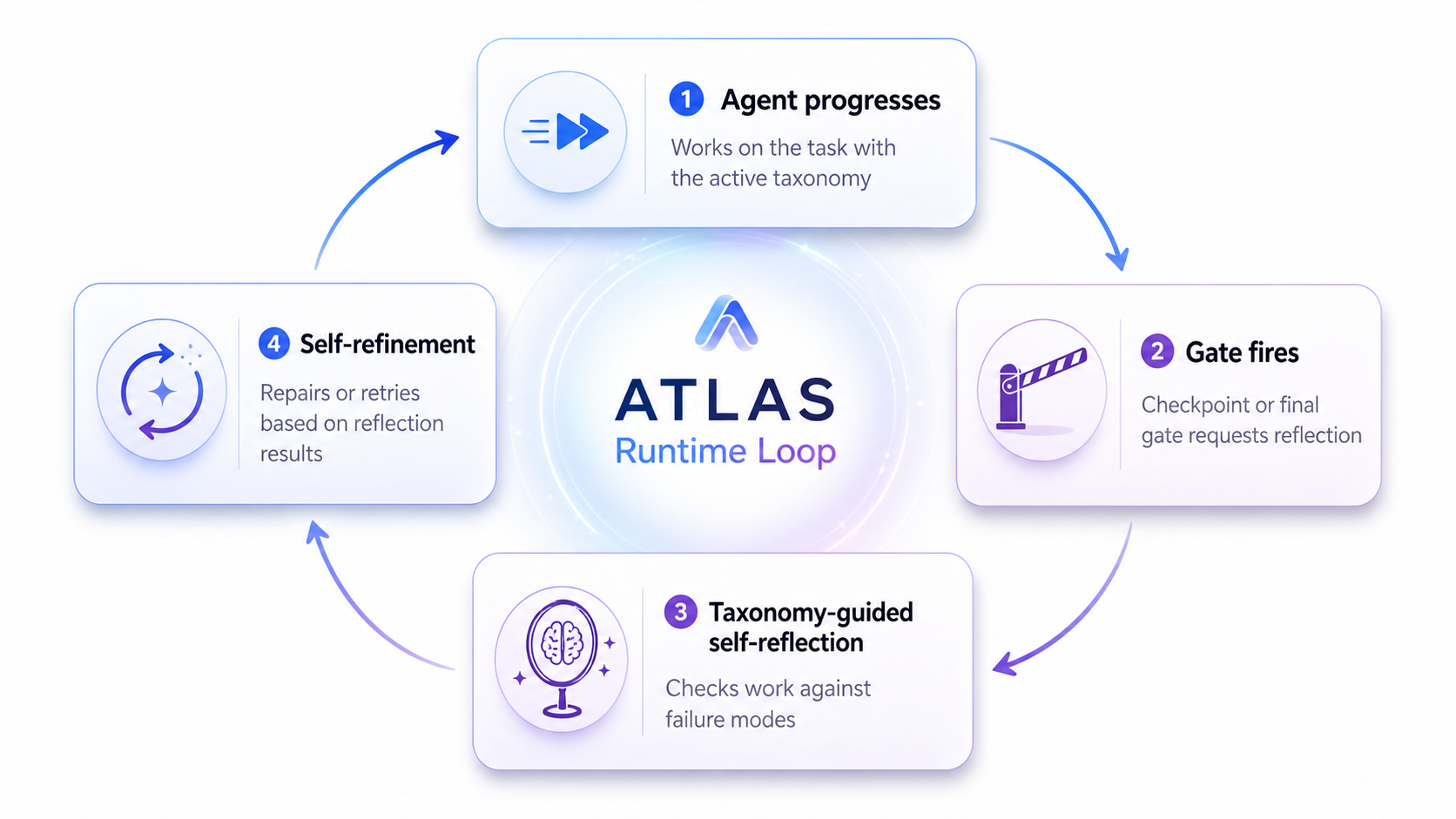
AdaMAST rides along with the agent you already use — Codex, Claude Code, or your own harness. While the agent works, AdaMAST quietly checks the work at natural boundaries, records evidence when something goes wrong, and — after enough completed tasks — learns a failure-mode catalog (a "taxonomy") specific to your project. From then on, the agent is checked against its own known weaknesses instead of a generic list.
Paper: Fantastic Adaptive Taxonomies and How to Use Them · Docs: Website
🚀 Quickstart (zero configuration)
Requirements: Python 3.10+ and Codex or Claude Code.
pip install adamast
Then register AdaMAST with the host you use (once):
# Claude Code
adamast claude install --user-level

# Codex
adamast codex install --user-level
Fully quit and reopen Codex / Claude Code, then start a new conversation. That's it — no config file, no extra API key, no second login.
On your first message, AdaMAST opens its taxonomy picker and asks one question — where should this conversation start from?
| Choice | What it means |
|---|---|
| 🧭 MAST (recommended at first) | Start from the built-in 14 general failure modes. After 5 completed tasks, AdaMAST automatically learns a taxonomy specific to your project. |
| 📚 A stored taxonomy | Reuse a taxonomy your project already learned. |
| 🚫 No taxonomy | AdaMAST stays completely out of this conversation. |
Pick with one click (or one number in a terminal) — your held message then continues automatically.
💡 Check it worked: run
adamast doctorany time. It validates your install and tells you exactly what to do if something is off.
🔄 What happens while you work
flowchart LR
    A["💬 You work with<br/>your agent as usual"] --> B["🛑 Checkpoints<br/>agent self-checks at<br/>natural boundaries"]
    B --> C["🧾 Traces<br/>each finished task<br/>is recorded"]
    C --> D["🧠 Learning<br/>after 5 traces: your<br/>project's taxonomy"]
    D --> E["♻️ Refinement<br/>reviewed after 10,<br/>then every 20 traces"]
    E -.->|"sharper failure modes"| B
- You work normally. AdaMAST never takes over the task.
- At checkpoints (finishing a sub-task, a failed tool, the final answer) the agent privately asks itself: what just happened, what caused it, does a known failure mode apply, continue or repair? Finding nothing wrong is a perfectly valid answer.
- Each completed task becomes a trace. Traces are the raw material for learning.
- At 5 traces, learning kicks in — a background worker drafts a taxonomy of your project's actual failure patterns, with verbatim evidence for every code. A separate reviewer must approve it before it activates. Your conversation never waits.
- It keeps improving. The taxonomy is reviewed against new traces after 10 more, then every 20.
Watch it live: adamast dashboard opens a local monitor showing every checkpoint, the evidence behind it, and which failure modes fired.

🎛️ Make it yours
Everything above ran on defaults. Each step has one obvious knob when you want a custom setup:
| I want to… | Do this instead |
|---|---|
| Enable AdaMAST for one repository only | adamast claude install --project-dir . (same for codex) · Getting started |
| Start every conversation from a taxonomy I already trust | --inherit <taxonomy-id> at install · Taxonomies |
| Learn faster / slower | --generation-threshold N (default 5), --k-init N (10), --k N (20) |
| Freeze the taxonomy (no more learning) | --freeze |
| Use a provider API for learning instead of native subagents | --learning-backend provider --adamast-model <model> · Providers |
| Build a taxonomy from traces I already have | adamast import-traces --traces ./my_traces · Trace formats |
| Wrap a single LLM call instead of a whole host | adamast single-run · Single LLM |
| Put AdaMAST inside my own agent loop | from adamast import start_session · Runtime API |
Every field, flag, and default lives in the Configuration reference; deeper customization (prompts, gates, custom hooks) in Customization.
🧠 Why adaptive taxonomies?
Improvement needs feedback that preserves why something failed. Scalar rewards throw the reason away; free-form reflection doesn't aggregate; a fixed catalog can't know your agent's roles, tools, or domain in advance. AdaMAST learns a compact, evidence-grounded failure vocabulary from the target system's own traces — starting from the built-in 14-code adaptation of MAST ("Why Do Multi-Agent LLM Systems Fail?", Cemri et al., 2025) until the first learned taxonomy activates.
Learned codes are organized on three stable axes:
| Axis | Scope | Example |
|---|---|---|
| ⚙️ System-level | Can arise in any agent system | Context exhaustion |
| 🎭 Role-specific | Tied to a discovered component role | Checker rubber-stamps solver output |
| 🧪 Domain-specific | Requires task knowledge | Algorithm mismatch |
🏆 Results
| Experiment | Headline |
|---|---|
| OfficeQA Pro | 44.4% → 51.9% official scorer, same 133-question harness in both arms |
| Circle packing, n=26 | AdaMAST-guided search reaches 0.997× the AlphaEvolve record in 20 evaluations |
| TRAIL (paper) | Induced codes align with expert annotations at Cohen's κ 0.725 |
| Terminal-Bench 2.0 (paper) | AdaMAST-Judge at 89.9% accuracy |
| Evolutionary optimization, 655 problems (paper) | 87.9% → 91.9% held-out improvement |
Summaries, exact taxonomies, and reproduction notes live in runs/. Per-question rows and raw scorer output are not included, so the headline numbers cannot be independently recomputed from this repository alone.
📚 Learn more
| You want to… | Read |
|---|---|
| Do the first install, step by step | Interactive setup |
| See one complete run end to end | Example run |
| Understand the words (gate, trace, taxonomy, …) | Concepts |
| Understand how learning stays safe & race-free | Native taxonomy learning |
| Fix a broken setup | Troubleshooting |
| Browse everything | Documentation index |
🧰 All commands
| Command | Purpose |
|---|---|
adamast doctor |
Validate paths, configuration, hooks, and host contracts |
adamast status |
Show the active taxonomy, traces, learning state, recent decisions |
adamast find |
List or select stored taxonomies |
adamast dashboard |
Open the local taxonomy dashboard / checkpoint monitor |
adamast traces |
Inspect trace state |
adamast import-traces |
Generate a taxonomy from existing traces |
adamast claude install / uninstall |
Manage Claude Code hooks |
adamast codex install / uninstall |
Manage Codex hooks |
adamast single-run |
Wrap one direct model task with AdaMAST |
🗂️ Repository map
| Path | Responsibility |
|---|---|
adamast/core/ |
Taxonomy data model, evidence, traces, reflection parsing, taxonomy store/MAST/resolution, session lifecycle |
adamast/protocol/ |
The one compact-checkpoint implementation and the pre-submission gate |
adamast/judges/ |
Taxonomy and reflection judges, plus the provider-neutral JUDGES contract |
adamast/llm/ |
Model routing, learning calls, and provider transports |
adamast/learning/ |
Taxonomy generation and refinement, learning jobs, and the vendored/ported pipelines |
adamast/hosts/ |
Claude Code, Codex, interactive, and single-LLM host adapters |
adamast/dashboard/ |
Local dashboard, status, taxonomy viewer, and web views |
adamast/cli.py |
The umbrella adamast command |
tests/ |
The single test suite (python -m pytest tests) |
docs/ |
User and contributor documentation (index) |
adamast/examples/ |
Runnable demonstrations (python -m adamast.examples copies them locally) |
runs/ |
Evaluation artifacts and reproduction notes |
scripts/ |
Repository tooling: docs-site build, public publishing |
website/ |
The static landing page served ahead of the docs |
SKILL.md |
The Codex skill manifest for AdaMAST |
Everything importable lives in the adamast package; the complete ownership
rules are in Architecture.
🤝 Contributing
Development setup, verification commands, and package boundaries: CONTRIBUTING.md · Release steps: RELEASING.md
The original research pipeline lives on the
paper-pipeline
branch; a maintained, locally patched fork is vendored under
adamast/learning/vendor/ with provenance in
VENDORED.md.
📄 License
Apache-2.0. See LICENSE.
1 maintainer

Download files
Download the file for your platform. If you're not sure which to choose, learn more about installing packages.
Source Distribution
Built Distribution
Filter files by name, interpreter, ABI, and platform.
If you're not sure about the file name format, learn more about wheel file names.
Copy a direct link to the current filters
File details
Details for the file adamast-0.2.0.tar.gz.
File metadata
- Download URL: adamast-0.2.0.tar.gz
- Upload date:
- Size: 2.0 MB
- Tags: Source
- Uploaded using Trusted Publishing? Yes
- Uploaded via: twine/6.1.0 CPython/3.13.14
File hashes
| Algorithm | Hash digest | |
|---|---|---|
| SHA256 |
3678e3bd0235276f6e3782a7656e267cd5ee98b8c4ef3c4ec34552b661a10877
|
|
| MD5 |
1c56be10002b3bc9cf8062472dd69a49
|
|
| BLAKE2b-256 |
df4b913d0736a5cf2538129e3eff1e51099b83551bfee2aba8a9e512d4711a4a
|
Provenance
The following attestation bundles were made for adamast-0.2.0.tar.gz:
Publisher:
release.yml on multi-agent-systems-failure-taxonomy/AdaMAST-private
-
Statement:
-
Statement type:
https://in-toto.io/Statement/v1 -
Predicate type:
https://docs.pypi.org/attestations/publish/v1 -
Subject name:
adamast-0.2.0.tar.gz -
Subject digest:
3678e3bd0235276f6e3782a7656e267cd5ee98b8c4ef3c4ec34552b661a10877 - Sigstore transparency entry: 2224097093
- Sigstore integration time:
-
Permalink:
multi-agent-systems-failure-taxonomy/AdaMAST-private@625e3b5c23988a2553320b4f308a04e8a4ae617c -
Branch / Tag:
refs/tags/v0.2.0 - Owner: https://github.com/multi-agent-systems-failure-taxonomy
-
Access:
private
-
Token Issuer:
https://token.actions.githubusercontent.com -
Runner Environment:
github-hosted -
Publication workflow:
release.yml@625e3b5c23988a2553320b4f308a04e8a4ae617c -
Trigger Event:
push
-
Statement type:
File details
Details for the file adamast-0.2.0-py3-none-any.whl.
File metadata
- Download URL: adamast-0.2.0-py3-none-any.whl
- Upload date:
- Size: 520.5 kB
- Tags: Python 3
- Uploaded using Trusted Publishing? Yes
- Uploaded via: twine/6.1.0 CPython/3.13.14
File hashes
| Algorithm | Hash digest | |
|---|---|---|
| SHA256 |
2c03ffeabf77570d3413fd3a215e84665c7a43e48b5d1d1401af6ec4d19a788e
|
|
| MD5 |
4c9cba46d048751c020468f5f5ad41b7
|
|
| BLAKE2b-256 |
5b4e8af9fc80e551b6c97274cc6b3d16ef3859fc18bf35af09aa3cd5128913ca
|
Provenance
The following attestation bundles were made for adamast-0.2.0-py3-none-any.whl:
Publisher:
release.yml on multi-agent-systems-failure-taxonomy/AdaMAST-private
-
Statement:
-
Statement type:
https://in-toto.io/Statement/v1 -
Predicate type:
https://docs.pypi.org/attestations/publish/v1 -
Subject name:
adamast-0.2.0-py3-none-any.whl -
Subject digest:
2c03ffeabf77570d3413fd3a215e84665c7a43e48b5d1d1401af6ec4d19a788e - Sigstore transparency entry: 2224097451
- Sigstore integration time:
-
Permalink:
multi-agent-systems-failure-taxonomy/AdaMAST-private@625e3b5c23988a2553320b4f308a04e8a4ae617c -
Branch / Tag:
refs/tags/v0.2.0 - Owner: https://github.com/multi-agent-systems-failure-taxonomy
-
Access:
private
-
Token Issuer:
https://token.actions.githubusercontent.com -
Runner Environment:
github-hosted -
Publication workflow:
release.yml@625e3b5c23988a2553320b4f308a04e8a4ae617c -
Trigger Event:
push
-
Statement type:







