

An adaptive tool to fetch public sequencing data



📖 Documentation · Installation · Usage · Comparison
Description
adaptiSeq is a fast, importable Python tool that downloads sequencing data and metadata from GSA, SRA, ENA, DDBJ, and GEO. It is built for the workload real pipelines actually have: lists of accessions, downloaded in parallel, with a segmented, resumable, self-tuning engine and a real Python API.
Important To use adaptiSeq your system must be connected to the network and able to reach the databases over HTTP, HTTPS, and (optionally) FTP / Aspera.
What's new in 0.1.14
- Aspera (
-a) works against ENA again. ENA's Aspera server refuses theascp4.4.2 that the conda packageaspera-cli4.14.0 ships (ascp: failed to authenticate; iSeq fails the same way). adaptiSeq now runs the newer of theascponPATHand the oneascli config ascp installputs in~/.aspera/sdk, and a failed ENA transfer says whichascpran and how to get a current one. See the Aspera page. - A repeated accession is processed once. A list that names a Run twice (lists from several projects overlap) used to
end with an error, a
fail.logentry and exit status 1 although the Run had downloaded and verified.
What's new in 0.1.13
A Run whose ID is the beginning of another ID (for example SRR123456 and SRR1234567) was skipped as
"already downloaded", and could erase the other Run's line in fail.log, because success.log and fail.log
matched IDs as substrings (#2). IDs are now matched as whole
IDs, and success.log is read once per run. The transfer engine is unchanged.
What's new in 0.1.12
The first release since 0.1.3, and the build behind the benchmarks in the accompanying manuscripts:
- Delivered means verified, and the exit status says so. Each file is checked against the archive's md5
as it lands, and a bad copy is deleted and fetched again inside the pool. A Run that cannot be verified is
written to
fail.logand the exit status is 1. A Run that ENA cannot serve is fetched from NCBI SRA by default, with an announcement;--no-sra-fallbackrefuses it, because SRA copies cannot be checked against ENA's md5. - Metadata failures are not read as answers. A failed or empty ENA query is retried before a Run is declared absent.
- Connections stay busy. Files are split into ranges that idle connections take over, and the per-host guard treats a refused connect as a ceiling to wait at.
- Five adaptive controllers (
--controller topdown|bottomup|budget|greedy|knee);topdownis the default. - GSA and GEO work again after both archives put browser checks on their pages.
The full list of changes is in the changelog.
How it works
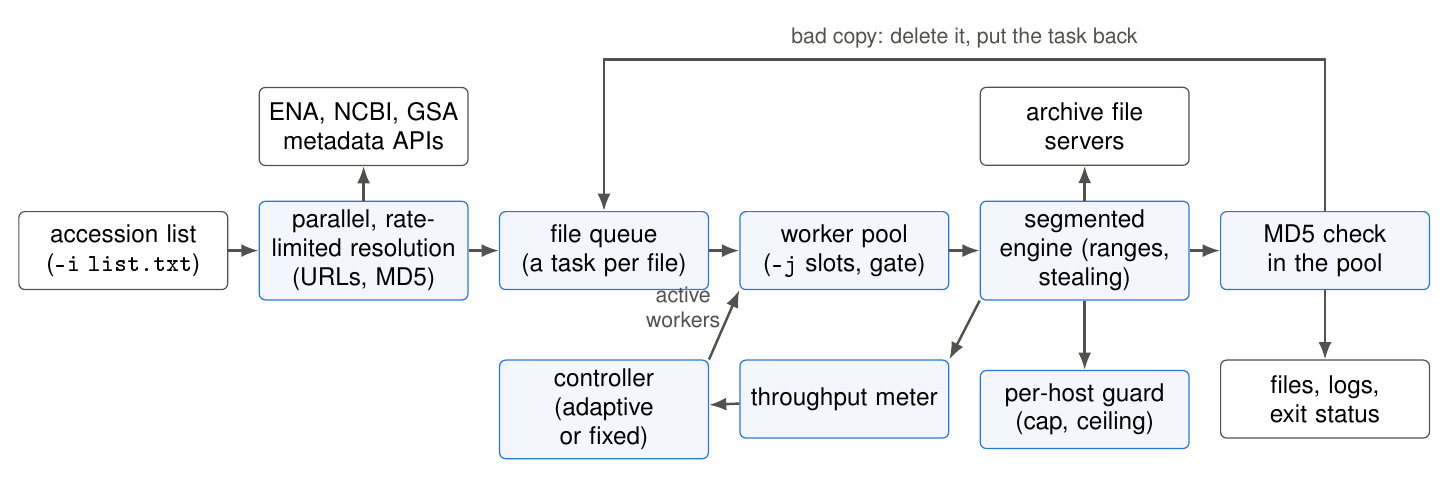
An accession list is resolved in parallel under per-archive request limits. Each file becomes a task; workers take tasks, the segmented engine splits each file into byte ranges on several connections, a per-host guard bounds the connections and reacts to refusals, and each finished file is md5-checked inside the pool, with a bad copy going back to the queue. A controller (adaptive or fixed) sets how many files are in flight. Details: Method details.
Features
- Five archives: GSA / SRA / ENA / DDBJ / GEO, from any Project, Study, BioSample, Sample, Experiment or Run accession, single or a file of many (mixed archives allowed).
- Verified delivery: every file is md5-checked in the worker pool as it lands, a bad copy is fetched again
in parallel, and the exit status is non-zero when a Run could not be delivered and verified (
fail.lognames it). - Batch-parallel download of accession lists (
-j) through an asyncio worker pool, with adaptive concurrency (--adaptive,--controller) and parallel, rate-limited metadata resolution (--meta-jobs). - Segmented, resumable transfers (HTTPS-first for ENA): interrupt and re-run to continue, not restart.
- Importable Python API (
fetch,resolve,get_metadata) that returns values and raises typed exceptions.
More features
- Metadata download: per-accession sample metadata (
-m). - File-format selection: direct gzip FASTQ (
-g) or SRA→FASTQ conversion (-q), multi-threaded (-t). - File merging per Experiment/Sample/Study (
-e). - ENA or nothing when you need it:
--no-sra-fallbackfails a Run instead of fetching an unverifiable copy from SRA. - Aspera high-speed download for GSA/ENA (
-a), with an adaptive pool for ENA. - Automatic retry (up to three rounds) and md5 /
vdb-validateverification. - 3-file runs (orphan/barcode +
_1+_2) downloaded correctly. - Error handling: clear, actionable messages with suggested solutions.
Installation
1. From PyPI
pip install adaptiseq
adaptiseq --version
pip installs only the Python package; the external tools below come from your system or from conda
(conda install -c conda-forge -c bioconda wget axel pigz coreutils sra-tools), or use the Bioconda
package below, which installs them all.
2. Conda (installs every external tool too)
conda create -n adaptiseq -c conda-forge -c bioconda adaptiseq
conda activate adaptiseq
The package is on Bioconda; its recipe is
recipe/meta.yaml. See
the installation guide.
3. From source (development)
git clone https://github.com/swargo98/adaptiSeq.git
cd adaptiSeq
conda env create -f environment.yml && conda activate adaptiseq   # tools + editable install
# or, if the external tools are already installed: pip install -e .
adaptiseq --version
External tools: wget (always), sra-tools, pigz, md5sum,
axel (classic -p), and IBM ascp (-a). adaptiSeq requires each only when a
run actually needs it. Full detail: the installation guide.
Example
- Download all Runs and metadata for an accession.
adaptiseq -i PRJNA211801
- Batch download a list, directly as gzip FASTQ, through the adaptive pool.
adaptiseq -i SRR_Acc_List.txt -g
See more examples for more.
Usage
$ adaptiseq --help

Usage:
  adaptiseq -i accession [options]

Required option:
  -i, --input     [text|file]   Single accession or a file containing multiple accessions.
                                Note: only one accession per line in the file.

Optional options:
  -m, --metadata                Skip the sequencing data downloads and only fetch metadata.
  -g, --gzip                    Download FASTQ files in gzip format directly (*.fastq.gz).
  -q, --fastq                   Convert SRA files to FASTQ format.
  -t, --threads   int           Threads for SRA->FASTQ / compression (default: 8).
  -e, --merge     [ex|sa|st]    Merge fastq files per Experiment, Sample, or Study.
  -d, --database  [ena|sra]     Force database for SRA data (default: auto-detect).
      --no-sra-fallback         Fail a Run that ENA cannot serve instead of fetching it from SRA,
                                so every kept file can be checked against ENA's md5.
  -p, --parallel  int           axel connection count (classic engine only), e.g. -p 10.
  -a, --aspera                  Use Aspera (ascp); GSA/ENA only.
  -s, --speed     int           Download speed limit (MB/s) (default: 1000).
  -k, --skip-md5                Skip the md5 check for downloaded files.
  -r, --protocol  [ftp|https]   ENA transport (default: auto, HTTPS-first).
  -Q, --quiet                   Suppress download progress bars.
  -o, --output    text          Output directory (created if missing; default: cwd).

Engine / batch / adaptive:
  --engine        [segmented|classic]   Download engine (default: segmented).
  --segment-size  int           Target segment size in MB (default: 512).
  --max-segments  int           Max connections per file (default: 8).
  --max-conns-per-host int      Cap on connections to one host (default: auto = -j x --max-segments;
                                the circuit breaker still lowers it on 429/503).
  -j, --jobs      int           Max worker-pool size for batch download (default: 20).
  --adaptive / --no-adaptive    Adaptive concurrency (default: on); --no-adaptive runs all -j workers.
  --controller    name          Adaptive controller: topdown (default), bottomup, budget, greedy, knee.
  --probe-window  int           Adaptive probe window in seconds (default: 5).
  --cc-penalty    float         Worker-cost penalty K in score=throughput/K**workers (default: 1.01).
  --meta-jobs     int           Parallelism for metadata/URL resolution (default: 3).
  --aspera-efficiency float     Keep an extra ascp worker only above this efficiency (default: 0.70).

  -h, --help                    Show the help information.
  -v, --version                 Show the program version.
1. -i, --input
Input the accession to download, or a file with one accession per line (databases may be mixed). adaptiSeq retrieves the accession's metadata, then downloads each Run it contains.
adaptiseq -i PRJNA211801
adaptiseq -i accessions.txt        # batch
Currently supports 6 accession formats across 5 databases:
| Databases | BioProject | Study | BioSample | Sample | Experiment | Run |
|---|---|---|---|---|---|---|
| GSA | PRJC | CRA | SAMC | \ | CRX | CRR |
| SRA | PRJNA | SRP | SAMN | SRS | SRX | SRR |
| ENA | PRJEB | ERP | SAME | ERS | ERX | ERR |
| DDBJ | PRJDB | DRP | SAMD | DRS | DRX | DRR |
| GEO | GSE | \ | GSM | \ | \ | \ |
GEO GSE/GSM accessions are resolved to their associated PRJNA/SAMN and then
downloaded from SRA. Every contained Run is md5-checked; on mismatch adaptiSeq
retries up to three rounds, recording results in success.log / fail.log.
2. -m, --metadata
Download only the sample metadata and skip the sequence data.
adaptiseq -i PRJNA211801 -m
adaptiseq -i CRR343031 -m
ENA → TSV (${accession}.metadata.tsv); GSA → CSV + project XLSX
(${accession}.metadata.csv, CRA*.metadata.xlsx). Details:
the metadata guide.
3. -g, --gzip
Download FASTQ directly in gzip format; if unavailable on ENA, download the .sra
and convert with fasterq-dump + pigz.
adaptiseq -i SRR1178105 -g
4. -q, --fastq
Convert the downloaded .sra into FASTQ (single-cell friendly: I1/R1/R2/R3).
adaptiseq -i SRR1178105 -q -t 10
5. -e, --merge
Merge a group of Runs into one FASTQ per Experiment (ex), Sample (sa), or
Study (st).
adaptiseq -i SRX003906 -g -e ex
6. -d / -r / -p / -s / -k / -Q
Force database (-d ena|sra), ENA transport (-r https|ftp, default auto
HTTPS-first), classic-engine axel connections (-p, with --engine classic),
speed cap (-s MB/s), skip md5 (-k), and quiet (-Q). See
the download guide.
7. Batch & adaptive (-j, --adaptive, --meta-jobs)
For accession lists, adaptiSeq resolves in parallel (--meta-jobs) then downloads
through an asyncio worker pool (-j) whose active size the adaptive controller
tunes (--adaptive; topdown by default, others with --controller NAME — see
the controller page).
adaptiseq -i accessions.txt -g -j 8
adaptiseq -i accessions.txt -g --no-adaptive              # all -j workers, no probing
adaptiseq -i accessions.txt -g --controller budget        # fewest connections
adaptiseq -i accessions.txt -g --no-sra-fallback          # ENA only, every file md5-checked
Full detail: the batch & adaptive guide.
8. -a, --aspera
Use IBM Aspera (ascp); GSA/ENA only. ENA uses an adaptive parallel pool
(efficiency hysteresis); GSA is sequential, best-effort (Huawei-Cloud preferred).
adaptiseq -i PRJNA211801 -a -g
Detail: the Aspera guide.
9. Python API
from adaptiseq import fetch, resolve, get_metadata

rows   = get_metadata("SRR7706354")               # parsed metadata rows
urls   = resolve("SRR7706354", database="ena")    # resolved URLs (no download)
result = fetch("accessions.txt", outdir="data/", gzip=True, jobs=20, adaptive=True,
               controller="topdown")
print(result.success_ids, result.fail_ids, result.failed)
The API never calls sys.exit and never prints colour codes; it raises the typed
exceptions in adaptiseq.errors. Full reference:
the Python API reference.
Output
- SRA / ENA / DDBJ / GEO accessions:
| Output | Description |
|---|---|
| SRA files | Convert to FASTQ with -q |
.metadata.tsv |
Metadata for the query accession |
success.log |
Runs downloaded successfully |
fail.log |
Runs that failed |
Exit status. 0 when every requested Run was delivered; 1 when any Run failed
(it is named in fail.log) or the command could not run. A file that fails its md5
check is deleted and fetched again, up to three rounds. A Run that ENA cannot serve is
downloaded from NCBI SRA unless --no-sra-fallback is given; the fallback is announced
and counts as delivered (its converted FASTQ is validated, but cannot be compared with
ENA's md5).
- GSA accessions:
| Output | Description |
|---|---|
| GSA files | Mostly *.gz (a few bam/tar/bz2) |
.metadata.csv |
Metadata for the query accession |
.metadata.xlsx |
Project metadata (xlsx) for the accession |
success.log |
Runs downloaded successfully |
fail.log |
Runs that failed |
Documentation
Full documentation lives in docs/:
Installation ·
Usage overview ·
Downloading ·
Metadata ·
Merging ·
Batch & adaptive ·
Aspera ·
Python API ·
Method details ·
Adaptive controller ·
Comparison ·
Examples ·
FAQ ·
Changelog.
Related tools
adaptiSeq sits among other downloaders for public sequencing data — iSeq, fastq-dl, fetchngs, pysradb, and Kingfisher. A comparison:
Features compared in the paper (Table I of the manuscript; versions as benchmarked, read from each tool's help output, source and documentation):
| Feature | adaptiSeq 0.1.12 | iSeq 1.9.9 | Kingfisher 0.5.0 | fastq-dl 4.0.1 | fetchngs 1.13.0 | pysradb 2.5.1 |
|---|---|---|---|---|---|---|
| Accession list in one call | ✔ | ✔ | ✔ | – | ✔ | project |
| Several runs at once | ✔ | – | – | – | ✔ | ✔ |
| Rate-limited parallel resolution | ✔ | – | – | – | no cap | – |
| MD5 check | ✔ | ✔ | optional | ✔ | ✔ | – |
| Resume partial file | ✔ | ✔ | – | – | per task | ✔ |
| Merge runs | ✔ | ✔ | – | ✔ | – | – |
| Python API | ✔ | – | ✔ | – | – | ✔ |
| GSA | ✔ | ✔† | experimental | – | – | – |
| GEO | ✔ | ✔† | – | – | ✔ | ✔ |
| Installation | pip, conda | conda | pip, conda | pip, conda | Nextflow | pip, conda |
† iSeq 1.9.9 lists GSA and GEO, but in our tests on 2026-10-19 its GSA run ended with exit status 0 and no data file, and its GEO accession was rejected, after both archives added browser checks to the pages iSeq reads. adaptiSeq reads GSA's run-info table and resolves GEO through NCBI E-utilities instead.
More detail (not in the paper's table):
| Software | Language | Databases | Accessions | Formats | Methods | Metadata | Several connections per file | Adaptive | Skip done |
|---|---|---|---|---|---|---|---|---|---|
| adaptiSeq | Python | GSA, SRA, ENA, DDBJ, GEO | All | fq, fq.gz, sra, bam | segmented http(s)/ftp, aspera, wget/axel | ✔ | ✔ | ✔ | ✔ |
| iSeq | Shell | GSA†, SRA, ENA, DDBJ, GEO† | All | fq, fq.gz, sra, bam | wget, axel, aspera | ✔ | ✔ (-p) |
– | ✔ |
| Kingfisher | Python | SRA, ENA, DDBJ, GSA (experimental) | All except GEO | fq, fq.gz, sra | curl, aria2c, aspera | ✔ | ✔ (--download-threads) |
– | ✔ |
| fastq-dl | Python | SRA, ENA, DDBJ | All except GSA/GEO | fq, fq.gz, sra | wget | ✔ | SRA only (--connections) |
– | ✔ |
| fetchngs | Nextflow | SRA, ENA, DDBJ, GEO | All except GSA | fq, fq.gz | wget, aspera, prefetch | ✔ | – | – | ✔ |
| pysradb | Python | SRA, ENA, GEO | Study, Experiment, GEO | fq, fq.gz, sra, bam | requests, aspera | ✔ | – | – | ✔ |
Several runs at once = many accessions downloaded in parallel in one run, not one after another · Rate-limited parallel resolution = accession-to-URL lookups run concurrently under a per-endpoint request-rate cap · Adaptive = a controller that tunes the number of concurrent downloads from measured throughput · Python API = an importable library (
fetch/resolve/get_metadata), not only a command-line tool. The SRA Toolkit and enaBrowserTools are not compared here.
In this comparison no other tool combines batch download, adaptive concurrency and a Python API. adaptiSeq pairs them with rate-limited parallel metadata resolution and a segmented, resumable engine, so a list of hundreds of accessions is resolved and downloaded concurrently, self-tuning to the throughput the servers actually give — from a script, notebook, or the shell.
Contributing
Contributions are welcome — please open an issue for bugs/suggestions, or fork,
branch, and submit a pull request. The offline test suite runs with
python -m pytest.
Cite us
A manuscript describing adaptiSeq is in preparation; until it appears, cite the
software. Version 0.1.12 is archived on Zenodo as
doi:10.5281/zenodo.24062785; the DOI
10.5281/zenodo.24062784 always resolves to
the latest version. The metadata are in
CITATION.cff.
Acknowledgements
adaptiSeq descends from two earlier tools:
iSeq (Chao H, Li Z, Chen D, Chen M.
Bioinformatics, 2024,
doi:10.1093/bioinformatics/btae641),
whose command-line options and accession handling it started from, and
FastBioDL (Swargo RM, Arslan E, Arifuzzaman M.
arXiv:2508.05511), the origin of its segmented
transfer engine. Both are MIT-licensed and their notices are in LICENSE.
This work was supported in part by the U.S. National Science Foundation (NSF) under grants 2451376 and 2427408, the same grants that supported FastBioDL.
License
This project is licensed under the MIT License, which also reproduces the notices of the two tools in Acknowledgements.
1 maintainer

Metadata
1 maintainer
Release files for adaptiseq 0.1.14
For a detailed explanation of source distributions (sdists) and built distributions (wheels), please see the package formats documentation.
Source distribution (sdist)
| File | Size | Uploaded | Provenance | Actions |
|---|---|---|---|---|
| adaptiseq-0.1.14.tar.gz | 171.1 kB | Without provenance | Details for adaptiseq-0.1.14.tar.gz |
Built distribution (wheel)
| File | Interpreter | ABI | Platform | Actions Reset |
|---|---|---|---|---|
| adaptiseq-0.1.14-py3-none-any.whl | Python 3 | none | any | Details for adaptiseq-0.1.14-py3-none-any.whl |
Total release size: 283.6 kB
Release files / adaptiseq-0.1.14.tar.gz
| Download URL | adaptiseq-0.1.14.tar.gz |
|---|---|
| Size | 171.1 kB |
| Tags | Source |
|
SHA-256 checksum How to use checksums |
2b0c20a39180a3951a9b16054473311d48587cc2182e966c6083659dca6e7ffb
|
|
BLAKE2b-256 checksum How to use checksums |
b9d0f470160a2bc194c2c41e6852bdfc8657274b18cd548895afa2699497a96e
|
| Upload date | |
|
Uploaded using Trusted Publishing? What is trusted publishing? |
No |
| Uploaded via |
twine/7.0.0 CPython/3.10.12
|
Release files / adaptiseq-0.1.14-py3-none-any.whl
| Download URL | adaptiseq-0.1.14-py3-none-any.whl |
|---|---|
| Size | 112.6 kB |
| Tags | Python 3 |
|
SHA-256 checksum How to use checksums |
11b950fb0833fac8b460711a1c1e6bafa9766f1026989d96aa2734d8c6256789
|
|
BLAKE2b-256 checksum How to use checksums |
ca868bd192c6bb006bc8ad42da552051952afc3f3e4fc42a4a8e13a94f71f4fd
|
| Upload date | |
|
Uploaded using Trusted Publishing? What is trusted publishing? |
No |
| Uploaded via |
twine/7.0.0 CPython/3.10.12
|
Security for adaptiseq 0.1.14
Provenance
Provenance describes where a file came from. On PyPI, provenance is shared via attestations, which provide a verifiable record of the build or publishing details. View details, limitations and caveats.
No provenance found
None of the files in this release were uploaded with provenance metadata.
A note on package security
PyPI is a repository for distributing packages, not a service for auditing them. While third-party security researchers and our staff do their best to detect and remove malicious packages, PyPI cannot guarantee the quality, security or suitability of any given package.
To learn more about protecting yourself from malicious actors, visit our package security documentation.














