
Adaptive Shots - Few-shots prompting using Contextual Combinatorial Bandit optimizations






gokhanmeteerturk/adaptive-shots
Github Repo | Documentation (in progress)
Overview
Adaptive Shots is a Python package that turns your prompts into few-shots prompts on the fly.
It automatically selects the most relevant prompt&answer pairs from the database based on what worked well before. Adaptive-shots package uses reinforcement learning algorithm UCB1-Tuned and learns from user feedback to improve its selections over time by using the numerical feedback as a reward.
This package implements UCB1-Tuned, but with a contextual cosine similarity of prompts to dynamically select and rank the most relevant and well performing old prompts for a given prompt text.
Initially designed for my Intelligent Tutoring System (ITS) project, the package is generalizable for any scenario requiring adaptive, reinforcement-learning-based prompt management.
Key Features
- Sentence transformers for generating vector representations.
Defaults toall-MiniLM-L6-v2(384 dimensional dense vector space) but can be configured easily. - SQLite Vector Search with sqlite-vec. (Cosine distance is used)
- Exploration vs Exploitation.
Flow
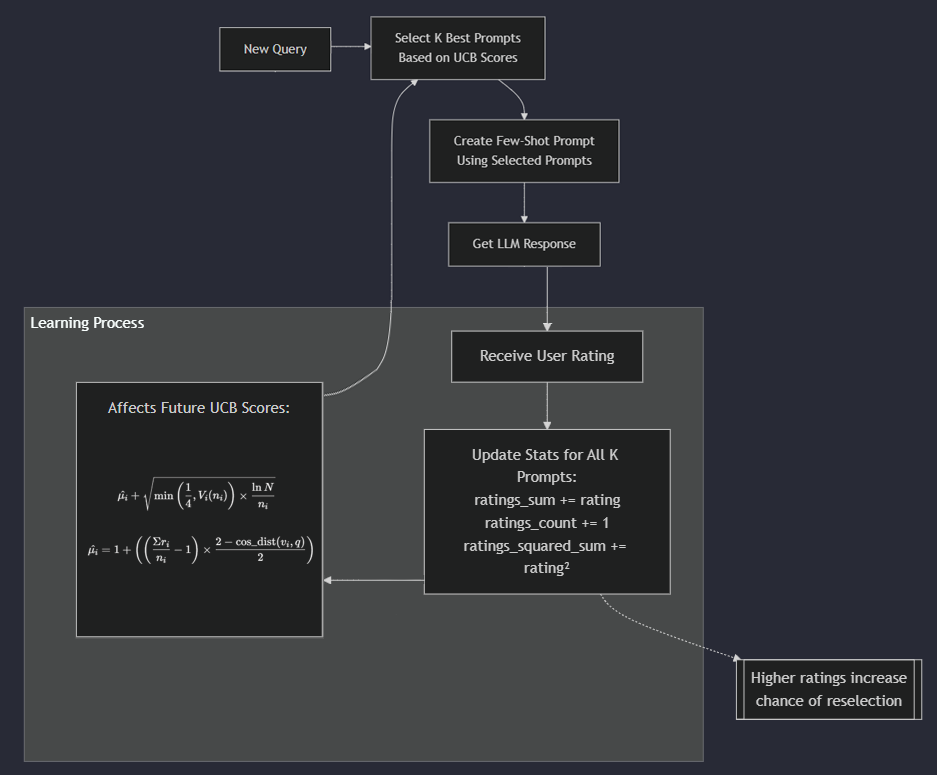
pip install adaptive-shots
Quick Start
Core feature, few-shots prompt generation, looks like this:
shot_list = db.get_best_shots(
  prompt='Who is the author of Twelfth Night?',
  domain='geography',limit=2
)
You can then use the returned list for message generation:
shot_list.to_messages()
// Output:
[
  {"role": "user", "content": "Who wrote Hamlet?"},
  {"role": "assistant", "content": "William Shakespeare"},
  {"role": "user", "content": "Who wrote Oedipus Rex?"},
  {"role": "assistant", "content": "Sophocles"}
]
Example
from adaptive_shots import initialize_adaptive_shot_db
from openai import OpenAI

# Initialize database and OpenAI client
db = initialize_adaptive_shot_db('./shots.db')
client = OpenAI()

# Register initial prompts
db.register_prompt(
    prompt='What is the capital of France?',
    answer='Paris',
    rating=9.5,
    domain='geography'
)

# Generate few-shots prompt
user_query = 'What is the capital of Germany?'
few_shots_prompt, shot_list = db.create_few_shots_prompt(
    prompt=user_query,
    domain='geography',
    limit=1
)

print(few_shots_prompt)
# This will print the following:
"""
Prompt: What is the capital of France?
Answer: Paris

Prompt: What is the capital of Germany?
Answer:
"""
# You can give this directly to your LLM, or
# alternatively, use to_messages for chat completions like this:
response = client.chat.completions.create(
    model='gpt-4',
    messages=[
      *shot_list.to_messages(),
      {"role": "user", "content": user_query},
    ]
)
answer = response.choices[0].message.content

# Register feedback so all used shots get rewarded:
db.register_prompt(
    prompt=user_query,
    answer=answer,
    rating=9.0, # ideally you should receive this from the user
    domain='geography',
    used_shots=shot_list
)
API Reference
AdaptiveShotDatabase
register_prompt(prompt: str, answer: str, rating: float, domain: str, used_shots: Optional[ShotPromptsList] = None) -> None
Registers a new prompt-answer pair and updates the ratings of used shots.
create_few_shots_prompt(prompt: str, domain: str, limit: int = 3) -> Tuple[str, ShotPromptsList]
Generates a few-shot prompt using the best-performing relevant examples.
create_one_shot_prompt(prompt: str, domain: str) -> Tuple[str, Optional[ShotPromptsList]]
Generates a one-shot prompt using the single best-matching example.
get_best_shots(prompt: str, domain: str, c: float = 2.0, limit: int = 3) -> ShotPromptsList
Retrieves the optimal set of shots using the UCB algorithm.
License
This work is licensed under the GNU 3 - see the LICENSE file for details.
Citation
If you use this package in your research, please cite:
@software{erturk2024adaptive,
  author       = {Ertürk, Gökhan Mete},
  title        = {Adaptive-Shots: A Contextual Combinatorial Bandit Approach to Few-Shot Prompt Selection},
  year         = {2024},
  url          = {https://github.com/gokhanmeteerturk/adaptive-shots}
}
1 maintainer

Metadata
1 maintainer
Release files for adaptive-shots 0.1.0
For a detailed explanation of source distributions (sdists) and built distributions (wheels), please see the package formats documentation.
Source distribution (sdist)
| File | Size | Uploaded | |
|---|---|---|---|
| adaptive_shots-0.1.0.tar.gz | 22.9 kB | Details |
Built distribution (wheel)
| File | Interpreter | ABI | Platform | Reset |
|---|---|---|---|---|
| adaptive_shots-0.1.0-py3-none-any.whl | Python 3 | none | any | Details |
Total release size: 46.2 kB
Release files / adaptive_shots-0.1.0.tar.gz
| Download URL | adaptive_shots-0.1.0.tar.gz |
|---|---|
| Size | 22.9 kB |
| Tags | Source |
|
SHA-256 checksum How to use checksums |
fe9330471c2902ec1990a5ed7d91aa7ed1afe910cef1aca1198d65aefd26cf07
|
|
BLAKE2b-256 checksum How to use checksums |
148d9d6616f65c7ebc07a84b26f6056f40a5c984ffb29cf2d22d0f9f475bc925
|
| Upload date | |
|
Uploaded using Trusted Publishing? What is trusted publishing? |
No |
| Uploaded via |
twine/6.0.1 CPython/3.12.6
|
Release files / adaptive_shots-0.1.0-py3-none-any.whl
| Download URL | adaptive_shots-0.1.0-py3-none-any.whl |
|---|---|
| Size | 23.3 kB |
| Tags | Python 3 |
|
SHA-256 checksum How to use checksums |
1ff3fca4f1040230c9518bde9b5e63201f295d02b8b3f2dec59db75283c21ba7
|
|
BLAKE2b-256 checksum How to use checksums |
812c770b4fb263186e974045141c51ef91eaf543cc997e8be0e29fc199311a34
|
| Upload date | |
|
Uploaded using Trusted Publishing? What is trusted publishing? |
No |
| Uploaded via |
twine/6.0.1 CPython/3.12.6
|













