
Adaptor: Objective-centric Adaptation Framework for Language Models.

Project description
Adaptor: Objective-centric Adaptation library


Adaptor will help you to easily adapt a language model to your own data domain(s), task(s), or custom objective(s).
If you want to jump right in, take a look at the tutorials.
Table of Content
Click to expand
Benefits of Task and Domain Adaptation
Both domain adaptation (e.g. Beltagy, 2019) and task adaptation (e.g. Gururangan, 2020) are reported to improve quality of the language models on end tasks, and improve model's comprehension on more niche domains, suggesting that it's usually a good idea to adapt pre-trained model before the final fine-tuning. However, it is still not a common practice, maybe because it is still a tedious thing to do. In the model-centric training, the multi-step, or multi-objective training requires a separate configuration of every training step due to the differences in the models' architectures specific to the chosen training objective and data set.
How Adaptor handles training?
Adaptor framework abstracts the term of Objective away from the model. With Adaptor, Any objective can be applied to any model, for as long as the trained model has some head of a compatible shape.
The ordering in which the Objectives are applied is determined by the given Schedule.
In conventional adaptation, the objectives are applied sequentially (that's what SequentialSchedule does),
but they might as well be applied in a combilation (ParallelSchedule), or balanced dynamically,
e.g. according to its objectives` losses.
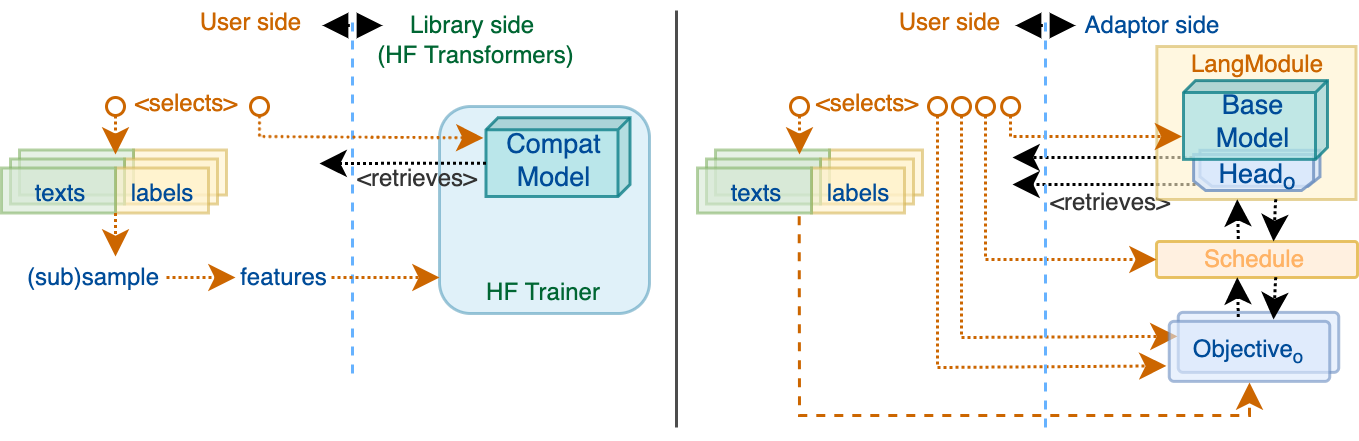
In the Adaptor framework, instead of providing the Trainer with a model encoded dataset both compatible
with specific training task,
a user constructs a Schedule composed of the initialised Objectives, where each Objective performs its
dataset sampling and objective-specific feature alignment (compliant with objective.compatible_head).
When training classic transformers models, a selection of objectives is model-agnostic: each objective takes care
of resolving its own compatible head within given LangModule.
How Can Adaptor Help
Adaptor introduces objective-centric, instead of model-centric approach to the training process, that makes it easier to experiment with multi-objective training, creating custom objectives. Thanks to that, you can do some things, that are difficult, or impossible in other NLP frameworks (like HF Transformers, FairSeq or NLTK). For example:
- Domain adaptation or Task adaptation: you do not have to handle the model between different training scripts, minimising a chance of error and improving reproducibility
- Seamlessly experiment with different schedule strategies, allowing you, e.g. to backpropagate based on multiple objectives in every training step
- Track the progress of the model, concurrently on each relevant objective, allowing you to easier recognise weak points of your model
- Easily perform Multi-task learning, which that can improves model robustness
- Although Adaptor aims primarily for training the models of the transformer family, the library is designed to work with any PyTorch model
Built upon the well-established and maintained 🤗 Transformers library, Adaptor will automatically support future new NLP models out-of-box. The upgrade of Adaptor to a different version of Hugging Face Transformers library should not take longer than a few minutes.
Usage
First, install the library:
pip install adaptor
If you clone it, you can also run and modify the provided example scripts.
git clone {this repo}
cd adaptor
python -m pip install -e .
You can also find and run full examples below with all the imports in
tests/end2end_usecases_test.py.
Adapted Named Entity Recognition
Say you have nicely annotated entities in a set of news articles, but eventually, you want to use the language model to detect entities in office documents. You can either train the NER model on news articles, hoping that it will not lose much accuracy on other domains. Or you can concurrently train on both data sets:
# 1. pick the model base
lang_module = LangModule("bert-base-multilingual-cased")

# 2. pick objectives
# Objectives take either List[str] for in-memory iteration, or a source file path for streamed iteration
objectives = [MaskedLanguageModeling(lang_module,
                                     batch_size=16,
                                     texts_or_path="tests/mock_data/domain_unsup.txt"),
              TokenClassification(lang_module,
                                  batch_size=16,
                                  texts_or_path="tests/mock_data/ner_texts_sup.txt",
                                  labels_or_path="tests/mock_data/ner_texts_sup_labels.txt")]
# 3. pick a schedule of the selected objectives
# This one will initially fit the first objective until convergence on its eval set, then fits the second one
schedule = ParallelSchedule(objectives, training_arguments)

# 4. Run the training using Adapter, similarly to running HF.Trainer, only adding `schedule`
adapter = Adapter(lang_module, schedule, training_arguments)
adapter.train()

# 5. save the trained lang_module (with all heads)
adapter.save_model("entity_detector_model")

# 6. reload and use it like any other Hugging Face model
ner_model = AutoModelForTokenClassification.from_pretrained("entity_detector_model/TokenClassification")
tokenizer = AutoTokenizer.from_pretrained("entity_detector_model/TokenClassification")

inputs = tokenizer("Is there any Abraham Lincoln here?", return_tensors="pt")
outputs = ner_model(**inputs)
ner_tags = [ner_model.config.id2label[label_id.item()] for label_id in outputs.logits[0].argmax(-1)]
Try this example on real data, in tutorials/adapted_named_entity_recognition.ipynb
Adapted Machine Translation
Say you have a lot of clean parallel texts for news articles (like you can find on OPUS), but eventually, you need to translate a different domain, for example chats with a lot of typos, or medicine texts with a lot of latin expressions.
# 1. pick the base model
lang_module = LangModule("Helsinki-NLP/opus-mt-en-de")

# (optional) pick train and validation evaluators for the objectives
seq2seq_evaluators = [BLEU(decides_convergence=True)]

# 2. pick objectives - we use BART's objective for adaptation and mBART's seq2seq objective for fine-tuning
objectives = [BackTranslation(lang_module,
                              batch_size=1,
                              texts_or_path="tests/mock_data/domain_unsup.txt",
                              back_translator=BackTranslator("Helsinki-NLP/opus-mt-de-en"),
                              val_evaluators=seq2seq_evaluators),
              Sequence2Sequence(lang_module,
                                batch_size=1,
                                texts_or_path="tests/mock_data/seq2seq_sources.txt",
                                labels_or_path="tests/mock_data/seq2seq_targets.txt",
                                val_evaluators=seq2seq_evaluators,
                                source_lang_id="en", target_lang_id="cs")]

# this one will shuffle the batches of both objectives
schedule = ParallelSchedule(objectives, adaptation_arguments)

# 4. train using Adapter
adapter = Adapter(lang_module, schedule, adaptation_arguments)
adapter.train()

# 5. save the trained (multi-headed) lang_module
adapter.save_model("translator_model")

# 6. reload and use it like any other Hugging Face model
translator_model = AutoModelForSeq2SeqLM.from_pretrained("translator_model/Sequence2Sequence")
tokenizer = AutoTokenizer.from_pretrained("translator_model/Sequence2Sequence")

inputs = tokenizer("A piece of text to translate.", return_tensors="pt")
output_ids = translator_model.generate(**inputs)
output_text = tokenizer.batch_decode(output_ids, skip_special_tokens=True)
print(output_text)
Try this example on real data, in tutorials/unsupervised_machine_translation.ipynb
Single-objective training
It also makes sense to use the comfort of adaptor high-level interface in simple use-cases where it's enough to apply one objective.
# 1. pick the base model
lang_module = LangModule(test_base_models["sequence_classification"])

# 2. pick any objective - note that all objectives have almost identical interface
classification = SequenceClassification(lang_module=lang_module,
                                        texts_or_path="tests/mock_data/supervised_texts.txt",
                                        labels_or_path="tests/mock_data/supervised_texts_sequence_labels.txt",
                                        batch_size=1)
# 3. Schedule choice does not matter in single-objective training
schedule = SequentialSchedule(objectives=[classification], args=training_arguments)

# 4. train using Adapter
adapter = Adapter(lang_module=lang_module, schedule=parallel_schedule, args=training_arguments)
adapter.train()

# 5. save the trained lang_module
adapter.save_model("output_model")

# 6. reload and use it like any other Hugging Face model
classifier = AutoModelForSequenceClassification.from_pretrained("output_model/SequenceClassification")
tokenizer = AutoTokenizer.from_pretrained("output_model/SequenceClassification")

inputs = tokenizer("A piece of text to translate.", return_tensors="pt")
output = classifier(**inputs)
output_label_id = output.logits.argmax(-1)[0].item()
print("Your new model predicted class: %s" % classifier.config.id2label[output_label_id])
Try this example on real data in tutorials/simple_sequence_classification.ipynb
More examples
You can find more examples in tutorials. Your contributions are welcome :) (see CONTRIBUTING.md)
Motivation for objective-centric training
We've seen that transformers can outstandingly perform on relatively complicated tasks, which makes us think that experimenting with custom objectives can also improve their desperately-needed generalisation abilities (many studies report transformers inability to generalise the end task, e.g. on language inference, paraphrase detection, or machine translation).
This way, we're also hoping to enable the easy use of the most accurate deep language models for more specialised domains of application, where a little supervised data is available, but much more unsupervised sources can be found (a typical Domain adaptation case). Such applications include for instance machine translation of non-canonical domains (chats or expert texts) or personal names recognition in texts of a domain with none of its own labeled names, but the use-cases are limitless.
How can you contribute?
-
If you want to add a new objective or schedule, see CONTRIBUTING.md.
-
If you find an issue, please report it in this repository and if you'd also be able to fix it, don't hesitate to contribute and create a PR.
-
If you'd just like to share your general impressions or personal experience with others, we're happy to get into a discussion in the Discussions section.
Citing Adaptor
If you use Adaptor in your research, please cite it as follows.
Text
ŠTEFÁNIK, Michal, Vít NOVOTNÝ, Nikola GROVEROVÁ and Petr SOJKA. Adaptor: Objective-Centric Adaptation Framework for Language Models. In Proceedings of 60th Annual Meeting of the Association for Computational Linguistics: Demonstrations. ACL, 2022. 7 pp.
BibTeX
@inproceedings{stefanik2022adaptor,
  author = {\v{S}tef\'{a}nik, Michal and Novotn\'{y}, V\'{i}t and Groverov{\'a}, Nikola and Sojka, Petr},
  title = {Adapt\$\mathcal\{O\}\$r: Objective-Centric Adaptation Framework for Language Models},
  booktitle = {Proceedings of 60th Annual Meeting of the Association for Computational Linguistics: Demonstrations},
  publisher = {ACL},
  numpages = {7},
  url = {https://aclanthology.org/2022.acl-demo.26},
}
If you have any other question(s), feel free to create an issue.
Release history Release notifications | RSS feed


Download files
Download the file for your platform. If you're not sure which to choose, learn more about installing packages.
Source Distribution
Built Distribution
Filter files by name, interpreter, ABI, and platform.
If you're not sure about the file name format, learn more about wheel file names.
Copy a direct link to the current filters
File details
Details for the file adaptor-0.2.5.tar.gz.
File metadata
- Download URL: adaptor-0.2.5.tar.gz
- Upload date:
- Size: 57.9 kB
- Tags: Source
- Uploaded using Trusted Publishing? No
- Uploaded via: twine/5.0.0 CPython/3.8.12
File hashes
| Algorithm | Hash digest | |
|---|---|---|
| SHA256 |
42d74c31cf4369c53b9110d17468c68cf1e4c009d2abfa1bfd2be0b954b250ad
|
|
| MD5 |
d3428f8c5b47363db3e4fa9f58282ac6
|
|
| BLAKE2b-256 |
304c2c59a062da8770282c3019bf1045dcb5f23c2e7d38e681d5c20fda0aaeb9
|
File details
Details for the file adaptor-0.2.5-py3-none-any.whl.
File metadata
- Download URL: adaptor-0.2.5-py3-none-any.whl
- Upload date:
- Size: 63.2 kB
- Tags: Python 3
- Uploaded using Trusted Publishing? No
- Uploaded via: twine/5.0.0 CPython/3.8.12
File hashes
| Algorithm | Hash digest | |
|---|---|---|
| SHA256 |
36827df40cab77b6ed55c0da3661a229217847ae8efaaf6013768cfa3245ce8d
|
|
| MD5 |
28849f084cd11a02fbcc4279f0f9cd89
|
|
| BLAKE2b-256 |
6aa4aece039633de1d1e2baa370472477d4a0c8eb377ec377e7c0306ff254c80
|






