
Android TV Remote 📺
A lightweight Python remote control for Android TV using ADB over network.
Works on desktop and mobile (Pydroid3).




✨ Features
- 📡 ADB over WiFi (no USB required)
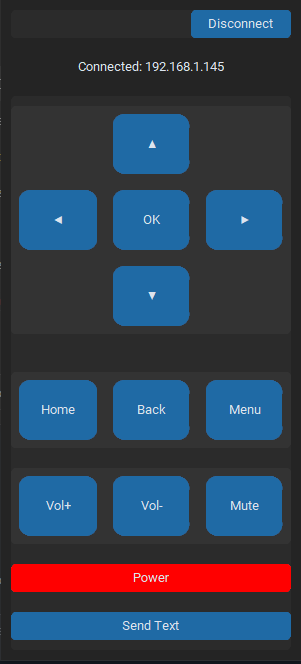
- 🎮 Full D-Pad control (navigation + OK)
- 🔊 Volume & Power controls
- 🏠 System buttons (Home, Back, Menu)
- ⌨️ Send text input to the device
- 🧵 Async ADB calls (non-blocking UI)
- 📱 Responsive UI (auto scaling)
- ⌨️ Keyboard shortcuts support
- 📝 Logging system (remote.log)
📦 Requirements
- Python 3.8+
- ADB installed and accessible in PATH (PC only)
⚡ Quick Start
Option 1: Install with pipx (Recommended)
pipx install adbtvremote
adbtvremote
Why pipx? Keeps the app isolated in its own virtual environment, avoiding dependency conflicts with other Python projects.
Option 2: Install with pip
pip install adbtvremote
adbtvremote
Option 3: Run from source
git clone https://github.com/DanVerseDev/android-tv-remote.git
cd android-tv-remote
pip install -r requirements.txt
python main.py
Pydroid3 (Android)
Note: On Pydroid3, this app uses a pure Python ADB implementation (
adb-shell), so no ADB binary is required.
- Install the package via pip in Pydroid3:
pip install adbtvremote
- Create a new Python script (e.g.,
run.py) with the following content:
from adbtvremote.app import main
import tkinter
main()
- Run the script in Pydroid3.
Note: Make sure
customtkinteris installed and the ADB binary is available on your Android device (manual setup may be required).
⚙️ Setup (ADB over Network)
-
Enable developer options on your Android TV
-
Enable:
- USB debugging
- Wireless debugging (if available)
-
Connect once via USB (optional but recommended):
adb tcpip 5555
- Get device IP and connect:
adb connect 192.168.x.x:5555
🚀 Usage
After installation, simply run:
adbtvremote
Or if running from source:
python main.py
Connect
- Enter IP:
192.168.x.x:#### - Click Connect
Controls
- UI buttons for navigation and system actions
- Keyboard:
- Arrow keys → Navigation
- Enter → OK
- Backspace → Back
- Escape → Home
Send Text
- Click Send Text
- Input text and send directly to device
🧠 How it works
- Uses
adb shell input keyeventfor buttons - Uses
adb shell input textfor text input - Runs ADB commands in background threads
- Logs all activity for debugging to
remote.log
📁 Project Structure
.
├── main.py
├── remote.log (generated)
└── README.md
🔁 Smart Backend
The app automatically selects the best ADB method:
- 💻 PC → Uses system
adbbinary (fast, full compatibility) - 📱 Pydroid3 → Uses pure Python
adb-shell(no ADB required)
No configuration needed.
⚠️ Notes
- Device and host must be on the same network
- Some TVs may require pairing for wireless ADB
- Text input replaces spaces with
%s(ADB limitation)
🐞 Logging
All ADB calls and errors are logged in remote.log
📄 License
MIT License - Copyright (c) 2026 Daniel Martí
Built with ❤️ by Daniel Martí aka DanVerse
1 maintainer

Metadata
1 maintainer
Release files for adbtvremote 0.1.3
For a detailed explanation of source distributions (sdists) and built distributions (wheels), please see the package formats documentation.
Source distribution (sdist)
| File | Size | Uploaded | |
|---|---|---|---|
| adbtvremote-0.1.3.tar.gz | 7.3 kB | Details |
Built distribution (wheel)
| File | Interpreter | ABI | Platform | Reset |
|---|---|---|---|---|
| adbtvremote-0.1.3-py3-none-any.whl | Python 3 | none | any | Details |
Total release size: 14.8 kB
Release files / adbtvremote-0.1.3.tar.gz
| Download URL | adbtvremote-0.1.3.tar.gz |
|---|---|
| Size | 7.3 kB |
| Tags | Source |
|
SHA-256 checksum How to use checksums |
48d5381b6426d95d240bb7cf5df46faade05664eb70506d087ea74bc54482e3a
|
|
BLAKE2b-256 checksum How to use checksums |
27639e51d85fb74a8d65a3761a7885c7bdcc774407c40b62f1ea461a9ced3c4d
|
| Upload date | |
|
Uploaded using Trusted Publishing? What is trusted publishing? |
No |
| Uploaded via |
twine/6.2.0 CPython/3.12.10
|
Release files / adbtvremote-0.1.3-py3-none-any.whl
| Download URL | adbtvremote-0.1.3-py3-none-any.whl |
|---|---|
| Size | 7.5 kB |
| Tags | Python 3 |
|
SHA-256 checksum How to use checksums |
f736a298149dc725e01eed47ec32889f4433401b5db8f8b8c701cc4f61f0a1ec
|
|
BLAKE2b-256 checksum How to use checksums |
96fdc2a8c2add3802b0422162411d91fbc71286bc7874f838a66a6bba6de5258
|
| Upload date | |
|
Uploaded using Trusted Publishing? What is trusted publishing? |
No |
| Uploaded via |
twine/6.2.0 CPython/3.12.10
|














