
Minimal Android TV remote over ADB (WiFi), works on PC and Pydroid

Project description
Android TV Remote 📺
A lightweight Python remote control for Android TV using ADB over network.
Works on desktop and mobile (Pydroid3).




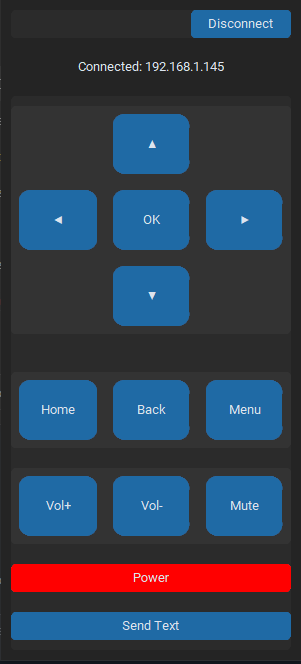
✨ Features
- 📡 ADB over WiFi (no USB required)
- 🎮 Full D-Pad control (navigation + OK)
- 🔊 Volume & Power controls
- 🏠 System buttons (Home, Back, Menu)
- ⌨️ Send text input to the device
- 🧵 Async ADB calls (non-blocking UI)
- 📱 Responsive UI (auto scaling)
- ⌨️ Keyboard shortcuts support
- 📝 Logging system (remote.log)
📦 Requirements
- Python 3.8+
- ADB installed and accessible in PATH
⚡ Quick Start
Option 1: Install with pipx (Recommended)
pipx install adbtvremote
adbtvremote
Why pipx? Keeps the app isolated in its own virtual environment, avoiding dependency conflicts with other Python projects.
Option 2: Install with pip
pip install adbtvremote
adbtvremote
Option 3: Run from source
git clone https://github.com/DanVerseDev/android-tv-remote.git
cd android-tv-remote
pip install -r requirements.txt
python main.py
Pydroid3 (Android)
- Install the package via pip in Pydroid3:
pip install adbtvremote
- Create a new Python script (e.g.,
run.py) with the following content:
from adbtvremote import app
import tkinter
app.main()
- Run the script in Pydroid3.
Note: Make sure
customtkinteris installed and the ADB binary is available on your Android device (manual setup may be required).
⚙️ Setup (ADB over Network)
-
Enable developer options on your Android TV
-
Enable:
- USB debugging
- Wireless debugging (if available)
-
Connect once via USB (optional but recommended):
adb tcpip 5555
- Get device IP and connect:
adb connect 192.168.x.x:5555
🚀 Usage
After installation, simply run:
adbtvremote
Or if running from source:
python main.py
Connect
- Enter IP:
192.168.x.x:#### - Click Connect
Controls
- UI buttons for navigation and system actions
- Keyboard:
- Arrow keys → Navigation
- Enter → OK
- Backspace → Back
- Escape → Home
Send Text
- Click Send Text
- Input text and send directly to device
🧠 How it works
- Uses
adb shell input keyeventfor buttons - Uses
adb shell input textfor text input - Runs ADB commands in background threads
- Logs all activity for debugging to
remote.log
📁 Project Structure
.
├── main.py
├── remote.log (generated)
└── README.md
⚠️ Notes
- Device and host must be on the same network
- Some TVs may require pairing for wireless ADB
- Text input replaces spaces with
%s(ADB limitation)
🐞 Logging
All ADB calls and errors are logged in remote.log
📄 License
MIT License - Copyright (c) 2026 Daniel Martí
Built with ❤️ by Daniel Martí aka DanVerse


Download files
Download the file for your platform. If you're not sure which to choose, learn more about installing packages.
Source Distribution
Built Distribution
Filter files by name, interpreter, ABI, and platform.
If you're not sure about the file name format, learn more about wheel file names.
Copy a direct link to the current filters
File details
Details for the file adbtvremote-0.1.2.tar.gz.
File metadata
- Download URL: adbtvremote-0.1.2.tar.gz
- Upload date:
- Size: 6.0 kB
- Tags: Source
- Uploaded using Trusted Publishing? No
- Uploaded via: twine/6.2.0 CPython/3.12.10
File hashes
| Algorithm | Hash digest | |
|---|---|---|
| SHA256 |
642b4c09aa9d294cdecd4843002ec14a2679b385fc1246ec94eb3a767482732a
|
|
| MD5 |
791ffa18b7042fd6c87b6c4e325b1abd
|
|
| BLAKE2b-256 |
89544ca62ae1cbfa27d2c64098282ca10b6592a2d06f8c31a4becd327d6c856b
|
File details
Details for the file adbtvremote-0.1.2-py3-none-any.whl.
File metadata
- Download URL: adbtvremote-0.1.2-py3-none-any.whl
- Upload date:
- Size: 6.0 kB
- Tags: Python 3
- Uploaded using Trusted Publishing? No
- Uploaded via: twine/6.2.0 CPython/3.12.10
File hashes
| Algorithm | Hash digest | |
|---|---|---|
| SHA256 |
b7dff42df77f39d6990b722efc2a9e965a23a69fef4091780976a0035320bbb1
|
|
| MD5 |
0b91dd53838ed1d0eaa86c08b7b440e3
|
|
| BLAKE2b-256 |
ba48ede22dda88ba0716a76d4fec838896ef04624c33a5a72b21245d1e0b2b19
|






