
NOTE: This is a vibe coded app. Proceed with caution.
add_subs_to_videos
You have video files but no subtitles. This tool fixes that.
It crawls a directory recursively, transcribes every video it finds using whisper.cpp, and writes a .srt sidecar file next to each one. Already-transcribed files are skipped, so re-running is fast.
Repo
https://github.com/simnim/add_subs_to_videos
Install
Every option below gives you both the add_subs_to_videos CLI command and an
"Add Subs to Videos" desktop GUI.
Ubuntu (snap — recommended, no prerequisites):
sudo snap install add-subs-to-videos
Installs the add-subs-to-videos CLI plus an "Add Subs to Videos" launcher in your applications menu (add-subs-to-videos-gui).
macOS (.dmg — no prerequisites):
Download Add Subs to Videos-<version>.dmg from GitHub Releases, open it, and drag the app to Applications. The DMG also includes a standalone add_subs_to_videos CLI binary and an Install CLI.command helper — double-click it to symlink the CLI into /usr/local/bin so add_subs_to_videos --help works from a terminal.
Metal GPU acceleration is auto-detected on macOS — no extra steps needed.
Any platform with Python 3.12+ (via pip/pipx):
pip install "add-subs-to-videos[gui]"
# or
pipx install "add-subs-to-videos[gui]"
This installs both the add_subs_to_videos CLI and the add-subs-to-videos-gui GUI entry point. Drop [gui] if you only want the CLI.
pywhispercppcompiles a C++ extension at install time (requires CMake —brew install cmake ffmpegon macOS, or on Ubuntu/Debiansudo apt install cmake ffmpeg).ffmpeg/ffprobeare also needed at runtime to decode non-WAV media and show per-file progress. On Linux with an NVIDIA GPU, setWHISPER_CUDA=1to compile with CUDA support instead of falling back to CPU:WHISPER_CUDA=1 pip install "add-subs-to-videos[gui]" --no-cache-dirRequires the CUDA Toolkit (
nvcconPATH) already installed.--no-cache-dirforces a rebuild — without it, pip may reuse a cached non-CUDA wheel from a previous install. If you already installed withoutWHISPER_CUDA=1, reinstall with--force-reinstall --no-cache-dirto pick up the flag.
Usage
CLI
add_subs_to_videos /path/to/videos
add_subs_to_videos /path/to/videos --model large-v3 --language en
add_subs_to_videos /path/to/videos --force   # re-transcribe even if .srt exists
add_subs_to_videos /path/to/videos --threads 4   # default: all available CPU cores
add_subs_to_videos /path/to/videos --quiet   # only warnings/errors + final summary
add_subs_to_videos /path/to/videos --verbose # debug output, incl. detected language
movie.mp4 → movie.srt, placed in the same directory. Supports .mp4, .mkv, .avi, .mov, .m4v, .webm, .ts, .flv.
Your last-used directory, model, language, and threads are remembered in ~/.config/add-subs-to-videos/config.toml, shared between the CLI and GUI — e.g. pick a folder in the GUI and a later CLI run can omit the directory argument.
GUI
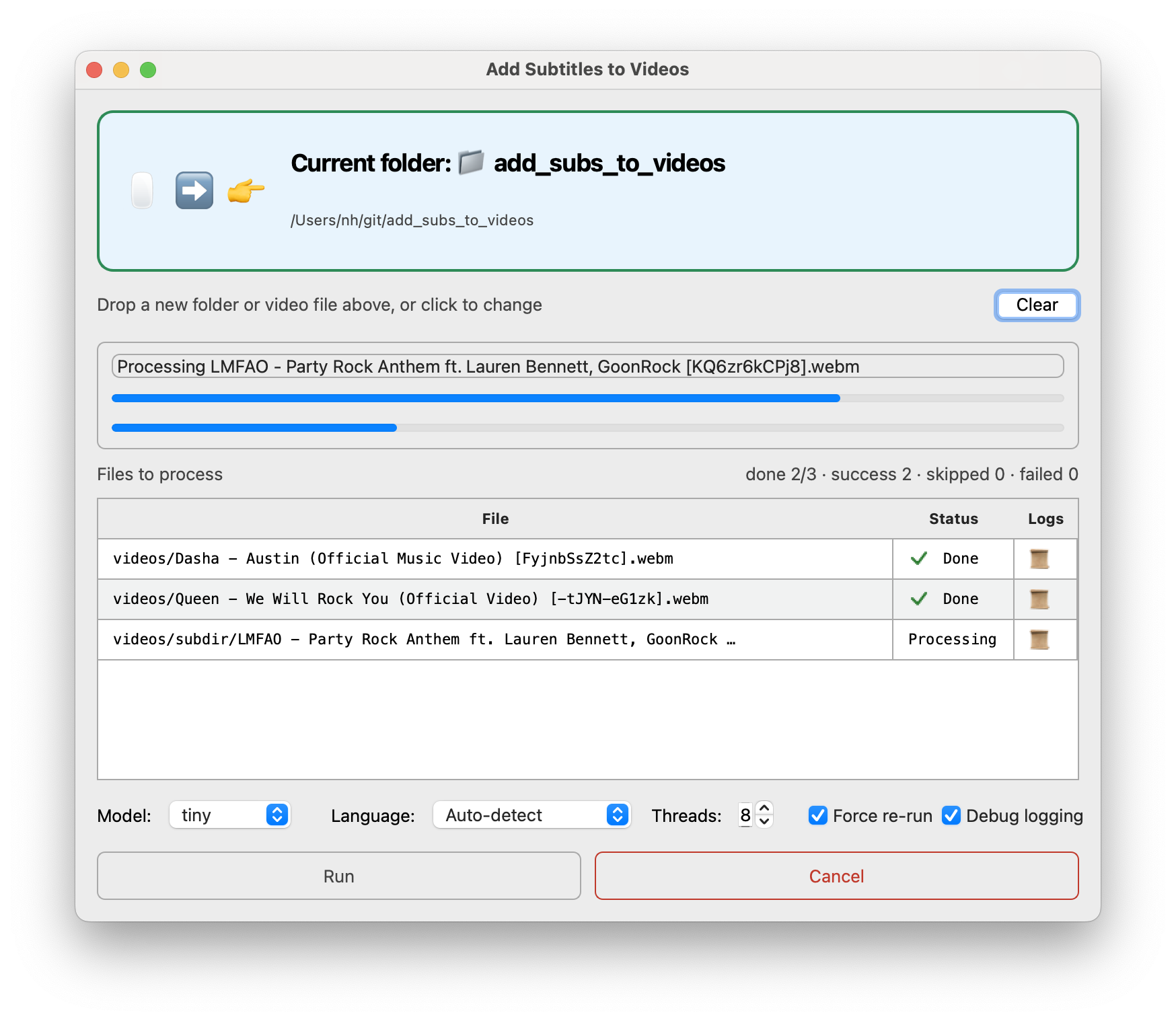
Drag a folder (or single video) onto the window, or click to pick one, then hit Run. Includes handy progress bars for model downloads and live, per-file transcription logs.
- A file table lists every discovered video with a live status (Pending / Processing / Done / Skipped / Failed) and a clickable log icon per row that opens that file's transcript/log output.
- Model dropdown (tiny/base/small/medium/large-v3) shows whether the model is already downloaded, not yet downloaded, or currently downloading.
- Language dropdown offers auto-detect or any of whisper.cpp's supported languages.
- A threads spinbox, a "Force re-run" checkbox, and a "Debug logging" checkbox.
- Overall and per-file progress bars, plus a Cancel button that aborts the current download or in-progress file.
- Auto re-run: once a run finishes (and wasn't cancelled), the Run button relabels to a countdown — "Run (auto re-run in M:SS)" — and automatically rescans the folder and re-runs after 10 minutes, so it can be left running unattended to pick up new files as they appear. Clicking Cancel during the countdown stops it.
Partial subtitles & cancellation
While a file is transcribing, segments are streamed incrementally into a movie.srt.part sidecar next to the eventual movie.srt, so you can open a growing, valid SRT file mid-run. On success it's atomically renamed to movie.srt. If you cancel (or the process is interrupted), the .part file is left on disk as-is — it's never deleted, but it's also never resumed: a later run on a file that only has a stray .part (no finished .srt) re-transcribes it from scratch, overwriting the partial content. Files that already have a completed .srt are still skipped unless --force/"Force re-run" is set.
Models
| Model | Speed | Quality |
|---|---|---|
tiny / base |
Very fast | Lower accuracy |
small / medium |
Moderate | Good for most content |
large-v3 |
Slow | Best accuracy |
medium is the default. Use large-v3 when accuracy matters; use tiny or base for quick drafts on long files.
Output
Each video gets a .srt file in the same directory:
movie.mp4 → movie.srt
1
00:00:01,240 --> 00:00:04,120
Welcome to the presentation.

2
00:00:04,500 --> 00:00:07,300
Today we'll cover three topics.
1 maintainer

Release files for add_subs_to_videos 0.2.1
For a detailed explanation of source distributions (sdists) and built distributions (wheels), please see the package formats documentation.
Source distribution (sdist)
| File | Size | Uploaded | |
|---|---|---|---|
| add_subs_to_videos-0.2.1.tar.gz | 2.0 MB | Details |
Built distribution (wheel)
| File | Interpreter | ABI | Platform | Reset |
|---|---|---|---|---|
| add_subs_to_videos-0.2.1-py3-none-any.whl | Python 3 | none | any | Details |
Total release size:2.1 MB
Release files / add_subs_to_videos-0.2.1.tar.gz
| Download URL | add_subs_to_videos-0.2.1.tar.gz |
|---|---|
| Size | 2.0 MB |
| Tags | Source |
|
SHA-256 checksum How to use checksums |
da61840915635f1a7f79bad0a8f42bf81dc99f3b0ec5da777a4535afe2bbbb30
|
|
BLAKE2b-256 checksum How to use checksums |
13a3e2106d5c7091a5724f307df264b83db3a9860fbbee650518ae7fdc2cc35b
|
| Upload date | |
|
Uploaded using Trusted Publishing? What is trusted publishing? |
No |
| Uploaded via |
uv/0.11.25 {"installer":{"name":"uv","version":"0.11.25","subcommand":["publish"]},"python":null,"implementation":{"name":null,"version":null},"distro":{"name":"Ubuntu","version":"24.04","id":"noble","libc":null},"system":{"name":null,"release":null},"cpu":null,"openssl_version":null,"setuptools_version":null,"rustc_version":null,"ci":true}
|
Release files / add_subs_to_videos-0.2.1-py3-none-any.whl
| Download URL | add_subs_to_videos-0.2.1-py3-none-any.whl |
|---|---|
| Size | 27.2 kB |
| Tags | Python 3 |
|
SHA-256 checksum How to use checksums |
12fd8f68d9529a1206653c52c4cc19e22d185b6b04f2d5e15f959158806dacde
|
|
BLAKE2b-256 checksum How to use checksums |
2ce237b965943b17617e966ab4a0b7ebfa25f406fa4836d1420b6b5470ed04d4
|
| Upload date | |
|
Uploaded using Trusted Publishing? What is trusted publishing? |
No |
| Uploaded via |
uv/0.11.25 {"installer":{"name":"uv","version":"0.11.25","subcommand":["publish"]},"python":null,"implementation":{"name":null,"version":null},"distro":{"name":"Ubuntu","version":"24.04","id":"noble","libc":null},"system":{"name":null,"release":null},"cpu":null,"openssl_version":null,"setuptools_version":null,"rustc_version":null,"ci":true}
|














