
Add missing subtitles. Recursive video-to-SRT transcription using whisper.cpp

Project description
NOTE: This is a vibe coded app. Proceed with caution.
add_subs_to_videos
You have video files but no subtitles. This tool fixes that.
It crawls a directory recursively, transcribes every video it finds using whisper.cpp, and writes a .srt sidecar file next to each one. Already-transcribed files are skipped, so re-running is fast.
Repo
https://github.com/simnim/add_subs_to_videos
GUI screenshot
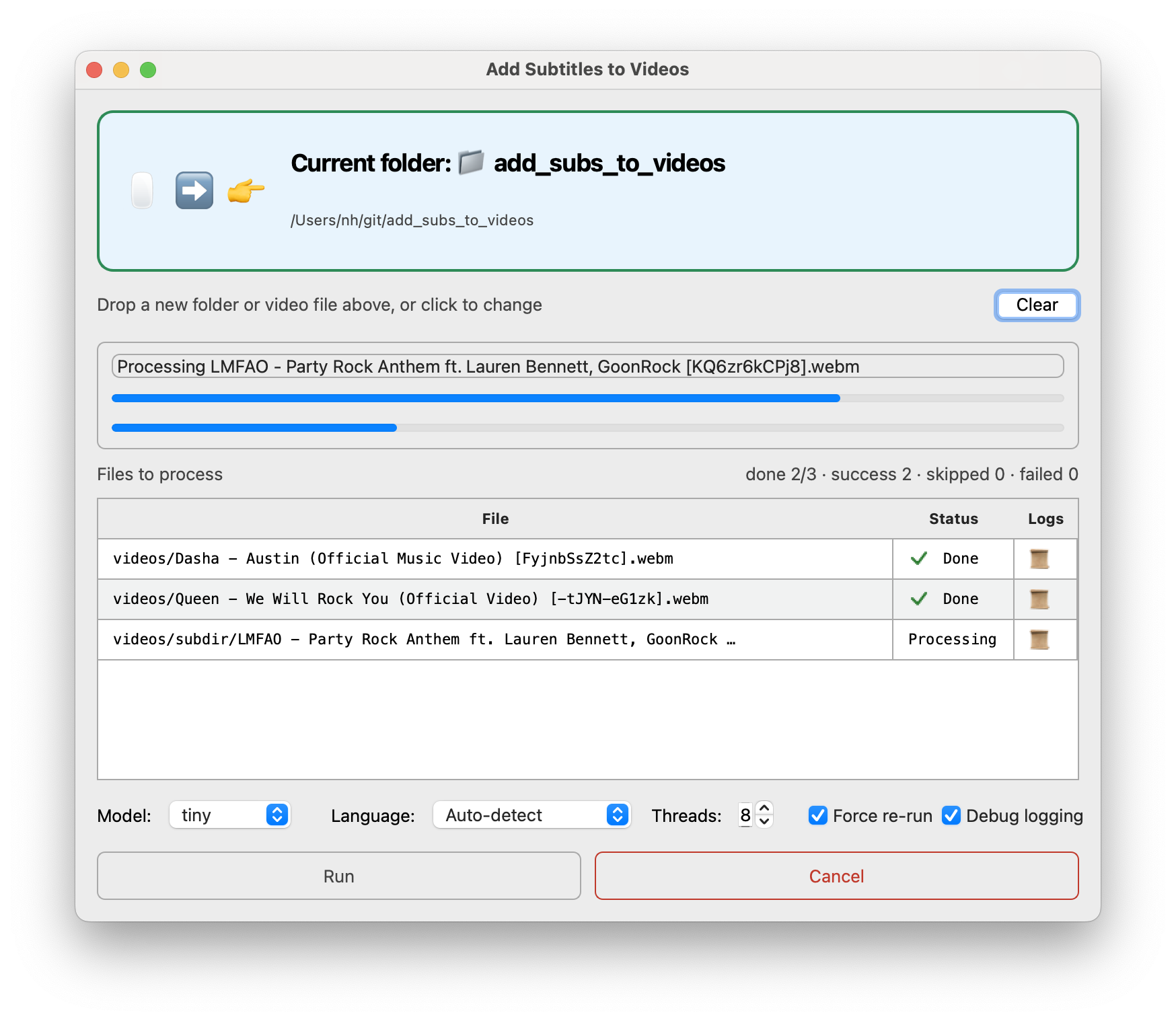
Drag a folder (or single video) onto the window, pick Model/Language/Threads, optionally check "Force re-run" or "Debug logging", then hit Run — overall and per-file progress bars and a live transcription log appear, with a Cancel button to stop mid-run.
Install
Every option below gives you both the add_subs_to_videos CLI command and an
"Add Subs to Videos" desktop GUI.
Ubuntu (snap — recommended, no prerequisites):
sudo snap install add-subs-to-videos
Installs the add-subs-to-videos CLI plus an "Add Subs to Videos" launcher in your applications menu (add-subs-to-videos-gui).
macOS (.dmg — no prerequisites):
Download Add Subs to Videos-<version>.dmg from GitHub Releases, open it, and drag the app to Applications. The DMG also includes a standalone add_subs_to_videos CLI binary and an Install CLI.command helper — double-click it to symlink the CLI into /usr/local/bin so add_subs_to_videos --help works from a terminal.
Metal GPU acceleration is auto-detected on macOS — no extra steps needed.
Any platform with Python 3.12+ (via pip/pipx):
pip install "add-subs-to-videos[gui]"
# or
pipx install "add-subs-to-videos[gui]"
This installs both the add_subs_to_videos CLI and the add-subs-to-videos-gui GUI entry point. Drop [gui] if you only want the CLI.
pywhispercppcompiles a C++ extension at install time (requires CMake —brew install cmake ffmpegon macOS, or on Ubuntu/Debiansudo apt install cmake ffmpeg).ffmpeg/ffprobeare also needed at runtime to decode non-WAV media and show per-file progress. On Linux with CUDA:WHISPER_CUDA=1 pip install "add-subs-to-videos[gui]"
Usage
CLI
add_subs_to_videos /path/to/videos
add_subs_to_videos /path/to/videos --model large-v3 --language en
add_subs_to_videos /path/to/videos --force   # re-transcribe even if .srt exists
add_subs_to_videos /path/to/videos --threads 4   # default: all available CPU cores
add_subs_to_videos /path/to/videos --quiet   # only warnings/errors + final summary
add_subs_to_videos /path/to/videos --verbose # debug output, incl. detected language
movie.mp4 → movie.srt, placed in the same directory. Supports .mp4, .mkv, .avi, .mov, .m4v, .webm, .ts, .flv.
Your last-used directory, model, language, and threads are remembered in ~/.config/add-subs-to-videos/config.toml, shared between the CLI and GUI — e.g. pick a folder in the GUI and a later CLI run can omit the directory argument.
Models
| Model | Speed | Quality |
|---|---|---|
tiny / base |
Very fast | Lower accuracy |
small / medium |
Moderate | Good for most content |
large-v3 |
Slow | Best accuracy |
medium is the default. Use large-v3 when accuracy matters; use tiny or base for quick drafts on long files.
Output
Each video gets a .srt file in the same directory:
movie.mp4 → movie.srt
1
00:00:01,240 --> 00:00:04,120
Welcome to the presentation.

2
00:00:04,500 --> 00:00:07,300
Today we'll cover three topics.
Release history Release notifications | RSS feed


Download files
Download the file for your platform. If you're not sure which to choose, learn more about installing packages.
Source Distribution
Built Distribution
Filter files by name, interpreter, ABI, and platform.
If you're not sure about the file name format, learn more about wheel file names.
Copy a direct link to the current filters
File details
Details for the file add_subs_to_videos-0.1.36.tar.gz.
File metadata
- Download URL: add_subs_to_videos-0.1.36.tar.gz
- Upload date:
- Size: 2.0 MB
- Tags: Source
- Uploaded using Trusted Publishing? No
- Uploaded via: uv/0.11.23 {"installer":{"name":"uv","version":"0.11.23","subcommand":["publish"]},"python":null,"implementation":{"name":null,"version":null},"distro":{"name":"Ubuntu","version":"24.04","id":"noble","libc":null},"system":{"name":null,"release":null},"cpu":null,"openssl_version":null,"setuptools_version":null,"rustc_version":null,"ci":true}
File hashes
| Algorithm | Hash digest | |
|---|---|---|
| SHA256 |
381d0fe893efc9d1770b4c3756e669d4594d07183a8bc1d2e2c5dbe9b4fdae11
|
|
| MD5 |
060cca961dc51d67965b290f34fa34ca
|
|
| BLAKE2b-256 |
225263de80ea15fb4b3fd2ca3e4a23a32f949642752b947d5d2154c61930d768
|
File details
Details for the file add_subs_to_videos-0.1.36-py3-none-any.whl.
File metadata
- Download URL: add_subs_to_videos-0.1.36-py3-none-any.whl
- Upload date:
- Size: 24.7 kB
- Tags: Python 3
- Uploaded using Trusted Publishing? No
- Uploaded via: uv/0.11.23 {"installer":{"name":"uv","version":"0.11.23","subcommand":["publish"]},"python":null,"implementation":{"name":null,"version":null},"distro":{"name":"Ubuntu","version":"24.04","id":"noble","libc":null},"system":{"name":null,"release":null},"cpu":null,"openssl_version":null,"setuptools_version":null,"rustc_version":null,"ci":true}
File hashes
| Algorithm | Hash digest | |
|---|---|---|
| SHA256 |
7d742f37a0df52d46abf736757fc14266bb4a5f5b98bf0b7f5fd565900e05bec
|
|
| MD5 |
791fa75a5cc5976a6d38d6002d730100
|
|
| BLAKE2b-256 |
77f210947be07edc8b1c5911498ca705a17c5f4a80c1ce9c1e224fe4cadbb643
|






