
NOTE: This is a vibe coded app. Proceed with caution.
add_subs_to_videos
You have video files but no subtitles. This tool fixes that.
It crawls a directory recursively, transcribes every video it finds using whisper.cpp, and writes a .srt sidecar file next to each one. Already-transcribed files are skipped, so re-running is fast.
Repo
https://github.com/simnim/add_subs_to_videos
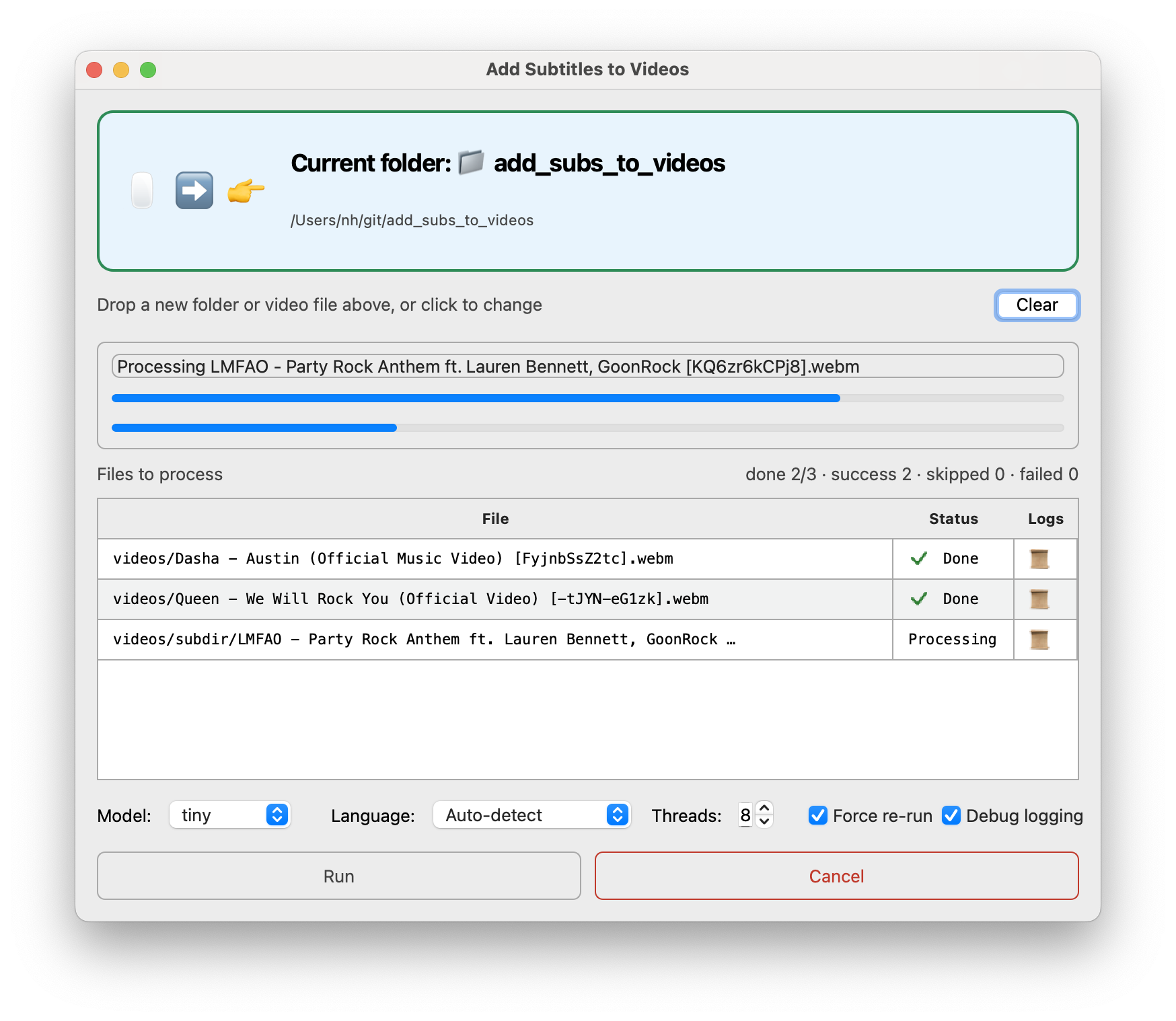
GUI screenshot
Install
Every option below gives you both the add_subs_to_videos CLI command and an
"Add Subs to Videos" desktop GUI.
Ubuntu (snap — recommended, no prerequisites):
sudo snap install add-subs-to-videos
Installs the add-subs-to-videos CLI plus an "Add Subs to Videos" launcher in your applications menu (add-subs-to-videos-gui).
macOS (.dmg — no prerequisites):
Download Add Subs to Videos-<version>.dmg from GitHub Releases, open it, and drag the app to Applications. The DMG also includes a standalone add_subs_to_videos CLI binary and an Install CLI.command helper — double-click it to symlink the CLI into /usr/local/bin so add_subs_to_videos --help works from a terminal.
Metal GPU acceleration is auto-detected on macOS — no extra steps needed.
Any platform with Python 3.12+ (via pip/pipx):
pip install "add-subs-to-videos[gui]"
# or
pipx install "add-subs-to-videos[gui]"
This installs both the add_subs_to_videos CLI and the add-subs-to-videos-gui GUI entry point. Drop [gui] if you only want the CLI.
pywhispercppcompiles a C++ extension at install time (requires CMake —brew install cmake ffmpegon macOS, or on Ubuntu/Debiansudo apt install cmake ffmpeg).ffmpeg/ffprobeare also needed at runtime to decode non-WAV media and show per-file progress. On Linux with CUDA:WHISPER_CUDA=1 pip install "add-subs-to-videos[gui]"
Usage
CLI
add_subs_to_videos /path/to/videos
add_subs_to_videos /path/to/videos --model large-v3 --language en
add_subs_to_videos /path/to/videos --force   # re-transcribe even if .srt exists
movie.mp4 → movie.srt, placed in the same directory. Supports .mp4, .mkv, .avi, .mov, .m4v, .webm, and more.
Models
| Model | Speed | Quality |
|---|---|---|
tiny / base |
Very fast | Lower accuracy |
small / medium |
Moderate | Good for most content |
large-v3 |
Slow | Best accuracy |
medium is the default. Use large-v3 when accuracy matters; use tiny or base for quick drafts on long files.
Output
Each video gets a .srt file in the same directory:
movie.mp4 → movie.srt
1
00:00:01,240 --> 00:00:04,120
Welcome to the presentation.

2
00:00:04,500 --> 00:00:07,300
Today we'll cover three topics.
1 maintainer

Metadata
1 maintainer
Release files for add_subs_to_videos 0.1.28
For a detailed explanation of source distributions (sdists) and built distributions (wheels), please see the package formats documentation.
Source distribution (sdist)
| File | Size | Uploaded | Provenance | Actions |
|---|---|---|---|---|
| add_subs_to_videos-0.1.28.tar.gz | 1.6 MB | Without provenance | Details for add_subs_to_videos-0.1.28.tar.gz |
Built distribution (wheel)
| File | Interpreter | ABI | Platform | Actions Reset |
|---|---|---|---|---|
| add_subs_to_videos-0.1.28-py3-none-any.whl | Python 3 | none | any | Details for add_subs_to_videos-0.1.28-py3-none-any.whl |
Total release size: 1.7 MB
Release files / add_subs_to_videos-0.1.28.tar.gz
| Download URL | add_subs_to_videos-0.1.28.tar.gz |
|---|---|
| Size | 1.6 MB |
| Tags | Source |
|
SHA-256 checksum How to use checksums |
8f645b7d96d172bc24717db01d1312edb34f33bb5ef572e237602c321ee75e7e
|
|
BLAKE2b-256 checksum How to use checksums |
86d49447c068d8c250ac0b831ae5e5ed1babd4ac2984bafd78dcc83c8f77ded0
|
| Upload date | |
|
Uploaded using Trusted Publishing? What is trusted publishing? |
No |
| Uploaded via |
uv/0.11.21 {"installer":{"name":"uv","version":"0.11.21","subcommand":["publish"]},"python":null,"implementation":{"name":null,"version":null},"distro":{"name":"Ubuntu","version":"24.04","id":"noble","libc":null},"system":{"name":null,"release":null},"cpu":null,"openssl_version":null,"setuptools_version":null,"rustc_version":null,"ci":true}
|
Release files / add_subs_to_videos-0.1.28-py3-none-any.whl
| Download URL | add_subs_to_videos-0.1.28-py3-none-any.whl |
|---|---|
| Size | 21.5 kB |
| Tags | Python 3 |
|
SHA-256 checksum How to use checksums |
c8d291fd2d249eba1a003bce44fd7e7ea9d3aab326db6fc65d95c721506247d7
|
|
BLAKE2b-256 checksum How to use checksums |
eadc633ce1029c11f8648fc69f9e6c46cbdf2b6249da56beb04762612f2f15fa
|
| Upload date | |
|
Uploaded using Trusted Publishing? What is trusted publishing? |
No |
| Uploaded via |
uv/0.11.21 {"installer":{"name":"uv","version":"0.11.21","subcommand":["publish"]},"python":null,"implementation":{"name":null,"version":null},"distro":{"name":"Ubuntu","version":"24.04","id":"noble","libc":null},"system":{"name":null,"release":null},"cpu":null,"openssl_version":null,"setuptools_version":null,"rustc_version":null,"ci":true}
|
Security for add_subs_to_videos 0.1.28
Provenance
Provenance describes where a file came from. On PyPI, provenance is shared via attestations, which provide a verifiable record of the build or publishing details. View details, limitations and caveats.
No provenance found
None of the files in this release were uploaded with provenance metadata.
A note on package security
PyPI is a repository for distributing packages, not a service for auditing them. While third-party security researchers and our staff do their best to detect and remove malicious packages, PyPI cannot guarantee the quality, security or suitability of any given package.
To learn more about protecting yourself from malicious actors, visit our package security documentation.














