
adif2callhistory




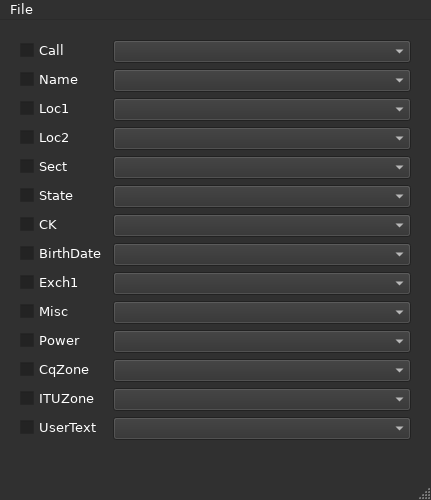
This package allows you to load an arbitrary ADIF file and map the ADIF tags to N1MM or Not1MM call history file fields. After selecting the fields you wished to export, simply save the file under the name you give it.
Installation
This Python package is hosted on PyPi. It can be installed with pipx, pipx install adif2callhistory or you can use uv.
Selecting/loading an ADIF file
Click File -> Load ADIF I file picker will appear allowing you to select the file. If the file is parsed correctly the drop downs next to the call history field names will populate with the unique ADIF tags found.
One thing that will prevent an ADIF file from parsing is if the ADIF header does not start with a comment line.
So if your ADIF file looks like:
<ADIF_VER:5>2.2.0
<EOH>
<QSO_DATE:8:d>20220625
<TIME_ON:4>1806
Just add a line to the top like:
Some Text Here
<ADIF_VER:5>2.2.0
<EOH>
<QSO_DATE:8:d>20220625
<TIME_ON:4>1806
and retry it.
Mapping the fields to tags and saving the file
After the ADIF file is loaded and the drop downs are populated with tags, go down the list of fields, place a checkmark to the left of the desired field and select which tag to map to it.
Here's an example of fields selected and mapped to a Field Day ADIF file:
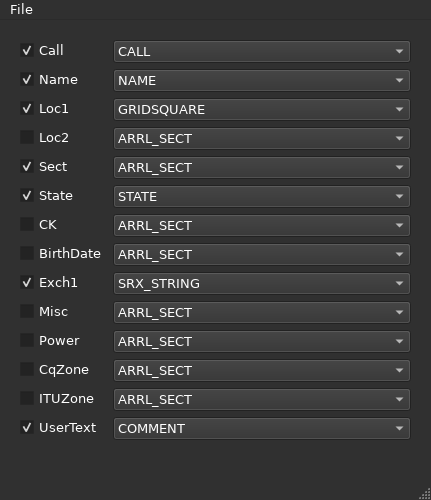
After selecting and mapping the fields select File -> Save Call History and choose a filename and location to save your file.
You will end up with something like:
!!Order!!,Call,Name,Loc1,Sect,State,Exch1
K6PV,,,LAX,CA,1D
K7SS,DANIEL A ESKENAZI,CN87tn,WWA,WA,1D
K6AA,UNITED RADIO AMATEUR CLUB INC,DM03ur,LAX,CA,3A
K0EU,RANDALL K MARTIN,DM79lp,CO,CO,1B
W3AO,NATIONAL PRESS RADIO CLUB,FM18pv,MDC,MD,1E
W6ZE,ORANGE COUNTY AMATEUR RADIO CLUB INC,DM13cs,ORG,CA,6A
...
Recent Changes
- [25-3-17] Define newline in file open command incase windows user happens to run it.
- [25-3-15] Bumped pyadif-file requirement to 1.3.1
- [25-3-10] Initial push.
Copyright
PyADIF-File © 2023-2024 by Andreas Schawo is licensed under CC BY-SA 4.0
PyADIF-File uses
xmlschema Copyright (c), 2016-2022, SISSA (Scuola Internazionale Superiore di Studi Avanzati)
xmltodict Copyright (c), 2012 Martin Blech and individual contributors
1 maintainer

Metadata
1 maintainer
Release files for adif2callhistory 25.3.17
For a detailed explanation of source distributions (sdists) and built distributions (wheels), please see the package formats documentation.
Source distribution (sdist)
| File | Size | Uploaded | |
|---|---|---|---|
| adif2callhistory-25.3.17.tar.gz | 18.1 kB | Details |
Built distribution (wheel)
| File | Interpreter | ABI | Platform | Reset |
|---|---|---|---|---|
| adif2callhistory-25.3.17-py3-none-any.whl | Python 3 | none | any | Details |
Total release size: 36.7 kB
Release files / adif2callhistory-25.3.17.tar.gz
| Download URL | adif2callhistory-25.3.17.tar.gz |
|---|---|
| Size | 18.1 kB |
| Tags | Source |
|
SHA-256 checksum How to use checksums |
0340d348cf9031798752f9c81492a4a72862406c30b985327ec9fbdd549c376b
|
|
BLAKE2b-256 checksum How to use checksums |
a20ca6edc8590cd7e329a7e2ef081ba1aa7a7cdc9935c66ca83422350a33f676
|
| Upload date | |
|
Uploaded using Trusted Publishing? What is trusted publishing? |
No |
| Uploaded via |
twine/6.1.0 CPython/3.13.2
|
Release files / adif2callhistory-25.3.17-py3-none-any.whl
| Download URL | adif2callhistory-25.3.17-py3-none-any.whl |
|---|---|
| Size | 18.6 kB |
| Tags | Python 3 |
|
SHA-256 checksum How to use checksums |
e71939961fcfa3dcdeb6b833644c4e4db13a558fd31e038e37a3f8a317ee0bcd
|
|
BLAKE2b-256 checksum How to use checksums |
35d4fbe815fc0e800d995eb95b36cb77a0565f6c2dd3665ac965307f07901fa6
|
| Upload date | |
|
Uploaded using Trusted Publishing? What is trusted publishing? |
No |
| Uploaded via |
twine/6.1.0 CPython/3.13.2
|














