
adk-finops




Universal FinOps cost, token usage, and grounding fee tracking for the Google Agent Development Kit (ADK) and LLM workflows.
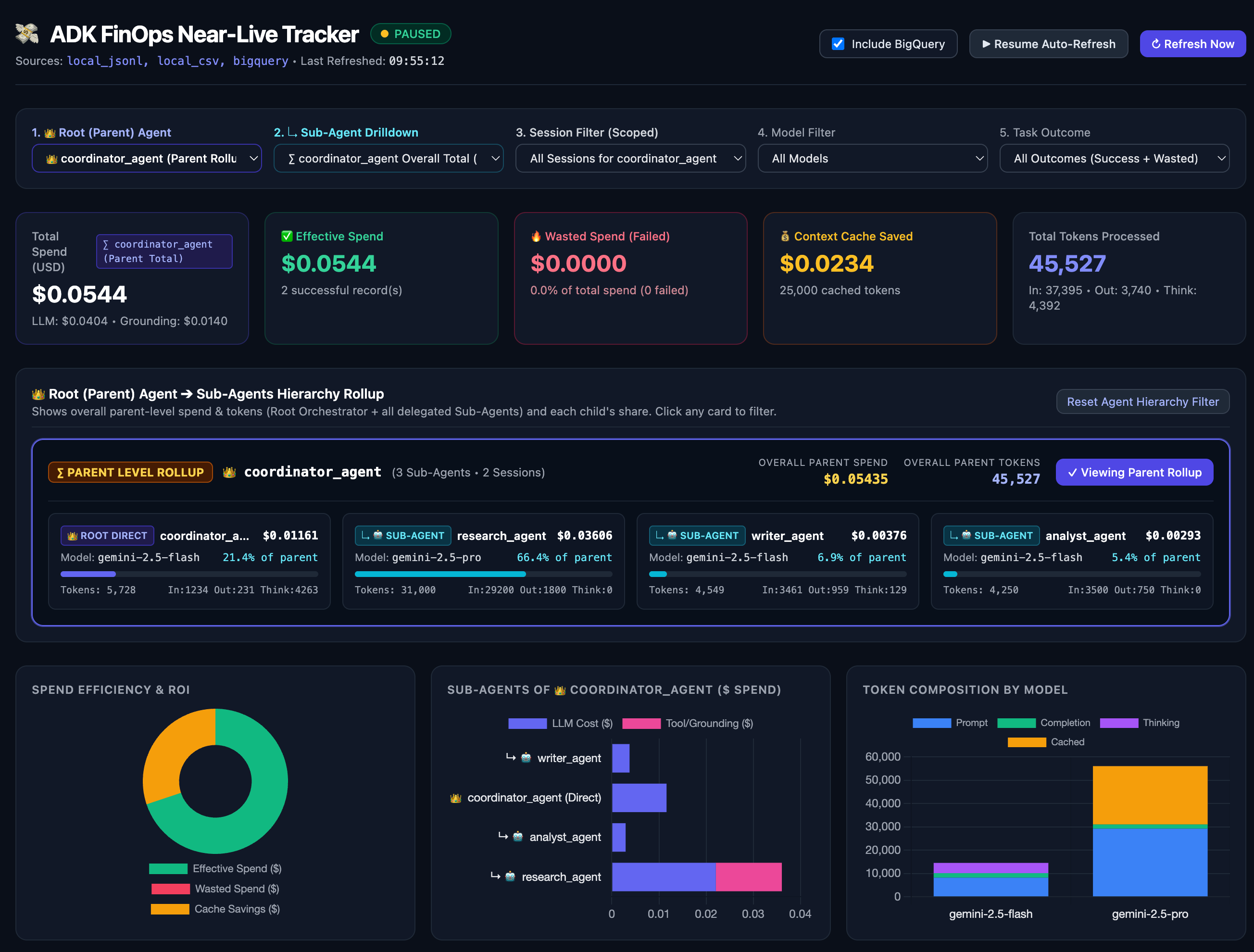
Table of Contents
- Why adk-finops?
- Key Features
- Installation
- Quickstart with Google ADK
- Dual-Scope Telemetry: Turn vs. Session
- Budget Guards & Circuit Breakers
- Task Outcome & Wasted Spend Analytics (Success vs. Failure)
- Context Caching Savings Analytics (ROI Tracker)
- Multi-Agent Cost Attribution & Delegation Tracking
- Automated FinOps Optimization Advisor
- Rich Terminal Summary Box
- Decoupled Rate Cards (Custom & Enterprise Pricing)
- Smart Tool Classification (MCP vs. Grounding)
- Gemini 2.5 Thinking Tokens Billing
- Telemetry State Schema
- Standalone Usage (Without ADK)
- Configuration Reference
- Built-In Model Rate Cards
- Flexible Exporters (Local, Cloud & OpenTelemetry)
- License
Why adk-finops?
Building production AI agents with Google ADK involves multi-step tool-calling loops, reasoning models, and external search tools. However, monitoring real financial costs in production presents several challenges:
- Missing Cumulative Turn Tokens: In a tool-calling loop (e.g., Call 1 decides to call a tool $\rightarrow$ Tool runs $\rightarrow$ Call 2 generates final response), default event telemetry only displays the token count of Call 2, hiding the cost of earlier reasoning calls.
- Thinking / Reasoning Tokens: Models like Gemini 2.5 Pro separate
thoughtsTokenCountfromcandidatesTokenCount. If thinking tokens are not explicitly extracted, your token usage will not match your Google Cloud bill. - MCP vs. Paid Grounding: Generic keyword matching often misclassifies free local/MCP tools (like
search_documents) as paid Vertex AI Grounding queries ($35/1k or $2.50/1k). - Hardcoded Pricing: Model prices change frequently, and enterprises negotiate custom volume discounts. Hardcoded rates in application code require constant code updates.
adk-finops solves all of these problems with a single lightweight, decoupled plugin.
Key Features
- Native Google ADK Integration: Intercepts model and tool invocations via the ADK
BasePluginlifecycle (before_run,after_model,on_event,after_tool,after_run). - Dual-Scope Accounting: Simultaneously tracks metrics for both the active turn (all calls within a user message) and the cumulative session (entire conversation history).
- Budget Guards & Circuit Breakers: Set hard session and turn USD spending limits. Prevent runaway bills by halting execution, emitting warnings, or automatically downgrading expensive models (e.g. Gemini 2.5 Pro → Flash) when limits are breached.
- Automated FinOps Optimization Advisor: Zero-LLM, deterministic rule engine that analyzes completed session telemetry in
< 1msand calculates concrete$and%savings across Context Caching Opportunities, Thinking Token Alerts (thinking_budget=0), and Model Right-Sizing (gemini-3.5-flash➔gemini-3.5-flash-lite,gemini-2.5-pro➔gemini-2.5-flash,gpt-4o➔gpt-4o-mini). Easily toggled on/off viaenable_optimization_advisor=True/False. - Task Outcome & Wasted Spend Analytics: Distinguishes productive spend (
status="success") from wasted capital burned on failed retry loops or runtime exceptions (status="failed","error"). Computes average spend per successful task vs. average wasted spend per failed loop, capital loss percentage, and auto-exports crashed sessions to BigQuery. - Context Caching Savings ROI: Demonstrates financial value by tracking gross cost (cost without caching) vs. actual net cost, reporting exact dollars and percentage saved (e.g. up to 90% savings via Gemini Context Caching).
- Decoupled Rate Cards: Pricing data is stored in clean JSON. Override rates via local file, remote URL, environment variable, or code without modifying the engine.
- Enterprise Volume Discounts: Configure global or provider-specific discount multipliers (e.g., 15% Google Cloud negotiated discount).
- Accurate Thinking Tokens: Automatically captures and bills
thoughts_token_countat the output rate while displaying thinking tokens separately in reports. - Smart Tool Discrimination: Automatically excludes
MCPTool,McpToolset, BigQuery, and local function tools ($0.00 fee) while accurately billing Google Search Grounding ($0.014/query) and Vertex AI Search ($0.0025/prompt). - Real-Time UI Streaming: Streams cost metrics to
event.actions.state_delta["finops_cost"]for live updates in the ADK Web UI, with formatted terminal stdout logging. - Zero Heavy Dependencies: Pure Python standard library for the core tracker.
Installation
From PyPI
pip install adk-finops
With Rich Terminal Summary
pip install "adk-finops[rich]"
With BigQuery Exporter
pip install "adk-finops[bigquery]"
With Google ADK
pip install "adk-finops[adk]"
Full Enterprise Suite (ADK + Rich + BigQuery)
pip install "adk-finops[all]"
From GitHub (Direct Git Dependency)
pip install git+https://github.com/dmoonat/adk-finops.git
Or in requirements.txt:
adk-finops @ git+https://github.com/dmoonat/adk-finops.git@main
Quickstart with Google ADK
Add FinOpsCostPlugin to your App in agent.py:
from google.adk.agents import Agent
from google.adk.apps import App
from adk_finops import FinOpsCostPlugin

# 1. Define your agent
root_agent = Agent(
    model="gemini-2.5-pro",
    name="my_agent",
    instruction="You are a helpful assistant.",
    tools=[...]
)

# 2. Instantiate the FinOps plugin
finops_plugin = FinOpsCostPlugin(
    name="finops_cost_tracker",
    default_model="gemini-2.5-pro",
)

# 3. Attach plugin to your App
app = App(
    name="my_agent",
    root_agent=root_agent,
    plugins=[finops_plugin],
)
⚠️ Note:
FinOpsCostPluginis a nativeApp/Runner-levelBasePlugin. Register it only viaApp(plugins=[finops_plugin])(orRunner(plugins=[finops_plugin])) — do not also passplugin.after_model_callbacktoAgent(after_model_callback=...), or ADK will invoke the callback twice.
Run your agent with adk web or adk run. Telemetry will log directly to the terminal and appear in the Web UI session state under finops_cost.
Dual-Scope Telemetry: Turn vs. Session
adk-finops resolves the mismatch between single-event inspection and session-level totals by reporting both scopes concurrently:
| Scope | Description | Matches in ADK Web UI |
|---|---|---|
turn |
Cumulative metrics for the current user interaction (Call 1 + Tool Execution + Call 2) | Full cost of the current turn |
session |
Cumulative metrics across all turns in the chat session (Turn 1 + Turn 2 + ...) | ADK "Usage Summary for Session" |
State Delta Example
{
  "total_tokens": 18671,
  "prompt_tokens": 16617,
  "completion_tokens": 1110,
  "thoughts_tokens": 944,
  "total_cost_usd": 0.0135785,
  "currency": "USD",

  "turn": {
    "total_calls": 2,
    "total_tool_calls": 0,
    "prompt_tokens": 14222,
    "completion_tokens": 1079,
    "thoughts_tokens": 908,
    "total_tokens": 16209,
    "llm_cost_usd": 0.0092341,
    "tool_cost_usd": 0.0,
    "total_cost_usd": 0.0092341,
    "breakdown_by_model": {
      "gemini-2.5-pro": {
        "calls": 2,
        "prompt_tokens": 14222,
        "completion_tokens": 1079,
        "thoughts_tokens": 908,
        "total_cost_usd": 0.0092341
      }
    }
  },

  "session": {
    "total_calls": 3,
    "total_tool_calls": 0,
    "prompt_tokens": 16617,
    "completion_tokens": 1110,
    "thoughts_tokens": 944,
    "total_tokens": 18671,
    "llm_cost_usd": 0.0135785,
    "tool_cost_usd": 0.0,
    "total_cost_usd": 0.0135785
  }
}
Budget Guards & Circuit Breakers
Prevent runaway agent loops and surprise bills with proactive budget enforcement. Set hard USD spending limits per session or per turn:
from adk_finops import FinOpsCostPlugin

finops_plugin = FinOpsCostPlugin(
    default_model="gemini-2.5-pro",
    budget_limit_usd=1.00,             # Hard stop at $1.00 per chat session
    turn_budget_limit_usd=0.25,        # Maximum $0.25 on any single turn
    on_budget_exceeded="halt",         # Action: "halt", "warn", or "downgrade"
    fallback_model="gemini-2.5-flash", # Target model when using "downgrade"
)
Enforcement Modes
| Mode | Behavior | Best Used For |
|---|---|---|
"halt" (default) |
Halts execution immediately, raises BudgetExceededError or returns a safe warning message in ADK to block further model calls. |
Production safeguards, preventing runaway costs. |
"downgrade" |
Automatically downgrades the agent's model to fallback_model (e.g. Gemini 2.5 Pro → Flash) once the budget threshold is reached. |
Graceful service degradation with zero user downtime. |
"warn" |
Logs a warning and marks exceeded: True in session state (finops_cost.budget) without interrupting the user. |
Soft monitoring and alerting. |
Task Outcome & Wasted Spend Analytics (Success vs. Failure)
In production AI systems, a failed agent loop (e.g., an agent repeatedly failing schema validation across 3 retries, or crashing due to a downstream API outage after generating a complex plan) often burns 5x–20x more tokens than a successful task while delivering zero business value.
adk-finops tracks every LLM call in real time and classifies outcomes into Productive Spend vs. Wasted Capital, allowing teams to compare the average spend of a successful task against the wasted spend of failed loops.
Understanding status vs. is_failure
| Field | Type | Values | Purpose |
|---|---|---|---|
status |
str |
"success", "pending", "failed", "error", "aborted", "budget_exceeded" |
Operational Root Cause: Identifies how the task ended (e.g., validation loop exhausted "failed", downstream tool crash "error", or circuit breaker halt "budget_exceeded"). |
is_failure |
bool |
True or False |
Financial Bucket: Binary flag (True when status is failed, error, aborted, or budget_exceeded) used to separate Wasted Spend (True) from Productive Spend (False). |
1. Automatic Workflow State Detection (Google ADK)
If any ADK workflow node or critic sets ctx.state["failed"] = True and ctx.state["error_reason"] = "...", FinOpsCostPlugin automatically detects the failure in after_run_callback, tags the root cause, and marks the run's cost as wasted spend:
def strict_validator(node_input, ctx):
    attempts = ctx.state.get("attempts", 0) + 1
    ctx.state["attempts"] = attempts
    if attempts >= 3:
        ctx.state["failed"] = True
        ctx.state["error_reason"] = "Exhausted 3 retry attempts without passing validation"
        return Event(output="Aborted", actions=EventActions(route="abort"))
2. Explicit Recording & Crash Recovery (Auto-Export to BigQuery)
When an unhandled exception crashes an agent run, ADK skips after_run_callback. Calling finops_plugin.record_task_status() inside your except block ensures the wasted tokens are logged and automatically streamed to BigQuery:
from adk_finops import CostTracker, print_summary, print_task_efficiency_summary

try:
    async for event in runner.run_async(user_id="u1", session_id=session_id, new_message=msg):
        ...
except Exception as e:
    # Logs error outcome AND automatically flushes the crashed session to BigQuery
    finops_plugin.record_task_status(
        session_id=session_id,
        status="error",
        error=f"{type(e).__name__}: {str(e)}",
    )
    print_summary(session_id=session_id)

# Render comparative efficiency report across all tasks
print_task_efficiency_summary()
Comparative Task Efficiency Report
╭───────────── 📊 FinOps Task Efficiency & Wasted Spend Analysis ──────────────╮
│                                                                              │
│  Metric         Successful Tasks   Failed Loops (Wasted)      Total / Impact │
│  ──────────────────────────────────────────────────────────────────────────  │
│  Task Count                    2                       2 4 (50.0% fail rate) │
│  Total Spend             $0.0021                 $0.0080 $0.0101 (79.6% was) │
│  Avg Spend / Task        $0.0010                 $0.0040 Wasted is 3.9x avg  │
│  Total Tokens                864                   3,383               4,247 │
│                                                                              │
│  ⚠️  Capital Loss: $0.0080 (79.6% of total spend) was burned on uncompleted  │
│ or failed tasks.                                                             │
│  🛡️  Budget Context: Total spend is $0.0101 / $5.0000 (0.2% limit used;      │
│ waste is 0.16% of budget limit).                                             │
╰─────────────── adk-finops • Successful vs. Wasted Agent Loops ───────────────╯
Context Caching Savings Analytics (ROI Tracker)
Context caching can reduce prompt token costs by up to 90%. adk-finops automatically calculates Gross Cost (what you would have paid without caching), Actual Net Cost, and Total Savings:
{
  "total_cost_usd": 0.00334,
  "gross_cost_usd": 0.00550,
  "savings_usd": 0.00216,
  "savings_pct": 39.3,
  "cached_tokens": 8000
}
Real-time stdout log highlight:
[FinOps LLM] turn=turn_1 model=gemini-2.5-flash tokens=11000 cost=$0.003340 | 💰 Saved $0.002160 (39.3%) via Context Caching
[FinOps Summary] Turn cost=$0.003340 | Session cost=$0.003340 | 💰 Total Saved: $0.002160 (39.3%) via Caching
Multi-Agent Cost Attribution & Delegation Tracking
In hierarchical multi-agent architectures (e.g., a supervisor delegating subtasks to a researcher and a coder), each agent makes distinct model calls, executes different tools, and consumes different context windows. Without granular attribution, teams cannot identify which sub-agent is driving 80% of costs or entering a costly reasoning loop.
adk-finops automatically attributes every LLM invocation, thinking token, context caching savings, and tool fee to the specific agent executing the task, with optional per-agent budget limits:
from adk_finops import FinOpsCostPlugin

finops_plugin = FinOpsCostPlugin(
    default_model="gemini-2.5-pro",
    budget_limit_usd=2.00,             # Total session cap: $2.00
    agent_budgets={
        "researcher": 0.50,            # Cap researcher at $0.50
        "coder": 1.00,                 # Cap coder at $1.00
    },
    on_budget_exceeded="halt",         # Halt if any agent breaches its limit
)
Hierarchical Root (Parent) Agent ➔ Sub-Agent Attribution
FinOpsCostPlugin automatically inspects the ADK agent tree (agent.root_agent, agent.parent_agent, and agent.sub_agents) during execution and tags every agent entry with:
root_agent_name: The top-level orchestrator / parent agent for the run (e.g.,"supervisor").parent_agent_name: The immediate parent agent (nullfor the root orchestrator,"supervisor"for delegated sub-agents).agent_role:"root_self"(the root orchestrator's own direct LLM/tool calls),"sub_agent"(a delegated specialist sub-agent), or"root_rollup"(the overall parent-level session rollup combining the root agent + all its sub-agents).
Every turn and session summary includes this hierarchy inside breakdown_by_agent:
{
  "root_agent_name": "supervisor",
  "breakdown_by_agent": {
    "supervisor": {
      "calls": 1,
      "prompt_tokens": 1000,
      "completion_tokens": 200,
      "thoughts_tokens": 0,
      "cached_tokens": 0,
      "total_tokens": 1200,
      "llm_cost_usd": 0.00225,
      "tool_cost_usd": 0.0,
      "total_cost_usd": 0.00225,
      "savings_usd": 0.0,
      "root_agent_name": "supervisor",
      "parent_agent_name": null,
      "agent_role": "root_self"
    },
    "researcher": {
      "calls": 2,
      "prompt_tokens": 4000,
      "completion_tokens": 500,
      "thoughts_tokens": 0,
      "cached_tokens": 2000,
      "total_tokens": 4500,
      "llm_cost_usd": 0.00189,
      "tool_cost_usd": 0.028,
      "total_cost_usd": 0.02989,
      "savings_usd": 0.00054,
      "savings_pct": 22.2,
      "root_agent_name": "supervisor",
      "parent_agent_name": "supervisor",
      "agent_role": "sub_agent"
    },
    "coder": {
      "calls": 1,
      "prompt_tokens": 8000,
      "completion_tokens": 1500,
      "thoughts_tokens": 300,
      "cached_tokens": 0,
      "total_tokens": 9800,
      "llm_cost_usd": 0.01275,
      "tool_cost_usd": 0.0,
      "total_cost_usd": 0.01275,
      "savings_usd": 0.0,
      "root_agent_name": "supervisor",
      "parent_agent_name": "supervisor",
      "agent_role": "sub_agent"
    }
  }
}
Real-Time Terminal Logs
[FinOps LLM] turn=turn_1 session=sess_1 agent=supervisor model=gemini-2.5-pro tokens=1200 cost=$0.002250
[FinOps Grounding] turn=turn_1 session=sess_1 agent=researcher tool=google_search fee=$0.014000
[FinOps LLM] turn=turn_1 session=sess_1 agent=researcher model=gemini-2.5-flash tokens=4500 cost=$0.001890 | 💰 Saved $0.000540 (22.2%) via Context Caching
[FinOps Agents] supervisor: $0.0023 (1200 tok) | researcher: $0.0299 (4500 tok) | coder: $0.0128 (9800 tok)
Automated FinOps Optimization Advisor
Beyond raw telemetry, adk-finops includes an Automated FinOps Optimization Advisor (src/adk_finops/advisor.py) that analyzes completed sessions in < 1ms with zero LLM calls and $0.00 overhead, computing concrete dollar and percentage savings directly from your active RateCardRegistry:
- ⚡ Context Caching Opportunity:
- Detects agents sending $\ge 2,000$ uncached prompt tokens across $\ge 2$ turns and calculates exact savings from enabling Context Caching (
cached_input_per_1mvs.input_per_1m).
- Detects agents sending $\ge 2,000$ uncached prompt tokens across $\ge 2$ turns and calculates exact savings from enabling Context Caching (
- 🧠 Thinking Token Alert:
- Detects agents where
thoughts_tokens >= 500account for $\ge 60%$ of total output token cost, recommendingthinking_budget=0(or a lowerThinkingConfigcap) for routing/classification steps.
- Detects agents where
- 🎯 Model Right-Sizing:
- Detects agents using flagship models (
gemini-3.5-pro$\rightarrow$gemini-3.5-flash$\rightarrow$gemini-3.5-flash-lite,gemini-2.5-pro$\rightarrow$gemini-2.5-flash,gpt-4o$\rightarrow$gpt-4o-mini,claude-3-5-sonnet$\rightarrow$claude-3-5-haiku) for short responses (< 200average output tokens) with0tool calls, calculating exact savings from switching to the lighter tier.
- Detects agents using flagship models (
Enabling or Disabling the Optimization Advisor
The advisor is enabled by default and can be toggled on or off in FinOpsCostPlugin:
from adk_finops import FinOpsCostPlugin

# Enabled by default (renders in Terminal Box & attaches to get_summary()['optimization_insights'])
finops_plugin = FinOpsCostPlugin(
    enable_optimization_advisor=True,
)

# Disable the advisor if you only want raw telemetry
finops_plugin = FinOpsCostPlugin(
    enable_optimization_advisor=False,
)
Or toggle globally via environment variable:
export ADK_FINOPS_OPTIMIZATION_ADVISOR="false"
Rich Terminal Summary Box
adk-finops includes an out-of-the-box, color-coded, border-styled terminal summary box. When running in a terminal, it provides instant financial visibility after every turn, displaying turn vs. session costs, context caching ROI, model breakdowns, and sub-agent attributions:
╭───────────────────────── 💸 ADK FinOps Cost Summary ─────────────────────────╮
│                                                                              │
│  Scope           Calls   Tokens   LLM Cost   Tool Fees   Total Cost          │
│  ──────────────────────────────────────────────────────────────────          │
│  Current Turn        2   10,100    $0.0053     $0.0280      $0.0333          │
│  Session Total       2   10,100    $0.0053     $0.0280      $0.0333          │
│                                                                              │
│  💰 Context Caching Savings: $0.0016 saved (4.6% reduction from $0.0349 gross)│
│                                                                              │
│  Model              Calls   Tokens (In/Out)   Cost (USD)           Savings   │
│  ─────────────────────────────────────────────────────────────────────────   │
│  gemini-2.5-pro         1       1,200 / 300      $0.0030                 —   │
│  gemini-2.5-flash       1       8,000 / 600      $0.0023   $0.0016 (41.5%)   │
│                                                                              │
│  Agent             Calls   Tokens   LLM Cost   Tool Fees   Total Cost        │
│  ────────────────────────────────────────────────────────────────────        │
│  🤖 researcher         4   14,400    $0.0078       $0.00      $0.0078        │
│  🤖 router_agent       1    5,900    $0.0130       $0.00      $0.0130        │
│  🤖 formatter          1    1,610    $0.0024       $0.00      $0.0024        │
│                                                                              │
│  🛡️  Budget Guard: $0.0233 / $1.0000 (2.3% utilized)                         │
│                                                                              │
│  💡 Optimization Insights (Est. Savings: $0.0148 | 63.6% cut available)      │
│   ⚡ Context Caching Opportunity: Agent 'researcher' sent >12k uncached      │
│ prompt tokens across 4 turns. Enabling Context Caching would save $0.0026    │
│ (90%).                                                                       │
│   🧠 Thinking Token Alert: Thinking tokens (4,200) were 82% of               │
│ 'router_agent' output cost ($0.0105); consider setting thinking_budget=0.    │
│   🎯 Model Right-Sizing: Agent 'formatter' used gemini-2.5-pro for <150      │
│ output tokens with 0 tool calls; switching to gemini-2.5-flash saves 70%     │
│ ($0.0017).                                                                   │
│   ℹ️  Disclaimer: Insights are deterministic hints; validate against your    │
│ use-case, eval data & business requirements.                                 │
╰───────────────── adk-finops • Universal Token & Cost Engine ─────────────────╯
Terminal Box Features
- Rich 24-Bit Color Styling: When
richis installed (pip install "adk-finops[rich]"), it renders full color highlights, styled headers, and rounded boxes. - Pure-Python Unicode Fallback: If
richis not installed, it falls back seamlessly to an aligned pure-Python Unicode box drawing (╭─╮│╰─╯) with zero external dependencies. - Responsive 80-Column Layout: Designed to fit standard terminal windows without clipping or wrapping.
Automatic & On-Demand Integration
adk-finops supports both hands-off automated terminal reporting in Google ADK and explicit on-demand rendering for any Python workflow:
1. Automatic Integration (Google ADK)
When using FinOpsCostPlugin, the summary box is rendered automatically to stdout at the conclusion of every turn (after_run_callback):
from google.adk.agents import Agent
from google.adk.apps import App
from adk_finops import FinOpsCostPlugin

# Automatically renders the Rich box and Optimization Advisor at the end of each turn
finops_plugin = FinOpsCostPlugin(
    default_model="gemini-2.5-pro",
    render_terminal_box=True,          # Enabled by default
    enable_optimization_advisor=True,  # Enabled by default
)

app = App(
    name="support_agent",
    root_agent=Agent(name="support_agent", model="gemini-2.5-pro"),
    plugins=[finops_plugin],
)
2. On-Demand Integration (Standalone & Custom Workflows)
You can trigger terminal rendering programmatically at any time across your batch scripts, agent loops, or background tasks:
from adk_finops import CostTracker, format_summary_box, print_summary

# 1. Print current turn/session summary box directly to terminal stdout
print_summary()

# Or specify an explicit turn and session ID:
print_summary(run_id="turn_123", session_id="session_abc")

# 2. Or call directly from CostTracker
CostTracker.print_summary()

# 3. Export formatted box string (ANSI or plain text) for custom loggers or webhooks (Slack/Discord)
summary_data = CostTracker.get_summary()
box_text = format_summary_box(summary_data)
logger.info("\n" + box_text)
Decoupled Rate Cards (Custom & Enterprise Pricing)
Pricing is completely decoupled from the tracking engine. You can configure rates via:
1. Custom JSON Rate Card
Create a my_rates.json file:
{
  "models": {
    "custom-fine-tuned-model": {
      "provider": "google",
      "input_per_1m": 0.50,
      "output_per_1m": 2.00,
      "cached_input_per_1m": 0.05
    }
  },
  "tools": {
    "paid_external_api": 0.01
  }
}
Pass the file path when initializing the plugin:
finops_plugin = FinOpsCostPlugin(rate_card_path="my_rates.json")
2. Environment Variable
Set the rate card path globally without touching any code:
export ADK_FINOPS_RATE_CARD_PATH="/etc/finops/rates.json"
3. Remote URL / Enterprise Pricing Endpoint
Fetch central rate cards from an internal endpoint or cloud storage bucket (GCS/S3):
from adk_finops import CostTracker

CostTracker.load_rate_card_url("https://internal.corp.com/finops/rates.json")
4. Enterprise Negotiated Discounts
Apply your organization's contracted cloud discounts:
# Apply a 15% discount across all models and tools
finops_plugin = FinOpsCostPlugin(discount_percent=15.0)

# Or configure dynamically via CostTracker:
CostTracker.set_discount(15.0)                      # Global 15% discount
CostTracker.set_discount(20.0, provider="google")   # 20% discount on Google Cloud models
Or set via environment variable:
export ADK_FINOPS_DISCOUNT_PERCENT="15.0"
5. Programmatic Model & Tool Registration
If a model is not present in the bundled default_rates.json, adk-finops applies the default fallback rate ($0.30 / $2.50 / $0.03 per 1M tokens), sets "is_fallback_rate": True on the recorded usage/summary, and logs a one-time warning prompting you to register the model's exact pricing via CostTracker.register_rate_card:
from adk_finops import CostTracker

CostTracker.register_rate_card("claude-opus-5", {
    "provider": "anthropic",
    "input_per_1m": 5.00,
    "output_per_1m": 25.00,
    "cached_input_per_1m": 0.50,
})

CostTracker.register_tool_rate("internal_vector_db", 0.0005)
6. Regional (non_global) & Date-Tiered (2027) Pricing
adk-finops automatically detects your Google Cloud region and applies non_global regional rates (e.g., us-central1, europe-west1) as well as promotional-to-standard pricing transitions (standard_pricing_2027 starting Jan 1, 2027):
- Region Resolution Precedence:
- Explicit
regionpassed toFinOpsCostPlugin(region="us-central1")orCostTracker.set_region("us-central1") GOOGLE_CLOUD_LOCATIONenvironment variable (standard Google ADK.envconfiguration)ADK_FINOPS_REGIONenvironment variable- Defaults to
"global"
- Explicit
from adk_finops import CostTracker, FinOpsCostPlugin

# Automatically uses GOOGLE_CLOUD_LOCATION from .env if set, or specify explicitly:
finops_plugin = FinOpsCostPlugin(
    region="us-central1",          # Applies non_global rates (+10% regional pricing where applicable)
    effective_date="2027-01-01",   # Optional: simulate or enforce 2027 standard pricing
)
7. Dynamic Remote Rate Card Syncing & Google Cloud Pricing Extraction Framework
To ensure your agents always calculate costs against the newest model pricing without waiting for a package upgrade, adk-finops provides opt-in Dynamic Remote Rate Card Syncing (with a 24-hour local disk cache at ~/.cache/adk-finops/remote_rates.json and graceful offline fallback) as well as a Google Cloud & Multi-Provider Pricing Extraction Framework (src/adk_finops/pricing_extractor.py).
Canonical Pricing Sources (source_urls & sources in default_rates.json)
Every rate card generated by adk-finops records all upstream sources queried in its top-level "source_urls" and "sources" metadata:
| Source Name | Canonical URL | Scope & Coverage |
|---|---|---|
gemini_enterprise_pricing |
https://cloud.google.com/gemini-enterprise-agent-platform/generative-ai/pricing |
Google Cloud Gemini Enterprise Agent Platform (global, non_global regional +10%, standard_pricing_2027, >200K context tiers, and Grounding Tools) |
litellm_registry |
https://raw.githubusercontent.com/BerriAI/litellm/main/model_prices_and_context_window.json |
Multi-Provider (openai, anthropic, deepseek, and cross-validation) |
gcp_cloud_billing_catalog_api (optional) |
https://cloudbilling.googleapis.com/v1/services/C7E2-9256-1C43/skus |
Official Google Cloud Billing Catalog REST API (when GOOGLE_CLOUD_BILLING_API_KEY or --gcp-billing-api-key is supplied) |
Note:
pricing_extractor.pyseeds Google Cloud model definitions directly fromdefault_rates.jsonvia_load_google_baseline_rates()so curatednon_global,standard_pricing_2027, and_gt_200kfields are never overwritten or duplicated.
Runtime Remote Rate Card Syncing (FinOpsCostPlugin & CostTracker)
from adk_finops import CostTracker, FinOpsCostPlugin

# Option A: Enable via FinOpsCostPlugin (or set ADK_FINOPS_SYNC_REMOTE_RATES=1 in .env)
finops_plugin = FinOpsCostPlugin(
    sync_remote_rates=True,             # Syncs latest default_rates.json (cached locally for 24h)
    remote_cache_ttl_seconds=86400,     # Optional custom cache TTL
)

# Option B: Programmatic sync on demand
status = CostTracker.sync_remote_rate_card(force=True)
Running the Pricing Extraction Framework (4 Ways)
-
Via the
adk-finopsCLI (extract-pricing&sync-rates):# 1. Sync local rate card cache (~/.cache/adk-finops/remote_rates.json) from canonical remote repo adk-finops sync-rates --force # 2. Dry-run pricing extraction report (prints Rich table comparing live sources vs default_rates.json) adk-finops extract-pricing # 3. Export merged rate card (including newly discovered models like gpt-4.1, o3, claude-4) to a custom file adk-finops extract-pricing --include-new-models --output ./custom_rates.json # 4. Update bundled src/adk_finops/rates/default_rates.json in-place adk-finops extract-pricing --update-default --include-new-models
-
Via the Python Module (
python -m adk_finops.pricing_extractor):python -m adk_finops.pricing_extractor --include-new-models --output ./custom_rates.json
-
Programmatically in Python (
extract_and_sync_pricing):from adk_finops import extract_and_sync_pricing report = extract_and_sync_pricing( update_default_rates=False, output_path="./custom_rates.json", include_new_models=True, quiet=False, ) print("Sources synced:", report.sources_succeeded) print("Added models:", list(report.added_models.keys()))
-
Automated Weekly GitHub Actions Workflow (
.github/workflows/sync_pricing.yml): Runs every Monday at06:00 UTC(or manually viaworkflow_dispatchwithinclude_new_modelsenabled by default) to extract live rates and commit any changes tosrc/adk_finops/rates/default_rates.json.
Smart Tool Classification (MCP vs. Grounding)
adk-finops distinguishes between paid cloud grounding services and free tools:
- MCP Tools (
McpToolset,MCPTool): Automatically identified and assigned $0.00 fee (e.g.search_documents). - Database & Custom Tools: BigQuery toolsets and custom Python functions incur $0.00 tool fee.
- Google Search Grounding & Web Grounding: Tools named
google_searchorGoogleSearchToolincur $0.014 / query ($14.00 per 1,000 queries; first 5,000 queries/month free). Charged for each individual Grounding Query performed by Gemini. Input tokens returned by search grounding are not charged. - Google Maps Grounding: Incurs $0.014 / query ($14.00 per 1,000 queries; first 5,000 queries/month free). Input tokens are not charged.
- Grounding with your data (Vertex AI Search / Datastores): Tools matching
vertex_search,vertex_ai_search, orGroundingToolincur $0.0025 / prompt ($2.50 per 1,000 prompts).
Gemini 2.5 & 3.x Thinking Tokens Billing
Gemini 2.5 and Gemini 3.x models separate reasoning/thinking tokens into thoughtsTokenCount.
Per Google Cloud pricing rules:
Total Billable Output Tokens =
candidates_token_count+thoughts_token_count
adk-finops automatically incorporates thinking tokens into the output token rate while reporting them as a separate field in breakdown_by_model so you can monitor your reasoning overhead.
Standalone Usage (Without ADK)
adk-finops is designed to be used in any Python application — FastAPI/Flask backends, Celery/Ray background pipelines, LangChain/LlamaIndex workflows, or raw Google GenAI SDK scripts — without requiring Google ADK.
from adk_finops import CostTracker, BigQueryExporter

# Wrap any execution block with automatic lifecycle cleanup
with CostTracker.track_run("request_123"):
    # Record Gemini call with thoughts/reasoning tokens
    CostTracker.record_usage(
        run_id="request_123",
        model_name="gemini-3.7-flash",
        prompt_tokens=1500,
        completion_tokens=250,
        thoughts_tokens=100,
        cached_tokens=0,
    )
    # Record grounding or tool fee ($0.014 / query)
    CostTracker.record_tool_call(
        run_id="request_123",
        tool_name="google_search",
    )

# Print color-coded terminal summary box
CostTracker.print_summary("request_123")

# Get structured metrics dictionary
summary = CostTracker.get_summary("request_123")
print(f"Total Cost: ${summary['total_cost_usd']:.6f}")
print(f"Total Tokens: {summary['total_tokens']}")

# (Optional) Export to BigQuery in 1 line
# exporter = BigQueryExporter("my-project.finops.agent_costs")
# exporter.export_summary(summary)
Configuration Reference
Environment Variables
| Variable | Type | Description |
|---|---|---|
GOOGLE_CLOUD_LOCATION |
str |
Primary ADK environment variable for region detection (e.g., "global", "us-central1"). Non-global regions automatically apply non_global rates. |
ADK_FINOPS_REGION |
str |
Fallback pricing region if GOOGLE_CLOUD_LOCATION is not set (defaults to "global"). |
ADK_FINOPS_EFFECTIVE_DATE |
str |
ISO date (YYYY-MM-DD) to evaluate date-tiered pricing such as standard_pricing_2027 (defaults to today's date). |
ADK_FINOPS_RATE_CARD_PATH |
str |
Absolute or relative path to a custom JSON rate card file. |
ADK_FINOPS_DISCOUNT_PERCENT |
float |
Global enterprise discount percentage (e.g., 15.0 for 15%). |
ADK_FINOPS_OPTIMIZATION_ADVISOR |
bool |
Toggle the Automated FinOps Optimization Advisor ("true" or "false"). |
Plugin Initialization Parameters
FinOpsCostPlugin(
    name: str = "finops_cost_tracker",
    default_model: str = "gemini-2.5-flash",
    rate_card_path: str | Path | None = None,
    rate_card: dict[str, Any] | None = None,
    discount_percent: float | None = None,
    region: str | None = None,
    effective_date: str | date | None = None,
    budget_limit_usd: float | None = None,
    turn_budget_limit_usd: float | None = None,
    agent_budgets: dict[str, float] | None = None,
    on_budget_exceeded: str = "halt",  # "halt", "warn", or "downgrade"
    fallback_model: str = "gemini-2.5-flash",
    render_terminal_box: bool = True,
    enable_optimization_advisor: bool = True,
)
| Parameter | Type | Default | Description |
|---|---|---|---|
default_model |
str |
"gemini-2.5-flash" |
Fallback model name if not reported by the LLM response. |
rate_card_path |
str | Path |
None |
Path to custom rate card JSON file. |
discount_percent |
float |
None |
Enterprise volume discount percentage (e.g. 15.0 for 15%). |
region |
str | None |
None |
Pricing region override. When None, auto-detects from GOOGLE_CLOUD_LOCATION $\rightarrow$ ADK_FINOPS_REGION $\rightarrow$ "global". |
effective_date |
str | date |
None |
Optional ISO date ("YYYY-MM-DD") for date-tiered pricing (e.g. "2027-01-01" for 2027 standard rates). |
budget_limit_usd |
float |
None |
Maximum cumulative spending limit in USD for the entire chat session. |
turn_budget_limit_usd |
float |
None |
Maximum spending limit in USD for any single user turn. |
agent_budgets |
dict[str, float] |
None |
Per-agent spending caps in USD (e.g. {"researcher": 0.50, "coder": 1.00}). |
on_budget_exceeded |
str |
"halt" |
Action on budget breach: "halt" (raise/block), "warn", or "downgrade". |
fallback_model |
str |
"gemini-2.5-flash" |
Target model when using "downgrade" mode. |
render_terminal_box |
bool |
True |
Renders a beautiful color-coded summary box to stdout at the end of each turn. |
enable_optimization_advisor |
bool |
True |
Enables deterministic FinOps Optimization Insights in the summary box and get_summary(). |
Built-In Model Rate Cards
The bundled default_rates.json contains official public pricing (USD per 1M tokens, sourced from Google Cloud Generative AI Pricing):
| Model | Provider | Input / 1M (<=200k) |
Output / 1M (<=200k) |
Cached / 1M (<=200k) |
Context >200k (_gt_200k) / Regional (non_global) / 2027 Notes |
|---|---|---|---|---|---|
gemini-3.1-pro-preview |
$2.00 | $12.00 | $0.20 | >200k: In $4.00, Out $18.00, Cached $0.40 |
|
gemini-3.8-flash-cyber |
$1.50 | $7.50 | $0.15 | Non-global: In $1.65, Out $8.25, Cached $0.165 | |
gemini-3.8-flash |
$0.75 | $3.75 | $0.075 | Non-global: $0.825 / $4.125 • 2027 Standard: $1.50 / $7.50 (Non-global: $1.65 / $8.25) | |
gemini-3.7-flash |
$0.75 | $3.75 | $0.075 | Non-global: $0.825 / $4.125 • 2027 Standard: $1.50 / $7.50 (Non-global: $1.65 / $8.25) | |
gemini-3.6-flash |
$0.75 | $3.75 | $0.075 | Non-global: $0.825 / $4.125 • 2027 Standard: $1.50 / $7.50 (Non-global: $1.65 / $8.25) | |
gemini-3.5-flash |
$1.50 | $9.00 | $0.15 | Non-global: In $1.65, Out $9.90, Cached $0.165 | |
gemini-3.5-flash-lite |
$0.30 | $2.50 | $0.03 | Non-global: In $0.33, Out $2.75, Cached $0.033 | |
gemini-3.1-flash-lite |
$0.25 | $1.50 | $0.025 | Non-global: In $0.275, Out $1.65, Cached $0.0275 | |
gemini-3-flash-preview |
$0.50 | $3.00 | $0.05 | — | |
gemini-3-pro-image |
$2.00 | $12.00 | $0.20 | >200k: In $4.00, Out $18.00, Cached $0.40 |
|
gemini-3.1-flash-image |
$0.50 | $3.00 | $0.05 | Nano Banana 2 image generation | |
gemini-3.1-flash-lite-image |
$0.25 | $1.50 | $0.025 | Nano Banana Lite image generation | |
gemini-2.5-pro |
$1.25 | $10.00 | $0.125 | >200k: In $2.50, Out $15.00, Cached $0.25 |
|
gemini-2.5-pro-computer-use-preview |
$1.25 | $10.00 | $0.125 | >200k: In $2.50, Out $15.00, Cached $0.25 |
|
gemini-2.5-flash |
$0.30 | $2.50 | $0.03 | >200k: In $0.30, Out $2.50, Cached $0.03 |
|
gemini-2.5-flash-lite |
$0.10 | $0.40 | $0.01 | >200k: In $0.10, Out $0.40, Cached $0.01 |
|
gemini-2.5-flash-image |
$0.30 | $2.50 | $0.03 | — | |
gemini-2.5-flash-live |
$0.50 | $2.00 | $0.05 | Live API text rates | |
gemini-2.0-flash |
$0.15 | $0.60 | $0.0375 | — | |
codemender |
$0.75 | $3.75 | $0.075 | 2027 Standard: In $1.50, Out $7.50, Cached $0.15 | |
gpt-4o |
OpenAI | $2.50 | $10.00 | $1.25 | — |
gpt-4o-mini |
OpenAI | $0.15 | $0.60 | $0.075 | — |
o1 |
OpenAI | $15.00 | $60.00 | $7.50 | — |
o3-mini |
OpenAI | $1.10 | $4.40 | $0.55 | — |
claude-3-7-sonnet |
Anthropic | $3.00 | $15.00 | $0.30 | — |
claude-3-5-sonnet |
Anthropic | $3.00 | $15.00 | $0.30 | — |
claude-3-5-haiku |
Anthropic | $0.80 | $4.00 | $0.08 | — |
deepseek-v3 |
DeepSeek | $0.14 | $0.28 | $0.014 | — |
deepseek-r1 |
DeepSeek | $0.55 | $2.19 | $0.14 | — |
One-Line BigQuery Exporter
Stream turn, session, model, and sub-agent FinOps telemetry directly into a Google BigQuery dataset with a single configuration parameter:
from adk_finops import FinOpsCostPlugin

finops_plugin = FinOpsCostPlugin(
    default_model="gemini-2.5-flash",
    bigquery_table="my-gcp-project.finops.agent_costs",
    bigquery_export_scope="both",  # "session" (default), "turn", or "both"
    bigquery_tags={"env": "production", "service": "support-agent"},
)
Zero-Boilerplate Schema Management
When bigquery_table is specified, adk-finops automatically inspects and provisions the dataset and table with enterprise best practices:
- Partitioning: Day-partitioned on
timestampto optimize query performance and reduce scan costs. - Clustering: Clustered by
[session_id, agent_name, model_name]for sub-second filtering in Looker Studio and BI tools. - Non-Blocking Background Streaming: Ingestion runs asynchronously in a background thread pool, adding zero latency to agent responses.
Table Schema Reference
| Field Name | Type | Description |
|---|---|---|
timestamp |
TIMESTAMP |
Event timestamp in UTC (Partition Key) |
session_id |
STRING |
ADK Session ID (Clustering Key #1) |
turn_id |
STRING |
ADK Turn / Invocation ID |
scope |
STRING |
Record scope: "turn" or "session" |
agent_name |
STRING |
Attributed Agent name (Clustering Key #2) |
model_name |
STRING |
Model name / version (Clustering Key #3) |
prompt_tokens |
INTEGER |
Input prompt token count |
completion_tokens |
INTEGER |
Output candidate token count |
thoughts_tokens |
INTEGER |
Gemini 2.5 thinking token count |
cached_tokens |
INTEGER |
Context cached token count |
total_tokens |
INTEGER |
Total billable tokens |
llm_cost_usd |
FLOAT |
Net LLM API cost in USD |
tool_cost_usd |
FLOAT |
Search & Grounding fees in USD |
total_cost_usd |
FLOAT |
Total net cost in USD |
gross_cost_usd |
FLOAT |
Gross cost before caching discount |
savings_usd |
FLOAT |
Dollars saved via context caching |
savings_pct |
FLOAT |
Percentage saved via context caching |
tool_calls_count |
INTEGER |
Number of billable grounding/tool calls |
budget_limit_usd |
FLOAT |
Configured budget threshold |
budget_utilization_pct |
FLOAT |
Budget utilization percentage |
budget_exceeded |
BOOLEAN |
Whether budget guard was tripped |
breakdown_by_agent |
JSON |
Multi-agent attribution snapshot |
breakdown_by_model |
JSON |
Model distribution snapshot |
tags |
JSON |
User-provided tags (e.g. env, tenant_id) |
Understanding Streamed Rows & Dimensions (Rollup vs. Attributed Rows)
When streaming telemetry to BigQuery, adk-finops records both overall aggregates (for high-level session/turn reporting) and attributed breakdown rows (for granular drill-downs by agent or model).
Why are agent_name or model_name NULL in some rows?
In data warehousing and BI rollup patterns, NULL is assigned to dimension columns in summary/rollup rows to distinguish between overall totals and specific entity breakdowns:
- Overall Aggregate Rows (
agent_name IS NULL):- Emitted once per turn or session representing the cumulative total across all agents and models.
agent_nameisNULL(can be displayed as'OVERALL'or'TOTAL'viaCOALESCE(agent_name, 'OVERALL')).- If multiple models were used in the run,
model_nameisNULL(the complete distribution is preserved in thebreakdown_by_modelJSON column). If only a single model was used,model_nameis set to that model.
- Attributed Agent Rows (
agent_name IS NOT NULL):- Emitted for each sub-agent participating in the turn/session (
agent_name = 'research_agent', etc.). model_namecontains the primary model invoked by that agent (e.g.gemini-2.5-pro,gemini-2.5-flash).
- Emitted for each sub-agent participating in the turn/session (
Querying Best Practices (Avoiding Double-Counting)
Because both aggregate rows and attributed breakdown rows coexist in the same table, write your SQL queries according to the level of granularity you need:
-
To query overall totals (e.g. total spend per session):
SELECT session_id, total_cost_usd, total_tokens
FROM `my-gcp-project.finops.agent_costs`
WHERE scope = 'session' AND agent_name IS NULL;
-
To query per-agent breakdown (without double-counting with the aggregate):
SELECT agent_name, SUM(total_cost_usd) AS agent_spend
FROM `my-gcp-project.finops.agent_costs`
WHERE scope = 'session' AND agent_name IS NOT NULL
GROUP BY 1;
-
To query by model:
SELECT model_name, SUM(total_cost_usd) AS model_spend
FROM `my-gcp-project.finops.agent_costs`
WHERE scope = 'session' AND model_name IS NOT NULL
GROUP BY 1;
Near-Live FinOps Web Dashboard (adk-finops dashboard)
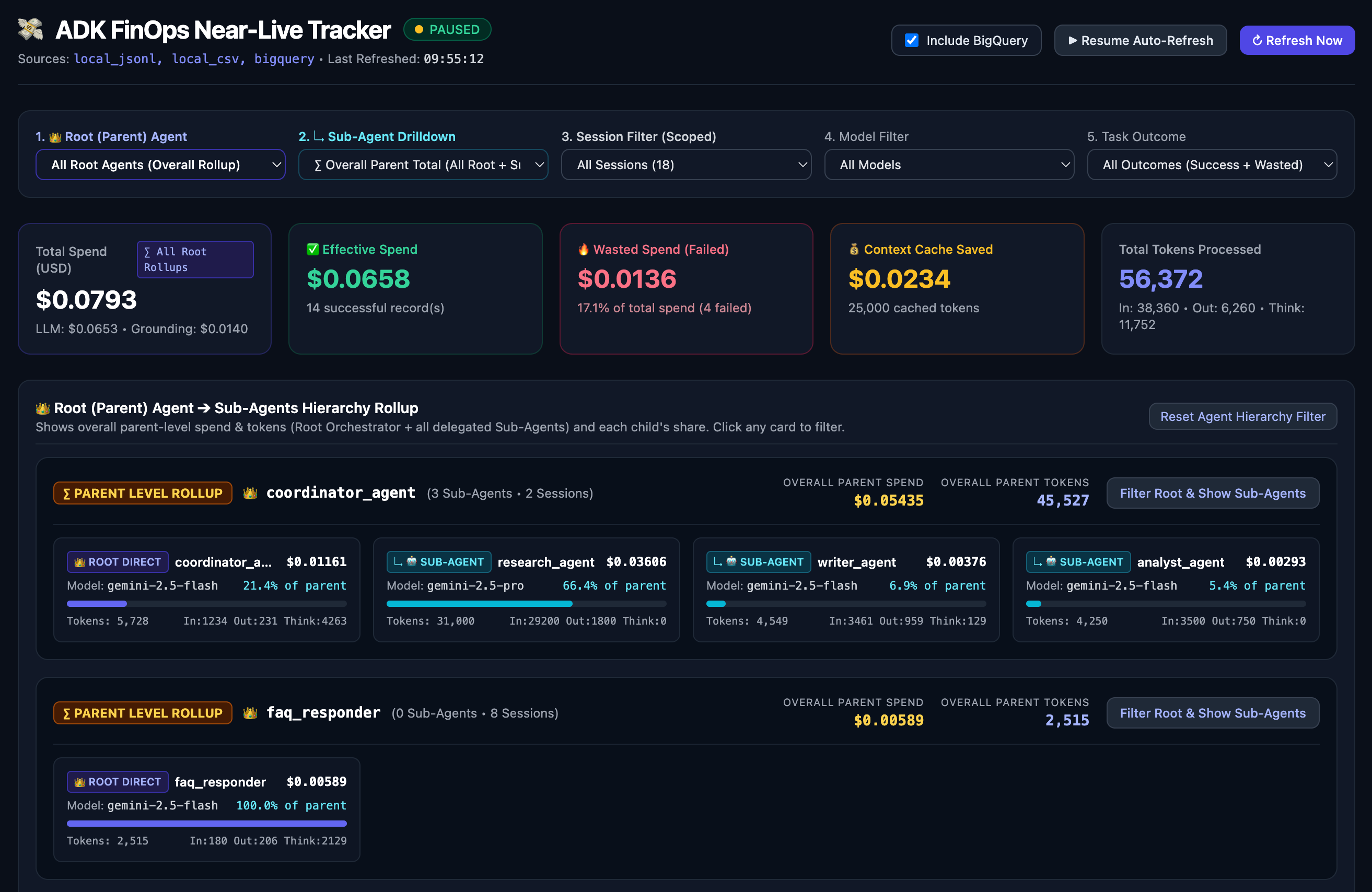
adk-finops includes a built-in, zero-extra-dependency FastAPI + Chart.js Near-Live Web Dashboard that auto-refreshes every 2 seconds, aggregating:
- Live In-Memory
CostTrackerState: Watch tokens and spend accumulate in real time while an agent is mid-execution. - Local Timestamped
.jsonl&.csvLogs: Automatically scanslogs/<YYYYMMDD_HHMMSS>/*.jsonland*.csv. - Remote HTTP Push (
POST /api/ingest): Receives telemetry pushed over HTTP from remote agent containers (HTTPExporter/dashboard_endpoint) and persists it to<log_dir>/ingested_costs.jsonl. - Optional BigQuery Live Sync: Toggle the Include BigQuery switch in the UI (
15scache TTL) to merge cloud warehouse records (ADK_FINOPS_BIGQUERY_TABLE).
Hierarchical Root (Parent) Agent ➔ Sub-Agent Drilldown & Cascading Filters
- 5 Cascading Hierarchy Filters:
1. 👑 Root (Parent) Agent: Filter by a top-level orchestrator/parent agent (e.g.,👑 coordinator_agent). Selecting a Root Agent automatically computes the Overall Parent-Level Spend & Tokens (∑ Parent + All Sub-Agents) in the KPI cards while displaying all of its sub-agents in the breakdown charts and hierarchy tree.2. ↳ Sub-Agent Drilldown: Dynamically cascades to list only the children belonging to the selected Root Agent (∑ Overall Parent Total,👑 Root Orchestrator Direct Only, or individual↳ 🤖 Sub-Agents).3. Session Filter (Scoped): Automatically scopes the session dropdown so it only lists sessions belonging to the selected Root Agent (and Sub-Agent).4. Model Filter: Scoped to the models invoked by the selected Root / Sub-Agent.5. Task Outcome: Filter between✅ Effective Spend Only (Success)and🔥 Wasted Spend Only (Failed / Error / Budget).
👑 Root (Parent) Agent ➔ Sub-Agents Hierarchy RollupExplorer: Interactive parent-to-child cards showing each Root Agent's overall parent rollup (∑ Overall Parent SpendandOverall Parent Tokens) alongside each child's spend, token breakdown (In / Out / Think), model, and percentage share of parent spend with click-to-filter support.- 5 Executive KPI Cards & 3 Interactive Charts: Total Spend ($ with active scope badge), Effective Spend ($), Wasted Spend ($ & %), Context Caching Savings ($), Total Tokens (
In / Out / Think), Spend Efficiency Doughnut, Sub-Agent Stacked Cost Bar (LLM vs Grounding), and Per-Model Token Composition.
Developer Mode: Embedded Background Server in FinOpsCostPlugin
Start the live dashboard automatically in a background daemon thread inside your agent process:
from adk_finops import FinOpsCostPlugin

finops_plugin = FinOpsCostPlugin(
    enable_dashboard=True,                  # or set ADK_FINOPS_ENABLE_DASHBOARD=true
    dashboard_port=8088,                    # default: 8088 (auto-selects next free port if busy)
    jsonl_path="logs/finops_costs.jsonl",   # saves into logs/<YYYYMMDD_HHMMSS>/finops_costs.jsonl
)
Enterprise & Org Admin Mode: Standalone Centralized Dashboard (3 Patterns)
An organization admin can run adk-finops dashboard as a single centralized FinOps control plane (with zero agents running inside the dashboard process) to monitor dozens of independent root agents and sub-agent teams across an organization:
Pattern A: Central Cloud Warehouse Mode (BigQuery Only)
All agents across the org stream to a shared BigQuery table (ADK_FINOPS_BIGQUERY_TABLE="org-project.finops.agent_costs"). The admin runs the standalone dashboard pointing strictly to BigQuery:
adk-finops dashboard \
  --bigquery-table org-project.finops.agent_costs \
  --log-dir "" \
  --host 0.0.0.0 \
  --port 8088
Pattern B: Multi-Project Shared Directory / Volume Mode (--log-dir)
Pass comma-separated directories to watch timestamped .jsonl / .csv files across multiple agent repositories or shared volumes simultaneously:
adk-finops dashboard \
  --log-dir "/srv/agents/retail_bot/logs,/srv/agents/finance_bot/logs" \
  --port 8088
Pattern C: Direct HTTP Push Mode (dashboard_endpoint $\rightarrow$ POST /api/ingest)
When an organization does not use BigQuery and agents run in isolated containers/VMs without a shared disk:
- Admin starts the central dashboard server:
adk-finops dashboard --host 0.0.0.0 --port 8088 --log-dir central_logs
- Each remote agent sets
dashboard_endpoint(orADK_FINOPS_DASHBOARD_ENDPOINT):from adk_finops import FinOpsCostPlugin finops_plugin = FinOpsCostPlugin( dashboard_endpoint="http://finops-dash.internal:8088", # Pushes via HTTPExporter to POST /api/ingest export_tags={"team": "payments", "service": "refund_agent"}, )
- Real-Time Memory + Automatic Disk Persistence (
<log_dir>/ingested_costs.jsonl): Every HTTP-pushed batch is immediately served from in-memory cache (source="http_ingest") and appended tocentral_logs/ingested_costs.jsonlon the dashboard server. If the dashboard server is restarted later with--log-dir central_logs, all previously pushed sessions and agent hierarchies are automatically restored fromingested_costs.jsonlwithout any data loss or double-counting.
- Real-Time Memory + Automatic Disk Persistence (
How Hybrid Local + BigQuery Deduplication Works
When both local logs (jsonl_path / csv_path) and bigquery_table are enabled, the dashboard deduplicates every record by (session_id, scope, agent_name):
- Zero Double-Counting: Active and local sessions load in
0msfrom memory/disk; if the samesession_idalso exists in BigQuery, the duplicate cloud row is ignored. - Historical Backfill: Older runs or teammate sessions that exist only in BigQuery are seamlessly merged into the dashboard when Include BigQuery is checked.
Cloud-Agnostic & Local Exporters (JSONL, CSV, OpenTelemetry)
You don't need a cloud warehouse to persist FinOps telemetry. adk-finops includes built-in local file exporters (JSONLExporter, CSVExporter) and an OpenTelemetryExporter that work completely offline or with any observability backend (DuckDB, Pandas, Jaeger, Datadog, Arize Phoenix, Honeycomb).
1. Configure Local & OTEL Exporters on FinOpsCostPlugin
from adk_finops import FinOpsCostPlugin

finops_plugin = FinOpsCostPlugin(
    jsonl_path="logs/finops_costs.jsonl",   # or set ADK_FINOPS_JSONL_PATH
    csv_path="logs/finops_costs.csv",       # or set ADK_FINOPS_CSV_PATH
    enable_otel=True,                       # or set ADK_FINOPS_ENABLE_OTEL=true
    export_scope="session",                 # "session", "turn", or "both"
    export_tags={"env": "local_dev"},
)
Each exported row in .jsonl and .csv automatically includes first-class task outcome columns (status, is_failure, error) alongside token counts, USD costs, context caching savings, and agent/model breakdowns.
2. Query Local .jsonl / .csv Logs Instantly with DuckDB or Pandas
-- Query local JSONL file directly using DuckDB CLI
SELECT
  status AS task_outcome,
  is_failure AS is_wasted_spend,
  COUNT(*) AS total_runs,
  ROUND(SUM(total_cost_usd), 4) AS total_spend_usd
FROM read_json_auto('logs/finops_costs.jsonl')
WHERE scope = 'session' AND agent_name IS NULL
GROUP BY 1, 2;
3. OpenTelemetry Semantic Conventions (OpenTelemetryExporter)
When enable_otel=True (or OpenTelemetryExporter is used), adk-finops enriches the active span and emits gen_ai.finops.<scope> spans with standard attributes:
gen_ai.usage.input_tokens,gen_ai.usage.output_tokens,gen_ai.usage.thoughts_tokens,gen_ai.usage.cached_tokens,gen_ai.usage.total_tokensgen_ai.usage.cost_usd,gen_ai.usage.llm_cost_usd,gen_ai.usage.tool_cost_usd,gen_ai.usage.savings_usdgen_ai.finops.task_outcome(success,failed,error,budget_exceeded)gen_ai.finops.is_wasted_spend(true/false)
4. Standalone Exporter Usage (BigQueryExporter, JSONLExporter, CSVExporter, OpenTelemetryExporter)
You can also use any exporter directly in standalone Python scripts or custom agent frameworks:
from adk_finops import CostTracker
from adk_finops.exporters import (
    BigQueryExporter,
    CSVExporter,
    JSONLExporter,
    OpenTelemetryExporter,
)

exporters = [
    JSONLExporter("finops_costs.jsonl"),
    CSVExporter("finops_costs.csv"),
    OpenTelemetryExporter(),
    # BigQueryExporter(table_id="my-gcp-project.finops.agent_costs"),
]

with CostTracker.track_run("batch_job_42"):
    CostTracker.record_usage(
        run_id="batch_job_42",
        model_name="gemini-2.5-pro",
        prompt_tokens=15000,
        completion_tokens=800,
        cached_tokens=12000,
        agent_name="data_extractor",
    )
    CostTracker.record_task_status(session_id="batch_job_42", status="success")

summary = CostTracker.get_summary("batch_job_42")
for exporter in exporters:
    exporter.export_summary(summary, scope="session", tags={"env": "prod", "pipeline": "etl"})
Sample SQL Queries for Looker Studio
Once data streams into BigQuery, power executive dashboards and chargeback reports with standard SQL:
1. Top 5 Most Expensive Agents by LLM & Grounding Spend
SELECT
  agent_name,
  COUNT(DISTINCT session_id) AS total_sessions,
  SUM(total_tokens) AS total_tokens,
  ROUND(SUM(llm_cost_usd), 4) AS llm_cost,
  ROUND(SUM(tool_cost_usd), 4) AS grounding_fees,
  ROUND(SUM(total_cost_usd), 4) AS total_spend,
  ROUND(SUM(savings_usd), 4) AS caching_dollars_saved
FROM `my-gcp-project.finops.agent_costs`
WHERE timestamp >= TIMESTAMP_SUB(CURRENT_TIMESTAMP(), INTERVAL 30 DAY)
  AND agent_name IS NOT NULL
GROUP BY 1
ORDER BY total_spend DESC
LIMIT 5;
2. Context Caching Savings & ROI by Model
SELECT
  model_name,
  SUM(cached_tokens) AS total_cached_tokens,
  ROUND(SUM(gross_cost_usd), 4) AS gross_spend_without_cache,
  ROUND(SUM(total_cost_usd), 4) AS actual_net_spend,
  ROUND(SUM(savings_usd), 4) AS net_dollars_saved,
  ROUND(SAFE_DIVIDE(SUM(savings_usd), SUM(gross_cost_usd)) * 100, 1) AS overall_savings_pct
FROM `my-gcp-project.finops.agent_costs`
WHERE timestamp >= TIMESTAMP_SUB(CURRENT_TIMESTAMP(), INTERVAL 7 DAY)
  AND scope = 'session'
  AND agent_name IS NULL
GROUP BY 1
ORDER BY net_dollars_saved DESC;
3. Successful vs. Wasted Spend & Failure Root-Cause Analysis
SELECT
  COALESCE(JSON_VALUE(tags, '$.status'), 'success') AS task_outcome,
  COALESCE(JSON_VALUE(tags, '$.is_failure'), 'false') AS is_wasted_spend,
  COUNT(*) AS total_runs,
  ROUND(SUM(total_cost_usd), 4) AS total_spend_usd,
  ROUND(AVG(total_cost_usd), 4) AS avg_cost_per_task,
  ROUND(AVG(total_tokens), 0) AS avg_tokens_per_task
FROM `my-gcp-project.finops.agent_costs`
WHERE scope = 'session'
  AND agent_name IS NULL
GROUP BY 1, 2
ORDER BY total_spend_usd DESC;
Limitations & Roadmap (Next Release)
- Explicit Tool Billing vs. String Matching: Grounding fees currently rely on tool name matching(e.g., checking if the tool is named google_search, GoogleSearchTool, or vertex_search); upcoming versions would support explicit billing metadata/tags (e.g.,
@billable(fee=...)) and tool config inspection so custom-named tools are never missed. - Pre-Flight Budget Guards: Budget checks currently evaluate reactively after calls finish; future releases would add pre-flight token estimation to block massive requests before the network call occurs.
- Dynamic Remote Rate Card Syncing: Pricing currently defaults to a bundled static JSON file; future iterations would support automated background syncing from centralized cloud pricing endpoints with offline fallback.
License
Distributed under the Apache License 2.0. See LICENSE for details.
1 maintainer

Release files for adk-finops 0.6.4
For a detailed explanation of source distributions (sdists) and built distributions (wheels), please see the package formats documentation.
Source distribution (sdist)
| File | Size | Uploaded | |
|---|---|---|---|
| adk_finops-0.6.4.tar.gz | 104.2 kB | Details |
Built distribution (wheel)
| File | Interpreter | ABI | Platform | Reset |
|---|---|---|---|---|
| adk_finops-0.6.4-py3-none-any.whl | Python 3 | none | any | Details |
Total release size: 202.4 kB
Release files / adk_finops-0.6.4.tar.gz
| Download URL | adk_finops-0.6.4.tar.gz |
|---|---|
| Size | 104.2 kB |
| Tags | Source |
|
SHA-256 checksum How to use checksums |
2024fa13fe8a651f2e094074a3af1aec0346c33005701164a8a6f0afe5ebaf7a
|
|
BLAKE2b-256 checksum How to use checksums |
31c15b04ee8bc0ea902b2fab21ae60e4b28553726f76597eb7a252d16e573cbf
|
| Upload date | |
|
Uploaded using Trusted Publishing? What is trusted publishing? |
No |
| Uploaded via |
twine/7.0.0 CPython/3.13.14
|
Release files / adk_finops-0.6.4-py3-none-any.whl
| Download URL | adk_finops-0.6.4-py3-none-any.whl |
|---|---|
| Size | 98.2 kB |
| Tags | Python 3 |
|
SHA-256 checksum How to use checksums |
43733efcad553c605a73c3efd8d7150cff508f608462a8db80c60be57fbb33e9
|
|
BLAKE2b-256 checksum How to use checksums |
db57a144b01b36a801fb7caa05d197efccefdc14a05059ec48a1495d6d969577
|
| Upload date | |
|
Uploaded using Trusted Publishing? What is trusted publishing? |
No |
| Uploaded via |
twine/7.0.0 CPython/3.13.14
|














