
This release is a pre-release and may not be stable for production use.
adminsite
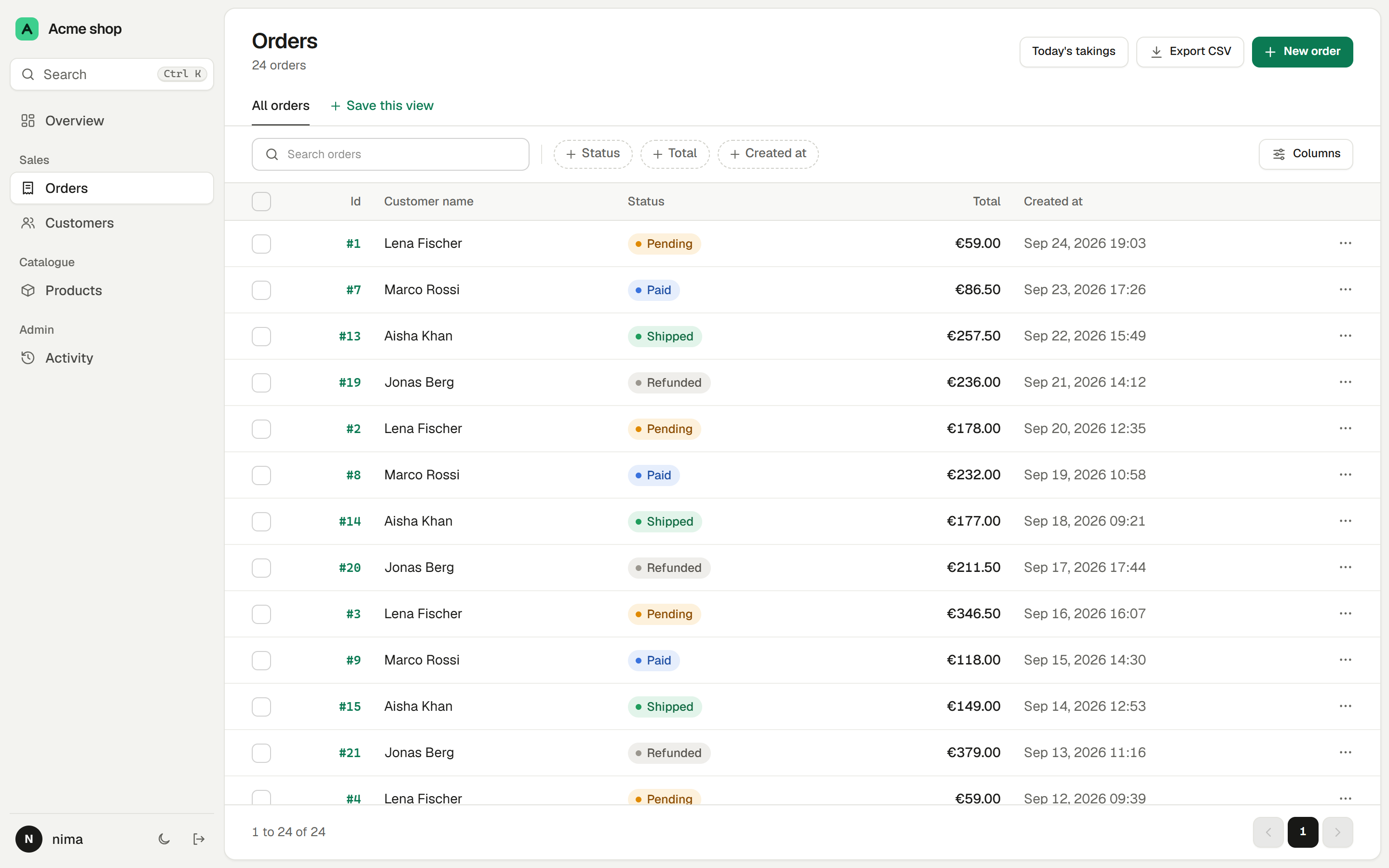
An admin panel for the SQLAlchemy 2.0 ORM that works with FastAPI, Starlette and Litestar.




Live demo · Documentation · Changelog · For AI assistants
adminsite is in alpha. It is tested and it works, but names may still change before 0.1.0, so pin the version you install.
Installation
pip install adminsite==0.1.0a17
Add the driver your database needs, such as asyncpg or aiosqlite.
Usage
from adminsite import Admin, Link, ModelView


class OrderView(ModelView[Order]):
    fields = [Order.id, Order.customer, Order.status, Order.total]
    searchable_fields = [
        Link(Order.customer, Customer.name),
        Link(Order.customer, Customer.email),
    ]
    list_filters = [Order.status, Order.created_at]


app.mount("/admin", Admin(engine, views=[OrderView]))
The settings name your models' own attributes, so a type checker catches a misspelt one. The labels, filters, form controls and validation come from your models. Getting started builds a complete app, signing in included, in a few minutes.
Features
- Pages from your models: a searchable, sortable list with filters and saved views, a page for each record, and forms with validation.
- Editing in the list for a value that changes often, such as an order's status.
- Lists that keep up to date on their own, for records that come in while people watch, such as new orders.
- Form layouts with panels, rows and tabs, which the record page follows too.
- Related records: pick a related record from a searchable list, and edit child rows, such as an order's lines, inside the parent's form.
- JSON columns edited with a form built from a Pydantic model or a TypedDict, instead of a code box.
- Built-in filters for choices, yes or no, number and date ranges, related records picked by name, and text.
- Custom filters for anything the built-in ones do not cover, such as "overdue" or "spent over €1,000".
- Actions that run your own code on the selected rows, on every row the filters match, on one record or on the whole table, with a dialog for any values they need.
- Permissions for each view, action, field and row.
- Hooks that run your code before and after a save or delete, in the same transaction, and can refuse it with a message.
- An audit log: who changed what and when, including actions, exports and sign ins, with a history on every record and an activity page you can filter.
- Import from CSV or Excel with a preview of every row, and export to CSV.
- File and image uploads, stored on disk or wherever you choose.
- A dashboard of stats, charts and the latest records.
- A command palette: Ctrl K jumps to any page or record.
- A JSON API that shares the same views and permissions.
- Signing in with a fixed list of users or your own user table.
- Pages and plugins of your own, such as reports or settings, in the same layout.
- Translations into eleven languages, among them Persian and Arabic laid out right to left, and every time shown in the reader's time zone.
- Light and dark themes, a layout for phones, and pages that work with a keyboard and a screen reader.
- Async or sync, on SQLite, Postgres and MySQL, with no N+1 queries.
- Large tables: rows never wait for their count, which can be estimated or skipped, and page 400 costs the same as page 1.
- No Node and no CDN: everything ships inside the package.
How it works
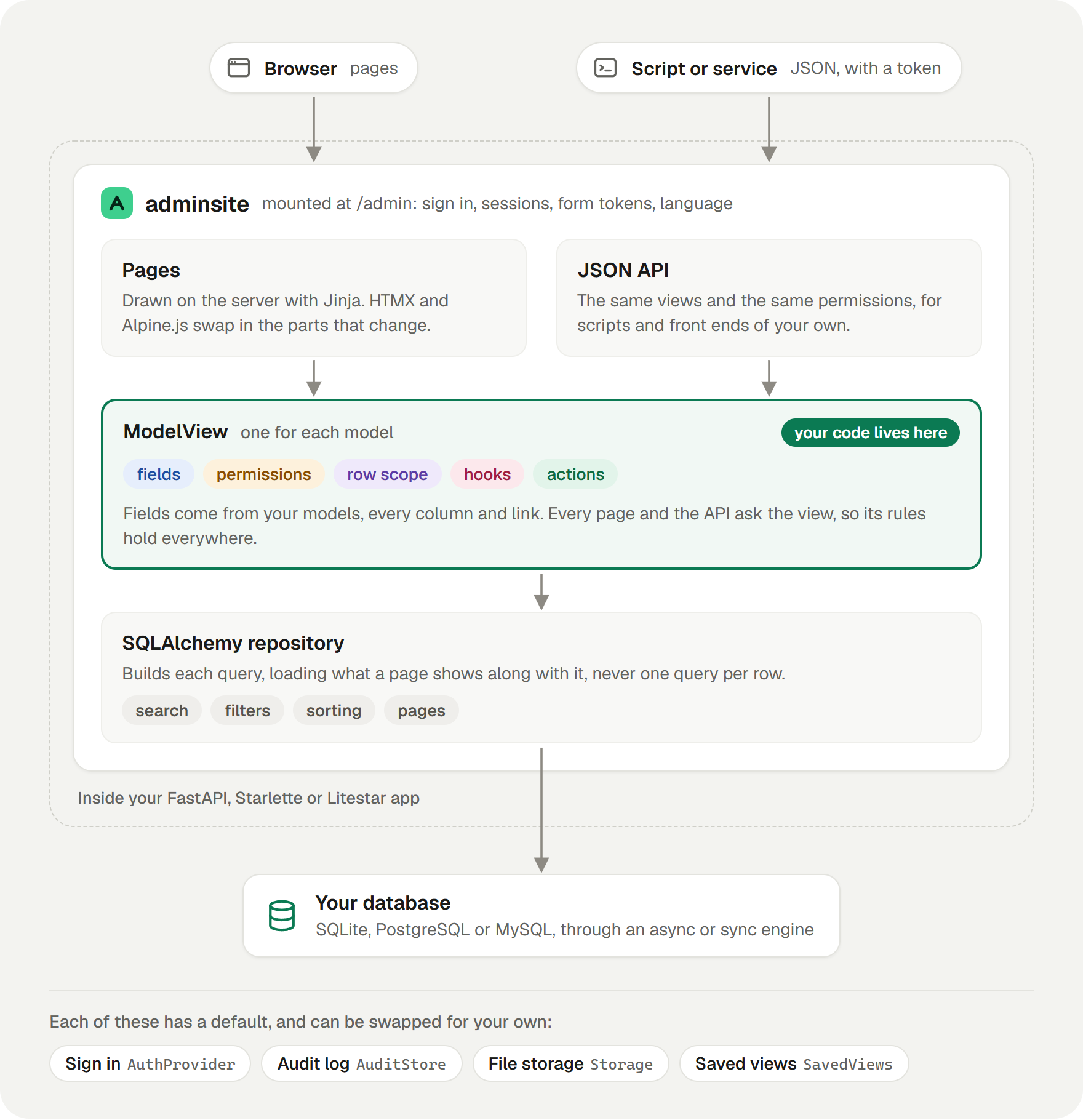
adminsite is one ASGI app, mounted inside yours. Every page and the JSON API go through the
ModelView you write for each model, so its rules hold everywhere.
Documentation
- Getting started sets up a working admin in a few minutes.
- Views covers everything a view can say about a model.
- Permissions is worth reading before you put the admin in front of anyone.
- The reference lists every class and option.
Contributing
Issues and pull requests are welcome. CONTRIBUTING.md says how to run the tests and rebuild the stylesheet.
License
1 maintainer

Metadata
1 maintainer
Release files for adminsite 0.1.0a17
For a detailed explanation of source distributions (sdists) and built distributions (wheels), please see the package formats documentation.
Source distribution (sdist)
| File | Size | Uploaded | |
|---|---|---|---|
| adminsite-0.1.0a17.tar.gz | 1.4 MB | Details |
Built distribution (wheel)
| File | Interpreter | ABI | Platform | Reset |
|---|---|---|---|---|
| adminsite-0.1.0a17-py3-none-any.whl | Python 3 | none | any | Details |
Total release size: 1.9 MB
Release files / adminsite-0.1.0a17.tar.gz
| Download URL | adminsite-0.1.0a17.tar.gz |
|---|---|
| Size | 1.4 MB |
| Tags | Source |
|
SHA-256 checksum How to use checksums |
06ed26268a6950aa7f9f0c8c3a6c55463382a82ae7bcd7d848827f3278412f2a
|
|
BLAKE2b-256 checksum How to use checksums |
694a9ae9f83bd733247f09cbbe6e9852898ba37afade35270cee35d90c0b541f
|
| Upload date | |
|
Uploaded using Trusted Publishing? What is trusted publishing? |
Yes |
| Uploaded via |
twine/7.0.0 CPython/3.13.14
|
Provenance
Provenance describes where a file came from. On PyPI, provenance is shared via attestations, which provide a verifiable record of the build or publishing details. View details, limitations and caveats.


PyPI Publish Attestation
PyPI verified that this artifact, at this checksum, originated from the publisher listed below.
Signed by GitHub Actions, verified by PyPI on Oct 9, 2026.
Transparency logRelease files / adminsite-0.1.0a17-py3-none-any.whl
| Download URL | adminsite-0.1.0a17-py3-none-any.whl |
|---|---|
| Size | 506.3 kB |
| Tags | Python 3 |
|
SHA-256 checksum How to use checksums |
12b9b732aa4030e5eedaf9b311c6b8e603bf52ed3e376ebdf4165428eb5f922c
|
|
BLAKE2b-256 checksum How to use checksums |
de768cd920928d14d9569c5248df98b17729868e2951c3a5a604e04c658400b0
|
| Upload date | |
|
Uploaded using Trusted Publishing? What is trusted publishing? |
Yes |
| Uploaded via |
twine/7.0.0 CPython/3.13.14
|
Provenance
Provenance describes where a file came from. On PyPI, provenance is shared via attestations, which provide a verifiable record of the build or publishing details. View details, limitations and caveats.
PyPI Publish Attestation
PyPI verified that this artifact, at this checksum, originated from the publisher listed below.
Signed by GitHub Actions, verified by PyPI on Oct 9, 2026.
Transparency log













