
This release is a pre-release and may not be stable for production use.
English · 简体中文
ADS Agent Bridge
Give AI agents a safe, local, and version-aware way to understand and operate Keysight ADS.




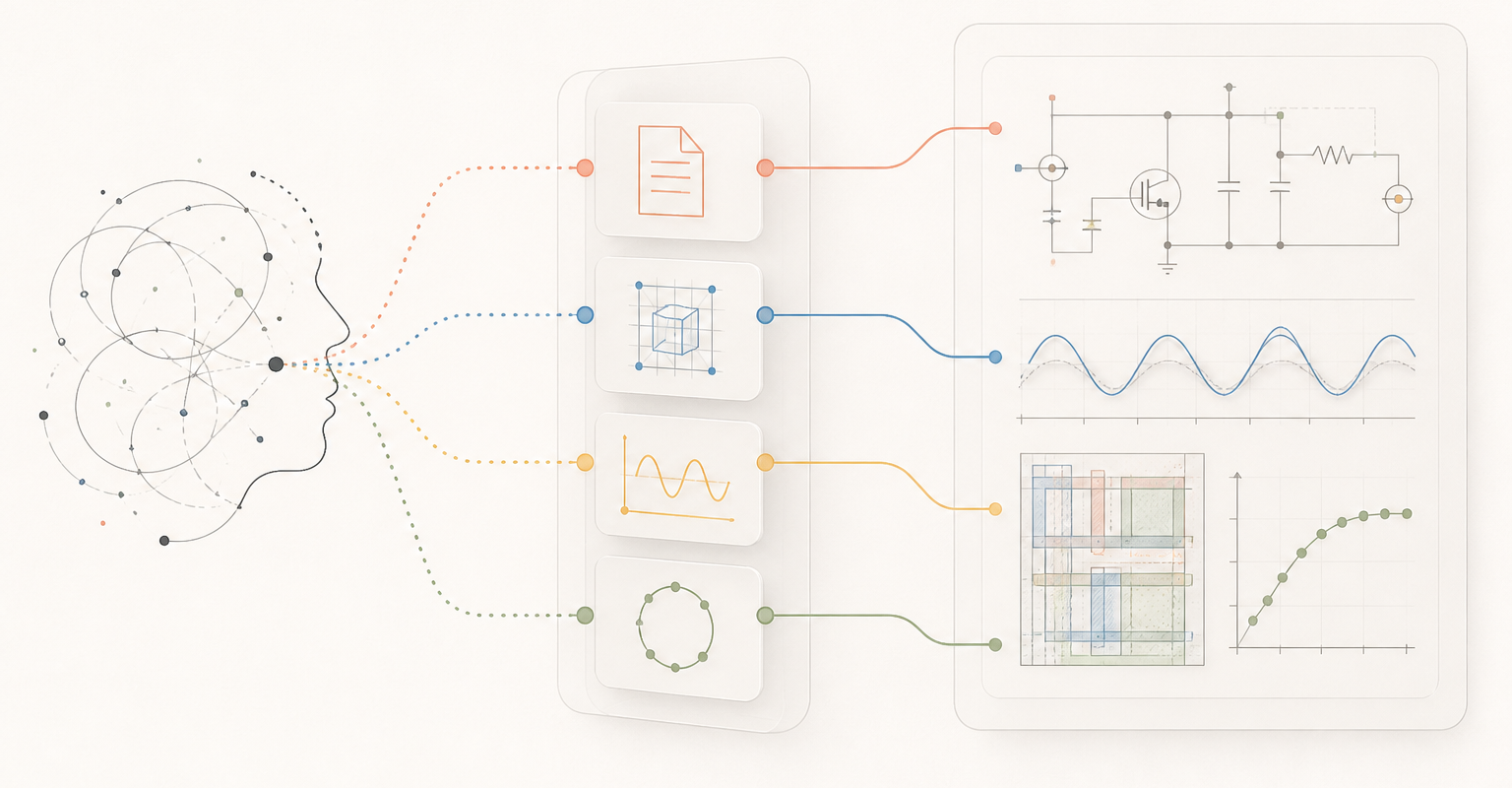
ADS Agent Bridge is an unofficial, local-first documentation and automation bridge for Keysight Advanced Design System (ADS). It turns the ADS installation already on your machine into a version-aware documentation source, a bounded runtime context, and a safely managed automation target for general-purpose Agents such as Codex or OpenCode.
The Agent may run on the ADS host or execute ads-agent there over SSH. Live
bridge endpoints remain bound to loopback on the ADS host; the package does not
open ADS directly to the network.
[!IMPORTANT] This project is a public alpha. Use disposable workspaces for first trials and review the reported capability gates before relying on automation results. Keysight and ADS are trademarks of Keysight Technologies. This project is not affiliated with or endorsed by Keysight.
What it does
| Capability | What the Agent gets |
|---|---|
| ADS discovery | Finds installed ADS versions, selects one explicitly, and probes runtime capabilities instead of assuming the newest version. |
| Private local docs | Builds a version-scoped index and Markdown cache from documentation already installed on the user's machine. Vendor documentation is never redistributed. |
| Verified quickstart | Creates a disposable workspace, runs a minimal AC simulation, and reads the resulting dataset through explicit acceptance gates. |
| Managed GUI sessions | Launches an exact workspace, tracks process and display identity, reports UI state, and distinguishes agent-owned from user-owned ADS sessions. |
| Exact DE/DDS context | Adds Copy ADS Context to supported menus so an Agent can work from the selected workspace, design, cell, cellview, or DDS target without guessing the foreground window. |
| Bounded UI lifecycle | Observes blocking dialogs, supports identity-checked intervention, disconnects without closing ADS, and requests native safe exit only for a verified agent-owned session. |
The initial release is deliberately small, but it is not a dummy wrapper: docs, no-GUI automation, live DE/DDS context, dialog supervision, and session lifecycle are separate, observable capability lanes.
Quick start
Prerequisites:
- a locally licensed ADS installation;
- Python 3.10 or later for the
ads-agentcommand; - Windows or Linux.
Install and prove the local setup:
pipx install ads-agent-bridge
ads-agent doctor
ads-agent setup
ads-agent quickstart
setup discovers installed ADS versions instead of hard-coding one release.
quickstart passes only after documentation indexing and query, add-on
registration, disposable workspace creation, circuit simulation, and dataset
readback all pass.
Launch a real workspace only after that gate succeeds:
ads-agent --pretty launch --workspace /path/to/MyWorkspace_wrk
ads-agent --pretty status
ads-agent disconnect                 # ADS keeps running
ads-agent shutdown                   # native exit for an agent-owned session
On Linux, bind GUI work to the intended display:
ads-agent --pretty launch --workspace /path/to/MyWorkspace_wrk --display :4
Bootstrap installation when pipx or a suitable Python is missing
Linux
curl -fsSLO https://github.com/cottman99/ads-agent-bridge/releases/download/v0.1.0a28/install.sh
sh install.sh
Windows PowerShell
Invoke-WebRequest https://github.com/cottman99/ads-agent-bridge/releases/download/v0.1.0a28/install.ps1 -OutFile install.ps1
powershell -NoProfile -ExecutionPolicy Bypass -File .\install.ps1
The bootstrap searches installed Python versions, can create an isolated pipx environment, and does not modify an externally managed system Python. See the CLI and installation reference for interpreter, offline-wheel, and check-only options.
Remote use over SSH
SSH is the recommended current remote boundary. Run the public CLI on the ADS host instead of exposing the embedded Bridge port:
ssh ads-host 'ads-agent doctor'
ssh ads-host 'ads-agent --pretty status'
ssh ads-host 'ads-agent --pretty launch --workspace /path/to/MyWorkspace_wrk --display :4'
This keeps session files, random tokens, process ownership, workspaces, and ADS itself on the same host. A direct local-client-to-remote-Bridge protocol and multi-client lease model are not yet part of the public contract.
How it works
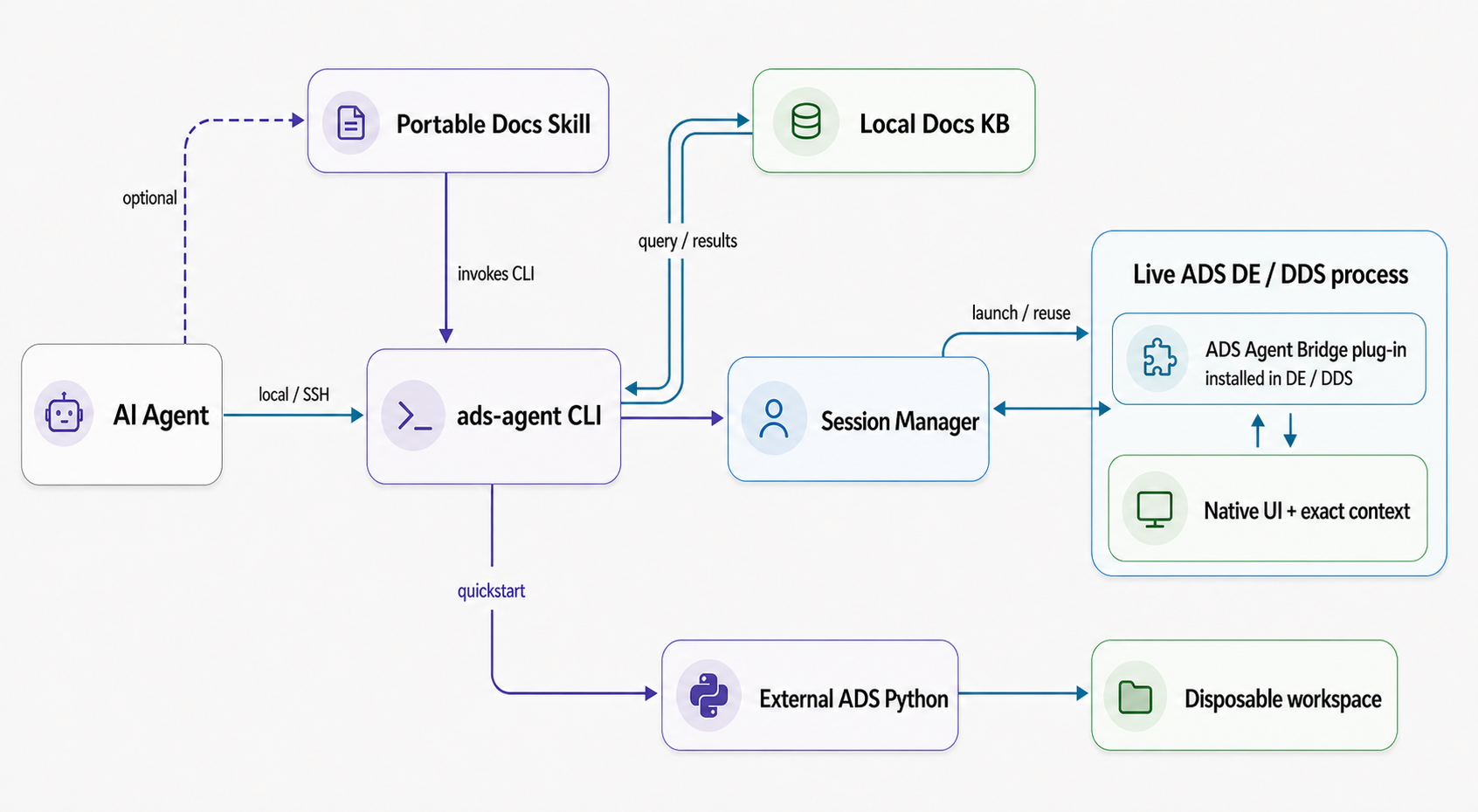
The package has three main execution lanes:
- Knowledge: the portable Docs Skill routes questions through the CLI to the selected installation's private, version-scoped local index, which returns matched content and source evidence.
- Live ADS: the Session Manager coordinates the packaged ADS Agent Bridge plug-in installed inside DE or DDS. Its loopback, token-authenticated endpoint verifies the exact workspace, process, display, slot, profile, and ownership identity.
- No-GUI automation: the selected ADS Python runtime creates a disposable example, simulates it, and reads the dataset without opening an ADS window.
On Linux, ADS Python can still require an available X display for runtime
initialization. For isolation, keep the real user HOME so ADS can see its
per-user state, and isolate Bridge state with ADS_AGENT_HOME.
Safety and privacy
- Documentation, indexes, workspaces, session tokens, and automation results remain local unless the user deliberately moves them.
- Bridge endpoints listen on loopback and use a random token per session.
- Reusing a session requires the selected ADS instance and exact workspace to match; the Bridge does not silently switch workspaces.
- Context handles identify a target but do not authorize editing or simulation.
- Dialog actions are bound to a fresh process/window fingerprint instead of a product title or fixed screen coordinate.
shutdownrefuses unverified or user-owned sessions and never force-kills ADS or silently discards modified work.- Arbitrary embedded Python and dynamic AEL calls stay disabled unless both the ADS process and the client explicitly opt into unsafe mode.
See the dialog automation contract, context interaction contract, and execution context contract for the exact boundaries.
Version support
| ADS generation | Public support level |
|---|---|
| ADS 2025 and later | Stable target, decided by runtime capability probes |
| ADS 2024 Update 2 | Preview |
| ADS 2023 Update 2 through ADS 2024 Update 1 | Experimental |
| Older installations | Documentation-only when local docs can be discovered |
No version is fixed into the portable Docs Skill. Multiple installed versions can be discovered and selected explicitly.
Five public examples
ads-agent --pretty examples list
The current catalog covers:
- ADS discovery and explicit version selection;
- no-GUI minimal-AC simulation and dataset readback;
- read-only live DE workspace context;
- bounded DDS dataset readback into a new native DDS file;
- a fixed read-only AEL workspace call showing the hybrid boundary.
Every runner names its prerequisites, state changes, evidence, and stop rule. See EXAMPLES.md for exact commands.
Current boundaries
The project does not yet claim a completed Momentum, RFPro, FEM, SIPro, or PIPro workflow. It also does not provide a public remote Bridge protocol: SSH execution is supported, while raw port forwarding is not the documented user path. These areas require their own runtime and solver-side acceptance evidence before they are promoted as supported capabilities.
Documentation
- CLI and installation reference
- Examples and acceptance gates
- Release contract
- Session and dialog automation
- DE/DDS context interaction
- Execution context contract
- Changelog
To remove the ADS integration while preserving unrelated add-ons:
ads-agent addon uninstall
Development
See CONTRIBUTING.md. Public claims are accepted only when the corresponding test, runtime observation, or validation gate has passed.
1 maintainer

Download files
Download the file for your platform. If you're not sure which to choose, learn more about installing packages.
Source Distribution
Built Distribution
Filter files by name, interpreter, ABI, and platform.
If you're not sure about the file name format, learn more about wheel file names.
Copy a direct link to the current filters
File details
Details for the file ads_agent_bridge-0.1.0a28.tar.gz.
File metadata
- Download URL: ads_agent_bridge-0.1.0a28.tar.gz
- Upload date:
- Size: 2.7 MB
- Tags: Source
- Uploaded using Trusted Publishing? Yes
- Uploaded via: twine/7.0.0 CPython/3.13.14
File hashes
| Algorithm | Hash digest | |
|---|---|---|
| SHA256 |
71d2e0db6642c86b8a713b821b838ac4b18e2304a8c5fc5bee8808964dcc788b
|
|
| MD5 |
a66811201a8c93d18ea5d6270d065104
|
|
| BLAKE2b-256 |
82b099155939b379a30442958271985d2b4e82e202f25e1abf3256759454da5d
|
Provenance
The following attestation bundles were made for ads_agent_bridge-0.1.0a28.tar.gz:
Publisher:
publish.yml on cottman99/ads-agent-bridge
-
Statement:
-
Statement type:
https://in-toto.io/Statement/v1 -
Predicate type:
https://docs.pypi.org/attestations/publish/v1 -
Subject name:
ads_agent_bridge-0.1.0a28.tar.gz -
Subject digest:
71d2e0db6642c86b8a713b821b838ac4b18e2304a8c5fc5bee8808964dcc788b - Sigstore transparency entry: 2411283822
- Sigstore integration time:
-
Permalink:
cottman99/ads-agent-bridge@484bd1e701e0c7061fa3bd17e7b3ff3e23b737a8 -
Branch / Tag:
refs/tags/v0.1.0a28 - Owner: https://github.com/cottman99
-
Access:
public
-
Token Issuer:
https://token.actions.githubusercontent.com -
Runner Environment:
github-hosted -
Publication workflow:
publish.yml@484bd1e701e0c7061fa3bd17e7b3ff3e23b737a8 -
Trigger Event:
release
-
Statement type:
File details
Details for the file ads_agent_bridge-0.1.0a28-py3-none-any.whl.
File metadata
- Download URL: ads_agent_bridge-0.1.0a28-py3-none-any.whl
- Upload date:
- Size: 82.5 kB
- Tags: Python 3
- Uploaded using Trusted Publishing? Yes
- Uploaded via: twine/7.0.0 CPython/3.13.14
File hashes
| Algorithm | Hash digest | |
|---|---|---|
| SHA256 |
815d222d676885aad40687963bc12315f3b8a4603dba80a22d1c195a1bc9667f
|
|
| MD5 |
6bdb32235f3a60d89e777732f99282cb
|
|
| BLAKE2b-256 |
0c95b1816a7385b8eb91182687869cc62a8ea95cdb5a73969901b5f99ae176b1
|
Provenance
The following attestation bundles were made for ads_agent_bridge-0.1.0a28-py3-none-any.whl:
Publisher:
publish.yml on cottman99/ads-agent-bridge
-
Statement:
-
Statement type:
https://in-toto.io/Statement/v1 -
Predicate type:
https://docs.pypi.org/attestations/publish/v1 -
Subject name:
ads_agent_bridge-0.1.0a28-py3-none-any.whl -
Subject digest:
815d222d676885aad40687963bc12315f3b8a4603dba80a22d1c195a1bc9667f - Sigstore transparency entry: 2411284156
- Sigstore integration time:
-
Permalink:
cottman99/ads-agent-bridge@484bd1e701e0c7061fa3bd17e7b3ff3e23b737a8 -
Branch / Tag:
refs/tags/v0.1.0a28 - Owner: https://github.com/cottman99
-
Access:
public
-
Token Issuer:
https://token.actions.githubusercontent.com -
Runner Environment:
github-hosted -
Publication workflow:
publish.yml@484bd1e701e0c7061fa3bd17e7b3ff3e23b737a8 -
Trigger Event:
release
-
Statement type:







