
Python library for ADS-B decoding and REST API using pyModeS

Project description
ADS-B Decoder and REST API



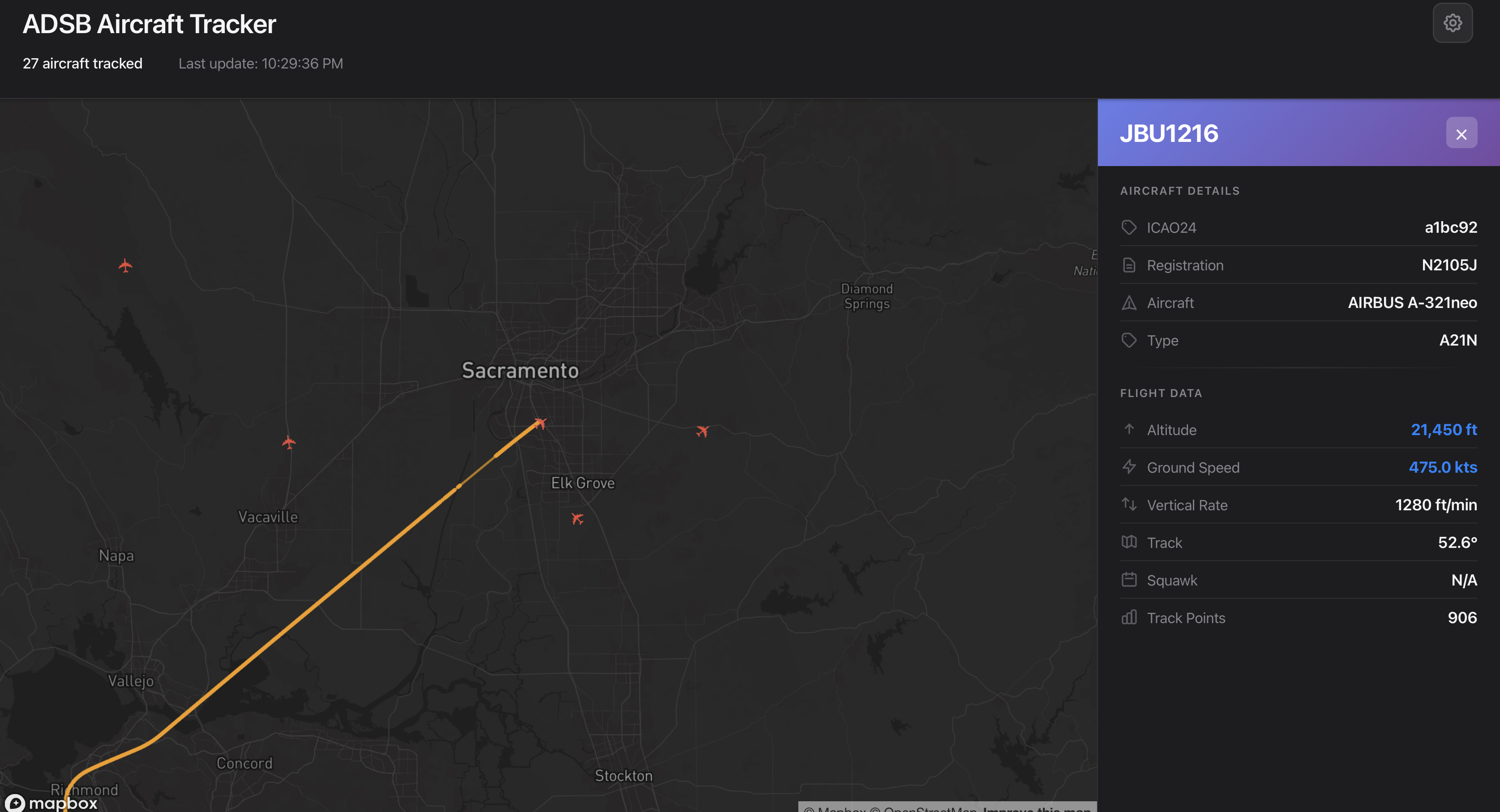
ADS-B decoder and REST API server using pyModeS for decoding Mode-S and ADS-B messages. Mirrors the jet1090 REST API interface with a Python-based implementation, plus a built-in interactive map.
Quickstart
The published wheel bundles the React UI; FastAPI serves the API and map on a single port. You only need Python — no Node, no bun, no Docker.
pip install adsb-map
adsb download                                # one-time: aircraft database

# Free Mapbox token: https://account.mapbox.com/access-tokens/
# Either export it in your shell, or drop it in a `.env` file in the directory
# you run `adsb serve` from (template: see .env.example in the repo).
export MAPBOX_TOKEN=pk.your_token_here

adsb serve --source net --connect localhost 30005 beast --lat 40.7 --lon -74.0
Visit http://localhost:8000/. Aircraft show up as markers; click one for its track.
Features
- pyModeS decoding — DF4/5/17/18/20/21 message types with CPR position decoding
- Aircraft enrichment — automatic registration / type / description lookup from the tar1090-db project (566k+ records)
- REST API — FastAPI endpoints under
/api/*, jet1090-compatible - SQLite storage — aircraft state, position history, reception metadata
- Interactive map — React + Mapbox GL, served same-origin from the wheel
- Network data sources — connects to dump1090 / readsb / modesdeco2 over TCP (Beast or raw)
Configuration
| Setting | Default | How to override |
|---|---|---|
| Mapbox token | (required for map UI) | MAPBOX_TOKEN env var, or .env file in CWD |
| Bind host | 0.0.0.0 |
adsb serve --host |
| Bind port | 8000 |
adsb serve --port |
| Database path | ./adsb.db |
adsb serve --db-path |
| Stale timeout | 60s |
adsb serve --stale-timeout |
| Receiver lat/lon | (none) | adsb serve --lat --lon (recommended) |
--lat and --lon are strongly recommended: ADS-B position messages use Compact Position
Reporting (CPR), which decodes faster and more accurately when given a reference position
within ~180 NM of the receiver.
CLI
adsb serve …      # API + bundled map UI
adsb download     # download tar1090-db aircraft database
adsb init-db      # create SQLite tables
adsb decode HEX   # decode a single message and store it
adsb cleanup      # remove aircraft not seen in --stale-timeout
adsb db-size      # show DB file size and row counts
Pass --help to any command for the full set of options.
API endpoints
All JSON endpoints live under /api/. The map UI is served at /.
| Endpoint | Returns |
|---|---|
GET /api/all |
All current aircraft state vectors |
GET /api/icao24 |
List of ICAO24 addresses currently tracked |
GET /api/track?icao24={icao24}&since={ts} |
Trajectory for one aircraft |
GET /api/sensors |
Receiver/sensor info (serials) |
GET /api |
API discovery (welcome JSON) |
GET / |
Bundled map UI |
GET /config.js |
Runtime config shim (exposes MAPBOX_TOKEN to the SPA) |
The REST API is self-contained — you can ignore the bundled UI and build your own
client (mobile, monitoring system, dashboard, etc.) against /api/*.
Network data sources
The decoder connects to existing ADS-B receivers via TCP:
- dump1090 — port 30005 (Beast), 30002 (raw)
- readsb — same ports as dump1090
- modesdeco2, or any Beast / raw hex feed
adsb serve --source net --connect <host> <port> <beast|raw> --lat <lat> --lon <lon>
The network client runs in a background thread, decodes messages, updates the database, and prunes stale aircraft every 30 seconds.
Develop from source
The repo uses just to run backend and frontend together
with hot reload. Install uv, bun, and
just, then:
git clone https://github.com/jbencina/adsb-map.git
cd adsb-map
uv sync --dev
uv run adsb download                          # one-time

cp frontend/.env.example frontend/.env        # then set VITE_MAPBOX_TOKEN

# Args after `dev` are passed straight through to `adsb serve`.
just dev --source net --connect localhost 30005 beast --lat 40.7 --lon -74.0
Visit http://localhost:3000/. Vite proxies /api/* and /config.js to the backend on
port 8000, so the frontend hits the API as if it were same-origin.
To exercise the production-style single-process bundle locally:
just build                                                # frontend → adsb/static/
MAPBOX_TOKEN=pk.… just serve --source net --connect localhost 30005 beast --lat 40.7 --lon -74.0
# Visit http://localhost:8000/
Tests, linting, formatting
uv run pytest                                 # full test suite
uv run pytest --cov=adsb --cov-report=term-missing
uv run tox                                    # multi-version (3.12, 3.13)

uv run ruff check .                           # lint
uv run ruff format .                          # format
uv run pre-commit install                     # one-time: enable git hooks
uv run pre-commit run --all-files
Frontend: bun run lint, bun run format from frontend/.
Verify the wheel ships the bundled frontend (run before merging changes that touch packaging, the static mount, or the publish workflow):
just build && uv build
unzip -l dist/adsb_map-*.whl | grep adsb/static/
# Expected: index.html + assets/*.js + assets/*.css
Architecture
Backend (adsb/)
| Module | Responsibility |
|---|---|
decoder.py |
pyModeS-based message decoding, CPR positions, DB enrichment |
network.py |
ADSBNetworkClient — daemon thread reading from dump1090/readsb |
api.py |
FastAPI app — /api/* JSON, bundled SPA at /, runtime /config.js |
models.py |
SQLAlchemy ORM: Aircraft, AircraftPosition, AircraftMetadata |
database.py |
Session/engine management with context-manager pattern |
schemas.py |
Pydantic response models |
aircraft_db.py |
Lazy-loaded singleton CSV (566k+ rows) → registration/type lookup |
cli.py |
Click CLI: serve, download, init-db, decode, cleanup, db-size |
static/ |
Built frontend assets (populated by just build or CI; gitignored) |
Frontend (frontend/src/) — React 18 + Vite, compiled and bundled into the wheel
during release. End users never need a JS toolchain.
Release flow
CI (.github/workflows/publish.yml) handles all of this on a v* tag push:
bun install && bun run buildproducesfrontend/dist/frontend/dist/is staged intoadsb/static/uv buildpackages the wheel —adsb/static/**is included via theartifactsdeclaration inpyproject.tomluv publish --trusted-publishing alwaysships to PyPI via OIDC (no API tokens stored)
The Mapbox token is not baked into the wheel. At runtime, the server exposes
/config.js which reads MAPBOX_TOKEN from its environment (process env, or a
.env file in CWD via python-dotenv) and writes window.APP_CONFIG for the SPA.
One wheel works for any user — no rebuild per token.
Database schema
| Table | Purpose |
|---|---|
aircraft |
Current state per aircraft (position, velocity, ID, telemetry, registration/type) |
aircraft_positions |
Historical positions for trajectory rendering |
aircraft_metadata |
Reception metadata (timing, RSSI, receiver serial) |
See data/README.md for notes on the aircraft database file.
License
GNU General Public License v3.0 or later (GPL-3.0-or-later). See LICENSE.
Release history Release notifications | RSS feed


Download files
Download the file for your platform. If you're not sure which to choose, learn more about installing packages.
Source Distribution
Built Distribution
Filter files by name, interpreter, ABI, and platform.
If you're not sure about the file name format, learn more about wheel file names.
Copy a direct link to the current filters
File details
Details for the file adsb_map-0.2.0.tar.gz.
File metadata
- Download URL: adsb_map-0.2.0.tar.gz
- Upload date:
- Size: 590.1 kB
- Tags: Source
- Uploaded using Trusted Publishing? Yes
- Uploaded via: uv/0.11.8 {"installer":{"name":"uv","version":"0.11.8","subcommand":["publish"]},"python":null,"implementation":{"name":null,"version":null},"distro":{"name":"Ubuntu","version":"24.04","id":"noble","libc":null},"system":{"name":null,"release":null},"cpu":null,"openssl_version":null,"setuptools_version":null,"rustc_version":null,"ci":true}
File hashes
| Algorithm | Hash digest | |
|---|---|---|
| SHA256 |
f49b4d6bb93cca005ff7c575e81fbe686c536e9ceb98de1a34e765f214416bcd
|
|
| MD5 |
743dee38170a12529edd42b2179ba09b
|
|
| BLAKE2b-256 |
b8a8ff250244ab9f1e0c3cabe65762dc848381bf362caaf6499273491a863b2f
|
File details
Details for the file adsb_map-0.2.0-py3-none-any.whl.
File metadata
- Download URL: adsb_map-0.2.0-py3-none-any.whl
- Upload date:
- Size: 587.8 kB
- Tags: Python 3
- Uploaded using Trusted Publishing? Yes
- Uploaded via: uv/0.11.8 {"installer":{"name":"uv","version":"0.11.8","subcommand":["publish"]},"python":null,"implementation":{"name":null,"version":null},"distro":{"name":"Ubuntu","version":"24.04","id":"noble","libc":null},"system":{"name":null,"release":null},"cpu":null,"openssl_version":null,"setuptools_version":null,"rustc_version":null,"ci":true}
File hashes
| Algorithm | Hash digest | |
|---|---|---|
| SHA256 |
af13e4c437fce5c15129e5b6f0d0d1525daa9ae3874c34059ded252846d0f828
|
|
| MD5 |
68bade82ee4613b8df0ee073b1a3bc00
|
|
| BLAKE2b-256 |
87b3cb8cb431cfd3b2eb09e1a4541930ee5652b2f4aa857525d4229175cf0da0
|






