

ADscan - Active Directory Pentesting Tool for Linux





Free active directory pentesting tool for Linux. Replace your AD pentest toolchain with one CLI.
ADscan is a free Linux CLI for pentesters, red teamers, and security consultants. It covers 103 Active Directory attack techniques in a single workflow: enumeration, Kerberoasting, AS-REP roasting, ADCS/ESC exploitation, DCSync, credential harvesting, and native attack-path analysis. No Windows required.
Table of Contents
- Demo
- Quick Start
- ADscan vs Alternatives
- Kerberoasting, ADCS and AD Attack Coverage
- Common Pentest Workflows
- Usage Examples
- Want the Full Client Report?
- Requirements
- FAQ
- Developer Setup
- Contributing
- License
Demo
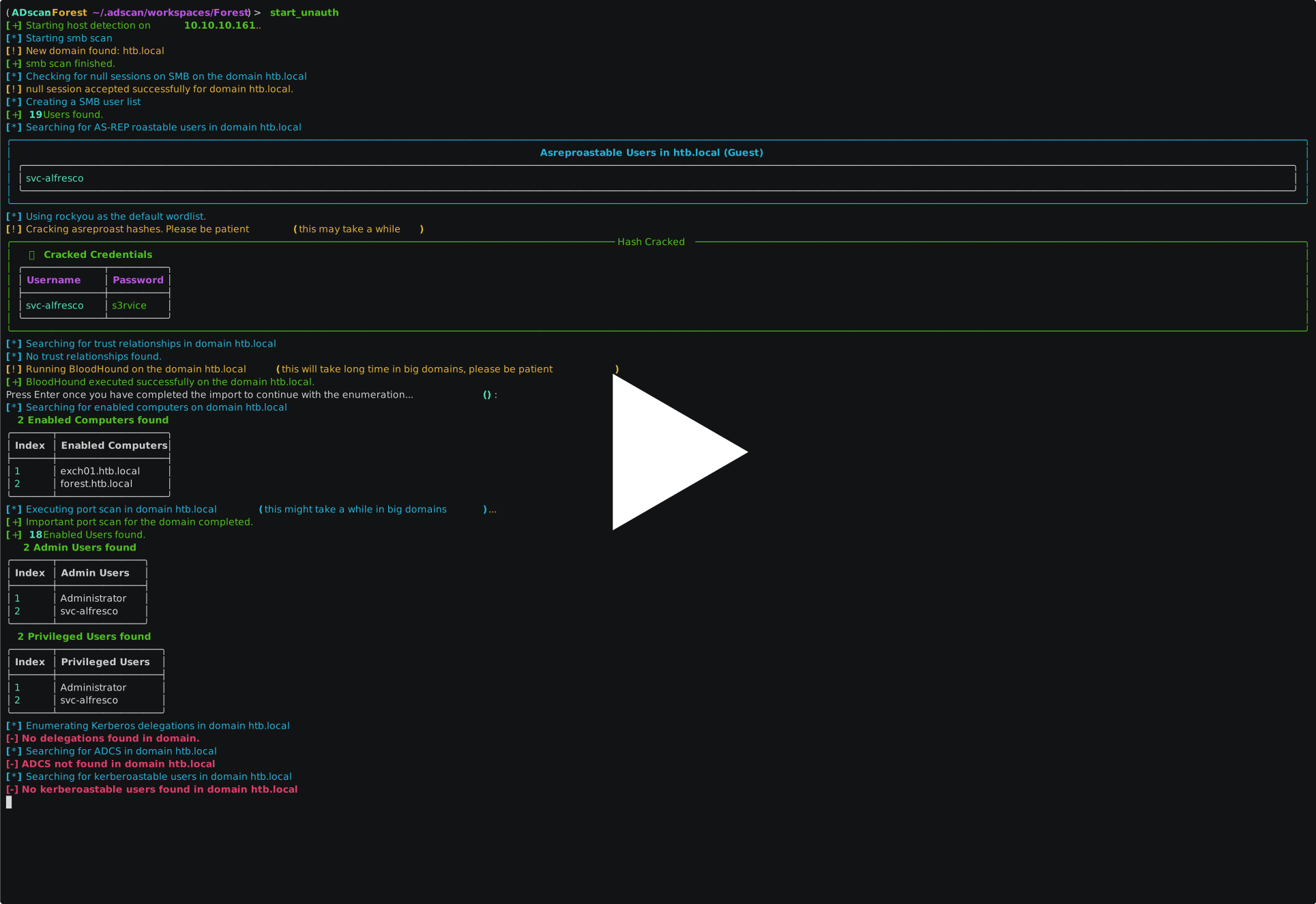
Auto-pwns HTB Forest in ~3 minutes
Quick Start
pipx install adscan
adscan install
adscan start
Full installation guide at adscanpro.com/docs
Once inside the shell, start an unauthenticated recon:
(ADscan) > start_unauth
This discovers domain controllers, SMB exposure, null sessions, and roastable accounts without credentials. From there, run start_auth with a domain user to enumerate LDAP, collect BloodHound data, and build the attack graph.
ADscan vs Alternatives
Most AD pentesters use 5-8 separate tools. ADscan replaces the chain:
| ADscan | NetExec/CrackMapExec | Certipy | Impacket | BloodHound CE | |
|---|---|---|---|---|---|
| Platform | Linux | Linux/Win | Linux | Linux | Linux/Win |
| AD enumeration | Full | Partial | No | Partial | No |
| Kerberoasting | Yes | Yes | No | Yes | No |
| ADCS ESC1-16 | Yes (auto) | No | Yes (manual) | No | No |
| Attack paths | Native graph | No | No | No | Yes |
| DCSync | Yes | Yes | No | Yes | No |
| Single workflow | Yes | No | No | No | No |
| Compliance reports | PRO tier | No | No | No | No |
ADscan is not a replacement for every tool in every scenario. It is the fastest path from credentials to a documented attack chain in a single terminal session.
Kerberoasting, ADCS and AD Attack Coverage
ADscan covers 103 Active Directory attack techniques across the kill chain:
Common Pentest Workflows
- CTF and lab auto-pwn: reproduce HTB Forest, Active, and Cicada attack chains from the docs.
- Unauthenticated AD recon: discover domains, DNS, SMB exposure, null sessions, users, and roastable accounts.
- Authenticated enumeration: collect LDAP, SMB, Kerberos, ADCS, attack-graph data, and credential exposure.
- Privilege escalation: execute Kerberoasting, AS-REP Roasting, DCSync, GPP password, ADCS, and local credential workflows.
- Evidence handling: keep workspaces isolated and export findings to TXT/JSON for reports.
Usage Examples
Unauthenticated recon:
adscan start
# Inside the ADscan shell:
start_unauth
Discovers domain controllers, DNS, SMB null sessions, and roastable accounts without credentials.
Authenticated scan with BloodHound collection:
# Inside the ADscan shell (after start_auth):
start_auth
Collects LDAP data, builds the attack graph, and identifies Kerberoasting targets, ADCS misconfigurations, and privilege escalation paths.
More walkthroughs:
Want the Full Client Report?
ADscan LITE gives you enumeration, attack paths, and findings in the terminal. ADscan PRO generates four PDF deliverables in 90 seconds:
- Executive Assessment Report — risk narrative, attack chains, posture score for the CISO and board
- MITRE Remediation Checklist — ATT&CK-mapped action items filtered to your actual findings
- AD Hardening Playbook — 30-day remediation roadmap with effort and ownership
- Coverage Matrix — MITRE x ENS Alto / NIS2 / ISO 27001, audit-ready
Beta access is free for security consultants. adscanpro.com/pro
Requirements
| OS | Linux (Debian/Ubuntu/Kali) |
| Docker | Docker Engine + Compose |
| Privileges | docker group or sudo |
| Network | Internet (pull images) + target network |
FAQ
Does ADscan work without a Windows machine? Yes. ADscan runs entirely on Linux inside Docker. No Windows VM, no RDP, no agent installation required. It connects to your target AD environment over the network using standard protocols (LDAP, SMB, Kerberos).
Is ADscan safe to run in production Active Directory environments? ADscan LITE is read-only by default for enumeration. Exploitation steps (Kerberoasting, credential dumping, DCSync) require explicit operator confirmation. Run it in a test window with your client's written authorization. See the security policy for responsible use guidelines.
How is ADscan different from BloodHound? BloodHound is a graph analysis tool that requires separate data collection (SharpHound or AzureHound). ADscan collects data, builds the attack graph, and executes the attack chain from one terminal. LITE includes native graph collection compatible with BloodHound CE. PRO adds algorithmic attack path auto-exploitation.
Developer Setup
uv sync --extra dev
uv run adscan --help
uv run adscan version
Quality checks:
uv run ruff check adscan_core adscan_launcher adscan_internal
uv run pytest -m unit
Contributing
Bug reports, lab reproductions, command-output samples, and focused pull requests are welcome. See CONTRIBUTING.md for the PR workflow and required checks.
Enterprise support: hello@adscanpro.com
License
Source available under the Business Source License 1.1.
- Use freely for pentesting (personal or paid engagements)
- Read, modify, and redistribute the source code
- Cannot create a competing commercial product
- Converts to Apache 2.0 on 2029-02-01
(c) 2024-2026 Yeray Martin Dominguez | adscanpro.com
1 maintainer

Download files
Download the file for your platform. If you're not sure which to choose, learn more about installing packages.
Source Distribution
Built Distribution
Filter files by name, interpreter, ABI, and platform.
If you're not sure about the file name format, learn more about wheel file names.
Copy a direct link to the current filters
File details
Details for the file adscan-10.0.0.tar.gz.
File metadata
- Download URL: adscan-10.0.0.tar.gz
- Upload date:
- Size: 424.1 kB
- Tags: Source
- Uploaded using Trusted Publishing? No
- Uploaded via: twine/6.2.0 CPython/3.11.13
File hashes
| Algorithm | Hash digest | |
|---|---|---|
| SHA256 |
5f039208d25c728337ae18e0b9c8cd8abd9ab24919692a9988978db27b304e22
|
|
| MD5 |
1eb03a07d4766d0a1fea9afe9ee791d4
|
|
| BLAKE2b-256 |
aec6bb5bc5095746b62ba1ea89403a91add48ece96999f2bf8b229470793bc23
|
File details
Details for the file adscan-10.0.0-py3-none-any.whl.
File metadata
- Download URL: adscan-10.0.0-py3-none-any.whl
- Upload date:
- Size: 458.4 kB
- Tags: Python 3
- Uploaded using Trusted Publishing? No
- Uploaded via: twine/6.2.0 CPython/3.11.13
File hashes
| Algorithm | Hash digest | |
|---|---|---|
| SHA256 |
9271c3a2bc7b675cb7248732d15f7e79d3e5ad1f6e557bf8820f759285c5f8c0
|
|
| MD5 |
3a66b8dd3c840ece097339f6834b0829
|
|
| BLAKE2b-256 |
9808fb7f99a1556b759394b98ae8176d10fb1bf2bd4a1791c1890347c4ae5cb8
|







