
ADSfolio
A desktop application and Python toolkit for organizing research PDFs with NASA ADS / SciXplorer, Crossref, and DataCite metadata. ADSfolio is an independent project, not an official ADS application.

Start with the PDFs you already have
Add your existing PDF folder. Identify papers in a batch, inspect their metadata, and preview useful filenames before you rename anything. You can keep your current folder structure. You do not need to import PDFs into managed storage.
Identification checks saved results before online lookups. Lookup time depends on PDF text quality, cache coverage, provider limits, and your connection. No fixed speed claim applies to every collection. Start with one folder to check results.
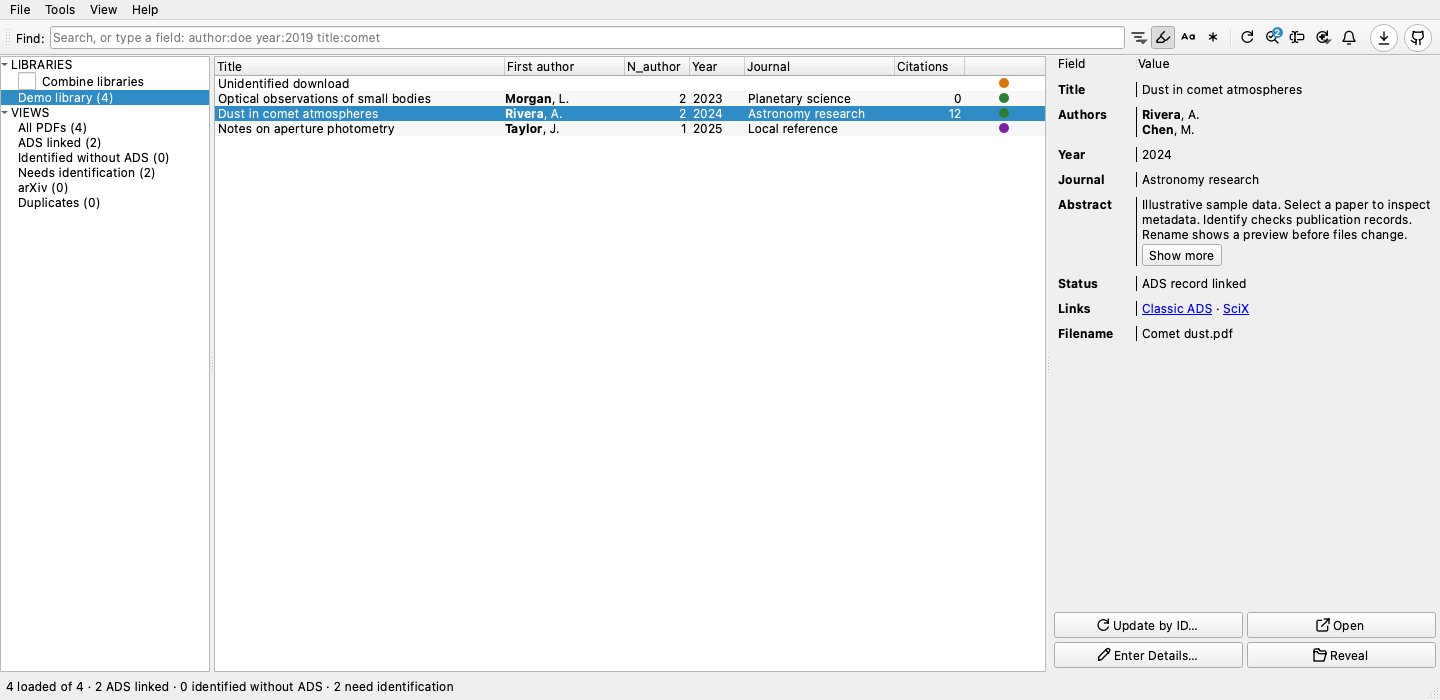
Application screenshot with illustrative sample data. Version 0.5.0 shown.
Website · First-library tutorial · Application guide
Three everyday workflows
- Keep a BibTeX file for your paper. Add the papers you cite to a NASA ADS
library, then choose Tools → Export ADS Library… to save a
.bibfile for LaTeX or Overleaf.adsfolio library watchkeeps that file current while you write. - Watch a folder and rename new papers. Right-click a library and choose Watch Current Library and Automatically Identify & Rename. Each new PDF gets publication details and a filename from your Rename template.
- Make your CV from your publications. Tools → CV Generator… builds your publication list from NASA ADS in LaTeX, HTML, Markdown, plain text, or your own template. You choose how to highlight your name and how each entry looks.
See the three workflows with screenshots and a short video.
Install the desktop app
Download ADSfolio 0.5.1. macOS downloads include DMG installers and ZIP archives. Desktop downloads include Python and the application dependencies. You do not need a Python environment or an ADS token to browse your local library.
| System | Download and open |
|---|---|
| macOS 15+, Apple Silicon | Open adsfolio-macos-arm64.dmg, drag ADSfolio.app to Applications, then open it. |
| macOS 15+, Intel | Open adsfolio-macos-x86_64.dmg, drag ADSfolio.app to Applications, then open it. |
| Windows x86-64 | Extract adsfolio-windows-x86_64.zip, then open adsfolio.exe inside the extracted folder. |
| Linux x86-64 | Extract adsfolio-linux-x86_64.tar.gz, then run adsfolio inside the extracted folder. Requires glibc 2.39+ and system desktop libraries. |
Keep the complete extracted folder together on Windows and Linux. See the platform requirements for details.
macOS with Homebrew
brew install --cask ysBach/adsfolio/adsfolio
open -a ADSfolio
Version 0.5.1 is unsigned and not notarized. macOS can block opening even when Homebrew installation succeeds. After attempting to open ADSfolio, review System Settings → Privacy & Security → Open Anyway if macOS offers that option. Approve it only if you trust the release. Installation alone does not establish that the app can open. Windows can also show publisher warnings.
Start using your library
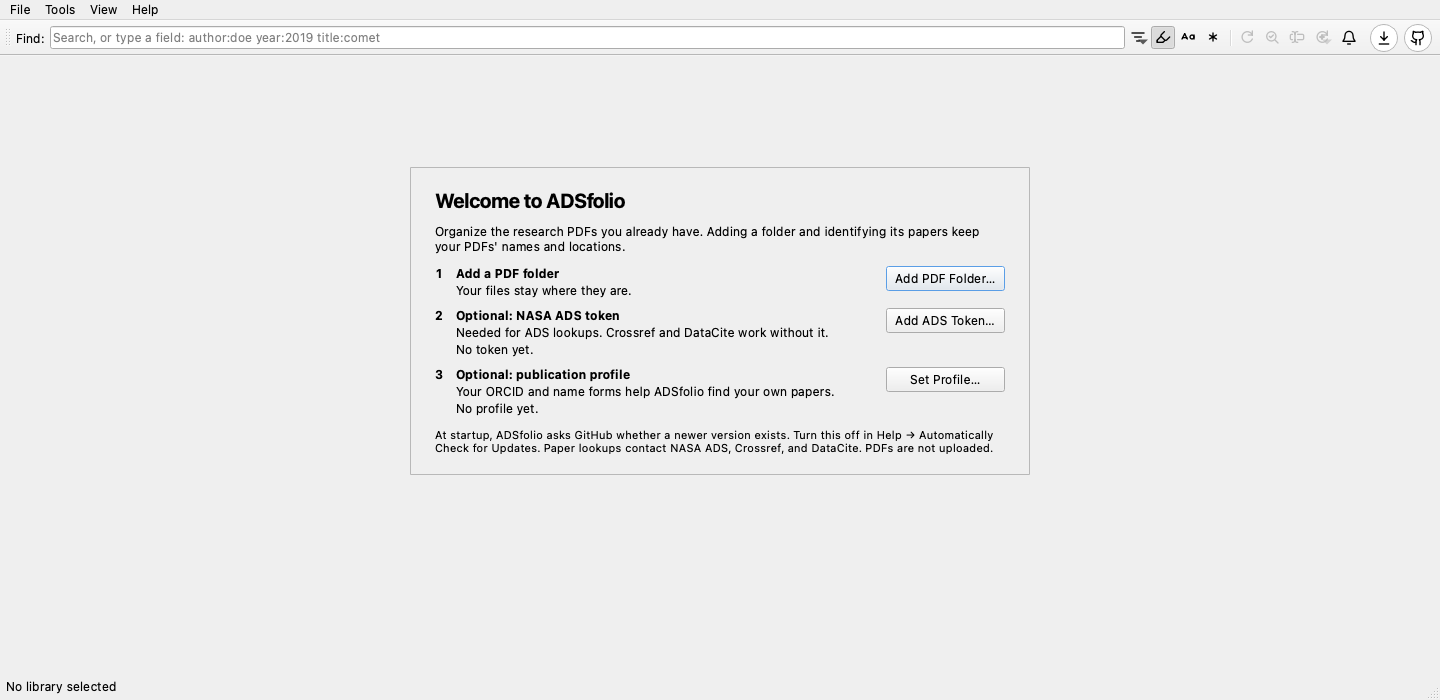
Welcome page of a new installation. Version 0.5.0 shown.
Watch the 28-second first-run video.
- Open ADSfolio. Choose Add PDF Folder… on the welcome page and select your PDF folder. If it has subfolders, choose Include Subfolders or This Folder Only.
- Select a PDF to inspect or edit its metadata. Double-click a row to open it in your system PDF viewer.
- Choose OK in the Identify prompt to look up publication metadata. The prompt also opens after adding a folder. Token setup opens if ADS needs it. Advanced options… changes the provider order. Crossref and DataCite can look up DOIs without an ADS token. Files keep their names and locations.
- Preview Rename before applying filename changes. Papers with sufficient metadata can be renamed without an ADS bibcode. Use File → Local References… for manual entries and BibTeX import/export, including references without PDFs.
- Press Refresh or F5 after moving or deleting files outside ADSfolio. This reconciles local files. Use the separate ADS refresh actions to update remote metadata. Permanent cleanup remains a separate operation.
See the interactive application guide for watching folders, selection, metadata editing, notifications, and refresh options.
Updates and existing libraries
Quit ADSfolio before replacing the app, or run brew upgrade --cask adsfolio.
The catalog, metadata, and history live in your user data directory, outside the
application bundle. Retain that directory when upgrading or uninstalling.
Earlier settings and catalogs are copied into ADSfolio storage on first use. The source remains intact. Close the earlier application before migration and keep its data until you check the migrated library. Saved automatic watch and rename settings remain active, so review them before resuming library work.
CLI and Python
ADSfolio also provides search, bibliography export, and scripted PDF workflows. See the CLI and Python workflows, CLI tutorials, and API reference. Version 0.5.1 and later are on PyPI and need Python 3.10 or newer:
pip install adsfolio                # CLI and Python client
pip install "adsfolio[full,gui]"    # also the desktop application (adsfolio-gui)
License
BSD-3-Clause
1 maintainer

Metadata
1 maintainer
Release files for adsfolio 0.5.1
For a detailed explanation of source distributions (sdists) and built distributions (wheels), please see the package formats documentation.
Source distribution (sdist)
| File | Size | Uploaded | Provenance | Actions |
|---|---|---|---|---|
| adsfolio-0.5.1.tar.gz | 813.8 kB | Without provenance | Details for adsfolio-0.5.1.tar.gz |
Built distribution (wheel)
| File | Interpreter | ABI | Platform | Actions Reset |
|---|---|---|---|---|
| adsfolio-0.5.1-py3-none-any.whl | Python 3 | none | any | Details for adsfolio-0.5.1-py3-none-any.whl |
Total release size: 1.5 MB
Release files / adsfolio-0.5.1.tar.gz
| Download URL | adsfolio-0.5.1.tar.gz |
|---|---|
| Size | 813.8 kB |
| Tags | Source |
|
SHA-256 checksum How to use checksums |
c7a46207a982cb800671c162b90631a3a532be5eb26d6200b39aeaf9a58ba247
|
|
BLAKE2b-256 checksum How to use checksums |
3237c76741da94347ce18d9521a011dbb083361ba4a2627ef11652ec8b64e710
|
| Upload date | |
|
Uploaded using Trusted Publishing? What is trusted publishing? |
Yes |
| Uploaded via |
uv/0.13.4 {"installer":{"name":"uv","version":"0.13.4","subcommand":["publish"]},"python":null,"implementation":{"name":null,"version":null},"distro":{"name":"Ubuntu","version":"24.04","id":"noble","libc":null},"system":{"name":null,"release":null},"cpu":null,"openssl_version":null,"setuptools_version":null,"rustc_version":null,"ci":true}
|
Release files / adsfolio-0.5.1-py3-none-any.whl
| Download URL | adsfolio-0.5.1-py3-none-any.whl |
|---|---|
| Size | 661.7 kB |
| Tags | Python 3 |
|
SHA-256 checksum How to use checksums |
2d0e9cad2a8680da05c7ed5eb67e8aef695f4a8c2a0a20193b646606ccc27e6a
|
|
BLAKE2b-256 checksum How to use checksums |
cded54862a7fe5d72973ee734a91b846f06a8669c11841db1380026e8c6583b7
|
| Upload date | |
|
Uploaded using Trusted Publishing? What is trusted publishing? |
Yes |
| Uploaded via |
uv/0.13.4 {"installer":{"name":"uv","version":"0.13.4","subcommand":["publish"]},"python":null,"implementation":{"name":null,"version":null},"distro":{"name":"Ubuntu","version":"24.04","id":"noble","libc":null},"system":{"name":null,"release":null},"cpu":null,"openssl_version":null,"setuptools_version":null,"rustc_version":null,"ci":true}
|
Security for adsfolio 0.5.1
Provenance
Provenance describes where a file came from. On PyPI, provenance is shared via attestations, which provide a verifiable record of the build or publishing details. View details, limitations and caveats.
No provenance found
None of the files in this release were uploaded with provenance metadata.
A note on package security
PyPI is a repository for distributing packages, not a service for auditing them. While third-party security researchers and our staff do their best to detect and remove malicious packages, PyPI cannot guarantee the quality, security or suitability of any given package.
To learn more about protecting yourself from malicious actors, visit our package security documentation.














