
AdvancedPrinter
AdvancedPrinter is a custom Python library designed to mimic the behavior of the print function with added color and style options using ANSI escape codes. This allows you to print text with various colors and styles to the terminal.
Features
- Print text in different colors:
black,white,red,green,yellow,blue,magenta,cyan,orange,gray,olive- a list of all colors available by calling thehelpmethod. - Apply styles to text:
bold=b,italic=it,underline=u,inverted=inv,strike-through=str. - Combine styles:
b-it,b-u,it-u,b-it-uetc. - Use
framemethod to frame text with different designs. - Use
inputmethod with colors and styles
Usage
-
Install the package from PyPi
pip install AdvancedPrinter
-
Import the
AdvancedPrinterclass into your Python script.from advancedprinter import AdvancedPrinter as ap
-
Use the
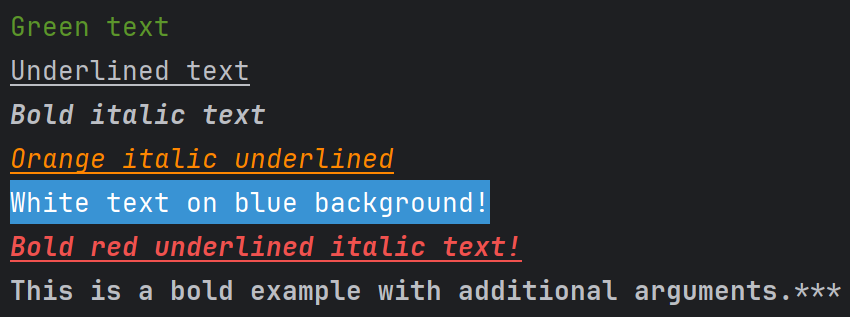
ap.print()method to print colored text.# Example usage ap.print("Green text", c="green") ap.print("Underlined text", s="u") ap.print("Bold italic text", s="b-it") ap.print("Orange italic underlined", s="it-u", c='orange') ap.print("White text on blue b!", c="white", b="blue") ap.print("Bold red underlined italic text!", c="red", s="b-it-u") # Additional arguments example ap.print("This is a bold example with additional arguments.", s="b", end="***")
-
Use
ap.line()method to print multiple colors in line using nestedf-stringsname = "Kaloian" print(f"""{ap.line("Hello, my name is", c='green', s='b')} {ap.line(f"{name}", c='blue')} {ap.line("and I'm", c='white')} {ap.line("28", c='red')} {ap.line('years old!', c='magenta')}""", end='***')

Import directly
-
Import
printandlinedirectly to override the inbuilt methodsfrom advancedprinter import print, line print("Green text", c="green") name = "Kaloian" print(f"""{line("Hello, my name is", c='green', s='b')} {line(f"{name}", c='blue')} {line("and I'm", c='white')} {line("28", c='red')} {line('years old!', c='magenta')}""", end='***')
-
Import the
framemethod to frame text with different designsfrom advancedprinter import frame

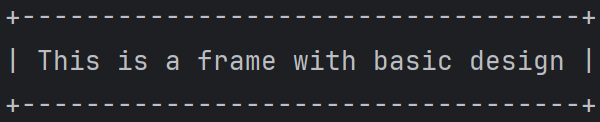
- basic
frame("This is a frame with basic design")
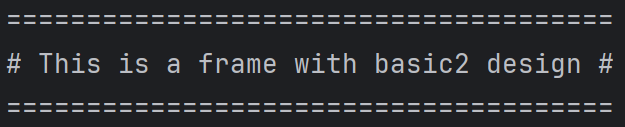
- basic2
frame("This is a frame with basic2 design", f_s='basic2')
- single
frame("This is a frame with single design", f_s='single')
- double
frame("This is a frame with double design", f_s='double')
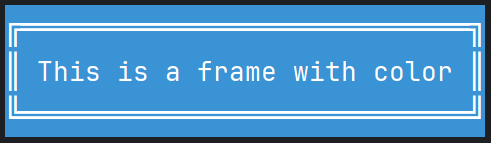
- color (if no parameters are provided for the frame color, it will take the color and background of the text)
frame("This is a frame with color", f_s='double', c='white', b='blue')
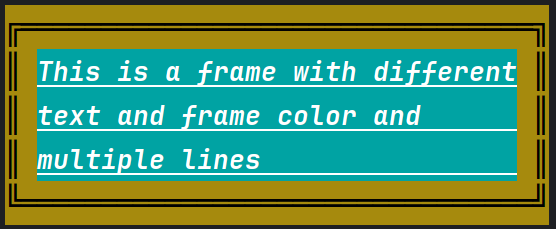
- multiline / multicolor
frame("""This is a frame with different
         text and frame color and
         multiple lines""",
         f_s='double', f_c='black', f_b='olive', c='white', b='cyan', s='b-u-it')


- Use the
inputmethod:from advancedprinter import input something = input('Please enter something: ', c='red', s='b-u') print(something)

License
This project is licensed under the MIT License - see the LICENSE file for details.
Support Me

1 maintainer

Metadata
1 maintainer
Release files for AdvancedPrinter 1.2.0
For a detailed explanation of source distributions (sdists) and built distributions (wheels), please see the package formats documentation.
Source distribution (sdist)
| File | Size | Uploaded | |
|---|---|---|---|
| AdvancedPrinter-1.2.0.tar.gz | 6.0 kB | Details |
Built distribution (wheel)
| File | Interpreter | ABI | Platform | Reset |
|---|---|---|---|---|
| AdvancedPrinter-1.2.0-py3-none-any.whl | Python 3 | none | any | Details |
Total release size: 12.5 kB
Release files / AdvancedPrinter-1.2.0.tar.gz
| Download URL | AdvancedPrinter-1.2.0.tar.gz |
|---|---|
| Size | 6.0 kB |
| Tags | Source |
|
SHA-256 checksum How to use checksums |
5b32e9b2f9a7ed4eb9953558b232794c2b4f6b0c4852d1fef1f50373220fdb7c
|
|
BLAKE2b-256 checksum How to use checksums |
9ea3eaa5e26f52fc9860dec754d36e4f5c478b8e627cb746ac9adfbe1bc1e61d
|
| Upload date | |
|
Uploaded using Trusted Publishing? What is trusted publishing? |
No |
| Uploaded via |
twine/5.0.0 CPython/3.12.0
|
Release files / AdvancedPrinter-1.2.0-py3-none-any.whl
| Download URL | AdvancedPrinter-1.2.0-py3-none-any.whl |
|---|---|
| Size | 6.5 kB |
| Tags | Python 3 |
|
SHA-256 checksum How to use checksums |
4140c6f3cb54a6cb5fad31d2a432526aaeed0dd68c7b25b7c5b6c3e8e3b2208b
|
|
BLAKE2b-256 checksum How to use checksums |
6400fede554547b46c44ad4e93e7c062ae8d68a64755c48d770ae1cbc293cf8b
|
| Upload date | |
|
Uploaded using Trusted Publishing? What is trusted publishing? |
No |
| Uploaded via |
twine/5.0.0 CPython/3.12.0
|














