
🎄 adventofcode 

Your framework for solving Advent Of Code puzzles 🧩 and benchmarking solutions 🚀
- Project scaffolding with
uv run adventofcode init. - Assert and submit your solutions with
uv run adventofcode run. - Benchmark all your solutions with
uv run adventofcode benchmark. - No copy-pasting puzzle inputs or loading inputs from files.
- Submit the answer immediately when your code returns the result. 🏅
Table of Contents
- Setup
- Session cookie
- Run and submit your solution
- Benchmark all your solutions
- Using AoC class
- Happy solving 🎄
- Similar projects
Setup
uv init
uv add adventofcode
uv run adventofcode init
This will generate the scripts for each day:
.
├── 01.py
├── 02.py
├── 03.py
├── 04.py
├── 05.py
├── 06.py
├── 07.py
├── 08.py
├── 09.py
├── 10.py
├── 11.py
├── 12.py
├── main.py
├── pyproject.toml
├── README.md
└── uv.lock

1 directory, 16 files
All the generated Python files look like this:
"""🎄 Solution for Day 1 of Advent of Code 2025 🎄

Usage:

uv run adventofcode run 01.py
"""

inp = """your input"""
part1_asserts = [
    (inp, None),
]
part2_asserts = [
    (inp, None),
]


def part1(inp: str) -> str | int | None:
    return None


def part2(inp: str) -> str | int | None:
    return None
Session cookie
Before we can run these files we need to set up your session cookie. You can find the session cookie by going to [adventofcode.com] in your browser. Make sure you are logged in, then open your browser's developer tools and navigate to Application → Storage → Cookies. Look for the cookie named session and copy its value.
Then add the adventofcode.com session cookie value to your .env file:
# Set your Advent of Code session cookie below
# You can find it in your browser's developer tools after logging in to adventofcode.com.
# The name of the cookie is `session`.
AOC_SESSION="YOUR_SESSION_COOKIE_HERE"
AOC_YEAR=2025
or to your environment variables:
export AOC_SESSION="..."
Run and submit your solution
Implement your solution in part1 and part2 functions and run
uv run adventofcode run 01.py
This will:
- Run your day 1,
part1function with the inputs provided in thepart1_assertsiterable and compare them with the expected values. If the function's return value doesn't match the expected answer, the command will stop. Hint: Each puzzle usually contains example input and an expected answer—these make for great asserts! - If all the
part1_assertspass,part1will be called with your puzzle input fetched from adventofcode.com using your session cookie. - If
part1returns a non-None value for your puzzle input, that value will be submitted to adventofcode.com as your part 1 answer using your session cookie. All answer submissions are cached, so each unique answer will only be submitted once. - If your answer was correct the same process repeats for
part2.
Benchmark all your solutions
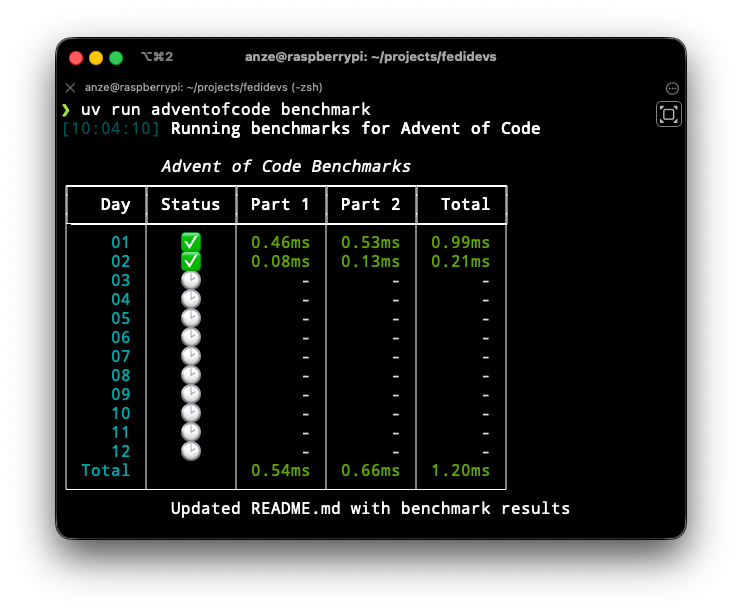
You can benchmark your solutions with
uv run adventofcode benchmark
This will run each day's solution and parse the timing results from the output. The results will be printed to the console as well as added to your README.md.
If you are in a hurry you can also benchmark a single day's solution with
uv run adventofcode benchmark 05.py
Example console output:
Example README:
| Day | Status | Part 1 Time | Part 2 Time | Total Time |
|---|---|---|---|---|
| 01 | ✅ | 0.28ms 🟢 | 0.41ms 🟢 | 0.69ms 🟢 |
| 02 | ✅ | 0.76ms 🟢 | 1.13ms 🟢 | 1.89ms 🟢 |
| 03 | ✅ | 0.15ms 🟢 | 0.33ms 🟢 | 0.48ms 🟢 |
| 04 | ✅ | 21.43ms 🟢 | 4.79ms 🟢 | 26.22ms 🟢 |
| 05 | ✅ | 1.95ms 🟢 | 3.51ms 🟢 | 5.46ms 🟢 |
| 06 | ✅ | 3.04ms 🟢 | 3.91s 🔴 | 3.91s 🔴 |
| 07 | ✅ | 30.58ms 🟢 | 1.01s 🔴 | 1.04s 🔴 |
| 08 | ✅ | 0.42ms 🟢 | 0.60ms 🟢 | 1.02ms 🟢 |
| 09 | ✅ | 5.75ms 🟢 | 1.01s 🔴 | 1.02s 🔴 |
| 10 | ✅ | 2.85ms 🟢 | 3.05ms 🟢 | 5.90ms 🟢 |
| 11 | ✅ | 0.97ms 🟢 | 37.60ms 🟢 | 38.57ms 🟢 |
| 12 | ✅ | 30.75ms 🟢 | 31.96ms 🟢 | 62.71ms 🟢 |
| 13 | ✅ | 108.79ms 🟡 | 342.44ms 🟡 | 451.23ms 🟡 |
| 14 | ✅ | 3.03ms 🟢 | 380.22ms 🟡 | 383.25ms 🟡 |
| 15 | ✅ | 2.28ms 🟢 | 4.71ms 🟢 | 6.99ms 🟢 |
| 16 | ✅ | 80.55ms 🟢 | 124.54ms 🟡 | 205.09ms 🟡 |
| 17 | ✅ | 0.02ms 🟢 | 19.99ms 🟢 | 20.01ms 🟢 |
| 18 | ✅ | 5.66ms 🟢 | 6.98s 🔴 | 6.99s 🔴 |
| 19 | ✅ | 9.05ms 🟢 | 99.83ms 🟢 | 108.88ms 🟡 |
| 20 | ✅ | 47.46s 🔴 | 4.28s 🔴 | 51.74s 🔴 |
| 21 | ✅ | 0.22ms 🟢 | 0.25ms 🟢 | 0.47ms 🟢 |
| 22 | ✅ | 603.65ms 🟡 | 1.87s 🔴 | 2.47s 🔴 |
| 23 | ✅ | 223.80ms 🟡 | 222.87ms 🟡 | 446.67ms 🟡 |
| 24 | ⚠️ | 0.94ms 🟢 | - | 0.94ms 🟢 |
| 25 | ✅ | 6.02ms 🟢 | - | 6.02ms 🟢 |
| Total | 48.60s 🔴 | 20.34s 🔴 | 68.94s 🔴 |
Legend:
- 🟢 < 100ms
- 🟡 100ms - 1s
- 🔴 > 1s
Using AoC class
Alternatively, you can build your own workflow using the lower level AoC class
from adventofcode import AoC

aoc = AoC()  # defaults to current year and parses the day from the filename (e.g. 01.py will be day 1)

aoc.print_p1()  # prints the first part of the puzzle
inp = aoc.get_input()  # returns the input as a string
# solve the puzzle here
...
aoc.submit_p1("part 1 answer")  # submits the answer to the first part of the puzzle
aoc.print_p2()  # prints the second part of the puzzle
# solve the puzzle here
...
aoc.submit_p2("part 2 answer")  # submits the answer to the second part of the puzzle
Happy solving 🎄
Enjoy and have fun!
Similar projects
1 maintainer

Metadata
1 maintainer
Release files for adventofcode 26.1
For a detailed explanation of source distributions (sdists) and built distributions (wheels), please see the package formats documentation.
Source distribution (sdist)
| File | Size | Uploaded | |
|---|---|---|---|
| adventofcode-26.1.tar.gz | 13.3 kB | Details |
Built distribution (wheel)
| File | Interpreter | ABI | Platform | Reset |
|---|---|---|---|---|
| adventofcode-26.1-py3-none-any.whl | Python 3 | none | any | Details |
Total release size: 27.0 kB
Release files / adventofcode-26.1.tar.gz
| Download URL | adventofcode-26.1.tar.gz |
|---|---|
| Size | 13.3 kB |
| Tags | Source |
|
SHA-256 checksum How to use checksums |
006ebdbdc59d843717489062a7619c9be2abcb931c55a0d4a60c95d3a1876ecb
|
|
BLAKE2b-256 checksum How to use checksums |
118ef395a7893715fdb1225f893f4d742643b35d110fca026f937b317066287c
|
| Upload date | |
|
Uploaded using Trusted Publishing? What is trusted publishing? |
Yes |
| Uploaded via |
twine/7.0.0 CPython/3.13.14
|
Provenance
Provenance describes where a file came from. On PyPI, provenance is shared via attestations, which provide a verifiable record of the build or publishing details. View details, limitations and caveats.


PyPI Publish Attestation
PyPI verified that this artifact, at this checksum, originated from the publisher listed below.
Signed by GitHub Actions, verified by PyPI on Oct 15, 2026.
Transparency logRelease files / adventofcode-26.1-py3-none-any.whl
| Download URL | adventofcode-26.1-py3-none-any.whl |
|---|---|
| Size | 13.7 kB |
| Tags | Python 3 |
|
SHA-256 checksum How to use checksums |
756e0ea53889291abcc8d23c93a18b246b4170bac6038342ff3646d6cbaaeedd
|
|
BLAKE2b-256 checksum How to use checksums |
8e67f5e478415a3c4005b904b5c38cf37564cd89934e53f70b9bbfe4167fb864
|
| Upload date | |
|
Uploaded using Trusted Publishing? What is trusted publishing? |
Yes |
| Uploaded via |
twine/7.0.0 CPython/3.13.14
|
Provenance
Provenance describes where a file came from. On PyPI, provenance is shared via attestations, which provide a verifiable record of the build or publishing details. View details, limitations and caveats.
PyPI Publish Attestation
PyPI verified that this artifact, at this checksum, originated from the publisher listed below.
Signed by GitHub Actions, verified by PyPI on Oct 15, 2026.
Transparency log













