
affine_image.np
Affine transformations on (currently only 3D, maybe later 2D) arrays via NumPy, intended to be
- an alternative to
F.affine_grid,F.grid_sampleorscipy.ndimage.affine_transform(with caveats) - used as pseudocode since it is <100 lines of code -> easy to port into other array frameworks
🛠️ Install via: pip install affine-image
Usage 💡
How-to (Basic)
Given you can read affine matrices, the following conventions (taken from PyTorch) + an example should get you started
- 1️⃣ batch and channel dim. prior to image dim. -> (batch, channel, x, y, z) for 3D images
- 2️⃣ affine acts in inverse order on image dim. (first row acts on z, second row acts on y, third row acts on x)
- 3️⃣ translation parameter (=value in last column of affine) of 1 moves the image by half its size in the respective dim.
import numpy as np
from affine_image import affine_transform_3d

b, c, x, y, z = (1, 3, 5, 5, 5)
im = np.random.rand(b, c, x, y, z)  # 1️⃣ shape: (batch, channels, x, y, z)
affine = np.array([[[1.5, 0, 0, 0],  # 2️⃣ acts on z-dim.: zoom of 150%
                    [0, 1, 0, 1.0],  # 2️⃣ acts on y-dim.: 3️⃣ translation by 2.5 pixels (=y/2)
                    [0, 0, 1, 0]]])  # 2️⃣ acts on x-dim.: zoom of 100% (i.e. no change)
shape = (x, y, z)
# Apply affine ✨ Since we are in the README, show all possible arguments (with default values)
im_out = affine_transform_3d(im, affine, shape, nearest=False, padding='zeros', align_corners=False, scipy_affine=False)
affine_transform_3d is the main function of this package and takes the arguments
im: Input image array with 5 dimensions (batch, channel, x, y, z)affine: Affine transformation matrix with 3 dimensions (batch, 3, 4)shape: Desired output shapenearest: Use nearest-neighbor interpolation ifTrue, otherwise use linear (=trilinear for 3D) interpolationpadding: Padding mode, either'zeros','border','reflection'or int/float (=padding value). ('border'and'reflection'are analogous to'nearest'and'mirror'in scipy)align_corners: Align corners flag (see PyTorch's docs)scipy_affine: Use SciPy affine convention ifTrue
If scipy_affine is set to True, the conventions 2️⃣ and 3️⃣ are replaced with
- 2️⃣* affine acts in normal order on image dim. (first row acts on x, second row acts on y, third row acts on y)
- 3️⃣* translation parameter (=value in last column of affine) of 1 moves the image by one pixel in the respective dim.
Why? (Interlude for the Curious 🤓)
This subsection serves readers who are not familiar with PyTorch who probably ask:
Why did affine_image (per default) follow the weird PyTorch conventions?
Let's start with a rewrite of the above example in torch (=PyTorch)
import torch
import torch.nn.functional as F

b, c, x, y, z = (1, 3, 5, 5, 5)
im = torch.rand(b, c, x, y, z)
affine = torch.tensor([[[1.5, 0, 0, 0],
                        [0, 1, 0, 1.0],
                        [0, 0, 1, 0]]])
shape = (x, y, z)
# Apply affine in torch
grid = F.affine_grid(affine, size=[1, 3, *shape], align_corners=True)
im_out = F.grid_sample(im, grid, mode='bilinear', padding_mode='zeros', align_corners=True)
Note that torch requires two steps to apply an affine to an image
- Pass
affinetoF.affine_gridwhich returns agrid - Apply the
gridto the image usingF.grid_sample
Let's look at the shape of the grid to understand it
print(grid.shape) # Output: [1, 5, 5, 5, 3] = [1, *shape, 3]
The grid contains coordinates w.r.t the input image from which the output image is sampled, e.g.
print(grid[0, 0, 0, 0, :]) # Output: [-1.5000, 0.0000, -1.0000] (align_corners=True in code above made coordinates more understandable here)
are the z, y and x coordinate in the input image from which the first (a corner) pixel of the output image are sampled.
Ok, everything is set up to finally tackle the Why...?s:
- Why two steps?: When applying an affine to multiple arrays/tensors,
gridcan be reused to avoid recalculation - Why 1️⃣?: Stacking images along the batch dim. enables parallel application of multiple affines
- Why 2️⃣?: No idea 🤔 Probably something about speed in the underlying C++/CUDA code of
torch- ...but why does
affine-imagefollow it anyway?: To avoid the introduction of another set of conventions
- ...but why does
- Why 3️⃣?: Since
gridcoordinates of -1/1 indicate edges of the input images with 0 indicating the center...- ...but why?: Makes
gridcoordinates more general since they are independent of image shapes
- ...but why?: Makes
How-to (Advanced)?
Similar to PyTorch, affine_transform_3d behind the scenes uses a grid to resample the image.
Let's rewrite the first example to explicitly work with a grid via affine_image
import numpy as np
from affine_image import affine_grid_3d, sample_linear_3d, sample_nearest_3d

b, c, x, y, z = (1, 3, 5, 5, 5)
im = np.random.rand(b, c, x, y, z)
affine = np.array([[[1.5, 0, 0, 0],
                    [0, 1, 0, 1.0],
                    [0, 0, 1, 0]]])
shape = (x, y, z)
grid = affine_grid_3d(affine, shape, align_corners=False)
im_out = sample_linear_3d(im, grid, padding='zeros', align_corners=False)
To run nearest-neighbor interpolation, replace sample_linear_3d with sample_nearest_3d
im_out = sample_nearest_3d(im, grid, padding='zeros', align_corners=False)
If you have read the full Usage 💡 section, here, take a cookie 🍪
Speed 💨
Compared to torch and scipy, affine-image runs at ~25% the speed for trilinear interpolation and ~50% speed for nearest interpolation
🤓 Pretty OK for being a naive NumPy implementation!
Runtimes on AMD Ryzen 9 5950X CPU with 16 cores
Default runtime (in seconds)
| Image size (Interpolation) | torch | scipy | affine-image |
|---|---|---|---|
| 64³ (nearest) | 0.004 | 0.005 | 0.009 |
| 64³ (trilinear) | 0.006 | 0.008 | 0.029 |
| 128³ (nearest) | 0.029 | 0.043 | 0.096 |
| 128³ (trilinear) | 0.048 | 0.064 | 0.262 |
| 256³ (nearest) | 0.306 | 0.355 | 0.749 |
| 256³ (trilinear) | 0.434 | 0.529 | 2.237 |
Single-thread runtime (in seconds)
| Image size (Interpolation) | torch | scipy | affine-image |
|---|---|---|---|
| 64³ (nearest) | 0.005 | 0.005 | 0.009 |
| 64³ (trilinear) | 0.007 | 0.009 | 0.031 |
| 128³ (nearest) | 0.042 | 0.043 | 0.093 |
| 128³ (trilinear) | 0.062 | 0.064 | 0.251 |
| 256³ (nearest) | 0.413 | 0.353 | 0.757 |
| 256³ (trilinear) | 0.569 | 0.536 | 2.262 |
Compatibility 📏
affine_grid_3d is compatible with F.affine_grid (meaning their respective outputs match) 🎉
Besides that, the outputs of affine-image currently slightly differ from the outputs of torch and scipy.
For nearest=True (especially with align_corners=True) affine-image almost matches torch:
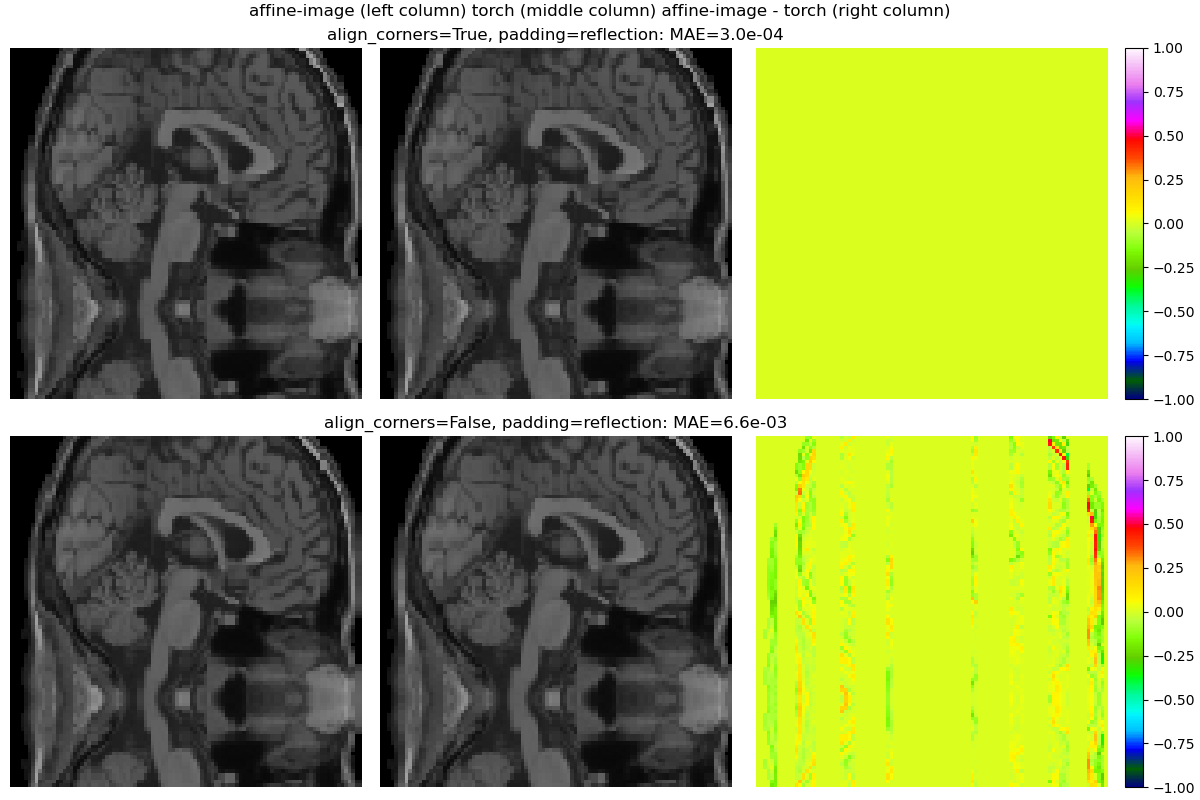
The test script offers plots (like the one above) and colorful terminal output to chase the remaining mismatches. Contributions (see Issues) are much appreciated 🤗
1 maintainer

Release files for affine-image 0.1.0
For a detailed explanation of source distributions (sdists) and built distributions (wheels), please see the package formats documentation.
Source distribution (sdist)
| File | Size | Uploaded | |
|---|---|---|---|
| affine_image-0.1.0.tar.gz | 6.0 kB | Details |
Built distribution (wheel)
| File | Interpreter | ABI | Platform | Reset |
|---|---|---|---|---|
| affine_image-0.1.0-py3-none-any.whl | Python 3 | none | any | Details |
Total release size: 12.6 kB
Release files / affine_image-0.1.0.tar.gz
| Download URL | affine_image-0.1.0.tar.gz |
|---|---|
| Size | 6.0 kB |
| Tags | Source |
|
SHA-256 checksum How to use checksums |
f382984bc5ef8128c6f0c437ab0b70ed7dc471102877bc0bf5ba7dc7e85faa65
|
|
BLAKE2b-256 checksum How to use checksums |
78ecf947cf8cdb319b6be3b75c7de9fbd6041ffda9c82208e86168920784aea1
|
| Upload date | |
|
Uploaded using Trusted Publishing? What is trusted publishing? |
No |
| Uploaded via |
poetry/1.5.1 CPython/3.9.12 Linux/5.15.0-105-generic
|
Release files / affine_image-0.1.0-py3-none-any.whl
| Download URL | affine_image-0.1.0-py3-none-any.whl |
|---|---|
| Size | 6.6 kB |
| Tags | Python 3 |
|
SHA-256 checksum How to use checksums |
09b2af92575bf2eac36ad49bfac3d0e10b780c91992e0faa828addbd67660814
|
|
BLAKE2b-256 checksum How to use checksums |
0f575c21a2d102691ba3ded827c2c450e86ee06605c8cf4ac573914ea47edaa6
|
| Upload date | |
|
Uploaded using Trusted Publishing? What is trusted publishing? |
No |
| Uploaded via |
poetry/1.5.1 CPython/3.9.12 Linux/5.15.0-105-generic
|














