
afMLevel: Deep-Learning for Levelling AFM Data









Overview
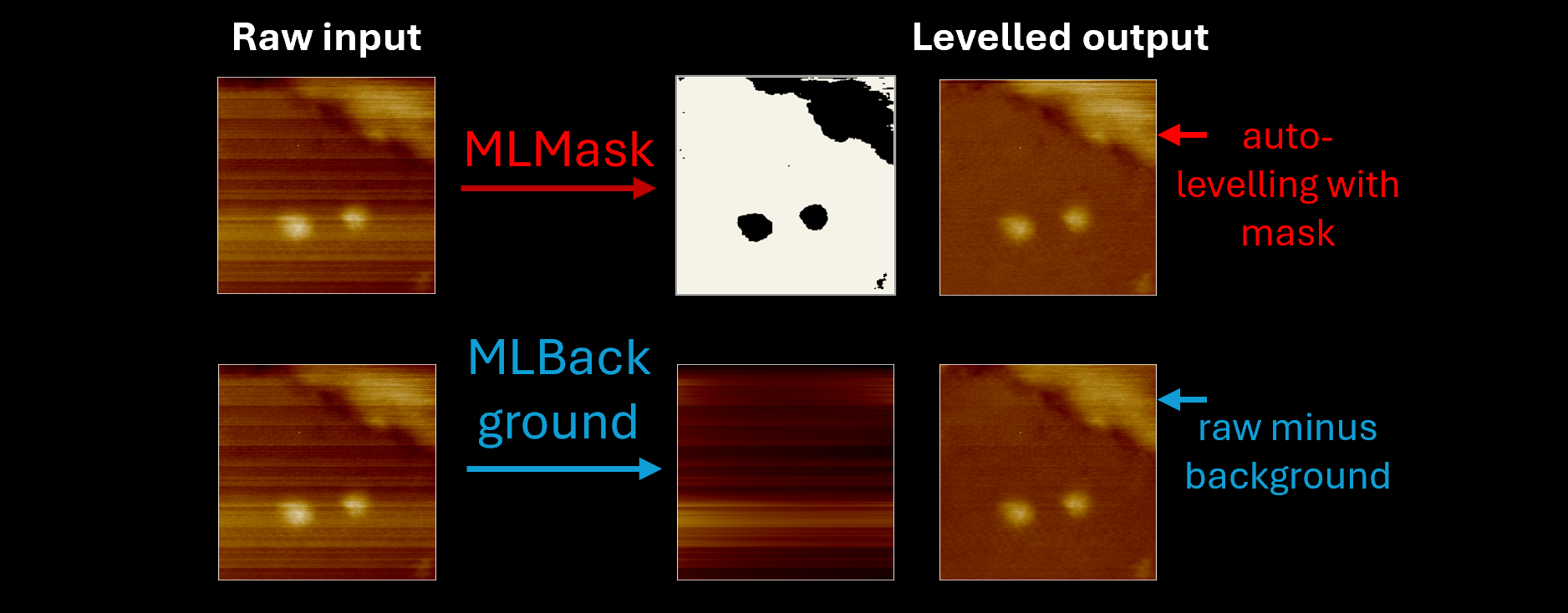
AFM image levelling, to correct background tilt and line-by-line scan artifacts, is a critical preprocessing step that typically requires users to manually apply operations, particularly for complex sample topographies, to ensure accurate pixel heights. The large frame counts of high-speed AFM movies can make this prohibitively time-consuming. afMLevel provides two deep-learning approaches that fully automate this process without altering local height information, enabling efficient batch processing of large datasets.
afMLevel is a Python package for running two separate trained U-Net models for automatic levelling of AFM images: MLMask and MLBackground.
The functions that provide the tools to run these models, including pre-processing and output, are found in the mask_model
and background_model modules respectively. These tools allow the levelling of AFM images or videos loaded as NumPy arrays.
background_model: Contains the tools for running the MLBackground U-Net model on unprocessed AFM image arrays. Thelevel_ml_bg()function orchestrates the application of this model on raw AFM topography data (2D images and 3D stacks).mask_model: Includes theml_mask()function and helpers for generating a feature mask from unprocessed AFM image arrays with the MLMask model. Thelevel_ml_mask()uses the output from theml_mask()function within auto-levelling routines as an alternative to generating the mask by thresholding (e.g. by Otsu’s method, fixed or relative value methods) to process raw AFM images.
Model Weights
Pre‑trained PyTorch model weights for the MLMask and MLBackground U‑Net models, containing the learned network parameters, are hosted in our Hugging Face repositories. These are automatically downloaded and cached when the model is first run and then reused for subsequent applications of the model.
The models are used for inference only; afMLevel does not retrain or modify the weights during use.
Quick-start guide
The easiest way to install afMLevel is to create a new conda environment and then install the package using pip.
Create new conda environment
Once you have installed miniforge, in the terminal or Miniforge Prompt:
conda create -n afmlevel-env python=3.11
conda activate afmlevel-env
Installation
The easiest way to install afMLevel is from PyPi, simply:
pip install afmlevel
Alternatively you can clone the GitHub repository and install.
Ensure you have git installed on your computer then use the command:
git clone https://github.com/mayatek1/afMLevel.git
Then once the repository is cloned there will be a folder called afMLevel containing the afMLevel repository.
Navigate into that folder and install with pip.
cd afMLevel
pip install -e .
Quick usage example
import numpy as np
from afmlevel.background_model import level_ml_bg
from afmlevel.mask_model import level_ml_mask

# imarray is a 2D (H, W) or 3D (N, H, W) NumPy array
levelled = level_ml_bg(imarray)

# Or using the mask-based approach
levelled = level_ml_mask(imarray, method="iterative-ml-mask")
Demonstration Notebooks
A series of Jupyter notebooks have been written to help introduce and demonstrate afMLevel. Access these by
cloning the GitHub repository (git clone https://github.com/mayatek1/afMLevel.git). In order to interact with
them you must first install Jupyter notebook in your environment along with packages for opening raw AFM files. This can be
done at installation with the command:
pip install afmlevel[notebooks]        # from PyPI
pip install -e ".[notebooks]"          # from cloned repo root
You can also manually install playnano, afmreader, tifffile, matplotlib and jupyter.
Then navigate to the notebooks folder within the afMLevel repository and launch Jupyter notebook:
cd afMLevel/notebooks
jupyter notebook
Use the browser based interface to open the notebooks and follow the instructions within. Options:
afMLevel_demo.ipynb- An introduction to the project and workflow, loading and applying the ML models to single AFM images,afMLevel_video_demo.ipynb- Load high-speed AFM videos and apply the ML models through the afMLevel plugin for playNano
All functions take a NumPy array as the input (2D - single image; 3D - movie stack) and output the result as a NumPy array. AFM files can be converted to NumPy arrays via existing software such as AFMReader. The demo notebooks also give an example of loading AFM files or TIFF files to NumPy arrays.
Dependencies
afMLevel requires Python ≥ 3.11 and the following packages, all installed automatically via pip:
| Package | Purpose |
|---|---|
torch ≥ 2.0 |
U-Net model inference |
huggingface_hub |
Automatic model weight download and caching |
pnanolocz |
AFM levelling routines used by MLMask methods |
numpy, scipy |
Array and numerical operations |
scikit-image, opencv-python-headless |
Image processing utilities |
A GPU is not required — models run on CPU — but inference will be faster with CUDA available.
MLBackground Levelling Routine
The MLBackground model detects noise and imaging artifacts and predicts the image background that contains these elements. The levelled image is obtained by subtracting third-order polynomial line fits to the predicted background from the AFM height data.
The model operates on 256 by 256 pixel arrays. To process images of arbitrary size, a combination of reflection padding and tiling is used to generate multiple input tiles for inference. Details on how pixel values are preserved by splitting alternating pixels into tiles will be available in the accompanying paper.
The U-Net model afMLevel-background-unet.pth is then
applied to the 256 by 256 pixel tiles which are then stitched back together. This model detects the noise background
and generates a predicted background for the image. The level_ml_bg() function within the background_model module
coordinates the generation of this background and subtracts a line fitted version of this from the raw image to give
the levelled image without altering local height differences.
MLMask Levelling Routine
The MLMask model detects image features and produces binary segmentation maps of image features. This is performed by
the ml_mask() function, that resizes the input images to 256 by 256 pixels then applies the afMLevel-mask-unet.pth
U-Net and generates a binary mask array. That mask is then resized again to the original dimensions. The ml_edges()
function uses morphology operations to turn a binary feature mask generated by ml_mask() into an edge mask for
region weighted leveling operations.
The level_ml_mask() function coordinates levelling images using various levelling functions from the pnanolocz
library, applied with the MLMask model generated masks or feature edge masks derived from the model.
The available afMLevel mask levelling routines are:
- ml-mask
- iterative-ml-mask (default)
- multi-plane-ml-mask
- multi-plane-ml-mask-line
| Method | Processing steps |
|---|---|
| ml-mask | 1st‑order x–y plane → single ml_mask() → masked median line subtraction → masked 1st‑order x–y plane |
| iterative-ml-mask (default) | 1st‑order x–y plane → 2× (ml_mask() + masked 1st‑order x–y plane) → ml_mask() → median line → masked 1st‑order x plane → 1× ml_mask() → median line → 2nd‑order x plane |
| multi-plane-ml-mask | 1st‑order x–y plane → 3× (ml_edges() + masked weighted 2nd‑order x–y plane) → masked weighted median line → ml_edges() → masked weighted 2nd‑order x–y plane → masked weighted median line |
| multi-plane-ml-mask-line | 1st‑order x–y plane → median line subtraction → 3× (ml_edges() + masked weighted 2nd‑order x–y plane) → masked weighted median line → ml_edges() → masked weighted 2nd‑order x–y plane → masked weighted median line |
Note:
level_ml_mask()uses internal equivalents ofml_mask()andml_edges()rather than calling them directly, to avoid repeated model loading when processing stacks. The public functions remain the recommended entry points for standalone use.
Use with other software
Since afMLevel works primarily with Numpy arrays, in order to load and process raw data from AFM control software external readers are required to convert the data into an array. This can be done with tools such as AFMReader, playNano and afmformats. Examples using AFMReader and playNano are given in the notebooks.
afMLevel is also supported as a plugin for playNano out of the box. Simply install
both packages in the same environment and you will be able to use the level_ml_bg and level_ml_mask functions within
playNano straight away. See the afMlevel_video_demo notebook for a programmatic demonstration.
Contributing and Issues
Bug reports and feature requests are welcome via the GitHub Issues page.
To contribute code:
- Fork the repository and create a branch for your change.
- Install the development dependencies:
pip install -e ".[dev]" - Run the linters and tests before submitting:
ruff check src/,pytest - Open a pull request with a clear description of what the change does and why.
Code style is enforced with black and ruff (numpy docstring convention).
A pre-commit config is included; run pre-commit install after cloning to apply checks automatically.
Tests
Tests are run with pytest and are split into fast (default) and slow categories.
Fast tests use pre-computed reference outputs stored in tests/ to verify that the
processing pipeline produces correct results without requiring the model weights.
Slow tests run the full inference pipeline by downloading the real model weights from
Hugging Face and are excluded by default to keep CI lightweight and fast.
Regression sentinels in conftest.py record expected output values and should only be
updated when the model weights themselves are intentionally updated. A failing sentinel
indicates a change in model behaviour that needs to be investigated.
pytest                          # fast tests only (slow excluded by default)
pytest -m slow                  # slow tests only
pytest -m "slow or not slow"    # all tests including slow
Citation
If you use afMLevel in your research, please cite the software. Citation metadata is provided via the CITATION.cff
file in this repository and is automatically recognised by GitHub and reference managers.
A human‑readable citation is provided below for convenience:
Tekchandani, M., Rollins, D. E., & Heath, G. R. (2026). afMLevel: Deep-Learning for Levelling AFM Data. University of Leeds. https://github.com/mayatek1/afMLevel
BibTeX
@software{afmlevel,
  title = {afMLevel: Deep-Learning for Levelling AFM Data},
  author = {Tekchandani, Maya and Rollins, Daniel E. and Heath, George R.},
  year = {2026},
  url = {https://github.com/mayatek1/afMLevel},
  institution = {University of Leeds},
  license = {BSD-3-Clause}
}
1 maintainer

Metadata
1 maintainer
Release files for afmlevel 0.1.1
For a detailed explanation of source distributions (sdists) and built distributions (wheels), please see the package formats documentation.
Source distribution (sdist)
| File | Size | Uploaded | |
|---|---|---|---|
| afmlevel-0.1.1.tar.gz | 1.1 MB | Details |
Built distribution (wheel)
| File | Interpreter | ABI | Platform | Reset |
|---|---|---|---|---|
| afmlevel-0.1.1-py3-none-any.whl | Python 3 | none | any | Details |
Total release size: 1.1 MB
Release files / afmlevel-0.1.1.tar.gz
| Download URL | afmlevel-0.1.1.tar.gz |
|---|---|
| Size | 1.1 MB |
| Tags | Source |
|
SHA-256 checksum How to use checksums |
2231f44c1cef1b1ab6d3aed2aa89519f0800e081ec3353b774d5730e0207f9c5
|
|
BLAKE2b-256 checksum How to use checksums |
d8d90569f395e6f965b6b7ddd821732738a8ce3a49c9e9f6e5ccfcfdd07b1a61
|
| Upload date | |
|
Uploaded using Trusted Publishing? What is trusted publishing? |
Yes |
| Uploaded via |
twine/6.1.0 CPython/3.13.12
|
Provenance
Provenance describes where a file came from. On PyPI, provenance is shared via attestations, which provide a verifiable record of the build or publishing details. View details, limitations and caveats.


PyPI Publish Attestation
PyPI verified that this artifact, at this checksum, originated from the publisher listed below.
Signed by GitHub Actions, verified by PyPI on May 13, 2026.
Transparency logRelease files / afmlevel-0.1.1-py3-none-any.whl
| Download URL | afmlevel-0.1.1-py3-none-any.whl |
|---|---|
| Size | 30.4 kB |
| Tags | Python 3 |
|
SHA-256 checksum How to use checksums |
c9e88a17a680267dec962bd9b9703b811ae2614989206ecab0176bf89eced678
|
|
BLAKE2b-256 checksum How to use checksums |
3585bd0d9aabe62c560ebe5f04e867dabe6d23f6bdf6bee97127763cae977ce2
|
| Upload date | |
|
Uploaded using Trusted Publishing? What is trusted publishing? |
Yes |
| Uploaded via |
twine/6.1.0 CPython/3.13.12
|
Provenance
Provenance describes where a file came from. On PyPI, provenance is shared via attestations, which provide a verifiable record of the build or publishing details. View details, limitations and caveats.
PyPI Publish Attestation
PyPI verified that this artifact, at this checksum, originated from the publisher listed below.
Signed by GitHub Actions, verified by PyPI on May 13, 2026.
Transparency log













