
Afnio: Making AI System Optimization Easy for Everyone



Afnio is a framework for automatic prompt and hyperparameter optimization, particularly designed for complex AI systems where Language Models (LMs) are employed multiple times in workflows, such as in LM pipelines and agent-driven architectures. Effortlessly build and optimize AI systems for classification, information retrieval, question-answering, etc.
Quickstart
Get started with Afnio in six steps, or try it instantly in Colab:

- Install the Afnio SDK with pip:
pip install afnio
- Set the API key for the LLM model you want to use as an environment variable (OpenAI for this quickstart). Get your key from OpenAI dashboard.
export OPENAI_API_KEY="your-api-key"
- Log in to Tellurio Studio and paste your API key when prompted. Create or view your API keys under the API Keys page.
afnio login
-
Copy and run this sample code to optimize your AI agent and track its quality metrics. Your first Run will appear in Tellurio Studio. Your system's checkpoints will be saved under the local
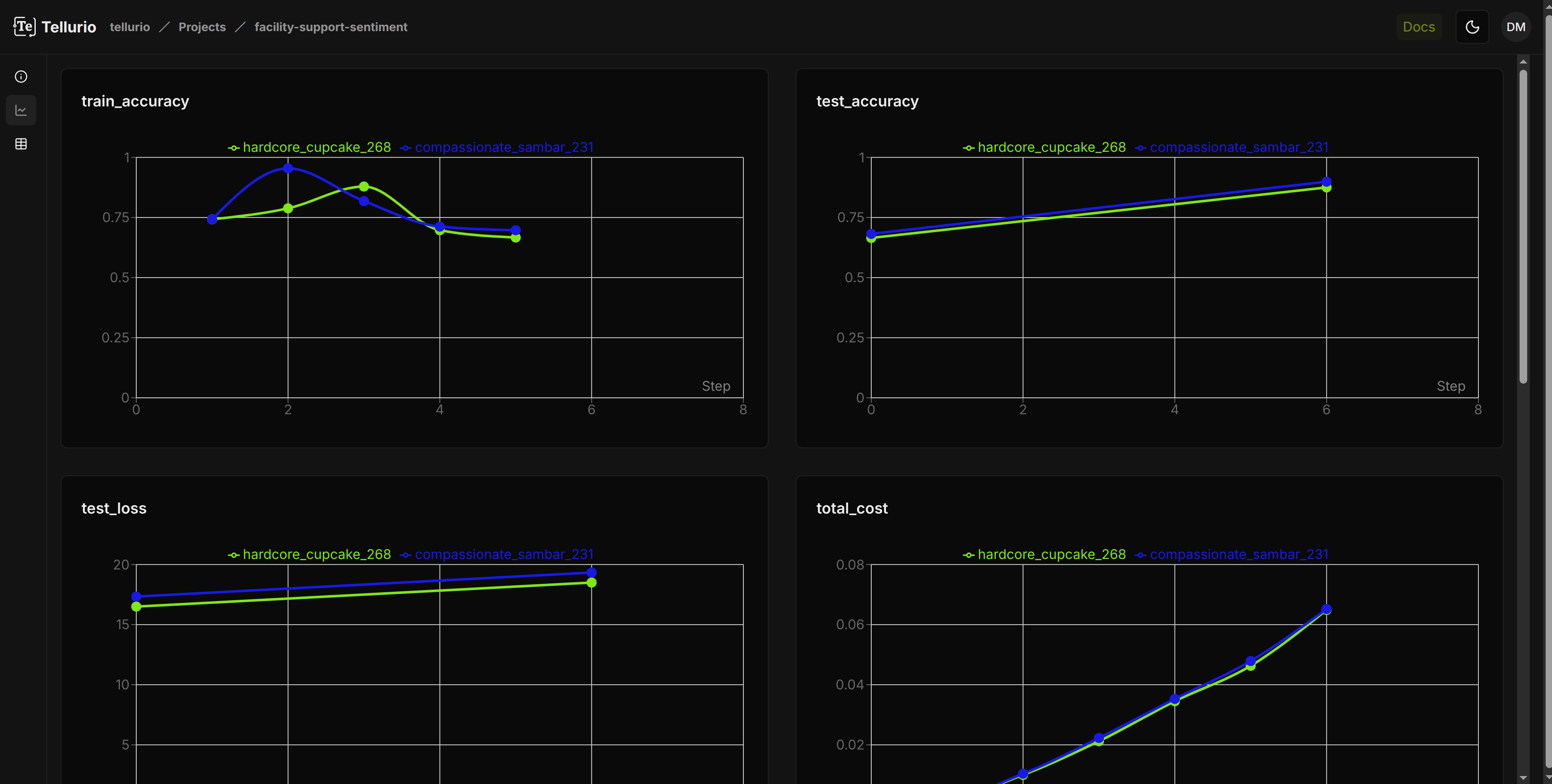
checkpoint/directory created in the same path where you executed the script.This example uses Meta's Facility Support Analyzer dataset to classify enterprise support emails as positive, neutral, or negative. Expect accuracy to improve from 66.4% ±1.5% to 80.8% ±12.5% — a +14.5% absolute gain.
import json
import re

import afnio
import afnio.cognitive as cog
import afnio.cognitive.functional as F
import afnio.tellurio as te
from afnio.models.openai import AsyncOpenAI
from afnio.trainer import Trainer
from afnio.utils.data import DataLoader, WeightedRandomSampler
from afnio.utils.datasets import FacilitySupport

# Initialize Project and experiment Run
run = te.init("your-username", "Facility Support")


# Compute per-sample weights to balance the training set
def compute_sample_weights(data):
    with te.suppress_variable_notifications():
        labels = [y.data for _, (_, y, _) in data]
        counts = {label: labels.count(label) for label in set(labels)}
        total = len(data)
    return [total / counts[label] for label in labels]


# Prepare data and loaders
train_data = FacilitySupport(split="train", root="data")
test_data = FacilitySupport(split="test", root="data")
val_data = FacilitySupport(split="val", root="data")

weights = compute_sample_weights(train_data)
sampler = WeightedRandomSampler(weights, num_samples=len(train_data), replacement=True)

BATCH_SIZE = 33
train_dataloader = DataLoader(train_data, sampler=sampler, batch_size=BATCH_SIZE)
val_dataloader = DataLoader(val_data, batch_size=BATCH_SIZE, seed=42)
test_dataloader = DataLoader(test_data, batch_size=BATCH_SIZE, seed=42)

# Define prompt and response format
sentiment_task = "Read the provided message and determine the sentiment."
sentiment_user = "Read the provided message and determine the sentiment.\n\n**Message:**\n\n{message}\n\n"
SENTIMENT_RESPONSE_FORMAT = {
    "type": "json_schema",
    "json_schema": {
        "strict": True,
        "name": "sentiment_response_schema",
        "schema": {
            "type": "object",
            "properties": {
                "sentiment": {
                    "type": "string",
                    "enum": ["positive", "neutral", "negative"],
                },
            },
            "additionalProperties": False,
            "required": ["sentiment"],
        },
    },
}

# Set up LM model clients used for forward, backward passes and optimization step
afnio.set_backward_model_client("openai/gpt-5", completion_args={"temperature": 1.0, "max_completion_tokens": 32000, "reasoning_effort": "low"})
fw_model_client = AsyncOpenAI()
optim_model_client = AsyncOpenAI()


# Define the sentiment classification agent
class FacilitySupportAnalyzer(cog.Module):
    def __init__(self):
        super().__init__()
        self.sentiment_task = cog.Parameter(data=sentiment_task, role="system prompt for sentiment classification", requires_grad=True)
        self.sentiment_user = afnio.Variable(data=sentiment_user, role="input template to sentiment classifier")
        self.sentiment_classifier = cog.ChatCompletion()

    def forward(self, fwd_model, inputs, **completion_args):
        sentiment_messages = [
            {"role": "system", "content": [self.sentiment_task]},
            {"role": "user", "content": [self.sentiment_user]},
        ]
        return self.sentiment_classifier(fwd_model, sentiment_messages, inputs=inputs, response_format=SENTIMENT_RESPONSE_FORMAT, **completion_args)

    def training_step(self, batch, batch_idx):
        X, y = batch
        _, gold_sentiment, _ = y
        pred_sentiment = self(fw_model_client, inputs={"message": X}, model="gpt-4.1-nano", temperature=0.0)
        pred_sentiment.data = [json.loads(re.sub(r"^```json\n|\n```$", "", item))["sentiment"].lower() for item in pred_sentiment.data]
        loss = F.exact_match_evaluator(pred_sentiment, gold_sentiment)
        return {"loss": loss, "accuracy": loss[0].data / len(gold_sentiment.data)}

    def validation_step(self, batch, batch_idx):
        return self.training_step(batch, batch_idx)

    def test_step(self, batch, batch_idx):
        return self.validation_step(batch, batch_idx)

    def configure_optimizers(self):
        constraints = [
            afnio.Variable(
                data="The improved variable must never include or reference the characters `{` or `}`. Do not output them, mention them, or describe them in any way.",
                role="optimizer constraint",
            )
        ]
        optimizer = afnio.optim.TGD(self.parameters(), model_client=optim_model_client, constraints=constraints, momentum=3, model="gpt-5", temperature=1.0, max_completion_tokens=32000, reasoning_effort="low")
        return optimizer


# Instantiate agent and trainer
agent = FacilitySupportAnalyzer()
trainer = Trainer(max_epochs=5)

# Evaluate the agent on the test set before training (baseline performance)
llm_clients = [fw_model_client, afnio.get_backward_model_client(), optim_model_client]
trainer.test(agent=agent, test_dataloader=test_dataloader, llm_clients=llm_clients)

# Train the agent on the training set and validate on the validation set
trainer.fit(agent=agent, train_dataloader=train_dataloader, val_dataloader=val_dataloader, llm_clients=llm_clients)

run.finish()
- View live metrics, compare Runs, and share results with your team.
- Run your optimized AI agent on the test set to see how it performs, or on new data! Check out how on our Colab:
Key Concepts
- Accelerated AI System Development: Ship complex AI systems faster thanks to high-level UX and easy-to-debug runtime.
- State-of-the-Art Performance: Leverage built-in optimizers to automatically refine prompts and tune model parameters for any LM task, ensuring optimal performance.
- LM Agnostic: Decouple prompts and parameters from application logic, reducing LM model selection to a single hyperparameter in Afnio’s optimizers. Seamlessly switch between models without any additional rework.
- Minimal and Flexible: Pure Python with no API calls or dependencies, ensuring seamless integration with any tools or libraries.
- Progressive Disclosure of Complexity: Leverage diverse UX workflows, from high-level abstractions to fine-grained control, designed to suit various user profiles. Start simple and customize as needed, without ever feeling like you’re falling off a complexity cliff.
- Define-by-Run Scheme: Your compound AI system is dynamically defined at runtime through forward computation, allowing for seamless handling of complex control flows like conditionals and loops, common in agent-based AI applications. With no need for precompilation, Afnio adapts on the fly to your evolving system.
Contributing Guidelines
💻 Would love to contribute? Please follows our contribution guidelines.
License
Afnio is open-source under the GNU Affero General Public License v3 (AGPLv3).
You can freely use Afnio — in personal, research, or commercial projects.
You don’t need to open-source your code; the license only applies if you modify Afnio itself and share that version publicly.
We keep Afnio open so everyone can build freely while helping the project grow.
💌 Questions or ideas? We’d love to hear from you at contact@tellurio.ai.
1 maintainer

Metadata
1 maintainer
Release files for afnio 0.3.7
For a detailed explanation of source distributions (sdists) and built distributions (wheels), please see the package formats documentation.
Source distribution (sdist)
| File | Size | Uploaded | |
|---|---|---|---|
| afnio-0.3.7.tar.gz | 226.6 kB | Details |
Built distribution (wheel)
| File | Interpreter | ABI | Platform | Reset |
|---|---|---|---|---|
| afnio-0.3.7-py3-none-any.whl | Python 3 | none | any | Details |
Total release size: 485.2 kB
Release files / afnio-0.3.7.tar.gz
| Download URL | afnio-0.3.7.tar.gz |
|---|---|
| Size | 226.6 kB |
| Tags | Source |
|
SHA-256 checksum How to use checksums |
56117e44199713ebca3bcca7f1f25a32afefa973ecfa34da926fbbc5a75329fa
|
|
BLAKE2b-256 checksum How to use checksums |
a99528b2d5c371a4448b1813881daa3a80923682a1b8851433a83997ecf173cf
|
| Upload date | |
|
Uploaded using Trusted Publishing? What is trusted publishing? |
Yes |
| Uploaded via |
twine/7.0.0 CPython/3.13.14
|
Provenance
Provenance describes where a file came from. On PyPI, provenance is shared via attestations, which provide a verifiable record of the build or publishing details. View details, limitations and caveats.


PyPI Publish Attestation
PyPI verified that this artifact, at this checksum, originated from the publisher listed below.
Signed by GitHub Actions, verified by PyPI on Sep 1, 2026.
Transparency logRelease files / afnio-0.3.7-py3-none-any.whl
| Download URL | afnio-0.3.7-py3-none-any.whl |
|---|---|
| Size | 258.5 kB |
| Tags | Python 3 |
|
SHA-256 checksum How to use checksums |
6a1fa67d6ef5ff76cf64eed869880a9c4a5f7d60ae0a045f4a52a5e517178354
|
|
BLAKE2b-256 checksum How to use checksums |
c8297f3078d02dce3b35583af286ac3b66d30a37f5379e2f3f6f6cbdf616add3
|
| Upload date | |
|
Uploaded using Trusted Publishing? What is trusted publishing? |
Yes |
| Uploaded via |
twine/7.0.0 CPython/3.13.14
|
Provenance
Provenance describes where a file came from. On PyPI, provenance is shared via attestations, which provide a verifiable record of the build or publishing details. View details, limitations and caveats.
PyPI Publish Attestation
PyPI verified that this artifact, at this checksum, originated from the publisher listed below.
Signed by GitHub Actions, verified by PyPI on Sep 1, 2026.
Transparency log













