
Agent Payment and Billing SDK Integration, Supports All Popular Payment methods Stripe,Paypal,Alipay,WeChat,A2ZAgent Credit Payment. Billing Agent to add transaction and do analysis on expenditure

Project description
Agent A2Z Pay SDK
GitHub | Website AI Agent A2Z Pay | Reviews
AgentA2Z Payment SDK can help you integrate various payment methods (Stripe,Paypal,Alipay,WeChat) into your agent workflow and you can define when and where to charge money or create (AI Agent A2Z/DeepNLP API Credit) in the workflow.
Payment in AI Agent Workflow Example:
- Render an AIGC Image thumbnail to user and charge $1 dollars to render the 4K version per each run.
- Charge 'buy me a coffee' checkout at the end of a Finance/Med/Literature Deep Research before output the final report.
- Ask for Tips of a few CNY by Scanning QR code to continue fixing bugs in the AI Coding scenario.
- E-Commerce AI shopping to allow users to confirm the final payment to complete the transaction.
Billing in in AI Agent Workflow Example
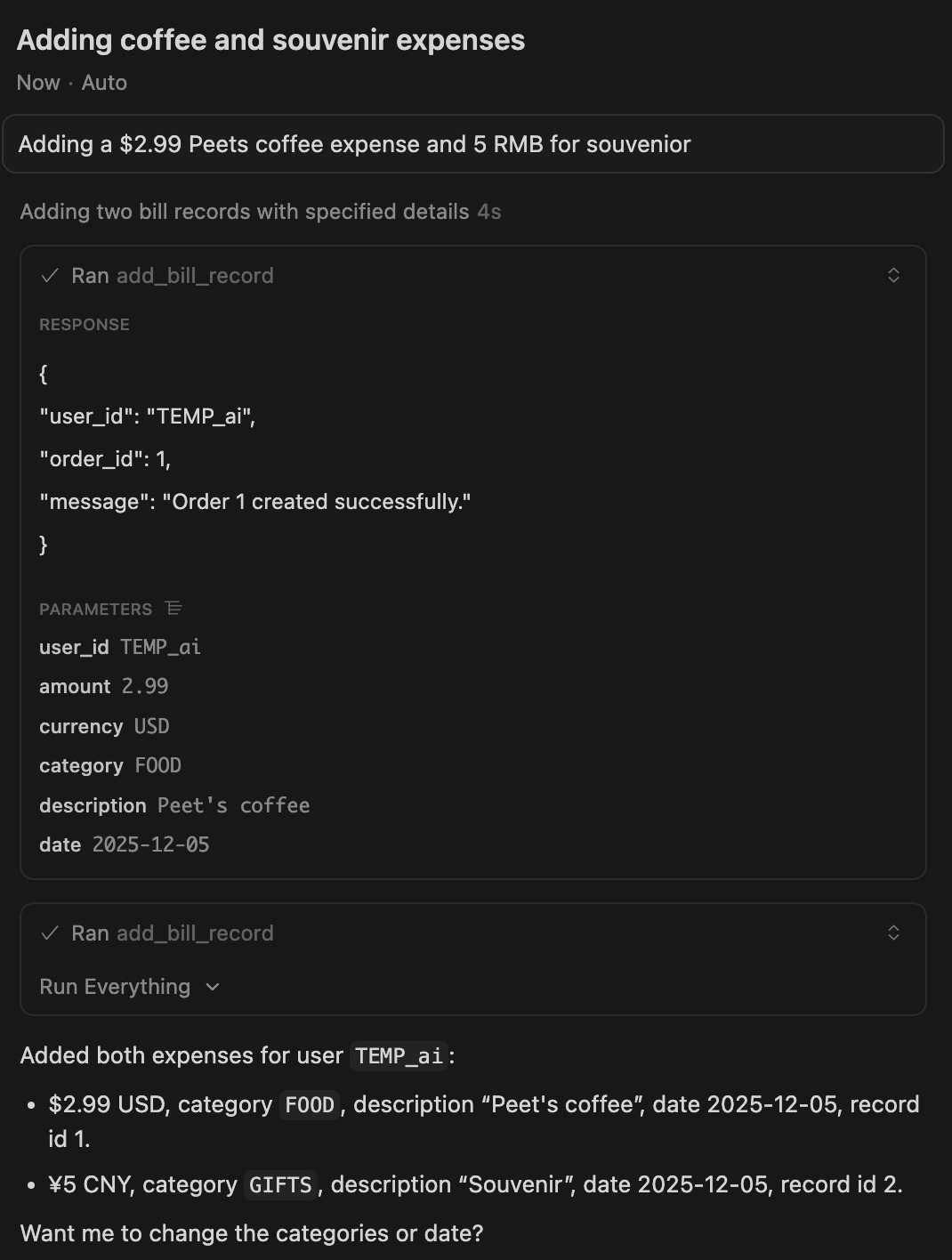
- Add a transaction: Breakfast Peets Coffee 2.99, AT&T phone $55.0, souvenir
- Your Billing Summary: You can ask 'How much did I spend on Food Last month?'
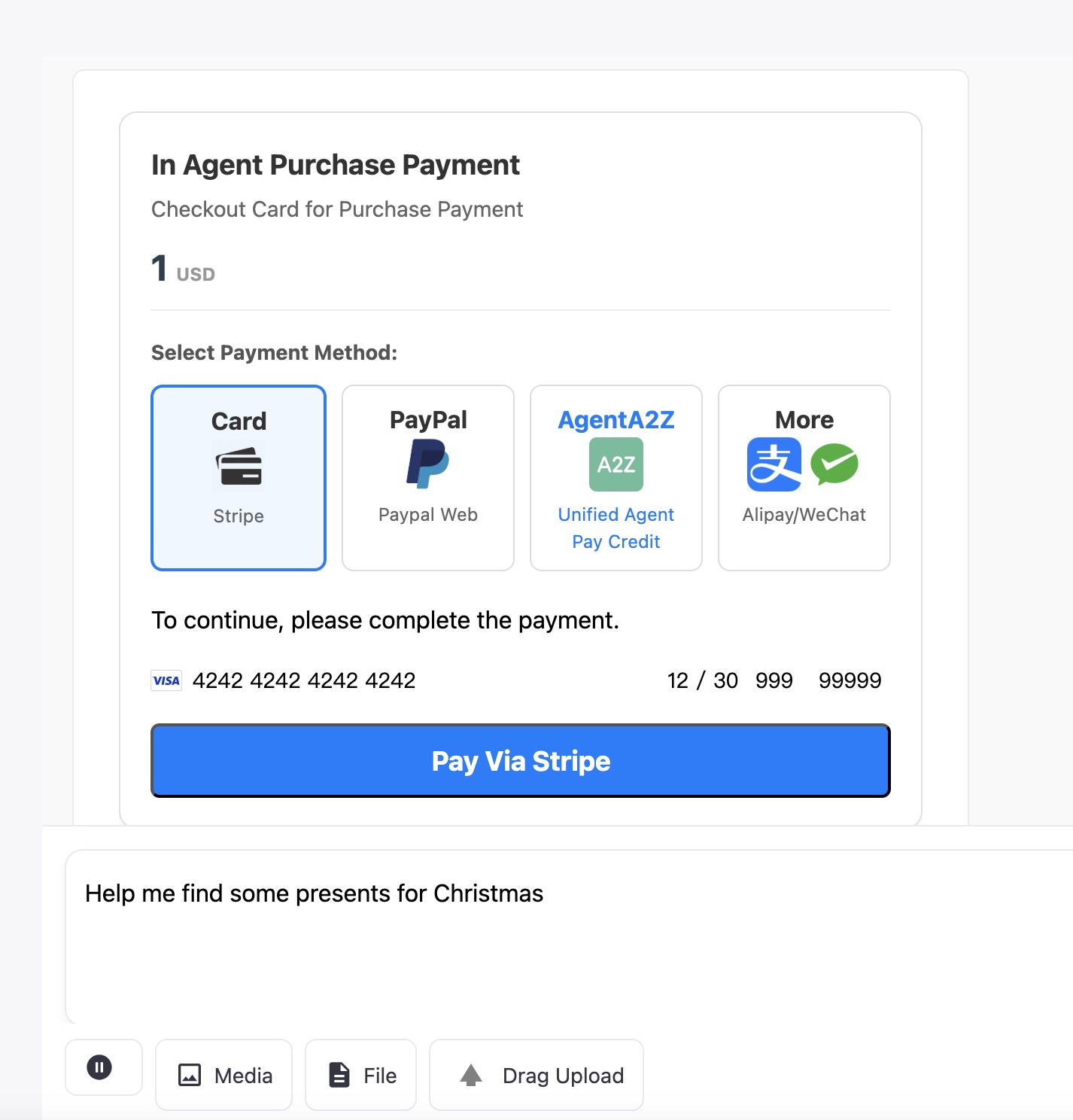
Use Case 1 AgentA2ZPayment Checkout Integration
Checkout Card and Playground Result
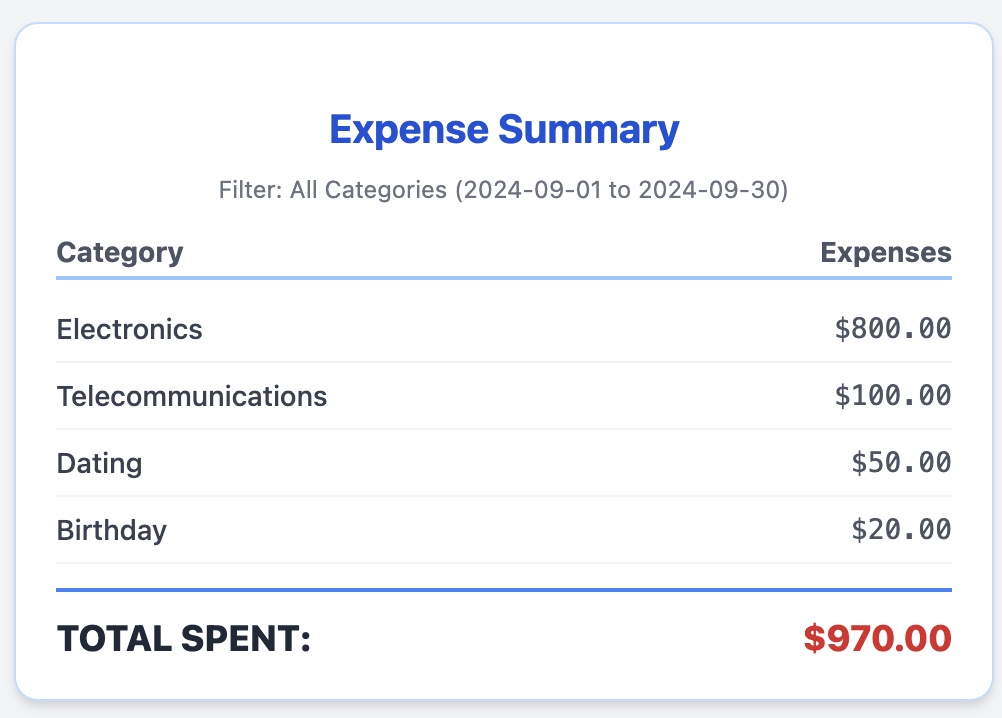
Use Case 2: A2Z Bill Agent
Features:
- A2Z Bill Agent can track every single bills and By Your Bill Assistant
- You can ask your expenses by category and start/end date, such as : How much did I spend on Food Last month?
- Giving you advice on how to save more money
Use Bill Agent in Cursor Tools and Workflow
Payment Options
| Platform | URL |
|---|---|
| Credit Card | Supported Credit Card using the Stripe Python Integration, including the checkout, webhook |
| Stripe | Supported, For Stripe Sandbox/Live PK, SK, Webhook Secret definition, see Stripe Doc |
| PayPal | Supported, For Client ID, Secret and Webhook ID, See Doc Paypal Doc |
| AgentA2Z Pay | WIP, Payment using API credit by AI AGENT A2Z Agent Platform / DeepNLP OneKey MCP & Agent API credit, OneKey Router Website and Doc OneKey Router API Benifits |
| Alipay | WIP, See Alipay Developer Doc |
| WeChat Pay | WIP, See WeChat Pay Developer Doc |
Supported Environment
| Platform | URL |
|---|---|
| Python | Pypi |
| NodeJs | NodeJS |
Brief Introduction of Different Payment Process
Stripe: Requires two steps: Create Payment Intent return a client_secret, Start Payment in the Client Side and then finish payment, Post Web Hook on
PayPal: Requires two steps: Create Order (server-side, returns approval_link) and Capture Order (server-side, after user approval/return).
Agent A2Z Payment: Requires one step of unified credit deduction A2Z Payment on aiagenta2z.com/deepnlp.org right after payment confirmation
Alipay/WeChat Pay: Requires one step: Unified Order/Create Payment (server-side, returns QR Code URL). Payment is completed via webhook after the user scans the code.
Tutorial
Tutorial 1. Agent Checkout
Let's begin with a workflow that charge user per tokens consumed, Example will charge $1. If user pays successfully, the agent loop will continue and return more things, otherwise it will await till timeout and return a checkout fail card.
Install
pip install agent-a2z-payment
Run complete app example at In Agent Purchase
import agent_a2z_payment
import uuid
from agent_a2z_payment.core import get_payment_sdk, PaymentWaitingMode, Environment
from agent_a2z_payment.core import _get_paypal_access_token


environment = Environment.SANDBOX.value
payment_agent = get_payment_sdk(env=environment)


### Define server endpoint, e.g., using FastAPI: @app.post("/api/chat")
async def chat(messages: list = Body(...)
               , kwargs: dict = Body(...)):

    # 0. Process input and initialize
    print (f"DEBUG: Input messages: {messages} kwargs: {kwargs}")

    # 1. LLM/Agent decides the cost of the task (e.g., 0.5 dollars for a report)
    ### Replace with actual logic to determine the required payment amount and currency.
    ### e.g.   output = payment_agent.calculate_payment(messages)
    amount = 1.00 # Example amount
    currency = "USD"
    print (f"Payment Agent calculated required amount: {amount} {currency}")

    # 2. Create an order and prepare for asynchronous waiting
    order = payment_agent.create_order(amount, currency)
    order_id = order.get("order_id", str(uuid.uuid4()))

    # 3. Create payment intent and get the checkout card HTML/JS
    ## payment_method: all,stripe,paypal,agenta2z,alipay,wechat,etc
    checkout_result = payment_agent.checkout(payment_method="all", order_id=order_id, amount=amount, currency=currency)
    checkout_html = checkout_result.get("checkout_html", "")
    checkout_js = checkout_result.get("checkout_js", "")

    ### code to format the HTML/JS for streaming back to the front-end
    # message_id  = get_new_message_id()
    ## Yield back the checkout_html and checkout_js
    ## Omitted

    # 4. Generator function to wait for payment and stream the final response
    generator = payment_stream_generator(
        order_id, message_id, chunk_list, payment_agent.orders
    )

    return StreamingResponse(generator, media_type="text/event-stream")

@app.post("/stripe/webhook")
async def stripe_webhook(request: Request):
    ### STRIPE WEBHOOK IMPLEMENTATION
    ### - Verify the signature (Stripe-Signature header).
    ### - Handle event types (e.g., 'checkout.session.completed', 'payment_intent.succeeded').


@app.post("/paypal/webhook")
async def paypal_webhook(request: Request):
    ### PAYPAL WEBHOOK IMPLEMENTATION
    ### - Verify the authenticity of the webhook sender.
    ### - Handle the relevant payment completion event.
    ### - Signal the waiting agent workflow as done in the Stripe webhook.
Remember to put necessary Environment Keys
STRIPE_API_KEY_PK_TEST=pk_test_xxxx
STRIPE_API_KEY_SK_TEST=sk_test_xxxx
STRIPE_API_KEY_PK_LIVE=pk_xxxx
STRIPE_API_KEY_SK_LIVE=sk_xxxx
STRIPE_WEBHOOK_SECRET=xxxx

PAYPAL_CLIENT_ID_TEST=xxxx
PAYPAL_SECRET_TEST=xxxx
PAYPAL_CLIENT_ID_LIVE=xxxx
PAYPAL_SECRET_LIVE=xxxx
PAYPAL_WEBHOOK_ID=xxxx

AGENT_A2Z_API_KEY_TEST=a2zt_xxxxxxxx
AGENT_A2Z_API_KEY_LIVE=a2zl_xxxxxxxx
Run your app workflow, you can see the fully integrated App as in the playground.
git clone https://github.com/aiagenta2z/agent_a2z_payment
cd ./agent_a2z_payment/app/payment_agent_app
## Start Server at 7000 port
uvicorn app:app --port 7000


## Visit http://127.0.0.1:7000/
## To Expose Your Local Server to Public URL for Web hook Testing
ngrok http 7000

# copy and pase the url to each payment site
# Example: https://zincky-kenton-cloudily-xxxxx.ngrok-free.dev -> http://localhost:7000

## Stripe Webhook
https://zincky-kenton-cloudily-xxxxx.ngrok-free.dev/stripe/webhook
Tutorial 2. Agent Checkout
import a2z_payment_agent
from a2z_payment_agent import BillAgent

def init_bill_agent():
    """

    :return:
    """
    import a2z_payment_agent
    from a2z_payment_agent import BillAgent
    # Initialize the A2ZPaymentAgent
    agent = BillAgent(db_folder="./", db_name="a2z_billagent.db")
    print("--- Initialized A2ZPaymentAgent Database ---")

    # Clear previous data for clean run (optional)
    ## agent.cursor.execute("DELETE FROM transactions;")
    # agent.conn.commit()
    print("Previous records cleared.")

    # 1. Add Records (Interface 1)
    # Adding data for two different months/weeks to test queries
    user_id = "TEMP_123"
    coffee_id = agent.add_bill_record(user_id,2.99, "USD", 'Coffee', 'Morning coffee', '2025-11-20')
    lunch_id = agent.add_bill_record(user_id,11.50, "USD", 'Food', 'Mexican Food lunch', '2025-11-20')
    transport_id = agent.add_bill_record(user_id,5.00, "USD", 'Transport', 'Subway ticket', '2025-11-25')
    groceries_id = agent.add_bill_record(user_id,45.50, "USD", 'Food', 'Weekly groceries', '2025-12-01')  # Next month

    print(f"\nAdded records (IDs: {coffee_id}, {lunch_id}, {transport_id}, {groceries_id})")

    # 2. Modify Record (Interface 2)
    success_update = agent.update_bill_record(user_id=user_id, record_id=lunch_id, amount=10.00)
    print(f"Updated Lunch Record (ID: {lunch_id}) to $10.00: {success_update}")

    # 3. Delete Record (Interface 3)
    success_delete = agent.delete_bill_record(user_id=user_id, record_id=coffee_id)
    print(f"Deleted Coffee Record (ID: {coffee_id}): {success_delete}")

    # 4. Query Records (Interface 4)

    # Query by Month (e.g., November 2025)
    print("\n--- Query by Month (November 2025) ---")
    start_m, end_m = agent.get_date_range('Month', year=2025, month=11)

    month_records = agent.query_bill_records(user_id=user_id,start_date=start_m, end_date=end_m)
    for record in month_records:
        print(
            f"Date: {record['date']}, Amount: ${record['amount']:.2f}, Category: {record['category']}, Desc: {record['description']}")

    # Summary by Category for November
    print("\n--- Summary by Category (November 2025) ---")
    category_summary = agent.query_bill_records_by_category(user_id=user_id, start_date=start_m, end_date=end_m)
    for summary in category_summary:
        print(f"Category: {summary['category']}, Total: ${summary['total_amount']:.2f}")

    ## set theme
    bill_html_card = agent.query_bill_records_by_category_summary_html(user_id, start_date=start_m, end_date=end_m, category='Coffee', theme='warm')
    print (f"DEBUG: bill_html_card")
    print (f"{bill_html_card}")

    agent.close()
    print("\n--- Database Connection Closed ---")
Related
AI Agent Marketplace Registry
Open AI Agent Marketplace
MCP Marketplace
OneKey Router AI Agent & MCP Ranking
OneKey Agent MCP Router
OneKey AGent MCP Router Doc
AI Agent Dataset
Gemini Nano Banana Agent


Download files
Download the file for your platform. If you're not sure which to choose, learn more about installing packages.
Source Distribution
Built Distribution
Filter files by name, interpreter, ABI, and platform.
If you're not sure about the file name format, learn more about wheel file names.
Copy a direct link to the current filters
File details
Details for the file agent_a2z_payment-0.0.2.tar.gz.
File metadata
- Download URL: agent_a2z_payment-0.0.2.tar.gz
- Upload date:
- Size: 25.5 kB
- Tags: Source
- Uploaded using Trusted Publishing? No
- Uploaded via: twine/6.1.0 CPython/3.12.0
File hashes
| Algorithm | Hash digest | |
|---|---|---|
| SHA256 |
a4d6cae20b2c68b71c7da541bcfcfa0dd6a8b95e298f32456fcf64c630cb8ad8
|
|
| MD5 |
c18d9c871922f88286fbdfa04a4d44e2
|
|
| BLAKE2b-256 |
751719f9cb2af3ebf1e91f73ed61b1c7e0e6c9dd2325ad598a7d5cc7df86b7a3
|
File details
Details for the file agent_a2z_payment-0.0.2-py3-none-any.whl.
File metadata
- Download URL: agent_a2z_payment-0.0.2-py3-none-any.whl
- Upload date:
- Size: 21.9 kB
- Tags: Python 3
- Uploaded using Trusted Publishing? No
- Uploaded via: twine/6.1.0 CPython/3.12.0
File hashes
| Algorithm | Hash digest | |
|---|---|---|
| SHA256 |
468d17b35471c67951282d86e5bb3803642c93316c92458a3d9437c8766c3eec
|
|
| MD5 |
2ebd5e0656b7f40b621e918f550d5ca3
|
|
| BLAKE2b-256 |
7f55369415c81525c9c23ff09519effb036438133b49f3ccd0383eaae3bbe1c7
|






